


Introduction
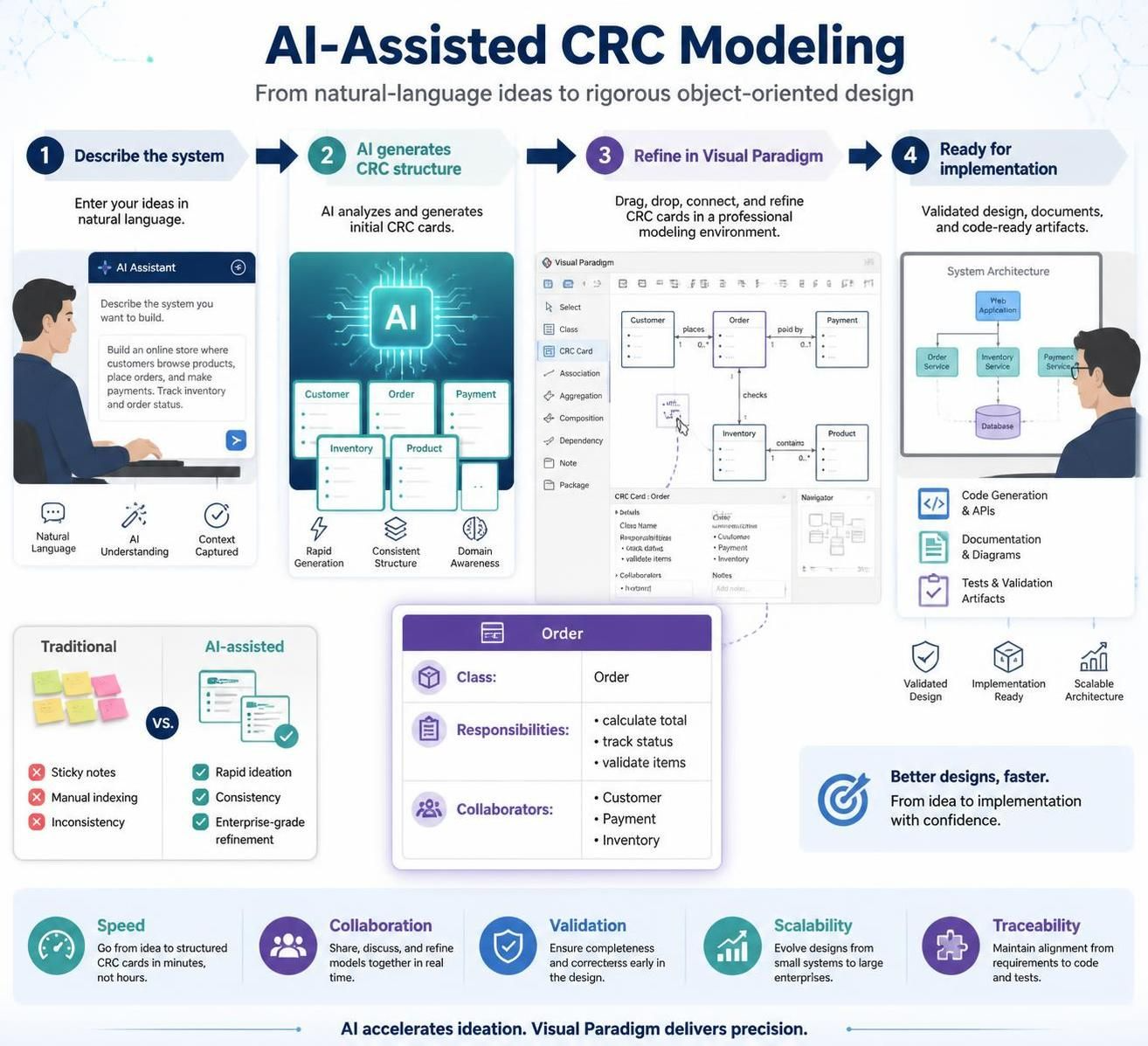
Class-Responsibility-Collaborator (CRC) cards are a foundational technique in object-oriented design, helping teams brainstorm and validate system architecture before writing a single line of code. Traditionally, creating these cards involves manual indexing, sticky notes, or basic drawing tools—a process that can be time-consuming and prone to inconsistency as systems grow complex.
Enter the era of AI-assisted modeling. By leveraging Visual Paradigm, developers and architects can now generate initial CRC structures instantly using natural language prompts, then refine them within a professional, enterprise-grade environment. This guide explores how to streamline your design workflow using Visual Paradigm’s AI capabilities, ensuring your conceptual models are both rapid to create and rigorous enough for implementation.
Key Concepts: Understanding CRC Cards
Before diving into the tooling, it is essential to understand the three pillars of a CRC card:
-
Class: The name of the object or entity (e.g.,
User,Order,PaymentGateway). -
Responsibilities: What the class knows or does. These are typically actions or data management tasks (e.g., “Calculate total,” “Validate email”).
-
Collaborators: Other classes that this class interacts with to fulfill its responsibilities (e.g.,
Ordercollaborates withProductto get pricing).
Why Use AI?
AI doesn’t replace the architect’s judgment; it accelerates the brainstorming phase. It helps overcome “blank page syndrome” by suggesting plausible responsibilities and collaborators based on common design patterns, allowing you to focus on refinement and validation rather than initial listing.
Step-by-Step Guide: Generating CRC Cards with Visual Paradigm AI
Visual Paradigm Desktop integrates AI directly into its modeling engine, allowing for a seamless transition from text-based ideas to visual models.
Prerequisites
-
Install Visual Paradigm Desktop.
-
Ensure you have an active internet connection for the AI service.
The Workflow
1. Access the AI Tool
Open your project in Visual Paradigm Desktop. Navigate to the top menu bar, click Tools, and select AI Diagram Generation. This opens the configuration interface where you define the scope of your model.
2. Select Diagram Type
In the configuration window, locate the dropdown menu labeled “Diagram Type.” Scroll through the options and pick CRC Card Diagram. This ensures the AI structures its output specifically for class-responsibility-collaborator formats rather than generic flowcharts.
3. Provide Input
Use the text field to explain your system architecture, project scope, or specific technical scenario. Be as descriptive as possible.
-
Bad Prompt: “Make a library system.”
-
Good Prompt: “Design a library management system including classes for Borrower, Book, and Librarian. Include responsibilities like borrowing books, checking availability, and managing fines.”
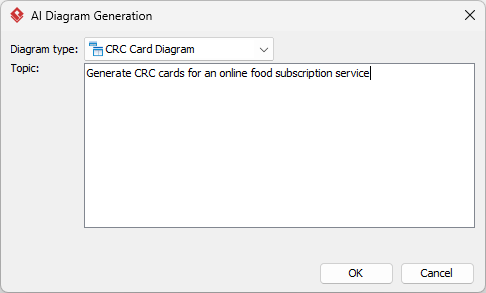
4. Execute
Hit OK to begin the automated modeling process. The AI will analyze your prompt against known object-oriented design patterns and generate a preliminary structure.
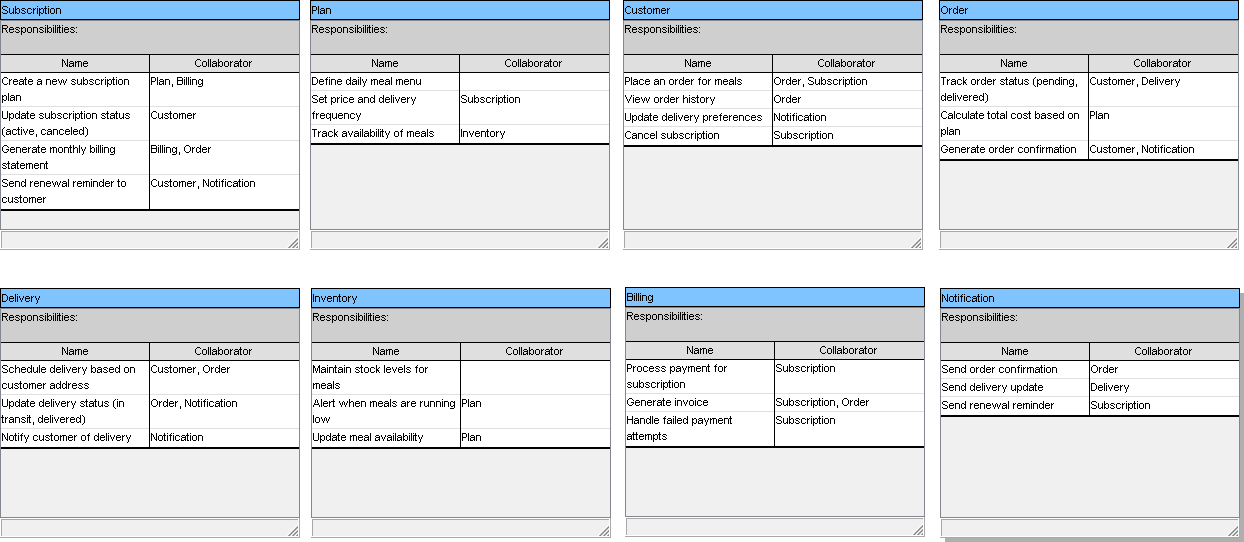
5. Review Results
The AI will instantly build the diagram for you. You will see a canvas populated with CRC cards, each pre-filled with suggested responsibilities and linked collaborators.
Refining Your Model: From AI Draft to Professional Design
The true power of Visual Paradigm lies not just in generation, but in refinement. Because the output is a native Visual Paradigm diagram rather than a static image, you have full control over the final product.
Editing and Validation
-
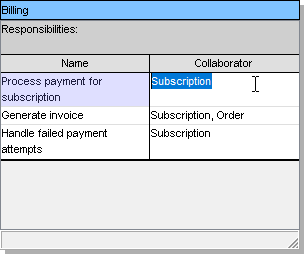
Refine the Model: Modify any shapes, connections, or layout styles using the standard editor tools. If the AI missed a critical responsibility, add it manually.
-
Expand Content: Manually insert additional details, attributes, or packages as needed. You can also drag-and-drop existing elements from your project repository.
-
Check Traceability: Link your CRC cards to use cases or requirements documents within Visual Paradigm to ensure every responsibility has a business justification.
Exporting and Implementation
Once your design is validated:
-
Share and Export: Save your work in various formats including PNG, SVG, or PDF for use in external documentation or stakeholder presentations.
-
Leverage Data: Utilize the diagram to produce source code stubs or comprehensive technical reports. Visual Paradigm can transform your refined CRC cards into Class Diagrams, which can then be used for forward engineering.
Practical Example: Library Management System
Let’s look at how this plays out in a real-world scenario.
Scenario: You are designing a backend for a public library.
AI Prompt: “Create CRC cards for a Library System. Classes: Member, Book, Loan. Responsibilities: Member should be able to borrow and return books. Book should track availability. Loan should record dates and calculate fines.”
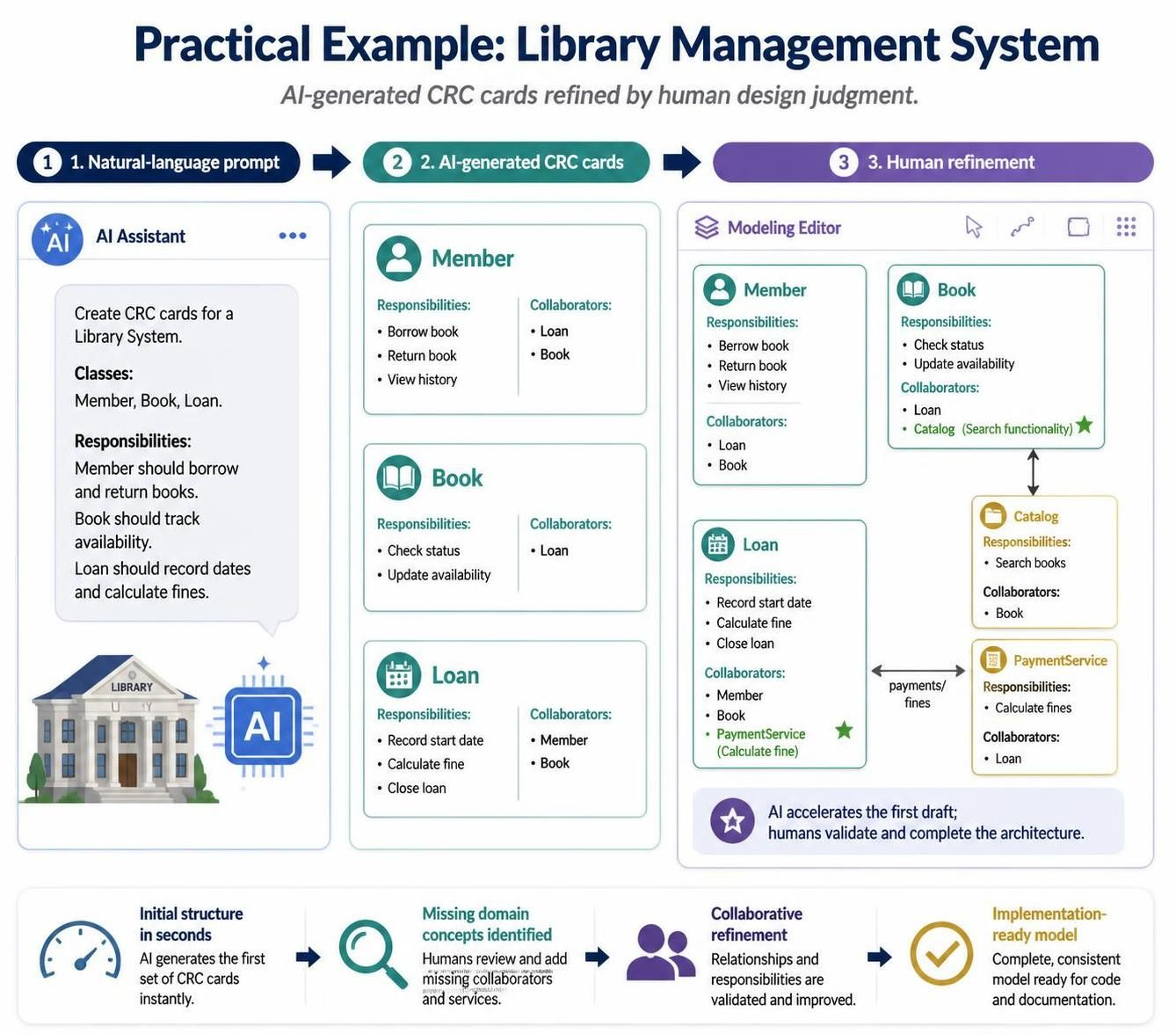
AI Output:
-
Class:
Member-
Responsibilities: Borrow book, Return book, View history.
-
Collaborators:
Loan,Book.
-
-
Class:
Book-
Responsibilities: Check status, Update availability.
-
Collaborators:
Loan.
-
-
Class:
Loan-
Responsibilities: Record start date, Calculate fine, Close loan.
-
Collaborators:
Member,Book.
-
Human Refinement:
You notice the Book class needs a collaborator for Catalog to handle search functionality. You add this manually in the editor. You also refine the Calculate fine responsibility to include a collaboration with a PaymentService class, which the AI initially omitted.
Conclusion
Creating CRC Card Diagrams no longer needs to be a tedious, manual exercise. By combining the speed of AI generation with the precision of Visual Paradigm’s professional modeling environment, you can accelerate your design phase without sacrificing quality. Whether you are brainstorming a new microservice or refactoring a legacy monolith, Visual Paradigm provides the end-to-end ecosystem to generate, refine, and implement your object-oriented designs efficiently.
Stop wrestling with manual CRC creation or half-baked AI outputs. Start with Visual Paradigm today to experience AI diagram generation that works for real projects.
Recommended Reading & Resources
- A Comprehensive Guide to the CRC Card Approach in Software Development – ArchiMetric: Comprehensive guide covering CRC card methodology from brainstorming to role-playing scenarios, with practical tips for identifying classes, responsibilities, and collaborators.
- Visual Paradigm CRC Cards: Digital Modeling Made Simple: Step-by-step tutorial for creating CRC cards in Visual Paradigm, including how to link them directly to UML class diagrams and generate code skeletons.
- CRC Meets Agile: Lightweight Modeling for Iterative Design: Explores how CRC cards integrate into agile sprints, with practical workflows for using CRC during user story refinement and iterative design.
- A Comprehensive Guide to CRC (Class Responsibility Collaborator) Modeling – Visual Paradigm Blog: Official Visual Paradigm guide covering CRC card anatomy, team roles (domain experts, facilitator, scribe), and the complete six-step modeling process.
- AI CRC Card Diagram Generator | Visual Paradigm AI: Demonstrates how to use Visual Paradigm Desktop’s AI features to generate initial CRC card structures from natural language prompts, then refine and export them.
- Shared CRC Models in Visual Paradigm: Covers moving CRC workshops to the cloud for real-time collaboration, version control, and linking CRC cards to use cases and user stories.
- Mastering CRC Card Diagrams: A Hands-On Guide to Object-Oriented Design with Visual Paradigm – Cybermedian: Hands-on review of creating CRC card diagrams in Visual Paradigm with practical tips on inline editing, textual analysis integration, and transitioning to UML.
- Class Responsibility Collaborator (CRC) Cards: An Agile Intro – Agile Modeling: Foundational introduction to CRC cards from Agile Modeling, covering the iterative process of finding classes, responsibilities, and collaborators for conceptual modeling.
- CRC Card Tutorial: Learn Object-Oriented Design Basics – Visual Paradigm Skills: Beginner-friendly tutorial with hands-on exercises for modeling a simple banking system, covering responsibility-driven design and collaboration patterns.
- Integrating CRC Design into Agile Sprints: Case-study approach showing how to run CRC design sprints during backlog refinement and sprint planning, with concrete examples for retail and fintech domains.

 English
 Arabic
 Chinese (Simplified)
 Dutch
Dutch French
 German
 Italian
 Japanese
 Korean
 Portuguese
 Russian
 Spanish