


Introduction
In the fast-paced world of software architecture, bridging the gap between abstract requirements and concrete code structure is often the most challenging phase of development. For decades, CRC (Class-Responsibility-Collaborator) Cards have served as a lightweight, effective tool for object-oriented analysis. Traditionally involving physical index cards on a whiteboard, this method encourages teams to focus on what a system does rather than how it is implemented. However, maintaining these physical artifacts in modern, distributed, and version-controlled workflows has always been a friction point.
Enter the Visual Paradigm AI Diagramming Chatbot. With its latest major enhancement, Visual Paradigm now offers full support for the instant generation of CRC Card Diagrams. By combining natural language processing with a specialized PlantUML syntax extension, software architects and agile teams can now transform simple conversational prompts into structured, editable, and professional-grade domain models in seconds. This guide explores how to leverage this powerful tool to streamline your object-oriented design process.
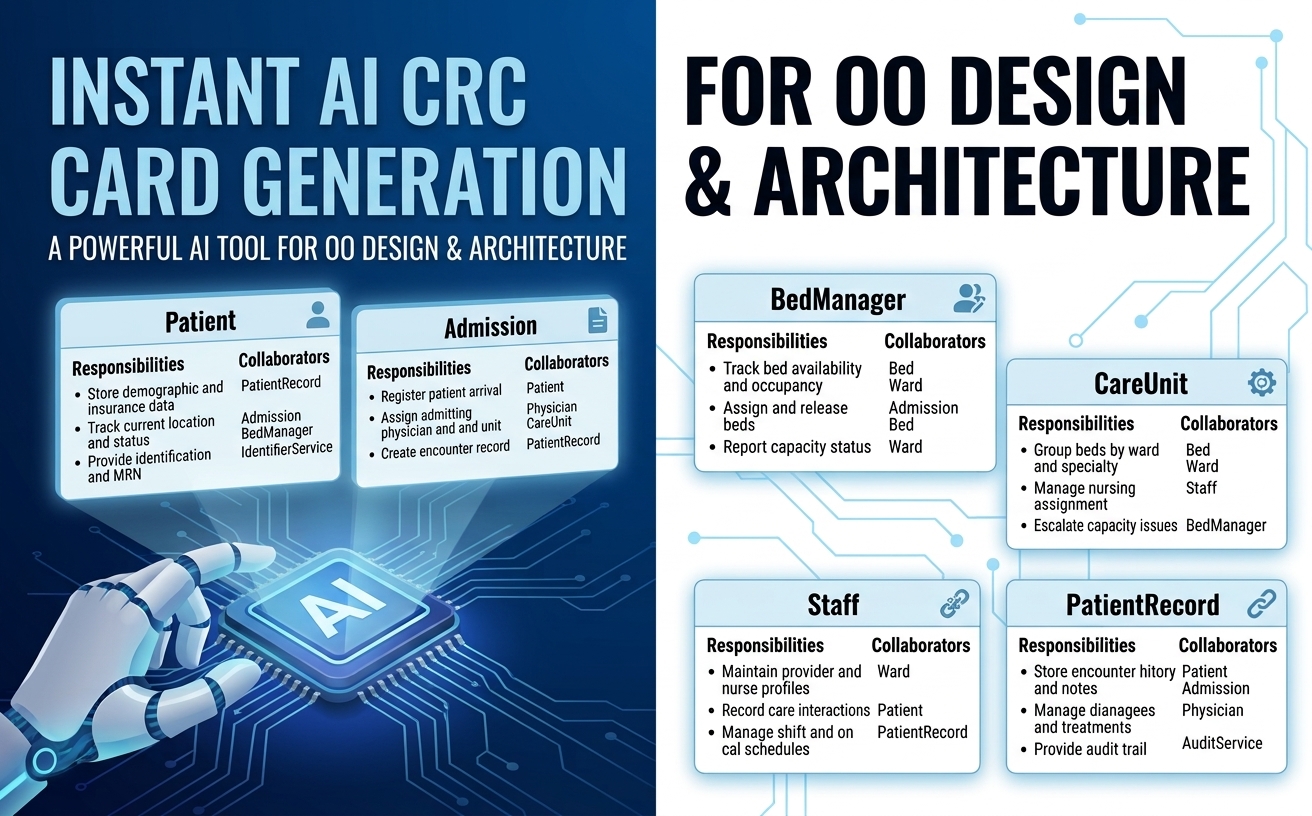
Key Concepts: Understanding CRC Cards
Before diving into the AI tooling, it is essential to understand the core components of a CRC Card. Introduced as a brainstorming technique, CRC cards help developers define the boundaries of system components without getting bogged down in low-level implementation details.
The Three Pillars of CRC
-
Class: Represents a key collection of similar objects or domain entities within your system. In a well-designed system, each class should represent a single, coherent concept.
-
Responsibilities: These are the high-level duties, behaviors, or knowledge that the class maintains. A responsibility answers the question: “What is this class responsible for knowing or doing?”
-
Collaborators: These are other classes that this class must interact with to perform its obligations. Identifying collaborators early helps map out the dependencies and communication pathways within your architecture.
Why CRC Matters in Modern Development
While traditional CRC sessions were excellent for human collaboration, they lacked digital persistence. The AI CRC Card Diagram generator solves this by combining the rapid brainstorming nature of classic CRC cards with the precision of AI-driven model creation. This approach promotes:
-
Reduced Coupling: By inspecting responsibilities and collaborators side-by-side, teams can identify overloaded classes before writing code.
-
Single Responsibility Principle: It becomes easier to spot when a class is trying to do too much, allowing for immediate refinement via conversational commands.
How the AI CRC Card Diagram Tool Works
Using the Visual Paradigm AI Diagramming Chatbot is designed to be intuitive. You simply describe your system requirements in plain English, and the chatbot processes the request using domain-trained models to output structured PlantUML code alongside an interactive image view.
Step-by-Step Workflow
-
Define Your Domain: Start with a clear prompt describing the system you wish to model.
-
Generate the Diagram: The AI analyzes the domain and proposes a set of classes, their responsibilities, and their collaborators.
-
Review and Refine: Use the interactive chat to tweak the design. If a class seems too complex, ask the AI to split it or reassign duties.
-
Export and Integrate: Save the diagram as code, embed it in documentation, or export it as an image.
Example: Hospital Patient Tracking System
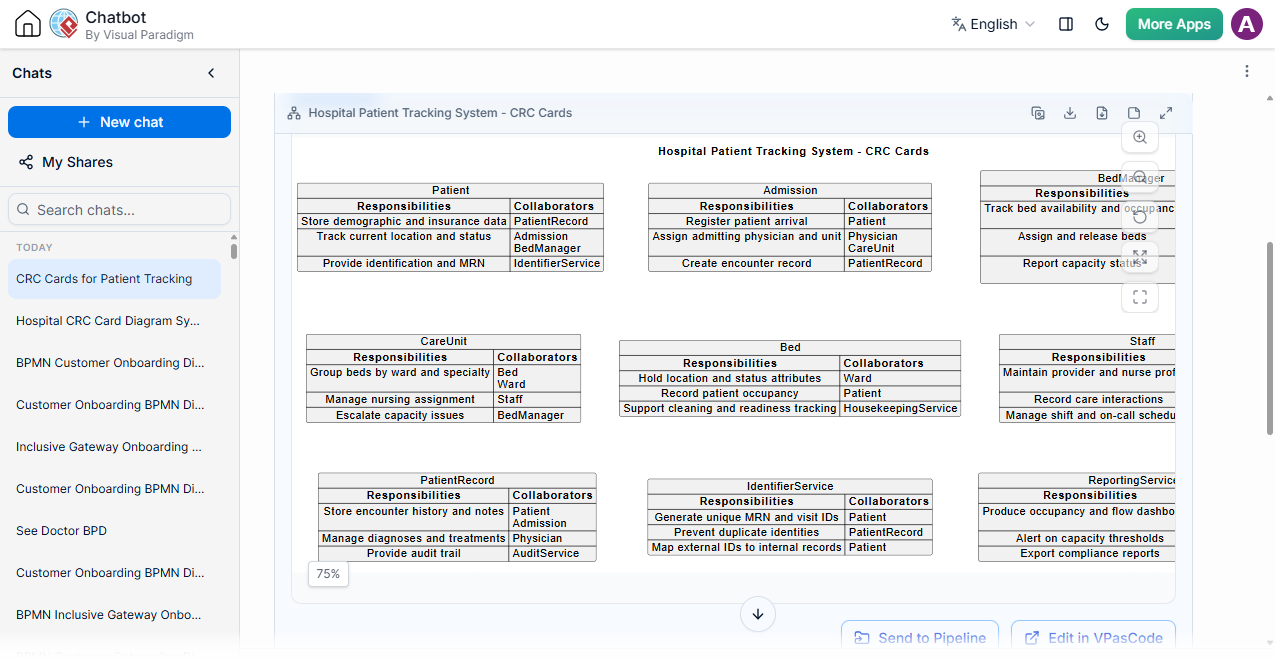
Let’s look at a practical example. If you submit the prompt:
“Generate a CRC Card Diagram for a hospital patient tracking system.”
The chatbot will generate a comprehensive model. Below is the resulting visualization:
The Generated PlantUML Code
Note on PlantUML Syntax: While standard PlantUML does not natively support CRC Card Diagrams out of the box, Visual Paradigm has developed a specialized PlantUML-based syntax extension to render them as structured models. This custom convention allows users to generate, edit, and visualize CRC cards seamlessly as code within the AI Diagramming Chatbot and VPasCode ecosystem.
Here is the underlying code generated for the patient tracking system:
@startuml
skinparam {
vpDiagramType CRCCardDiagram
}
title Hospital Patient Tracking System - CRC Cards
map "Patient" as Patient {
<b>Responsibilities</b> => <b>Collaborators</b>
Store demographic and insurance data => PatientRecord
Track current location and status => Admission\nBedManager
Provide identification and MRN => IdentifierService
}
map "Admission" as Admission {
<b>Responsibilities</b> => <b>Collaborators</b>
Register patient arrival => Patient
Assign admitting physician and unit => Physician\nCareUnit
Create encounter record => PatientRecord
}
map "BedManager" as BedManager {
<b>Responsibilities</b> => <b>Collaborators</b>
Track bed availability and occupancy => Bed\nWard
Assign and release beds => Admission\nBed
Report capacity status => Ward\nReportingService
}
map "CareUnit" as CareUnit {
<b>Responsibilities</b> => <b>Collaborators</b>
Group beds by ward and specialty => Bed\nWard
Manage nursing assignment => Staff
Escalate capacity issues => BedManager
}
map "Bed" as Bed {
<b>Responsibilities</b> => <b>Collaborators</b>
Hold location and status attributes => Ward
Record patient occupancy => Patient
Support cleaning and readiness tracking => HousekeepingService
}
map "Staff" as Staff {
<b>Responsibilities</b> => <b>Collaborators</b>
Maintain provider and nurse profiles => Role\nDepartment
Record care interactions => PatientRecord
Manage shift and on-call schedules => ShiftService
}
map "PatientRecord" as PatientRecord {
<b>Responsibilities</b> => <b>Collaborators</b>
Store encounter history and notes => Patient\nAdmission
Manage diagnoses and treatments => Physician
Provide audit trail => AuditService
}
map "IdentifierService" as IdentifierService {
<b>Responsibilities</b> => <b>Collaborators</b>
Generate unique MRN and visit IDs => Patient
Prevent duplicate identities => PatientRecord
Map external IDs to internal records => Patient
}
map "ReportingService" as ReportingService {
<b>Responsibilities</b> => <b>Collaborators</b>
Produce occupancy and flow dashboards => BedManager\nAdmission
Alert on capacity thresholds => CareUnit
Export compliance reports => AuditService
}
Patient -[hidden]right-> Admission
Admission -[hidden]right-> BedManager
Patient -[hidden]down-> CareUnit
Admission -[hidden]down-> Bed
BedManager -[hidden]down-> Staff
CareUnit -[hidden]right-> Bed
Bed -[hidden]right-> Staff
CareUnit -[hidden]down-> PatientRecord
Bed -[hidden]down-> IdentifierService
Staff -[hidden]down-> ReportingService
PatientRecord -[hidden]right-> IdentifierService
IdentifierService -[hidden]right-> ReportingService
@enduml
Explore the interactive CRC Card Diagram live chat session here.
Seamless Integration with the Visual Paradigm Ecosystem
Generating a diagram is only the first step. The true strength of the AI CRC Card Diagram generator lies in its deep integration across the Visual Paradigm product ecosystem, ensuring that your architectural decisions are preserved, shared, and actionable.
1. VPasCode Fine-Tuning
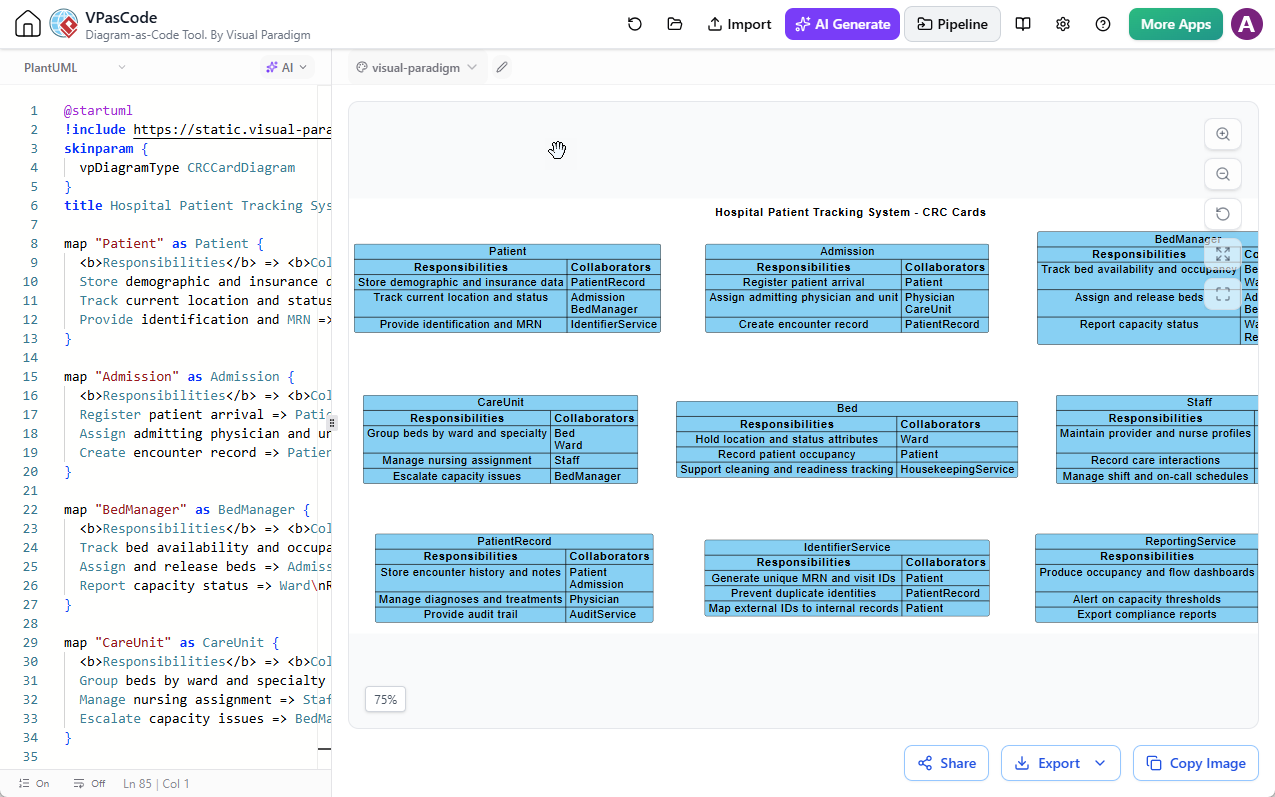
For developers who prefer code-first workflows, you can edit and tweak the generated PlantUML code directly inside Visual Paradigm VPasCode. This allows for precise adjustments to class names, responsibilities, or collaborator relationships.
2. OpenDocs Integration
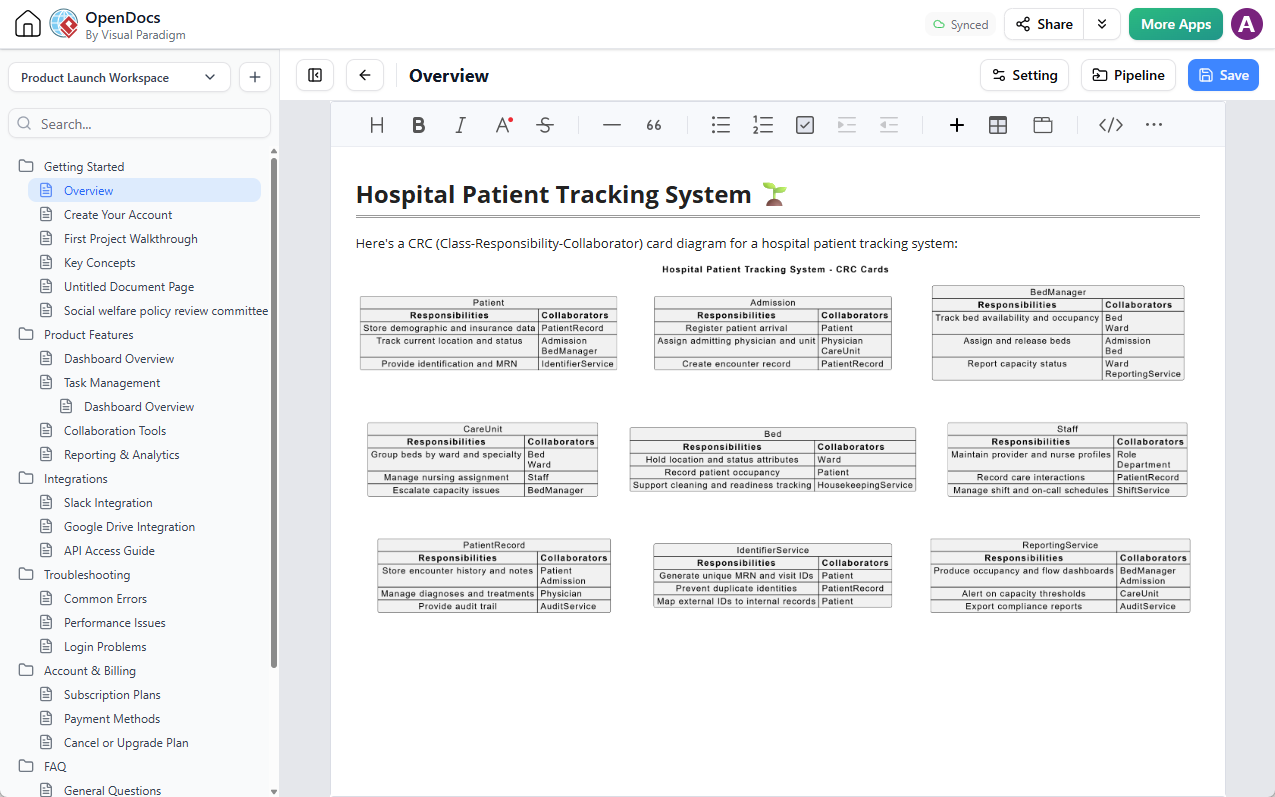
Documentation is critical for team alignment. You can push your CRC diagrams into project pipelines and embed them directly into technical documentation using Visual Paradigm OpenDocs. This ensures that your architectural models are always in sync with your project documentation.
3. NotesKeep Knowledge Capture
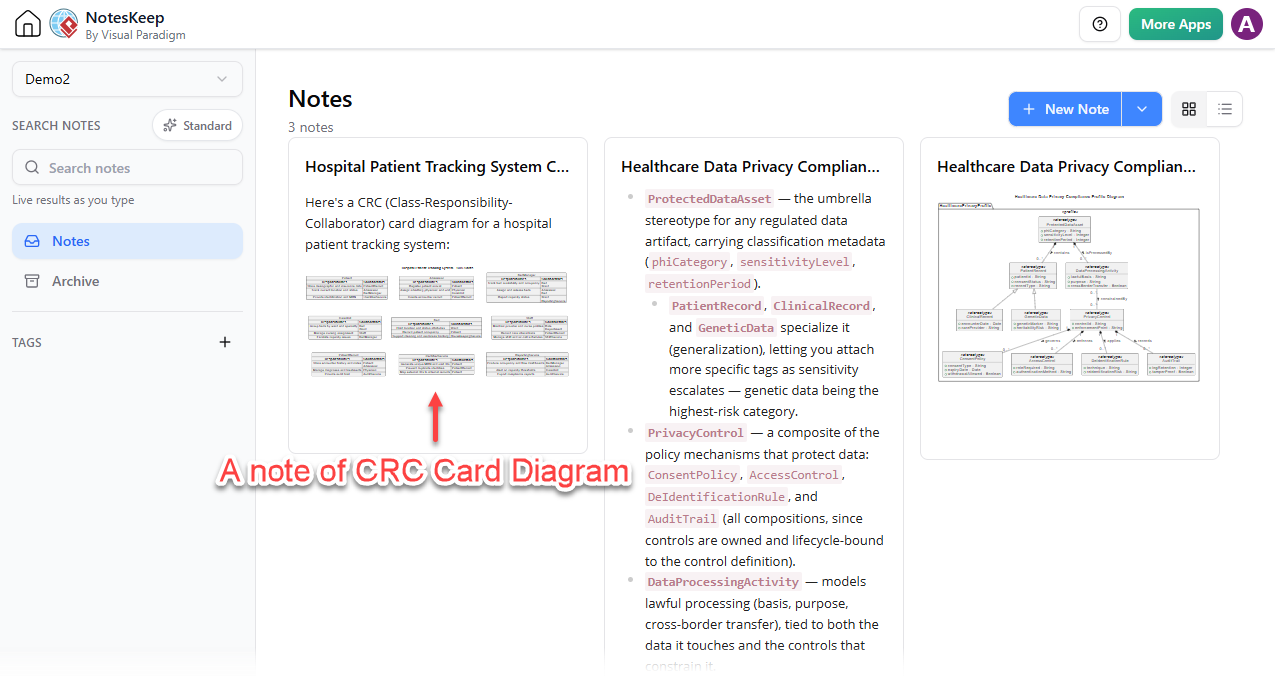
Architectural decisions often require context. You can save key explanations, code blocks, or specific chat segments into Visual Paradigm NotesKeep. This serves as a ground truth for future architectural decisions or team Q&A sessions, preserving the rationale behind your design choices.
4. Multi-Format Export
For presentations, design reviews, or external reports, you can export your diagrams as high-resolution PNGs or SVG vector graphics, ensuring they look professional in any medium.
Conclusion
The introduction of AI-driven CRC Card Diagram generation marks a significant evolution in object-oriented analysis. By removing the friction of manual modeling and integrating seamlessly with modern development workflows, Visual Paradigm empowers teams to focus on what matters most: designing robust, maintainable, and well-structured systems. Whether you are designing a brand-new module or documenting a legacy architecture, the AI CRC Card Diagram tool simplifies the process, turning natural language ideas into actionable architectural blueprints in seconds.
Accelerate your software architecture and object-oriented modeling with AI assistance. Experience how fast natural language prompts can turn into structured, actionable domain models.
Launch the Visual Paradigm AI Diagramming Chatbot and Create Your CRC Card Diagram Now
Recommended Reading
- A Comprehensive Guide to the CRC Card Approach in Software Development – ArchiMetric: Comprehensive guide covering CRC card methodology from brainstorming to role-playing scenarios, with practical tips for identifying classes, responsibilities, and collaborators.
- Visual Paradigm CRC Cards: Digital Modeling Made Simple: Step-by-step tutorial for creating CRC cards in Visual Paradigm, including how to link them directly to UML class diagrams and generate code skeletons.
- CRC Meets Agile: Lightweight Modeling for Iterative Design: Explores how CRC cards integrate into agile sprints, with practical workflows for using CRC during user story refinement and iterative design.
- A Comprehensive Guide to CRC (Class Responsibility Collaborator) Modeling – Visual Paradigm Blog: Official Visual Paradigm guide covering CRC card anatomy, team roles (domain experts, facilitator, scribe), and the complete six-step modeling process.
- AI CRC Card Diagram Generator | Visual Paradigm AI: Demonstrates how to use Visual Paradigm Desktop’s AI features to generate initial CRC card structures from natural language prompts, then refine and export them.
- Shared CRC Models in Visual Paradigm: Covers moving CRC workshops to the cloud for real-time collaboration, version control, and linking CRC cards to use cases and user stories.
- Mastering CRC Card Diagrams: A Hands-On Guide to Object-Oriented Design with Visual Paradigm – Cybermedian: Hands-on review of creating CRC card diagrams in Visual Paradigm with practical tips on inline editing, textual analysis integration, and transitioning to UML.
- Class Responsibility Collaborator (CRC) Cards: An Agile Intro – Agile Modeling: Foundational introduction to CRC cards from Agile Modeling, covering the iterative process of finding classes, responsibilities, and collaborators for conceptual modeling.
- CRC Card Tutorial: Learn Object-Oriented Design Basics – Visual Paradigm Skills: Beginner-friendly tutorial with hands-on exercises for modeling a simple banking system, covering responsibility-driven design and collaboration patterns.
- Integrating CRC Design into Agile Sprints: Case-study approach showing how to run CRC design sprints during backlog refinement and sprint planning, with concrete examples for retail and fintech domains.

 English
 Arabic
 Chinese (Simplified)
 Dutch
Dutch French
 German
 Italian
 Japanese
 Korean
 Portuguese
 Russian
 Spanish