


Introduction
In today’s rapidly evolving business landscape, organizations must continuously adapt their operations to remain competitive. However, implementing change without a clear understanding of current workflows can lead to confusion, inefficiency, and wasted resources. This is where As-Is and To-Be process modeling becomes essential.
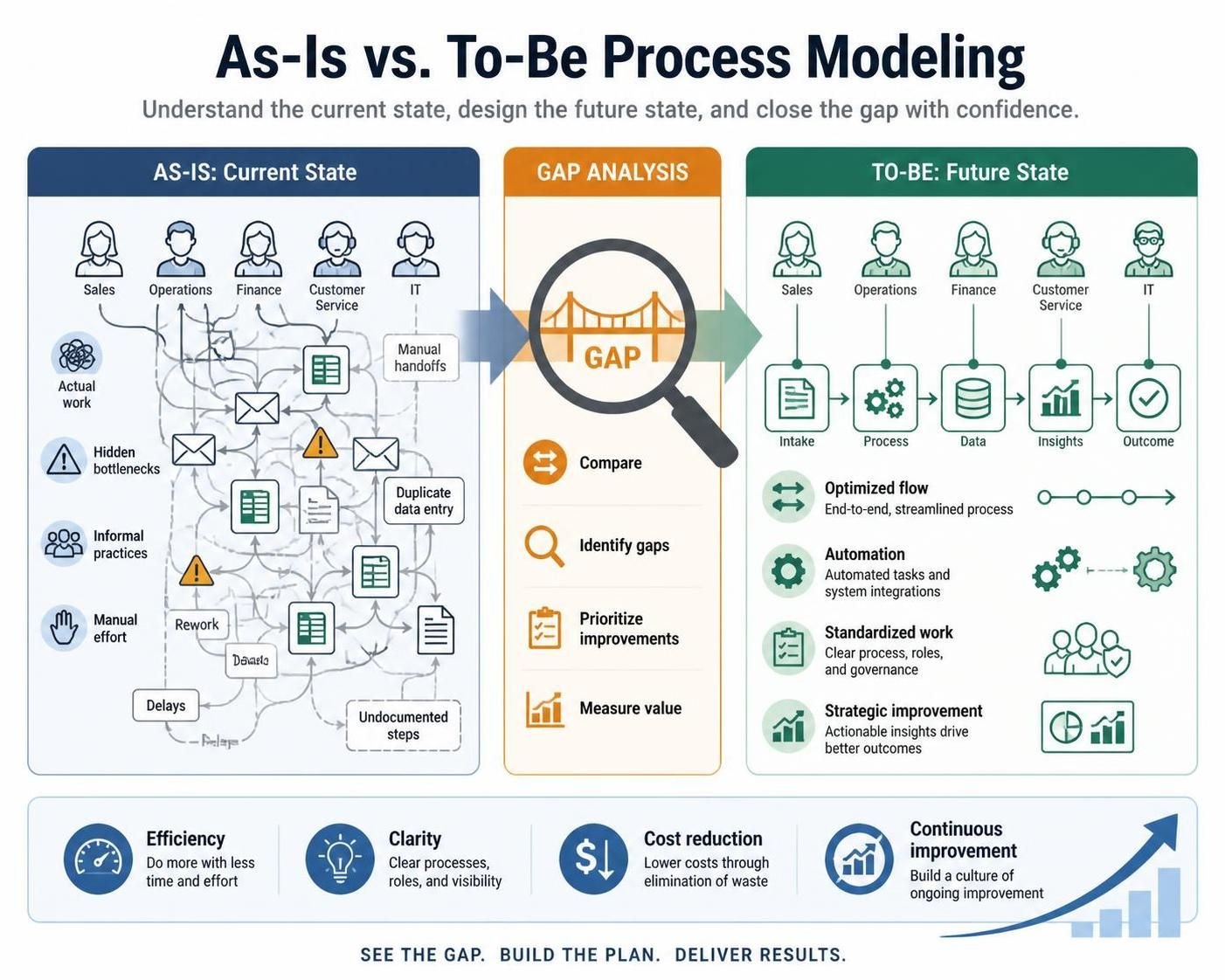
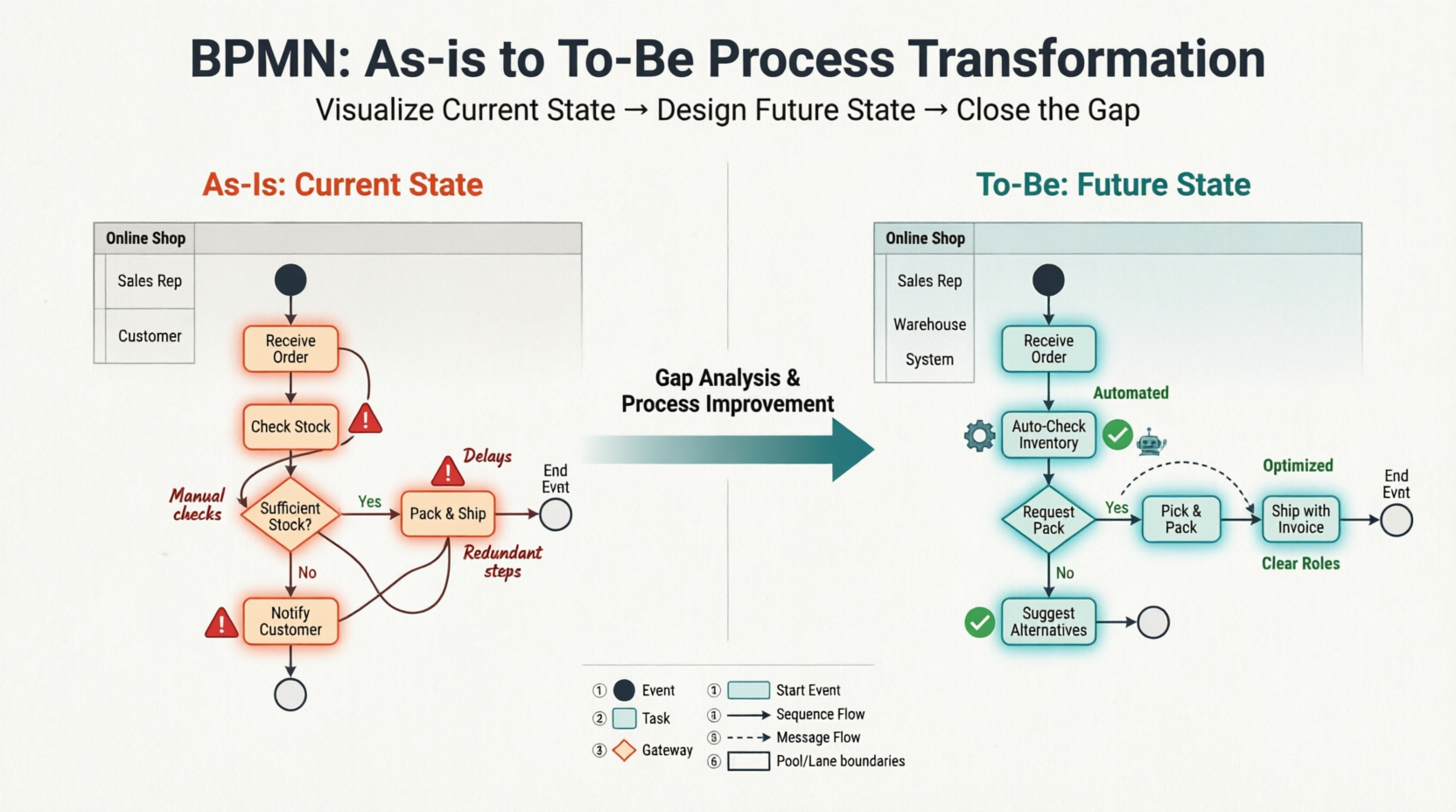
As-Is modeling captures the reality of how work is currently done, including informal practices and hidden bottlenecks. To-Be modeling designs the ideal future state, incorporating optimizations, automation, and strategic improvements. By comparing these two states, businesses can perform precise gap analysis, ensuring that every change adds value.
Visual Paradigm offers a powerful, BPMN-compliant environment for creating these models, auto-generating To-Be processes from existing As-Is diagrams, and using Visual Diff tools to highlight exactly what has changed. This guide will walk you through the entire workflow, from documenting your current operations to visualizing your future success.
Key Concepts
1. The As-Is Process
The As-Is process is a faithful baseline model of how your business processes currently operate in practice. It is not necessarily how the process should work according to official documentation, but rather how it actually works. This model highlights:
-
Existing bottlenecks and delays.
-
Informal knowledge and workarounds used by employees.
-
Legacy inefficiencies and redundant steps.
2. The To-Be Process
The To-Be process is a strategic roadmap outlining the desired future state of capabilities, workflows, and culture after applying operational optimizations. It represents the ideal workflow where:
-
Bottlenecks have been removed or mitigated.
-
Tasks are automated where possible.
-
Roles and responsibilities are clearly defined and optimized.
3. Gap Analysis
Gap analysis is the process of comparing the As-Is and To-Be models to identify the differences. This helps organizations understand:
-
What new tasks or roles need to be created.
-
Which existing steps can be eliminated.
-
The specific changes required to move from the current state to the future state.
Creating and Generating a To-Be Process
Step 1: Model the As-Is State
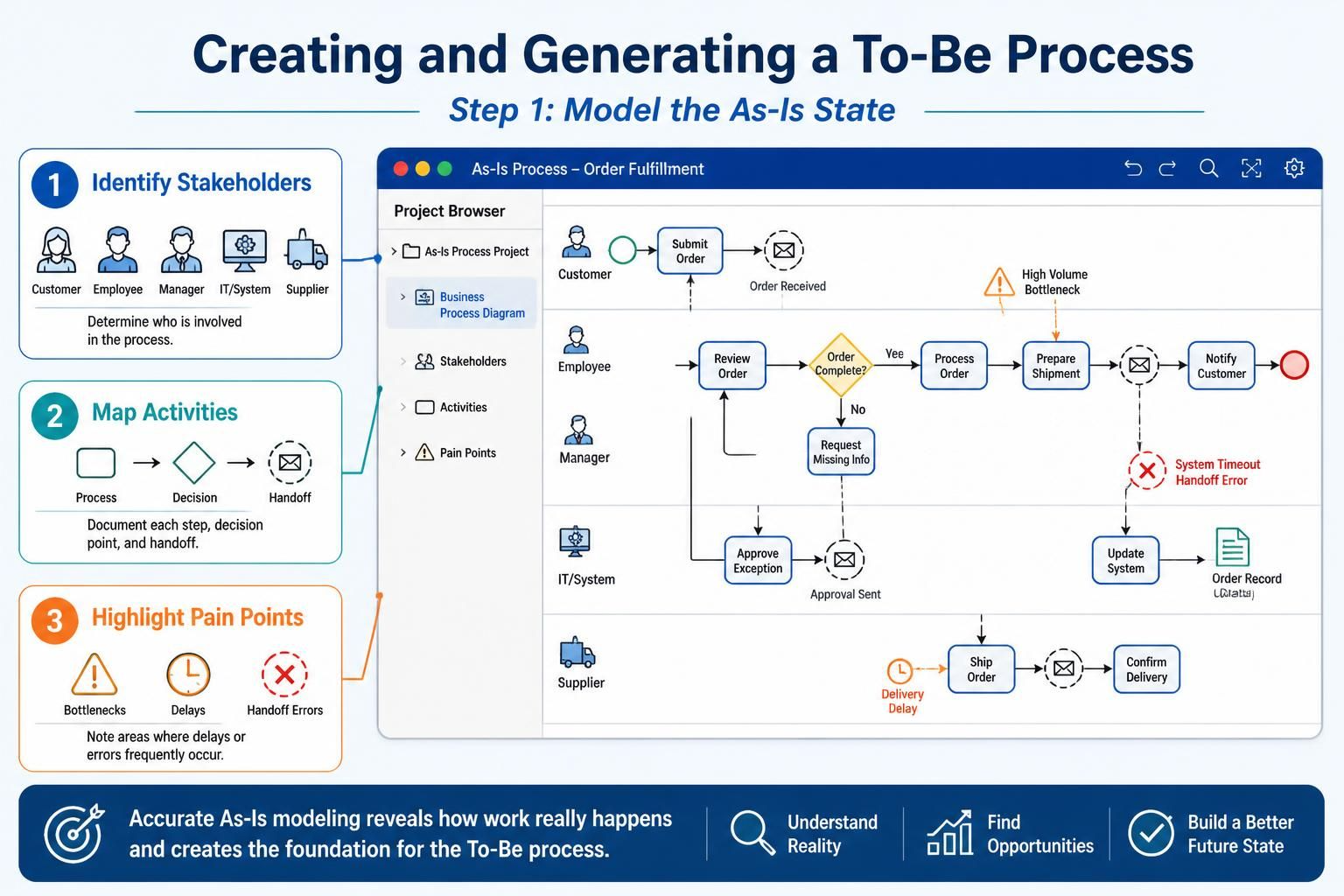
The first step is to document your current workflows accurately. Use Business Process Model and Notation (BPMN) in the Visual Paradigm Project Browser to create your As-Is diagram.
-
Identify Stakeholders: Determine who is involved in the process.
-
Map Activities: Document each step, decision point, and handoff.
-
Highlight Pain Points: Note any areas where delays or errors frequently occur.
Step 2: Auto-Generate To-Be Process
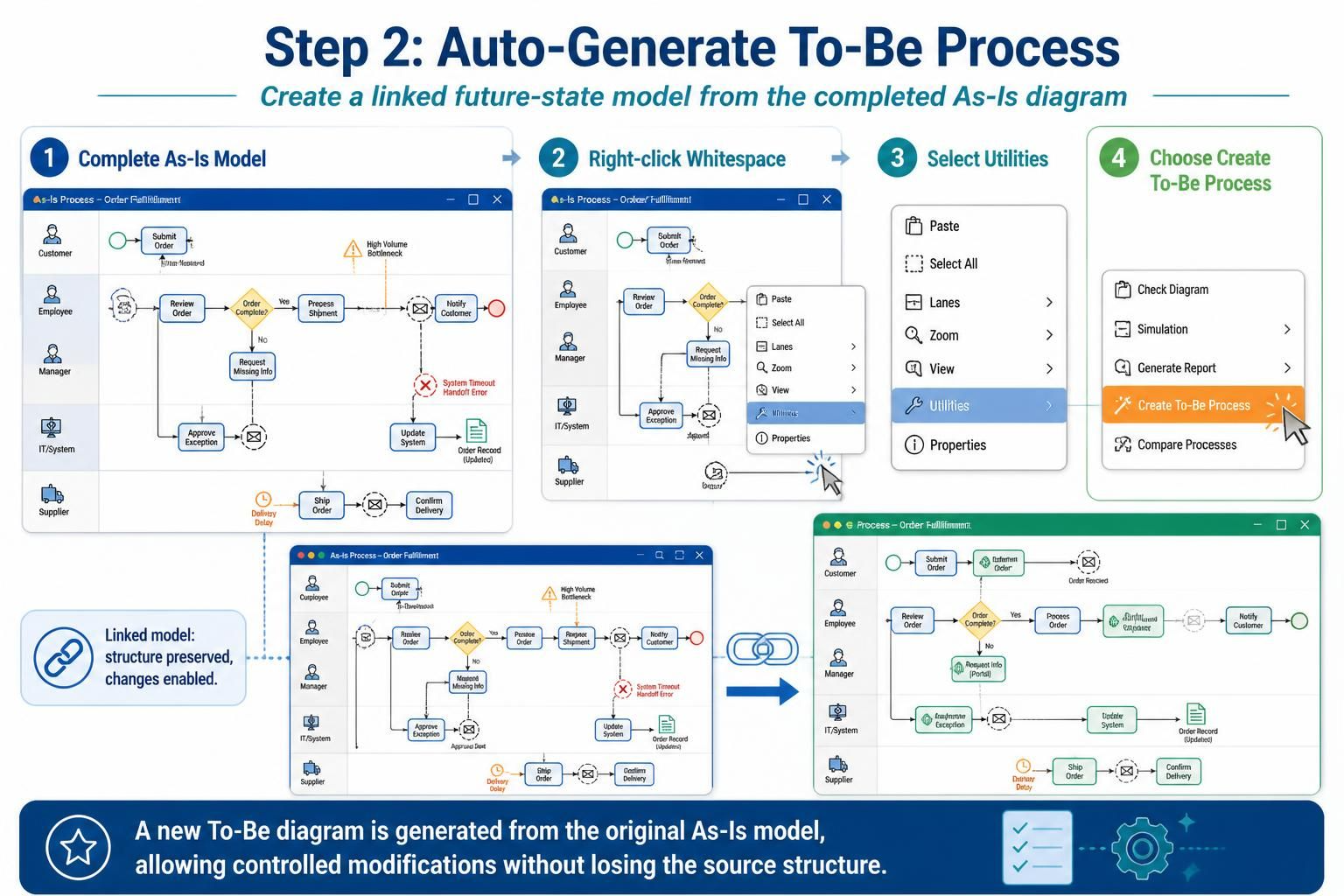
Once your As-Is model is complete, Visual Paradigm allows you to quickly create a linked To-Be model.
-
Right-click the whitespace in your As-Is diagram.
-
Select Utilities.
-
Choose Create To-Be Process.
This action spins up a new diagram that is linked to your original As-Is model, preserving the structure while allowing you to make modifications.
Step 3: Modify and Redesign
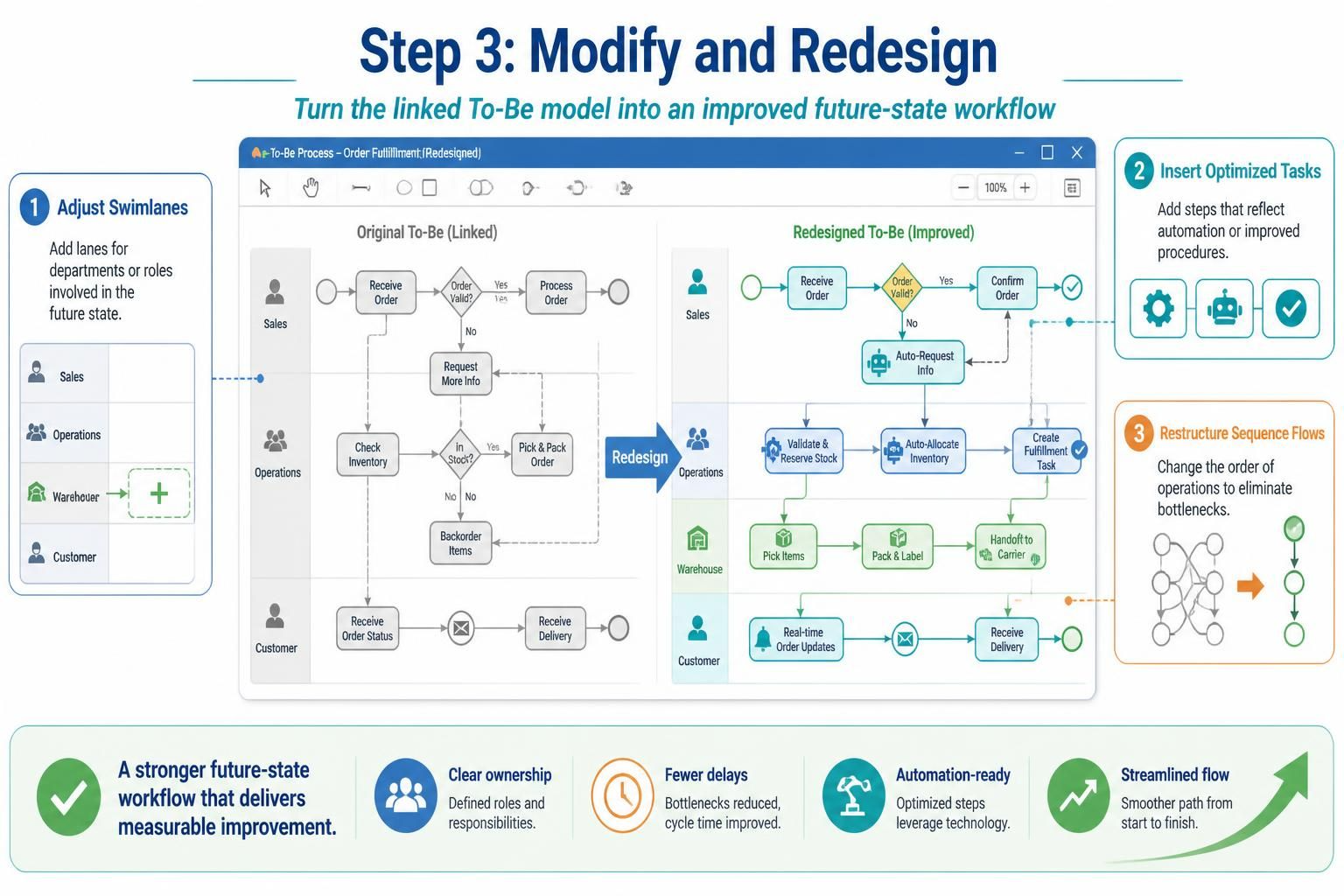
With your To-Be model created, you can now design the improved workflow.
-
Adjust Swimlanes: Add new lanes for departments or roles that will be involved in the future state (e.g., adding a “Warehouse” lane).
-
Insert Optimized Tasks: Add new steps that reflect automation or improved procedures.
-
Restructure Sequence Flows: Change the order of operations to eliminate bottlenecks and streamline the process.
Comparing Models with Visual Diff
The final step is to compare your As-Is and To-Be models to ensure that your changes effectively address the identified gaps.
Access the Tool
Navigate to the Modeling menu and select Visual Diff. This tool allows you to compare your two models side-by-side.
Choose Strategy
Set the comparison strategy to Transitor. This setting tracks element-level transitions and structural changes, providing a detailed view of what has been added, removed, or modified.
Analyze the Gap
Review the highlighted differences in the Visual Diff view.
-
Additions: New tasks or roles that have been introduced.
-
Deletions: Steps that have been removed as unnecessary.
-
Modifications: Changes to existing tasks or flows.
This analysis ensures that your To-Be model effectively closes the operational gap and delivers the desired improvements.
Examples
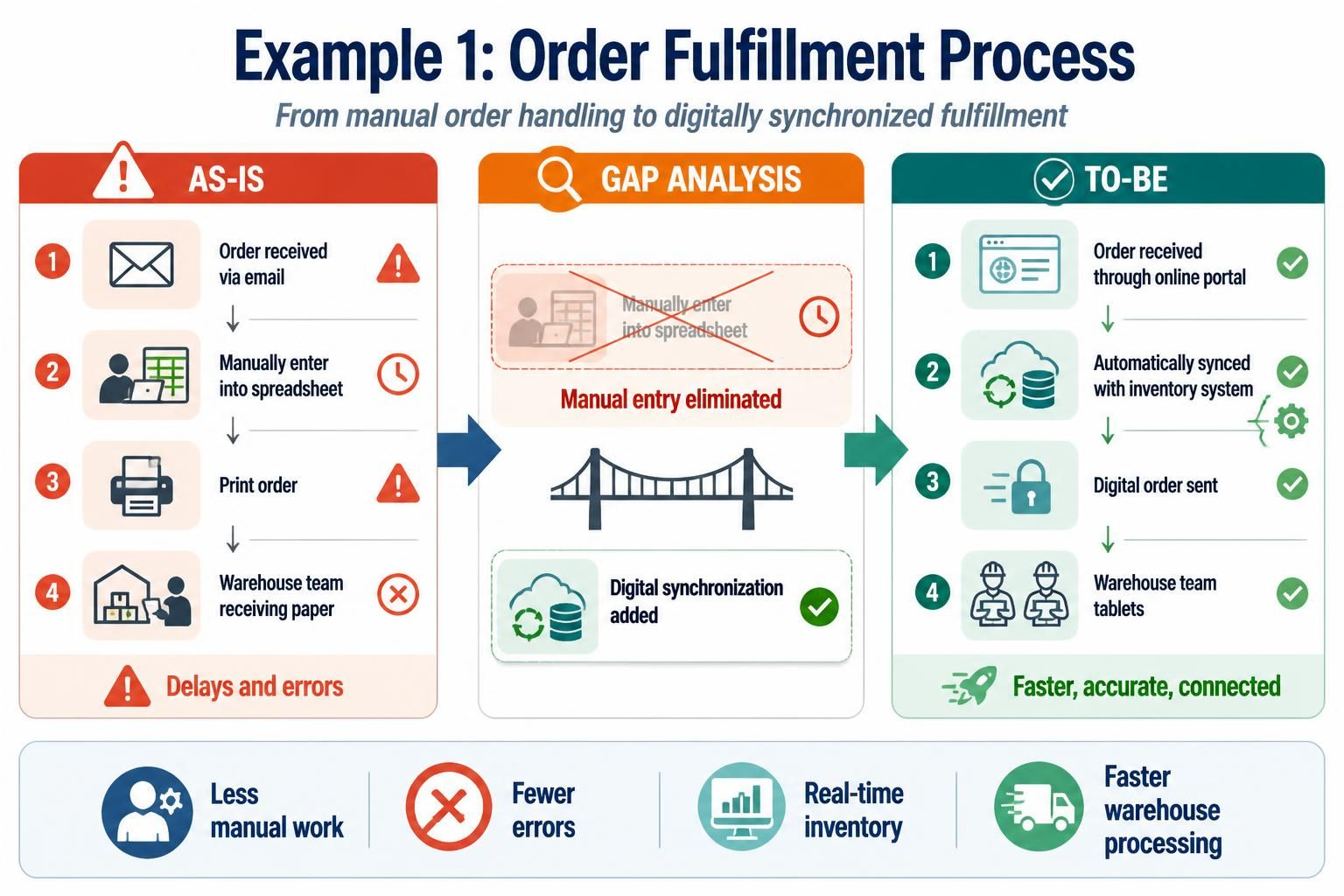
Example 1: Order Fulfillment Process
-
As-Is: Orders are received via email, manually entered into a spreadsheet, and then printed for the warehouse team. This leads to delays and errors.
-
To-Be: Orders are received through an online portal, automatically synced with the inventory system, and digitally sent to the warehouse team’s tablets.
-
Gap Analysis: The manual entry step is eliminated, and a new digital synchronization task is added.
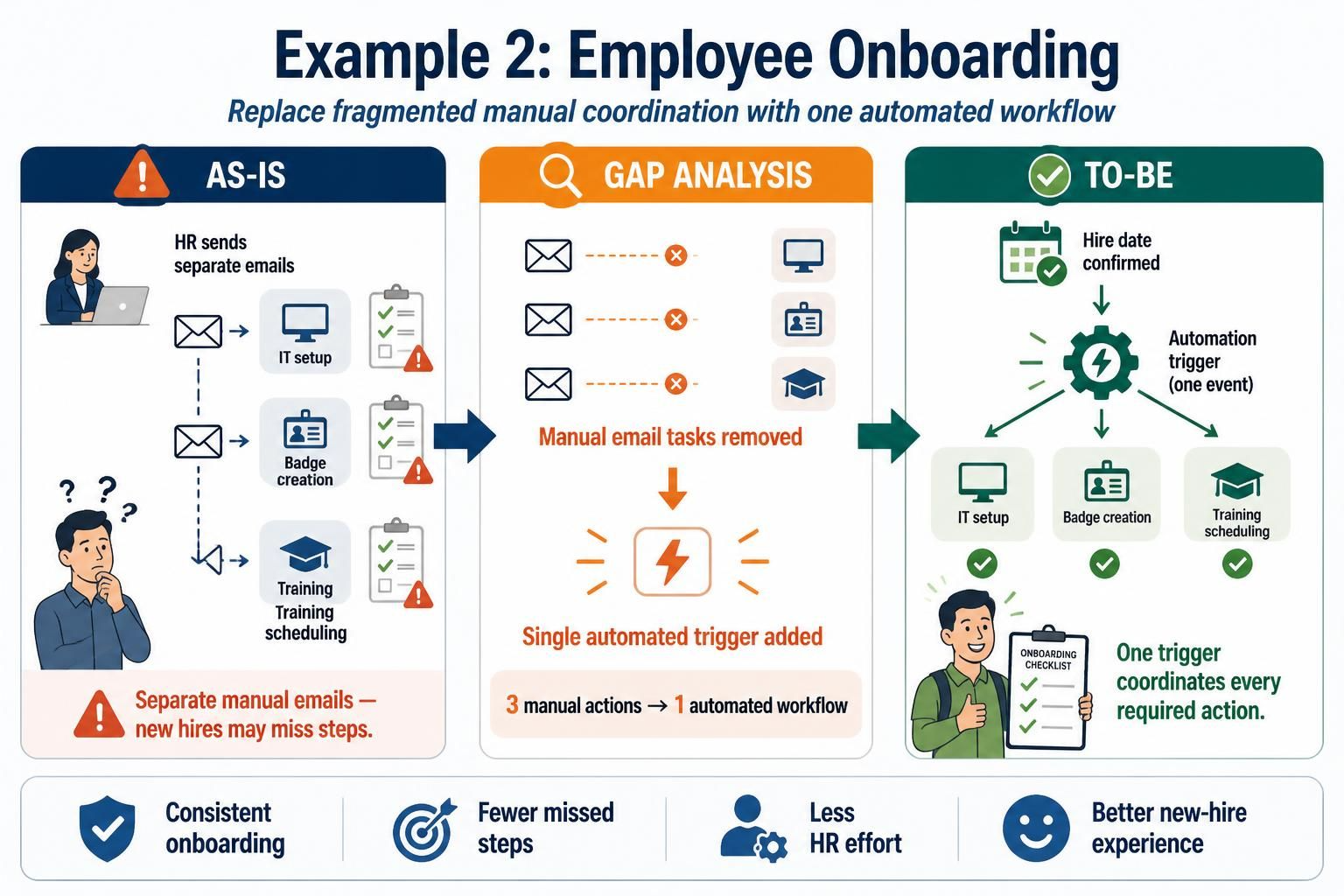
Example 2: Employee Onboarding
-
As-Is: HR sends separate emails for IT setup, badge creation, and training scheduling. New hires often miss steps.
-
To-Be: A single automated workflow triggers all necessary actions upon hire date confirmation.
-
Gap Analysis: Multiple manual email tasks are replaced by a single automated trigger.
Conclusion
As-Is and To-Be process modeling is a powerful technique for driving organizational improvement. By accurately documenting current operations and strategically designing future states, businesses can ensure that changes are purposeful and effective. Visual Paradigm simplifies this process with its intuitive BPMN tools, auto-generation features, and robust Visual Diff capabilities. Whether you are streamlining order fulfillment, optimizing onboarding, or reengineering any other business process, this approach provides the clarity and precision needed for successful transformation.
Recommended Resources
- Visual Paradigm As-Is to To-Be Tutorial: Step-by-step guide on creating and comparing As-Is and To-Be processes.
- BPMN Business Process Modeling Guide: Comprehensive resource for learning BPMN notation and best practices.
- Bridging the Gap with BPMN: In-depth article on using BPMN for gap analysis and process improvement.
- Visual Paradigm User Guide: Comparing As-Is and To-Be: Official documentation on using the Visual Diff tool.
- How to Develop As-Is and To-Be Business Processes: Practical tutorial with examples and tips.
Related posts:
 Mastering Repetition in BPMN: A Practical Guide to Loops and Multi-Instance Activities
 Step-by-Step Guide: Mapping Employee Onboarding Workflows with AI
 🛒 From Cart to Confirmation: A Beginner’s Complete Guide to BPMN Using Visual Paradigm Online’s Free Web-Shop Workflow
 The Ultimate Guide to AI-Powered BPMN 2.0 Diagramming with Visual Paradigm

 English
 Arabic
 Chinese (Simplified)
 Dutch
Dutch French
 German
 Italian
 Japanese
 Korean
 Portuguese
 Russian
 Spanish