


Business Process Management (BPM) is critical for enterprise efficiency, yet creating accurate BPMN 2.0 diagrams can be a technical bottleneck. It requires not only an understanding of business logic but also strict adherence to syntax rules, such as correct gateway placement, message flows, and swimlane assignments. This is where the VPasCode feature within the Visual Paradigm ecosystem revolutionizes the workflow.
This tutorial explores the architecture and technical capabilities of VPasCode, specifically focusing on how it leverages AI to translate natural language prompts into compliant, standard BPMN diagrams. We will analyze the workflow demonstrated in the system interface and break down the underlying logic that transforms a simple text request into a structured visual model.
The AI-Driven Modeling Workflow
The core innovation of VPasCode lies in its ability to bridge the gap between “business speak” and “technical modeling.” Unlike generic AI tools that might generate simple flowcharts with basic shapes, VPasCode is trained on the specific semantics of BPMN.
The process follows a three-step architecture:
- Input Phase: The user provides a high-level description of a process involving specific roles (swimlanes), events (start/end), and logic gates.
- Processing Phase: The AI Chatbot analyzes the semantic intent, mapping nouns to BPMN elements (e.g., “Hiring Manager” becomes a Participant/Swimlane) and verbs to activities.
- Output Phase: The system generates
PlantUMLcode, which is then rendered by the Visual Paradigm engine into a valid BPMN 2.0 diagram.
Deconstructing the Prompt: The “Onboarding” Example
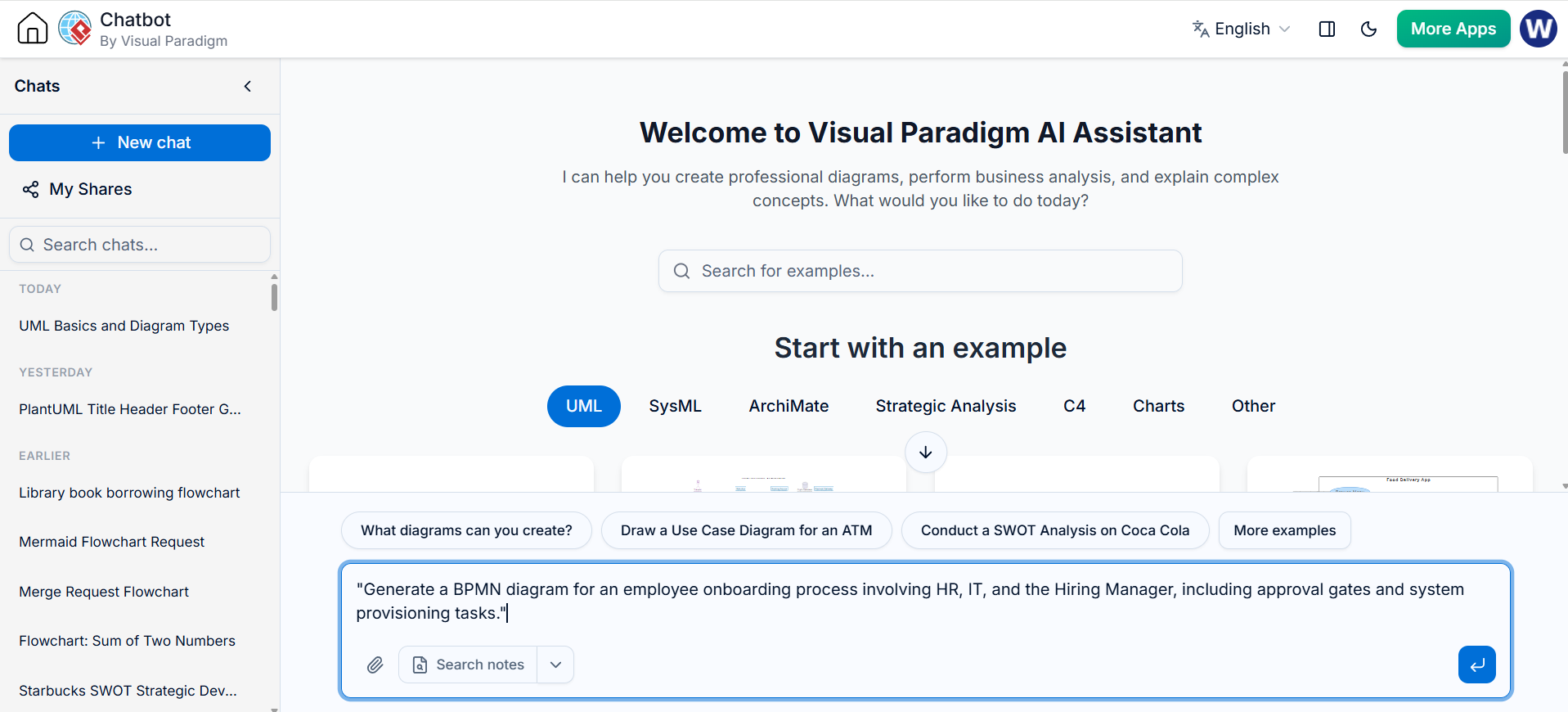
To understand how VPasCode interprets requirements, let’s analyze the specific prompt shown in the system interface:
Prompt: “Generate a BPMN diagram for an employee onboarding process involving HR, IT, and the Hiring Manager, including approval gates and system provisioning tasks.”
This prompt contains three distinct technical directives that the AI must parse:
1. Identifying Participants (Swimlanes)
The phrase “involving HR, IT, and the Hiring Manager” instructs the AI to create a Process Diagram with three distinct pools or lanes. In BPMN, these represent the actors responsible for the tasks. The AI correctly assigns these entities to the vertical structure of the diagram, ensuring that subsequent tasks are placed in the correct context.
2. Implementing Decision Logic (Gateways)
The request for “approval gates” is a critical technical constraint. In a standard flowchart, this might just be a decision diamond. In BPMN, this must be a specific Gateway element (e.g., an Exclusive Gateway). The AI understands that “approval” implies a binary or multi-choice outcome (Approved vs. Rejected), necessitating a branching logic flow.
3. Defining System Interactions (Tasks)
The term “system provisioning tasks” refers to automated activities. The AI interprets this as a specific type of Task (often a Manual or Service Task depending on the context) that likely triggers a message flow to an external system, rather than just a human action.
Technical Output: The PlantUML Code
VPasCode generates standard PlantUML syntax to describe the diagram. This code is the “source code” for the visual model. Below is an example of the structural logic VPasCode generates based on the prompt above. This demonstrates how the AI maps the natural language to the strict syntax of PlantUML.
@startuml
title Employee Onboarding Process

participant "HR" as HR
participant "Hiring Manager" as HM
participant "IT" as IT

HR -> HM: Request New Employee
HM -> HM: Review Application

note right of HM: Decision Point
HM --> HR: Reject
HM --> HR: Approve

HR -> IT: Provision System Access
IT -> IT: Create User Account
IT -> HR: Account Created

HR -> HM: Send Welcome Pack
@enduml
In this code snippet, you can observe how the participant keyword defines the swimlanes and the arrow syntax -> defines the sequence flows. The “Decision Point” is represented by the logic branching into “Reject” or “Approve.”
Why Semantic Understanding Matters
The distinction between VPasCode and generic AI is semantic. A generic AI might generate a flowchart that looks like a picture but contains no data structure. VPasCode generates a model that is:
- Executable: The underlying code can be interpreted by BPMN engines.
- Compliant: It adheres to the BPMN 2.0 specification.
- Editable: Because it generates code, the resulting diagram can be modified manually in the BPMN editor if the AI’s initial generation isn’t perfect.
Conclusion
By leveraging the Visual Paradigm AI Chatbot and the VPasCode tool, organizations can bypass the steep learning curve of manual diagramming. The ability to prompt for complex logic—such as approval gates and multi-party interactions—and receive a structured, code-based output allows business analysts to focus on process optimization rather than syntax errors.

 English
 Arabic
 Chinese (Simplified)
 Dutch
Dutch French
 German
 Italian
 Japanese
 Korean
 Portuguese
 Russian
 Spanish