


Effective software architecture relies on defining clear relationships between objects. In Object-Oriented Programming (OOP), this often involves balancing inheritance (reusing code) with composition (building complex structures from simpler parts). This tutorial demonstrates how to model a scalable “Asset Management System” using VPasCode and the PlantUML syntax engine.
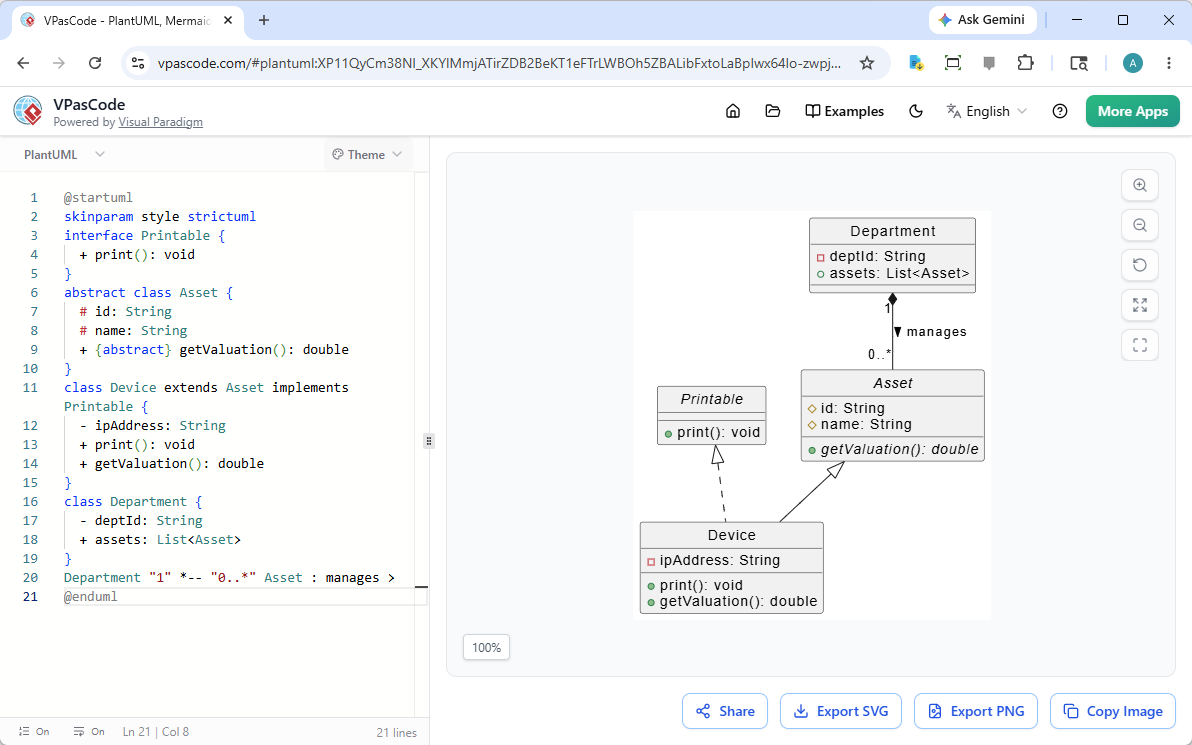
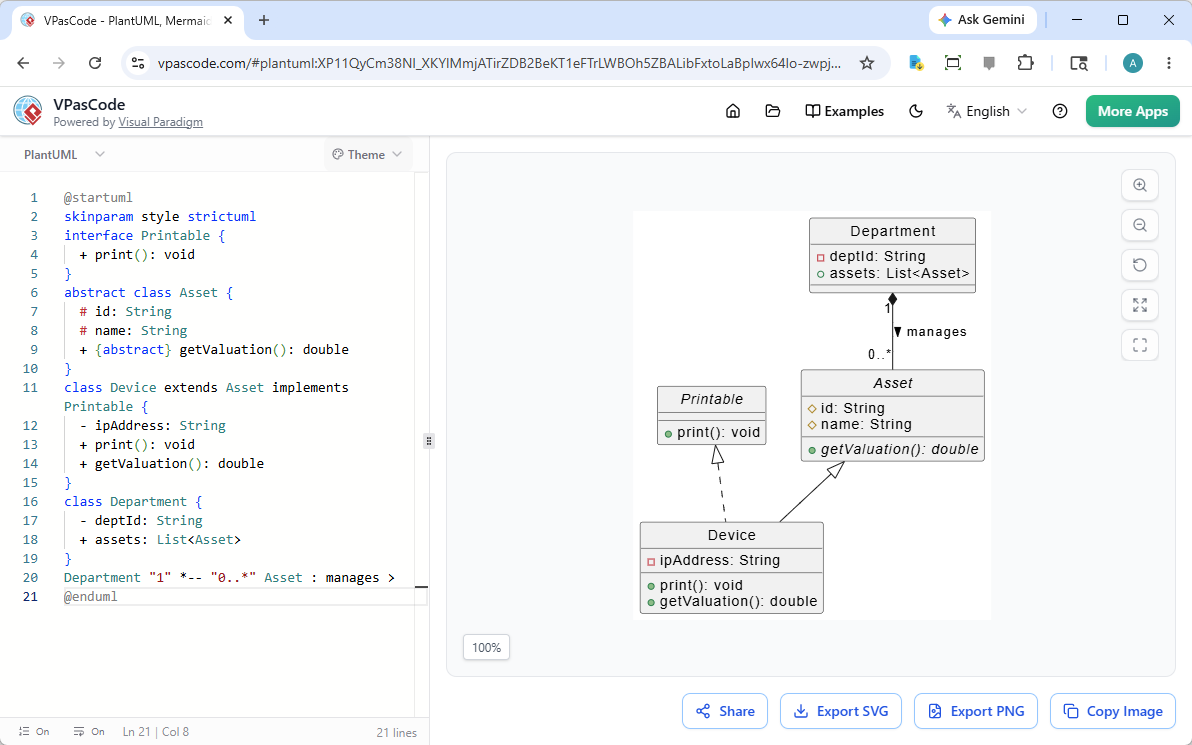
By examining the system architecture shown below, we will break down how to create abstract base classes, enforce interfaces, and model aggregation relationships between departments and assets.
1. System Overview: The Asset Hierarchy
The diagram illustrates a classic hierarchy where specific devices (like computers or printers) inherit common properties from a generic “Asset” class. This approach reduces redundancy: instead of defining id and name for every single device, you define them once in the parent class.
We will also introduce an interface called Printable. This allows the system to treat different objects uniformly if they share a specific capability, regardless of their inheritance lineage.
2. Step-by-Step Implementation Guide
Step 1: Configuring the Diagram Style
Before writing the code, we define the visual theme. In VPasCode, the @startuml directive marks the beginning of the diagram, while skinparam controls the aesthetic.
We use style strictuml to enforce standard UML shapes and spacing, ensuring the diagram looks professional and adheres to industry standards.
@startuml
skinparam style strictuml
Step 2: Defining the Interface
An interface represents a contract. In our code, the interface Printable defines a method print() that any class choosing to implement must provide.
interface Printable {
    + print(): void
}interface: Declares a contract without implementation.+ print(): void: A public method that returns nothing (void).
Step 3: Creating the Abstract Base Class
The abstract class Asset serves as the parent for all physical items in the system. It is marked “abstract” because you cannot create a generic “Asset” in reality; you need a specific type like a “Server” or “Desk.”
abstract class Asset {
    # id: String
    # name: String
    +{abstract} getValuation(): double
}
Key concepts here:
# idand# name: The hash symbol#indicates private attributes, visible only within the class itself.+{abstract} getValuation(): This is a pure virtual function. It forces any child class (likeDevice) to define how to calculate the value of the asset.
Step 4: Implementing Concrete Classes
Here we define class Device, which extends Asset and implements Printable. This shows how a single class can inherit data from one source and functionality from another.
class Device extends Asset implements Printable {
    - ipAddress: String
    + print(): void
    + getValuation(): double
}
extends Asset: Inheritsidandnameautomatically.implements Printable: Must now include theprint()method.- ipAddress: The minus symbol-denotes a private attribute specific to devices.
Step 5: Modeling Aggregation (Composition)
Finally, we model the relationship between Department and Asset. A department owns many assets, but the assets can exist independently.
class Department {
    - deptId: String
    + assets: List<Asset>
}

Department "1" *-- "0..*" Asset : manages >List<Asset>: This generic type allows the department to hold a collection of any object that is anAsset(e.g., aDevice)."1" -- "0..": This is a multiplicity constraint. It means one Department manages zero or many Assets.*--: The diamond shape represents Aggregation (or Composition), indicating a “has-a” relationship rather than a strict inheritance link.
3. Visualizing the Result
When rendered in VPasCode, the Department box connects to the Asset box via a diamond, signifying that the Department manages the Asset. Meanwhile, the Device box connects to Asset via a solid arrow (inheritance) and to Printable via a dashed arrow (implementation).
Conclusion
By combining abstract classes for shared data, interfaces for shared behavior, and aggregation for relationships, VPasCode allows you to rapidly prototype complex system architectures. This text-based approach ensures your diagrams remain consistent, version-controlled, and easy to update.

 English
 Arabic
 Chinese (Simplified)
 Dutch
Dutch French
 German
 Italian
 Japanese
 Korean
 Portuguese
 Russian
 Spanish