


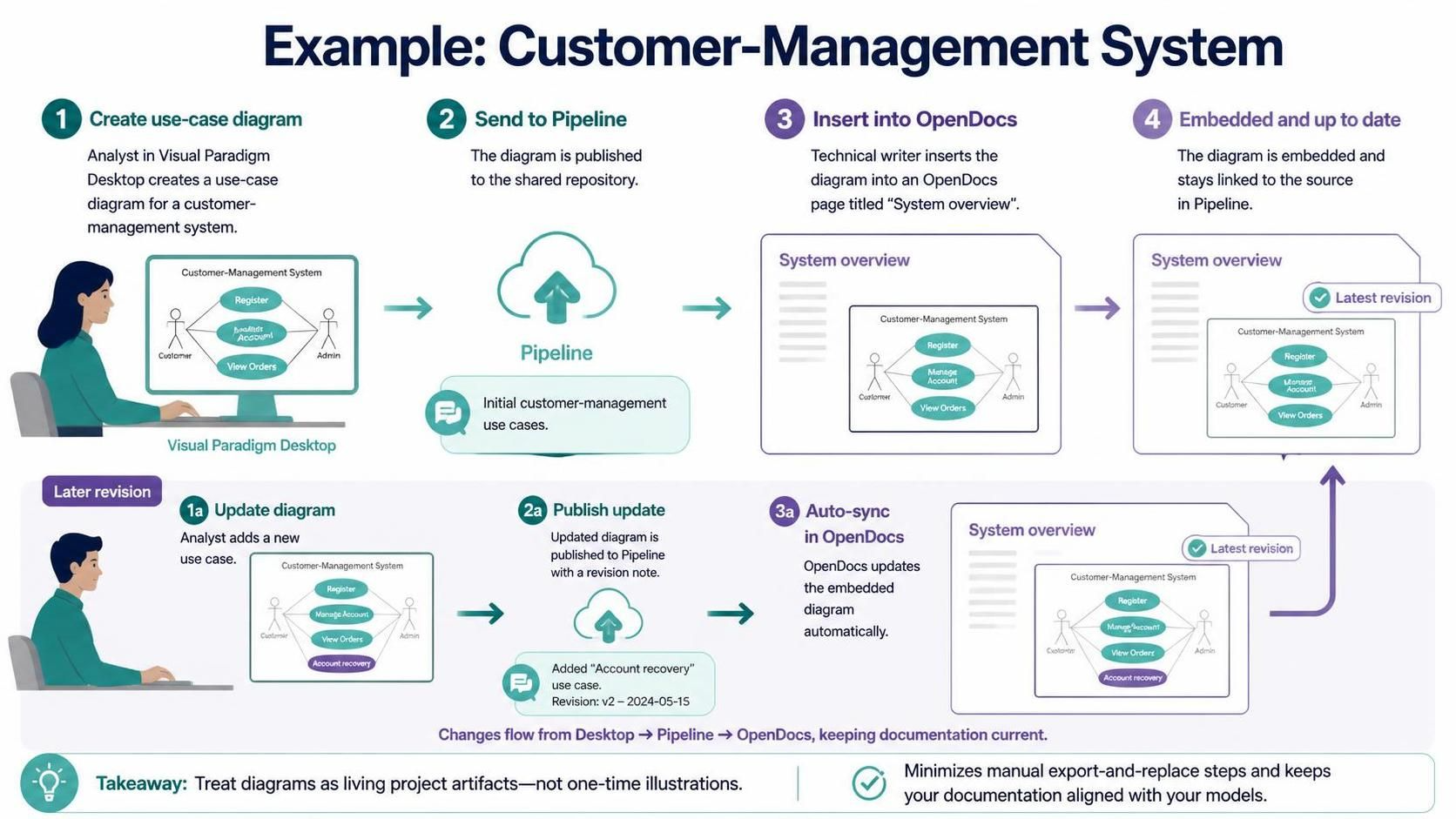
In the world of systems engineering and technical documentation, the most persistent challenge is ensuring that visual representations of a system remain accurate as the system evolves. Traditionally, analysts create diagrams in modeling tools like Visual Paradigm Desktop, export them as static images (PNG or JPG), and paste them into documentation platforms like OpenDocs. When the system changes, the analyst must remember to update the model, export a new image, and manually replace the old one. This “export-and-replace” workflow is prone to human error and version drift.
The Visual Paradigm Desktop–OpenDocs Pipeline solves this by treating diagrams as “living project artifacts” rather than static illustrations. This tutorial explores the architecture behind this integration, walking you through the step-by-step process of creating a use-case diagram, pushing it to the Pipeline, and embedding it into OpenDocs so that updates are synchronized automatically.
1. The Architecture of the Integration
To understand how this workflow functions, we must look at the three primary components involved in the data flow:
- Visual Paradigm Desktop (The Source): This is where the “single source of truth” resides. Here, analysts create and maintain the actual UML models, including use cases, actors, and relationships. The model is dynamic; you can add, remove, or modify elements at any time.
- Pipeline (The Transport Layer): Acting as a shared repository or middleware, the Pipeline manages the version control and transmission of these diagrams. It listens for changes in the Desktop model and pushes updates to connected documentation systems. It handles the metadata, such as revision notes and timestamps.
- OpenDocs (The Consumer): This is the documentation environment where technical writers present information to stakeholders. Instead of a static image, OpenDocs hosts an embedded object that maintains a live link to the Pipeline.
2. The Workflow: From Analyst to Reader
Let’s walk through a practical scenario: a team is documenting a Customer-Management System. The process involves two distinct phases: the initial setup and the maintenance of revisions.
Phase 1: Initial Setup
The workflow begins with the analyst in Visual Paradigm Desktop.
- Create the Model: The analyst designs a Use-Case Diagram. This diagram includes actors (e.g., “Customer,” “Admin”) and use cases (e.g., “Register,” “View Orders,” “Evaluate Account”).
- Publish to Pipeline: Once the diagram is ready, the analyst uses the Pipeline feature to send the diagram to the shared repository. They attach a comment, such as “Initial customer-management use cases.” This action publishes the diagram version to the cloud.
- Insert into OpenDocs: A technical writer opens the “System Overview” page in OpenDocs. Instead of pasting an image file, they use the integration tool to insert the diagram from the Pipeline.
- Result: The diagram appears on the page, but it is not a flat image. It is a linked object that displays the latest revision available in the Pipeline.
Phase 2: The “Living Artifact” Lifecycle
Imagine a requirement change: the business decides that users need a way to reset forgotten passwords. The team adds a new “Account Recovery” flow to the model.
- Update Diagram: In Visual Paradigm Desktop, the analyst adds the “Account Recovery” use case to the diagram. The model is now at Revision v2.
- Publish Update: The analyst sends this updated diagram to the Pipeline with a revision note, such as “Added ‘Account recovery’ use case.”
- Auto-Sync in OpenDocs: The diagram in the OpenDocs document is now “out of sync” with the source. However, because of the integration, the system automatically detects the new revision. The embedded diagram updates itself to reflect the new “Account Recovery” use case.
- Verification: The technical writer sees a checkmark or a “Latest revision” indicator, confirming that the documentation matches the current model state.
3. Technical Benefits of the Pipeline
Why should engineering teams adopt this architecture over manual export methods? The benefits are significant:
- Version Synchronization: The diagram in the documentation always mirrors the model in Desktop. There is no need to manually track file versions (e.g.,
diagramv1.pngvs.diagramv2.png). - Reduced Maintenance Overhead: Technical writers and analysts spend less time managing image files and more time focusing on the actual system logic and content.
- Contextual Integrity: The model and its explanatory text live in the same workflow. This ensures that if a use case is renamed in the model, the diagram updates immediately, preserving the integrity of the documentation.
4. Implementation Best Practices
To get the most out of the Visual Paradigm Desktop–OpenDocs integration, follow these guidelines:
- Use Descriptive Revision Notes: When publishing to the Pipeline, always provide a clear comment. This serves as a changelog for the documentation team.
- Treat Diagrams as Code: Just as you would version control source code, treat your UML diagrams as critical project assets. Do not rely on the diagram as a one-time illustration.
- Monitor “Latest Revision” Status: In OpenDocs, keep an eye on the status indicators. If a diagram shows a warning or outdated status, it indicates that the source model has changed but the Pipeline hasn’t been updated or the sync hasn’t run.
Conclusion
The transition from static documentation to dynamic, model-driven documentation represents a maturity in the engineering process. By utilizing the Desktop-to-OpenDocs Pipeline, teams ensure that their Customer-Management System diagrams—and indeed all system architecture models—remain living artifacts that evolve in lockstep with the software they describe.

 English
 Arabic
 Chinese (Simplified)
 Dutch
Dutch French
 German
 Italian
 Japanese
 Korean
 Portuguese
 Russian
 Spanish