


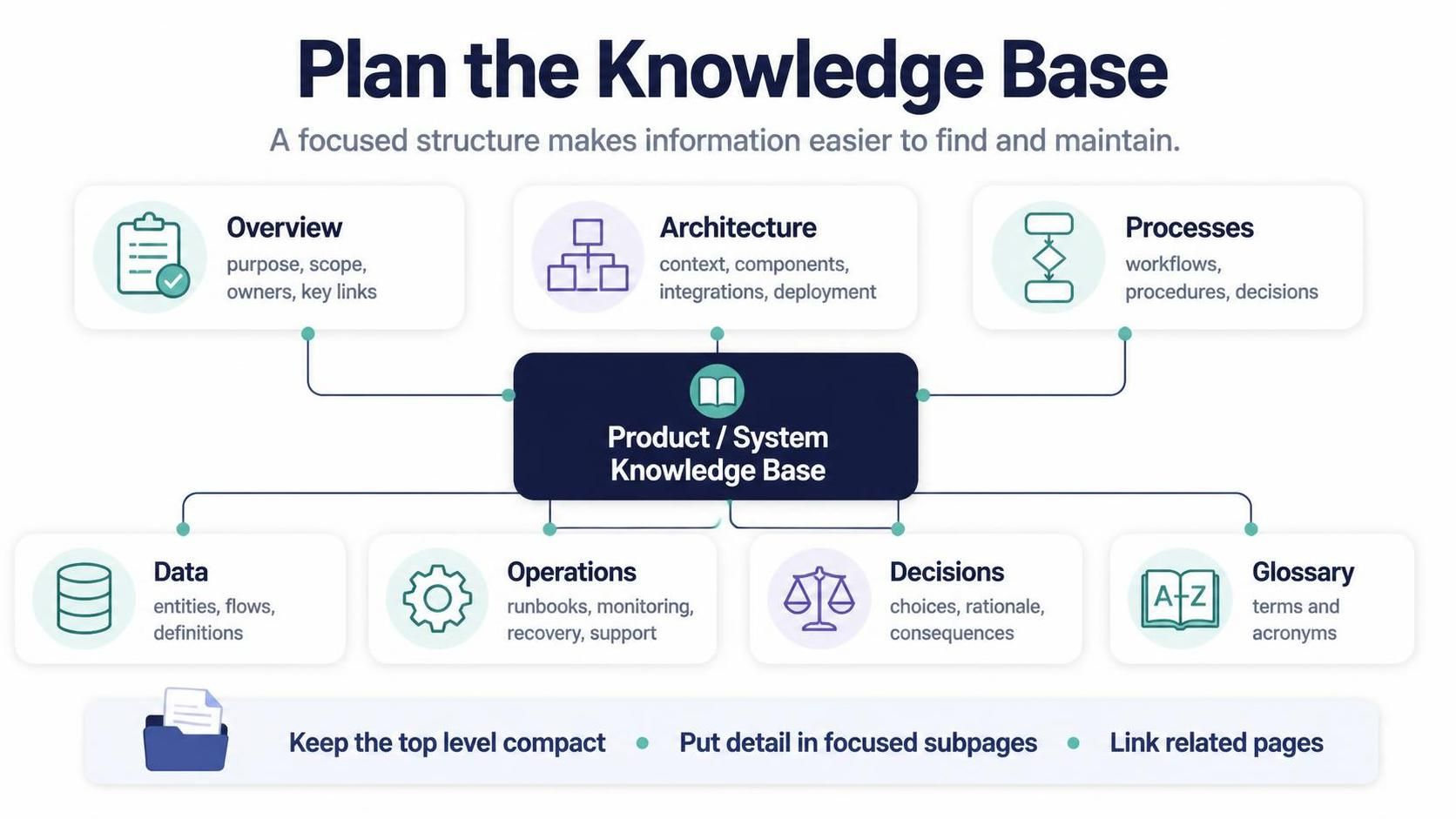
In the realm of technical documentation, the most common pitfall is not a lack of information, but rather a lack of structure. When a knowledge base grows organically without a predefined architectural plan, it inevitably becomes a “content swamp” where critical runbooks and architectural decisions are buried beneath unstructured text. This tutorial explores the essential framework for planning a Product or System Knowledge Base, ensuring that information is discoverable, maintainable, and scalable.
The Central Hub: Why Structure Matters
The foundation of a successful knowledge base lies in its topology. As illustrated in the reference diagram, a robust system documentation strategy revolves around a central “Product / System Knowledge Base.” This central node acts as the single source of truth, branching out into seven distinct, specialized domains. By compartmentalizing information, we reduce cognitive load for the reader. Instead of searching through a monolithic document, a user can navigate directly to the specific context they need—be it high-level architecture or granular data definitions.
Deconstructing the Seven Pillars of Documentation
To build a focused structure, we must define the scope of each of the seven core sections. Here is a step-by-step breakdown of the architectural blueprint:
1. Overview: The Entry Point
The Overview section serves as the landing page for your documentation. It is the first thing a new team member or stakeholder reads. Its primary function is to establish context immediately.
- Purpose: Clearly state what the system does and the problems it solves.
- Scope: Define what is in scope and, crucially, what is out of scope.
- Ownership: Identify the product owners or system administrators responsible for the content.
- Navigation: Provide high-level links to the other key pages.
2. Architecture: The System Blueprint
While the Overview is text-heavy, the Architecture section should be visual and structural. It answers the question, “How does the system work?”
- System Context: How does this system fit into the broader enterprise ecosystem?
- Components: Breakdown of microservices, modules, or physical servers.
- Integrations: External APIs, third-party dependencies, and data exchange points.
- Deployment: Infrastructure topology (e.g., Cloud regions, Kubernetes clusters).
3. Processes: The Flow of Work
Documentation often fails to capture the dynamic nature of systems. The Processes section bridges the gap between static architecture and active usage.
- Workflows: End-to-end user journeys or automated triggers.
- Procedures: Standard Operating Procedures (SOPs) for common tasks.
- Decision Points: Logic gates where the system behavior changes based on inputs.
4. Data: The Foundation
Data is the lifeblood of any system. The Data section ensures that developers and analysts are speaking the same language regarding information storage.
- Entities: Database schemas, tables, or object models.
- Data Flows: How data moves from ingestion to storage to presentation.
- Definitions: A formal glossary of data attributes and business rules.
5. Operations: Keeping the Lights On
When things go wrong, or when scaling is required, the Operations section is the critical resource for DevOps and SRE teams.
- Runbooks: Step-by-step guides for routine maintenance and incident response.
- Monitoring: Key performance indicators (KPIs), dashboards, and alert thresholds.
- Recovery: Disaster recovery plans and backup restoration procedures.
- Support: Escalation paths and contact information for support teams.
6. Decisions: The Rationale
Code tells you what was built; the Decisions section tells you why it was built that way. This is vital for future-proofing the system.
- Design Choices: Why was Technology A chosen over Technology B?
- Rationale: The business or technical constraints that drove the decision.
- Consequences: Known trade-offs, limitations, or technical debt resulting from the choice.
7. Glossary: The Shared Language
Finally, the Glossary ensures semantic consistency across the entire knowledge base. It defines shared terminology, acronyms, and domain-specific jargon, preventing miscommunication between business stakeholders and technical teams.
Implementation Strategy: The “Compact Top Level” Rule
The diagram emphasizes a critical structural rule: Keep the top level compact. This means the main navigation menu or the “Overview” page should not contain every single piece of information. Instead, it should act as a directory.
When planning your knowledge base, apply the Drill-Down Methodology:
- Level 1 (Compact): The 7 Pillars (Overview, Architecture, Processes, etc.).
- Level 2 (Focused): Deep dives into specific sub-components (e.g., “Architecture” -> “Database Schema”).
- Level 3 (Linked): Detailed code snippets, specific API references, or historical logs.
By keeping the top level clean, you prevent “navigation fatigue.” You must also ensure that related pages are linked to one another. For instance, a page describing a Process should link directly to the Architecture diagrams it utilizes, creating a web of context rather than isolated islands of text.
Conclusion
Planning your knowledge base is an exercise in systems engineering applied to information. By adopting the Overview, Architecture, Processes, Data, Operations, Decisions, Glossary framework, you create a resilient structure that can grow with your product. Remember, the goal is not just to store information, but to create a focused structure that makes information easier to find and maintain.

 English
 Arabic
 Chinese (Simplified)
 Dutch
Dutch French
 German
 Italian
 Japanese
 Korean
 Portuguese
 Russian
 Spanish