


In the fast-paced world of software development, a critical disconnect often occurs between the written requirements, the visual architecture, and the actual implementation. Teams frequently find themselves managing static Word documents in one folder, outdated screenshots in a wiki, and complex UML models in a separate desktop tool. This fragmentation leads to version control nightmares and “lost” knowledge.
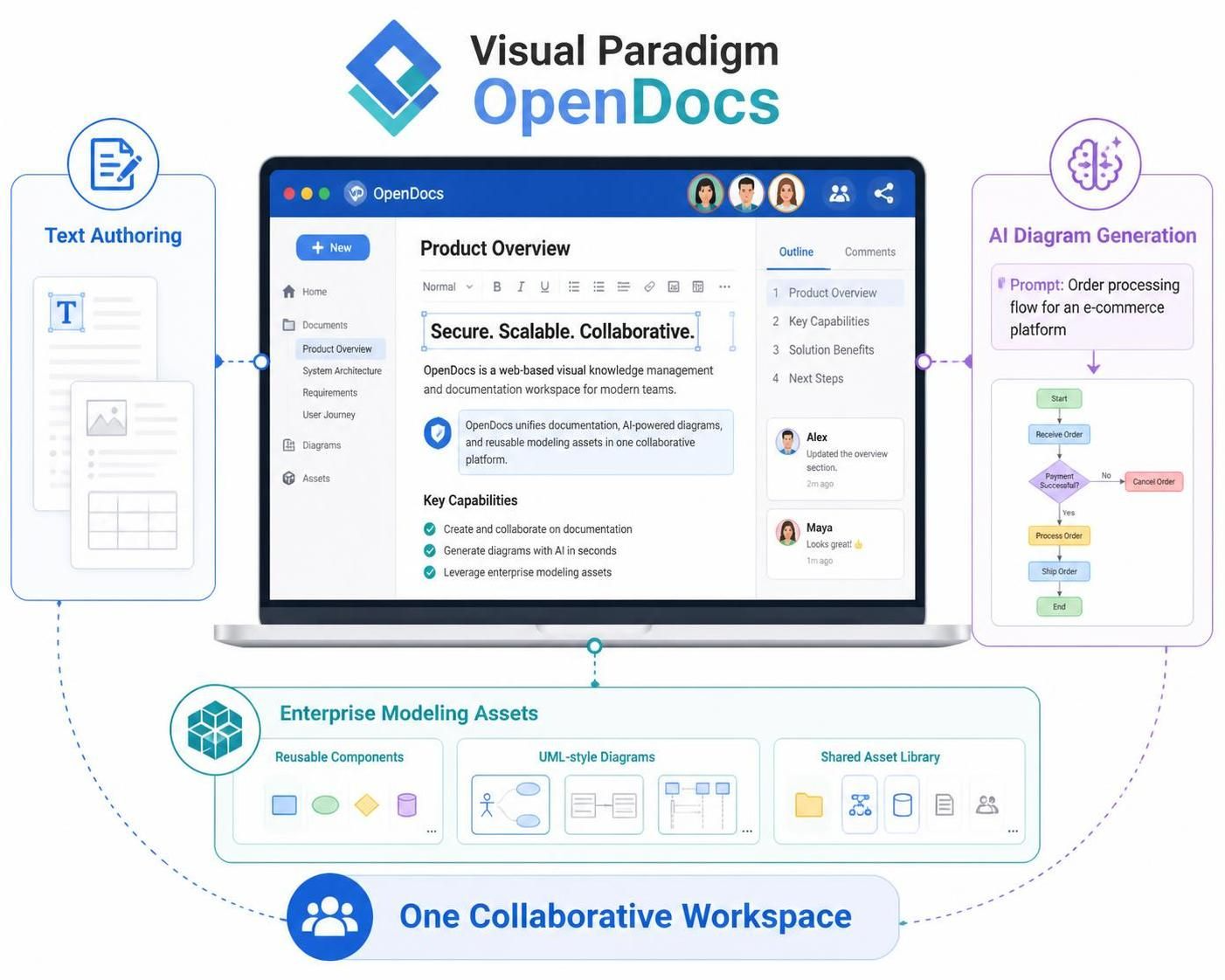
Visual Paradigm OpenDocs addresses this by fundamentally changing how technical documentation is managed. It unifies text authoring, AI-powered diagram generation, and enterprise modeling assets into a single, collaborative workspace. As shown in the system architecture below, OpenDocs acts as the central hub where the “What” (Text) and the “How” (Model) coexist.
1. The Core Architecture: One Collaborative Workspace
The diagram illustrates a centralized architecture designed to eliminate silos. At the heart of the system is the OpenDocs interface, which serves as the primary user interface for product managers, architects, and developers.
- Central Hub: The application interface acts as the source of truth. It is not merely a viewer; it is an editor where users can organize pages, embed diagrams, and manage comments in real-time.
- Integration Layer: OpenDocs connects to the backend modeling engines (such as Visual Paradigm Desktop or VP Online), ensuring that the diagrams displayed are live models, not static images.
2. Text Authoring & Knowledge Management
On the left side of the architecture, we see the Text Authoring component. This is the starting point for many teams. Instead of creating a document in isolation, the user writes within the context of the project.
The workflow allows users to:
- Write detailed requirements and product overviews.
- Embed diagrams directly into the text flow.
- Structure information using a hierarchical outline (as seen in the “Outline” tab of the interface).
This ensures that documentation is never static. When a model changes, the diagram embedded in the text updates automatically, maintaining synchronization between the business narrative and the technical reality.
3. AI-Driven Diagram Generation
The most transformative feature highlighted in the right-hand flow is AI Diagram Generation. This feature leverages Large Language Models (LLMs) to bridge the gap between abstract ideas and concrete visual models.
The process follows these logical steps:
- Prompt Input: The user provides a natural language description of a system or process. In the example, the prompt is: “Order processing flow for an e-commerce platform”.
- AI Interpretation: The system parses the intent, identifying key entities (e.g., Order, Payment) and actions (e.g., Receive, Process, Ship).
- Model Synthesis: The AI generates a valid diagram (such as a Flowchart or BPMN) instantly. It handles the syntax, layout, and logical connectors.
- Refinement: The generated model is placed into the workspace, where it can be further edited or refined by human experts.
4. Enterprise Modeling Assets & Reusability
At the bottom of the architecture, the system integrates with Enterprise Modeling Assets. This layer is crucial for maintaining consistency across large organizations.
- Reusable Components: Teams can define standard shapes, connectors, and templates that adhere to company standards.
- UML-style Diagrams: The system supports complex diagram types, from Class Diagrams to Sequence Diagrams, ensuring that the visual language matches industry standards.
- Shared Asset Library: A centralized repository ensures that every team member uses the same icons and definitions, preventing the “barbecue diagram” effect where different teams use different symbols for the same concepts.
Conclusion
By unifying these four pillars—Authoring, AI Generation, Assets, and Collaboration—Visual Paradigm OpenDocs transforms documentation from a post-project administrative task into a living part of the development lifecycle. It ensures that as the software evolves, the documentation evolves with it, keeping the entire team aligned.

 English
 Arabic
 Chinese (Simplified)
 Dutch
Dutch French
 German
 Italian
 Japanese
 Korean
 Portuguese
 Russian
 Spanish