


Introduction
In the modern landscape of product development and enterprise architecture, teams often struggle with fragmented tools. Business analysts use one set of applications for requirements, software architects use another for UML modeling, project managers rely on separate agile boards, and developers work in isolated IDEs. This fragmentation leads to information silos, inconsistent documentation, and a loss of traceability from high-level business goals down to lines of code.
The Visual Paradigm Unified Platform addresses this challenge by bringing visual modeling, business analysis, software design, agile planning, project management, documentation, and collaboration into one connected workspace. Rather than treating diagrams, requirements, plans, code, and documents as separate deliverables, it helps teams connect them throughout the entire project lifecycle.
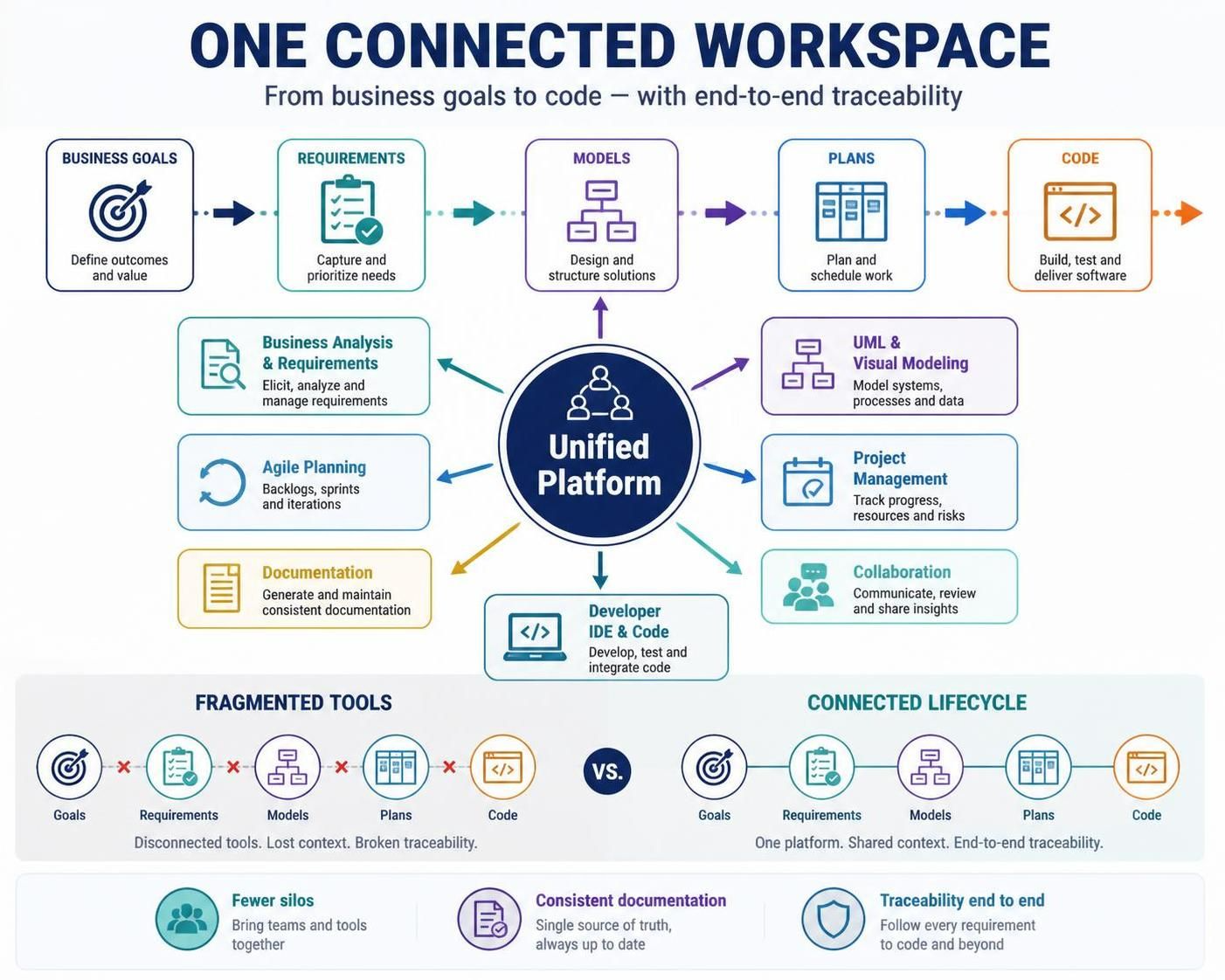
This guide explores the core concepts of the Unified Platform, its key capabilities, and how it can streamline workflows for teams ranging from software developers to enterprise architects.
What is the Visual Paradigm Unified Platform?
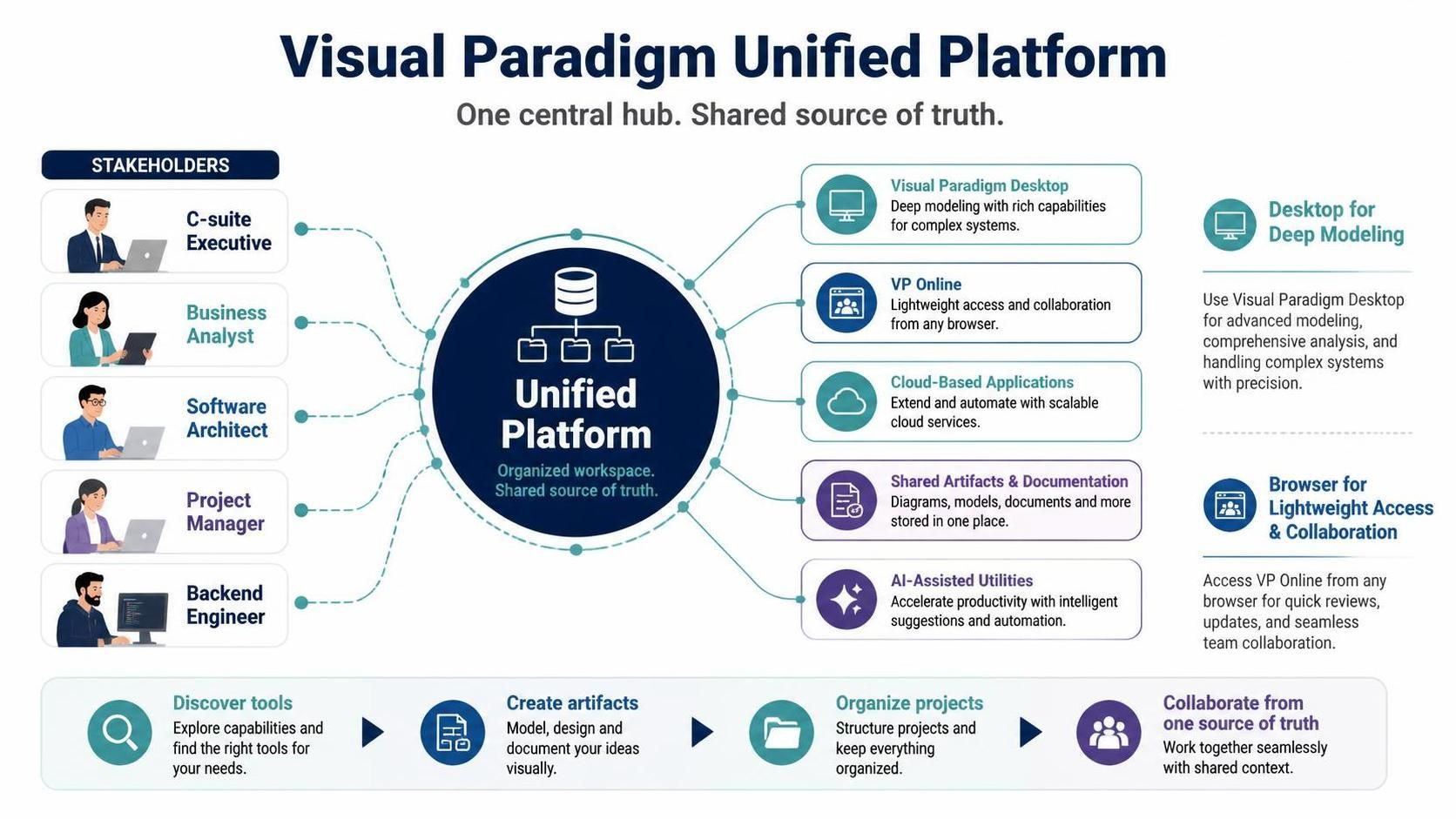
The Visual Paradigm Unified Platform serves as a central hub that integrates Visual Paradigm Desktop, VP Online, cloud-based applications, shared artifacts, documentation tools, and AI-assisted utilities.
Users can access their work through the robust Visual Paradigm Desktop application for deep modeling or via a web browser for lightweight access and collaboration. The Unified Platform provides a shared location for discovering tools, creating artifacts, and organizing projects, ensuring that every stakeholder—from C-suite executives to backend engineers—is looking at the same source of truth.
Key Concepts and Capabilities
The platform’s strength lies in its ability to bridge different disciplines. Below are the primary capability areas integrated into the Unified Platform:
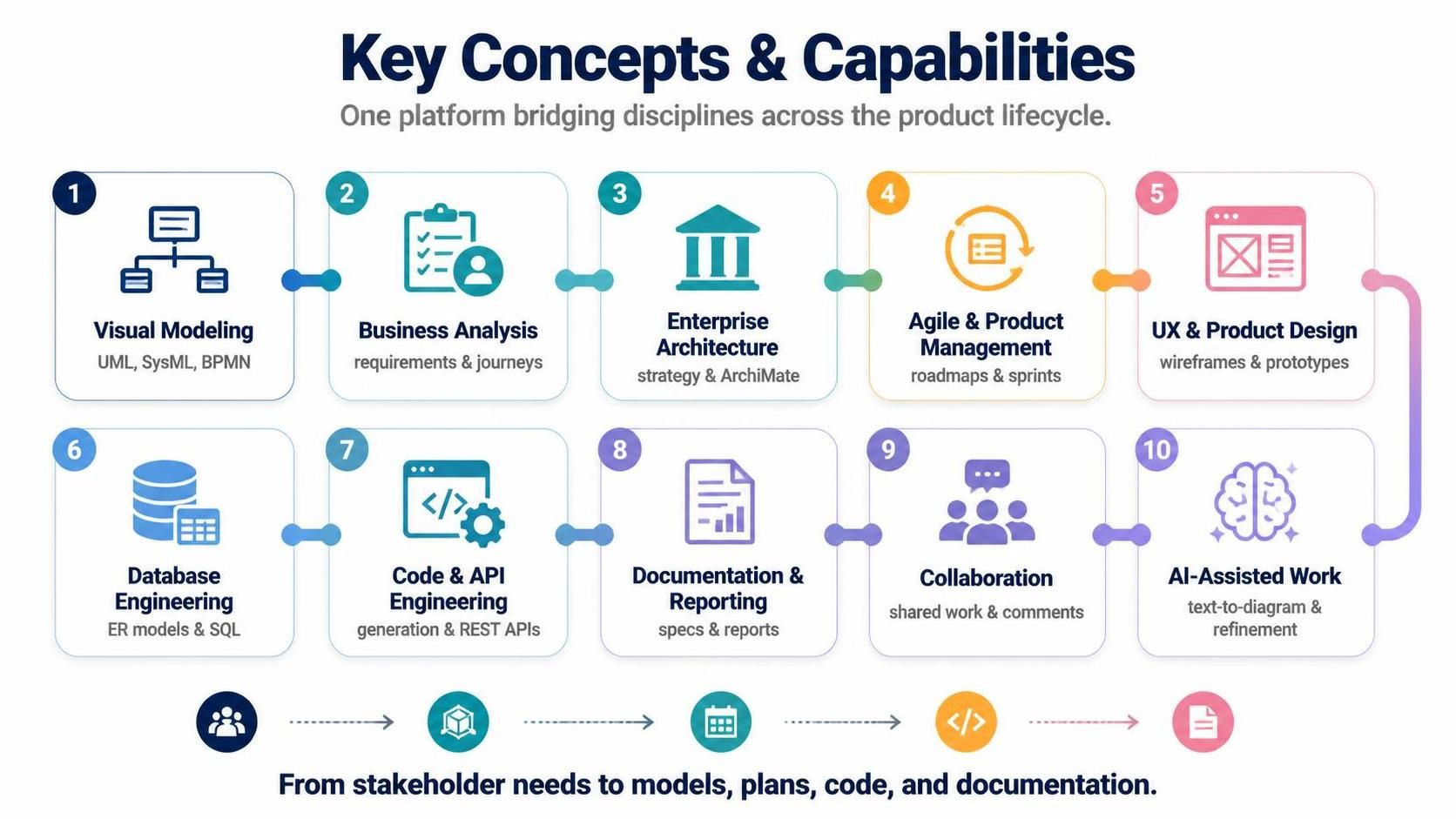
1. Visual Modeling
-
Tools: UML, SysML, BPMN, flowcharts, activity diagrams, state machines.
-
Concept: Create standardized visual representations of system structures and behaviors.
-
Example: A software architect uses Class Diagrams to define the static structure of a new microservice and Sequence Diagrams to map out the API calls between services.
2. Business Analysis
-
Tools: Requirements management, use cases, decision tables, customer journeys, process maps.
-
Concept: Capture and refine stakeholder needs before technical design begins.
-
Example: A business analyst creates a Customer Journey Map to identify pain points in the current checkout process, which then informs the requirements for a new feature.
3. Enterprise Architecture
-
Tools: ArchiMate, TOGAF, organizational modeling, capability mapping.
-
Concept: Align IT strategy with business goals by modeling business, application, data, and technology layers.
-
Example: An EA team uses ArchiMate to model the impact of migrating a legacy CRM to the cloud, ensuring all dependent applications are identified.
4. Agile and Product Management
-
Tools: User story maps, backlogs, roadmaps, sprint planning, prioritization matrices.
-
Concept: Connect high-level product vision with day-to-day execution.
-
Example: A Product Manager converts epics from the roadmap into user stories, organizes them into a Story Map, and assigns them to upcoming sprints.
5. UX and Product Design
-
Tools: Wireframes, storyboards, user journeys, wireflows, prototypes.
-
Concept: Visualize the user experience and link it directly to functional requirements.
-
Example: A UX designer creates wireframes for a new dashboard and links them to specific user stories in the backlog, ensuring developers understand the intended UI behavior.
6. Database Engineering
-
Tools: ER diagrams, schema design, database generation, reverse engineering, DDL scripts.
-
Concept: Bridge the gap between logical data models and physical database implementation.
-
Example: A database engineer designs an Entity-Relationship (ER) diagram and automatically generates the SQL DDL scripts to create the tables in PostgreSQL.
7. Code and API Engineering
-
Tools: Code generation, reverse engineering, round-trip engineering, REST API design.
-
Concept: Keep code and design in sync through automated engineering features.
-
Example: A developer designs a REST API using the platform’s API editor and generates the initial Swagger/OpenAPI documentation and skeleton code for the Java backend.
8. Documentation and Reporting
-
Tools: Project documentation, model-based reports, presentations, specifications.
-
Concept: Automate the creation of consistent, up-to-date project documentation.
-
Example: At the end of a sprint, the team generates a comprehensive System Specification document that includes all updated UML diagrams, requirement lists, and API definitions.
9. Collaboration
-
Tools: Shared workspaces, comments, task coordination, version management.
-
Concept: Enable real-time or asynchronous teamwork on complex models.
-
Example: A remote team member leaves a comment on a specific element in a BPMN diagram, triggering a notification for the process owner to review and respond.
10. AI-Assisted Work
-
Tools: Text-to-diagram generation, model analysis, diagram refinement.
-
Concept: Leverage artificial intelligence to speed up modeling tasks and ensure quality.
-
Example: A user types “Create a login process with email verification” and the AI generates a basic Activity Diagram, which the user then refines.
Typical Usage Cases
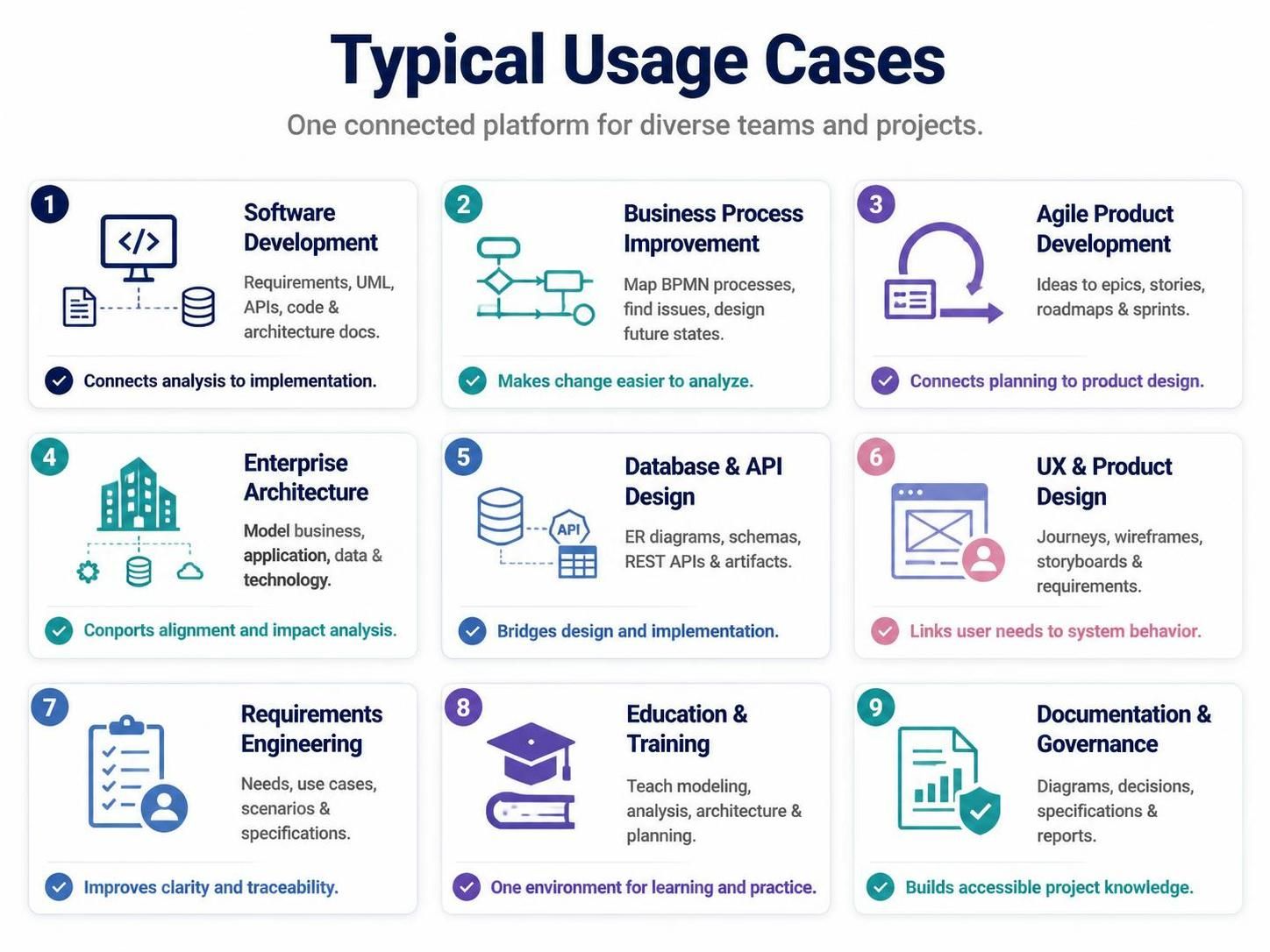
The Unified Platform is versatile enough to support various organizational roles and project types:
| Usage Case | How the Platform Can Be Used | Main Benefit |
|---|---|---|
| Software Development | Capture requirements, create UML models, design APIs, generate code, and document architecture. | Connects analysis with implementation, reducing rework. |
| Business Process Improvement | Map current processes in BPMN, identify problems, design future-state processes, and document procedures. | Makes operational change easier to analyze and communicate. |
| Agile Product Development | Convert product ideas into epics, user stories, story maps, roadmaps, and sprint plans. | Keeps agile planning connected to product design and requirements. |
| Enterprise Architecture | Model business, application, data, and technology layers using enterprise architecture views. | Supports strategic alignment and impact analysis across the organization. |
| Database and API Design | Create ER diagrams, design schemas, model REST APIs, and generate technical artifacts. | Reduces gaps between logical design and physical implementation. |
| UX and Product Design | Map user journeys, create wireframes, organize storyboards, and connect designs to requirements. | Links user needs directly to system behavior and technical specs. |
| Requirements Engineering | Capture stakeholder needs, define use cases, model scenarios, and generate specifications. | Improves clarity, consistency, and traceability of requirements. |
| Education and Training | Teach UML, BPMN, systems analysis, software architecture, and project planning. | Provides one environment for both theoretical learning and practical application. |
| Documentation and Governance | Maintain architecture diagrams, decision records, specifications, and project reports. | Creates more consistent and accessible project knowledge bases. |
Example Workflow: From Idea to Implementation
One of the most powerful aspects of the Unified Platform is its ability to support a hybrid workflow that moves seamlessly from high-level ideation to technical implementation. Here is a typical sequence:
-
Capture the Idea: Record the business problem, stakeholder goals, user needs, or product opportunity in the platform’s requirements module.
-
Define Requirements: Refine informal ideas into structured requirements, use cases, user stories, acceptance criteria, and measurable outcomes.
-
Model the Processes: Use BPMN, activity diagrams, customer journey maps, or process maps to describe how work should happen from a business perspective.
-
Design the Solution: Create wireframes for UI, domain models for business logic, class diagrams for structure, sequence diagrams for interactions, and deployment diagrams for infrastructure.
-
Design Data and APIs: Develop ER diagrams for database structures, model REST APIs for integration, and define data flows.
-
Plan Delivery: Organize the work into a product backlog, create a visual roadmap, define release plans, and break down tasks for sprint planning.
-
Implement the Solution: Use code engineering features to generate skeleton code, reverse-engineer existing code into models, and generate database scripts.
-
Review and Validate: Check models for consistency, analyze dependencies, simulate selected processes where appropriate, and review designs with stakeholders via shared views.
-
Publish and Collaborate: Generate final specifications, reports, and presentations. Share project views with technical and non-technical audiences for feedback and approval.
Conclusion
The Visual Paradigm Unified Platform represents a shift away from disjointed toolchains toward a holistic, connected approach to project delivery. By integrating visual modeling, business analysis, agile planning, and engineering tools into a single workspace, it enables teams to maintain traceability, improve communication, and accelerate delivery.
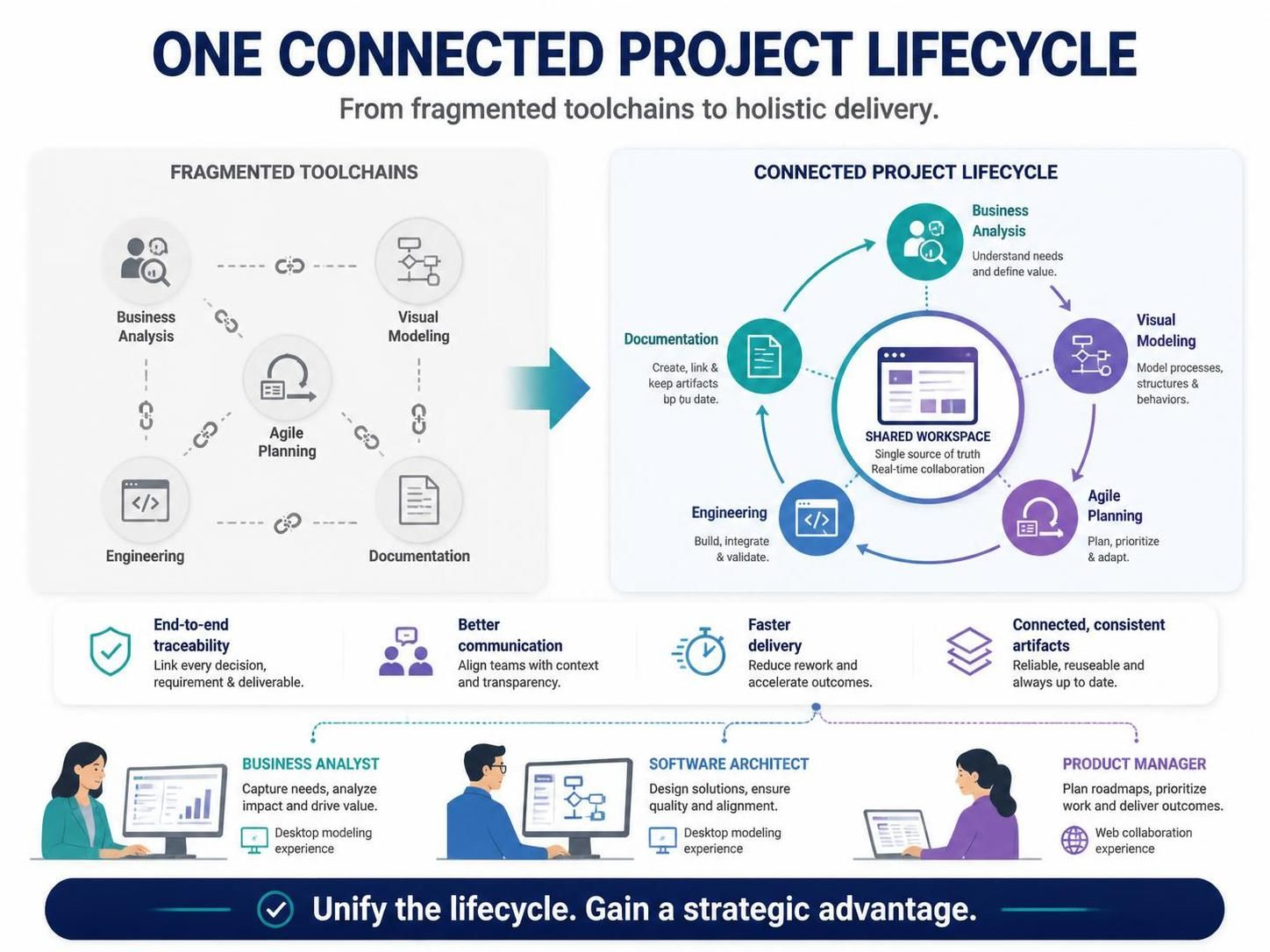
Whether you are a business analyst mapping out complex processes, a software architect designing scalable systems, or a product manager prioritizing features, the Unified Platform provides the flexibility to work in your preferred style—whether through deep desktop modeling or lightweight web-based collaboration—while ensuring that all artifacts remain connected and consistent. In an era where speed and accuracy are paramount, unifying your project lifecycle is not just a convenience; it is a strategic advantage.

 English
 Arabic
 Chinese (Simplified)
 Dutch
Dutch French
 German
 Italian
 Japanese
 Korean
 Portuguese
 Russian
 Spanish