


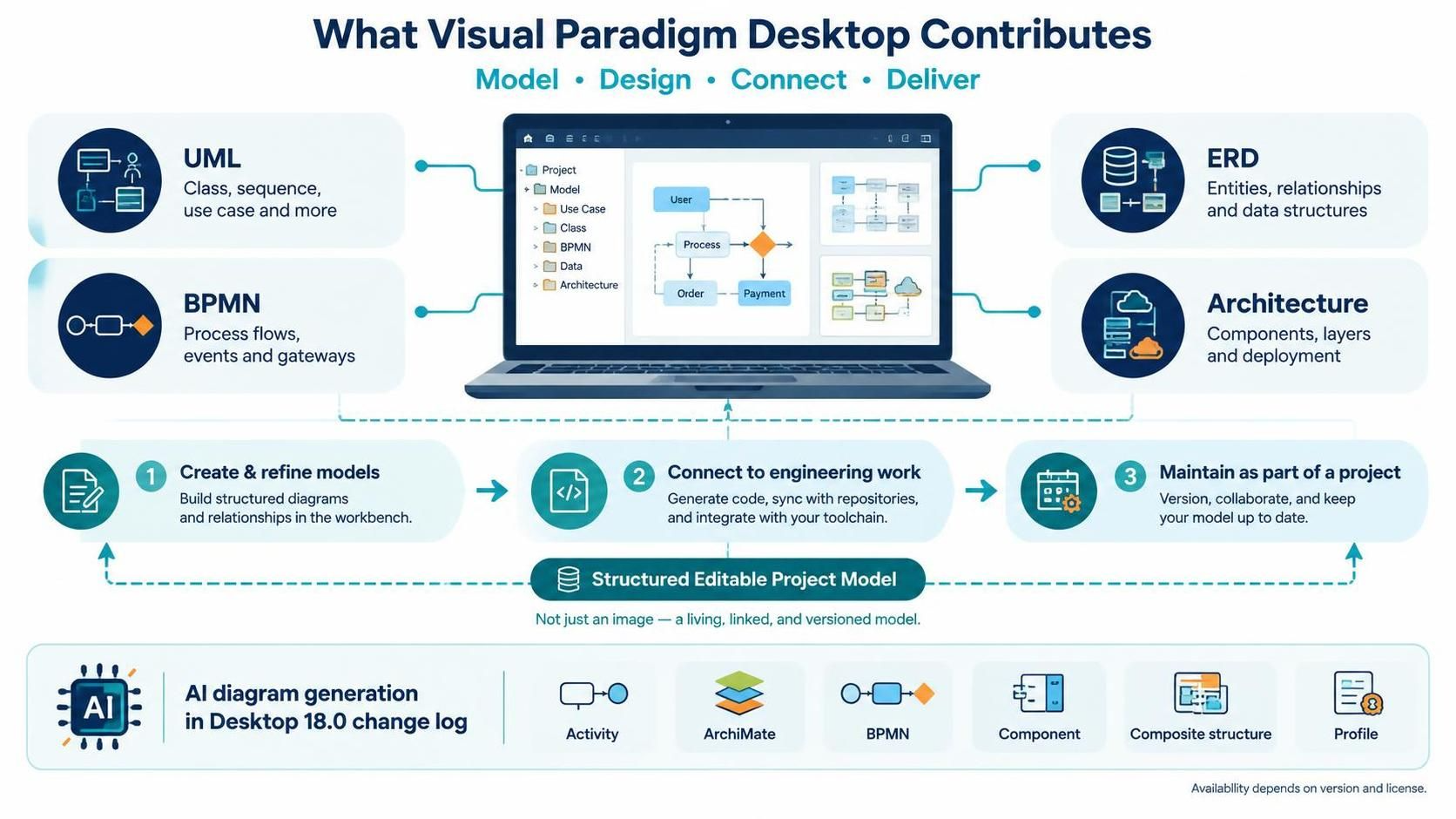
In the modern landscape of software engineering, the gap between abstract design and concrete implementation is often bridged by a robust modeling environment. Visual Paradigm Desktop serves as the central nervous system for this process, offering a comprehensive workspace that goes far beyond simple drawing tools. It transforms diagrams into structured, editable project models that drive the entire software development lifecycle.
The Core Philosophy: Model, Design, Connect, Deliver
The platform operates on a holistic workflow designed to keep teams aligned from the initial sketch to the final deployment. This ecosystem is not merely about creating static images; it is about managing Structured Editable Project Models. This distinction is crucial. Unlike a standalone PNG or JPEG, a model in Visual Paradigm Desktop is a living entity—linked, versioned, and capable of interacting with engineering activities.
The workflow is generally categorized into three primary phases:
- Create & Refine Models: Teams build structured diagrams and define relationships within the workbench. This is the foundational stage where logic is codified visually.
- Connect to Engineering Work: This phase involves generating code, syncing with version control repositories, and integrating with external toolchains. It ensures the visual model remains synchronized with the actual codebase.
- Maintain as Part of a Project: The system emphasizes collaboration and versioning. Models are kept up-to-date, ensuring that the documentation evolves alongside the product.
Comprehensive Modeling Capabilities
Visual Paradigm Desktop supports a wide array of diagramming standards, catering to different facets of system design. The interface organizes these capabilities into distinct domains:
- UML (Unified Modeling Language): Essential for object-oriented design. It supports Class diagrams, Sequence diagrams, Use Case diagrams, and more, helping architects visualize the structural and behavioral aspects of a system.
- BPMN (Business Process Model and Notation): Focused on process flows, events, and gateways. This allows business analysts to map out workflows and operational logic with precision.
- ERD (Entity Relationship Diagram): Critical for database design, handling entities, relationships, and complex data structures.
- Architecture: This covers high-level system views, including components, layers, and deployment topologies. It helps in visualizing how software fits into the infrastructure.
The AI Revolution in Desktop 18.0
A significant leap forward in the tool’s capabilities comes with the recent updates in Desktop 18.0. The introduction of AI-generated diagram support has democratized the creation of complex models. Instead of manually dragging and dropping nodes, users can leverage AI to generate diagrams for specific domains instantly.
The AI engine now supports generation for:
- Activity Diagrams
- ArchiMate Models
- BPMN Diagrams
- Component Diagrams
- Composite Structure Diagrams
- Profile Diagrams
This feature significantly accelerates the “Create & Refine” phase, allowing teams to iterate faster and focus more on high-level design decisions rather than the mechanical act of drawing.
Conclusion: A Complete Workflow Solution
By integrating visual modeling with engineering connectivity and AI assistance, Visual Paradigm Desktop provides a complete workflow for teams. Whether you are defining the data schema for a new database or mapping the business logic for a complex enterprise system, the platform ensures that your models are not just pictures, but active contributors to your project’s success.

 English
 Arabic
 Chinese (Simplified)
 Dutch
 French
 German
 Italian
 Japanese
 Korean
 Portuguese
 Russian
 Spanish