


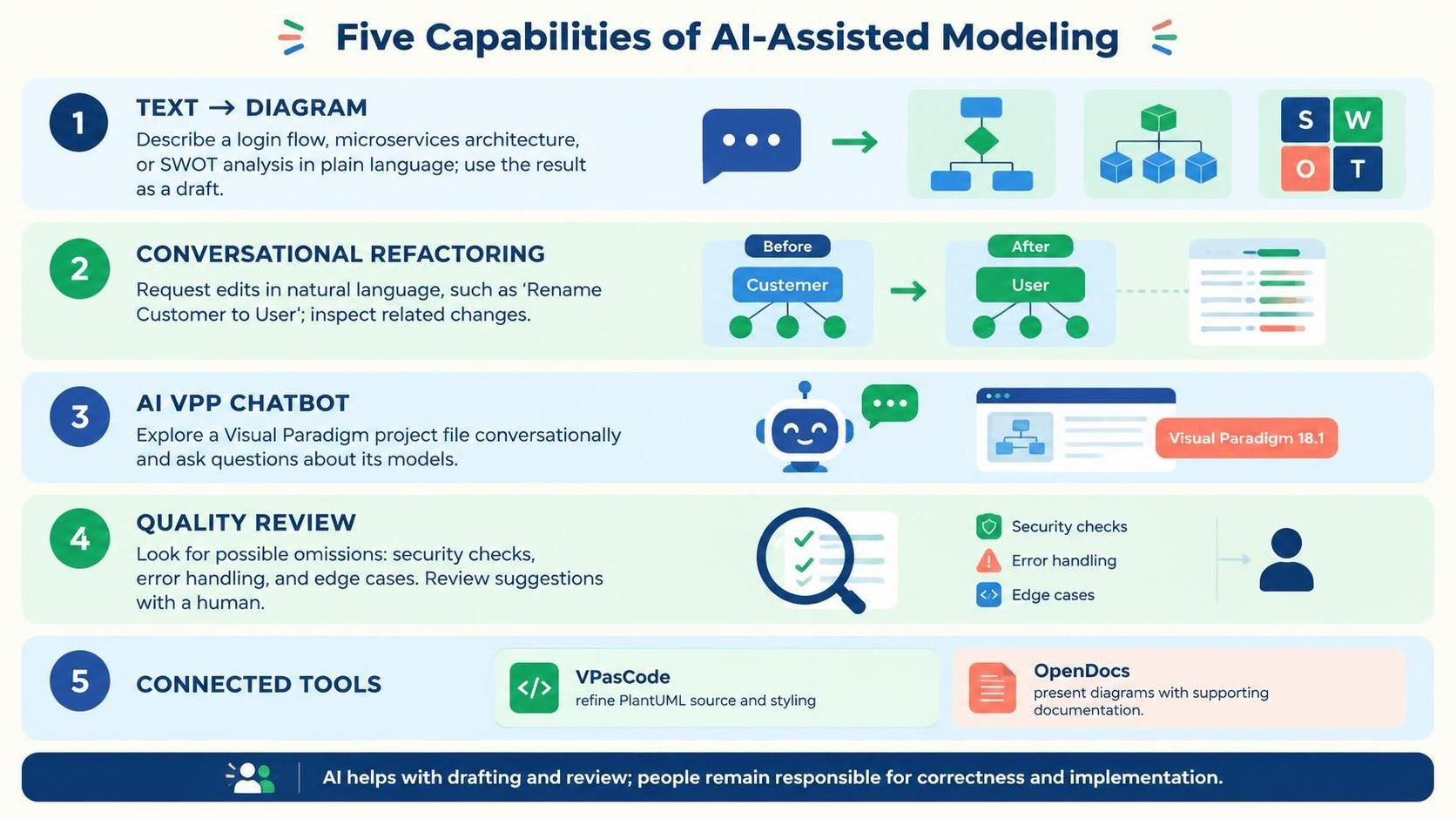
The landscape of software architecture and business process modeling is shifting rapidly. We are moving away from static drawing tools toward dynamic, conversational interfaces where the diagram is no longer just a drawing—it is a living, breathing component of the development ecosystem. This tutorial explores the transformative power of the Visual Paradigm AI ecosystem, specifically focusing on the five core capabilities that redefine how we design, refine, and validate complex systems.
1. From Text to Visuals: Eliminating the Blank Canvas
The most daunting aspect of system modeling is often the “blank canvas” paralysis. Where do you start? How do you ensure your syntax is correct? The AI Chatbot fundamentally changes this workflow by acting as an interpretive engine.
Instead of manually dragging and dropping shapes, you can simply describe your intent in plain language. Whether you are outlining a User Login Flow, defining a Microservices Architecture, or structuring a SWOT Analysis, the AI interprets these descriptions and generates syntactically correct diagrams instantly.
- Focus on Logic: By automating the heavy lifting of layout and notation compliance, you can dedicate your cognitive energy to the system’s actual behavior rather than formatting aesthetics.
- Immediate Visualization: Turn abstract concepts into concrete visual models in seconds, allowing for rapid iteration during brainstorming sessions.
2. Conversational Refactoring & Cascading Intelligence
Modeling is inherently iterative. As requirements change, models must evolve. In traditional tools, renaming a key entity like “Customer” to “User” often requires tedious manual searching and updating across multiple diagrams to ensure consistency.
The AI Chatbot introduces Cascading Intelligence to this process. When you issue a natural language command to modify an existing diagram, the AI doesn’t just change the label; it understands the context.
For example, asking to “Rename Customer to User” triggers a deep update mechanism:
- The primary entity label is updated.
- Related attributes (e.g., CustomerID) are renamed to UserIdentifier.
- Methods and references across the entire canvas are synchronized.
This ensures that your model remains consistent throughout the refactoring process, significantly reducing the risk of human error and saving valuable time during large-scale architectural updates.
3. The AI VPP Chatbot: Deep Project Analysis
Introduced in Visual Paradigm 18.1, the AI VPP Chatbot elevates the role of the AI from a simple diagram generator to a deep analytical partner. It operates at the project level, allowing you to interact directly with your entire .vpp project file.
This capability transforms a static project file into an interactive knowledge base. You can query your architecture models to extract specific insights, such as:
- Identifying bottlenecks in business process designs.
- Retrieving relationships between specific technical components.
- Managing complex project data through direct conversation without needing to navigate complex menu structures.
4. Quality Review & Validation
Even the most skilled architect can miss edge cases or logical gaps. The AI acts as an intelligent, proactive reviewer, evaluating your flowcharts and architectural models for completeness.
This feature moves quality assurance from a post-implementation phase to the design phase. The AI looks for potential omissions such as:
- Security Checks: Ensuring authentication points are present where necessary.
- Error Handling: Verifying that failure paths and exception flows are defined.
- Edge Cases: Identifying scenarios that might cause the system to break under specific conditions.
By highlighting these missing steps before development begins, you maintain high standards in both business processes and technical architectures.
5. The Integrated Ecosystem: VPasCode & OpenDocs
The AI capabilities do not exist in a vacuum; they are part of a broader ecosystem designed to bridge the gap between design and documentation.
VPasCode: Fine-Grained Control
While natural language is powerful for high-level design, developers sometimes require precise control over styling and logic. VPasCode addresses this by exposing PlantUML scripts. This allows you to apply fine-grained styling and logic control that might be difficult to achieve through pure natural language, ensuring the visual output matches exact technical requirements.
OpenDocs Pipeline: Synchronized Documentation
One of the biggest challenges in software development is documentation that becomes outdated as soon as the code or design changes. The OpenDocs Pipeline solves this by generating structured documentation, technical explanations, and summaries directly from your visual models.
Because the documentation is generated from the source of truth (the model), it stays in sync with the latest design changes, eliminating the “documentation debt” that often plagues complex projects.

 English
 Arabic
 Chinese (Simplified)
 Dutch
 French
 German
 Italian
 Japanese
 Korean
 Portuguese
 Russian
 Spanish