


Imagine being able to transform a simple topic into a dynamic, animated presentation in under a minute. The AI Markdown Presentation Maker from Visual Paradigm makes this a reality. This powerful, web-based tool leverages AI to generate compelling content from a simple text prompt, allowing users to focus on their message rather than the mechanics of design. The screenshot below illustrates this process perfectly, showing a user creating a presentation on “Exploring the potential of AI, from machine learning and neural networks to the future of work.” The interface is split, with a Markdown editor on the left and a live preview on the right, demonstrating the seamless workflow of this innovative tool.
For professionals who prefer the speed and simplicity of text-based workflows, this AI-powered presentation maker is a game-changer. It eliminates the need for complex software, enabling users to draft and refine their content directly in Markdown. This focus on text allows for a distraction-free environment, where the emphasis remains on the substance of the message. The tool’s AI engine takes the initial idea and generates a complete draft, providing a strong foundation for further refinement. This is particularly beneficial for developers, technical writers, and product managers who are accustomed to working with text-based formats.
Quick summary
-
AI Markdown Presentation Maker creates animated presentations from simple text.
-
It features a dual-view editor with a Markdown input and a live preview.
-
Users can generate content with AI, customize animations, and share presentations via a unique URL.
-
It’s ideal for technical professionals who prefer a text-first workflow.
How the AI Markdown Presentation Maker Works
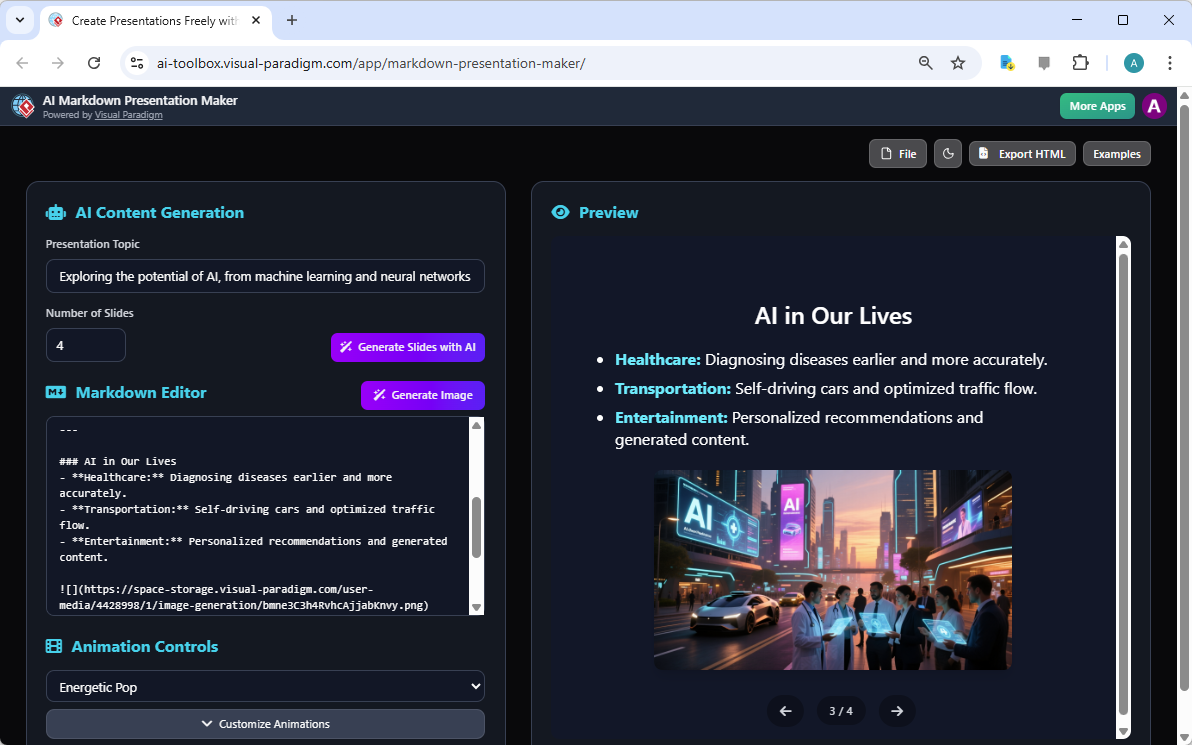
The core of this tool is its ability to generate content. The process begins with the user defining a “Presentation Topic” and specifying the “Number of Slides.” In the example shown, the topic is “Exploring the potential of AI, from machine learning and neural networks to the future of work,” and the user has requested four slides. By clicking the “Generate Slides with AI” button, the AI engine creates a structured Markdown document. This draft includes slide titles and body text, which the user can then edit and refine directly in the editor. This AI-powered feature drastically reduces the time and effort required to create a presentation, allowing users to focus on the message and its delivery.
Once the content is drafted, the user can enhance the visual appeal. The tool provides an “AI Generate Image” feature, which creates a descriptive prompt based on the slide’s content. This prompt can then be used with an external AI image generator to create a unique visual for the slide. In the screenshot, the AI has generated a prompt for the “AI in Our Lives” slide, which has been used to create a futuristic image of a city with self-driving cars and AI-powered displays. This feature ensures that the presentation is not only informative but also visually engaging.
The dual-view interface is a key strength of the AI Markdown Presentation Maker. The “Markdown Editor” on the left allows for text-based content creation, while the “Preview” panel on the right provides a live rendering of the presentation. This immediate feedback loop allows users to see how their Markdown translates into a formatted slide, enabling them to make real-time adjustments to their content and formatting. The preview shows a polished, animated presentation with a consistent visual style, which is controlled by the “Animation Profile” setting. In the example, the “Energetic Pop” profile is selected, giving the presentation a dynamic and modern feel.
For collaboration and sharing, the tool offers robust project management features. Users can save their work to the cloud, ensuring it is accessible from any device. Once a presentation is saved, a unique URL can be generated to share a read-only, interactive version. This makes it easy to present to clients, colleagues, or stakeholders without the risk of accidental edits. The tool also allows for the export of presentations as self-contained HTML files, which can be shared and viewed in any web browser. This flexibility ensures that the presentation can be shared widely and accessed easily.
Who Benefits from This Tool?
While the AI Markdown Presentation Maker is a powerful tool for anyone who needs to create presentations, it is particularly well-suited for technical professionals. Developers can use it to create presentations from code comments or documentation, avoiding the need to switch to a complex GUI tool. Technical writers can transform their Markdown documentation into engaging presentations for training or onboarding sessions. Educators and trainers can build dynamic lessons and materials using a text-based workflow. Product managers can quickly create concise and impactful presentations for feature reviews, roadmaps, or project updates. For these users, the ability to work in a familiar text-based environment is a significant advantage.
For those who want to create a professional, animated presentation without the complexity of traditional software, the AI Markdown Presentation Maker offers a streamlined solution. By combining a powerful AI assistant with a dynamic rendering engine, it allows users to create stunning visual stories from simple Markdown text. The tool’s focus on efficiency and ease of use makes it a valuable asset for anyone looking to communicate their ideas effectively.
Ready to transform your text into a captivating presentation? Try the AI Markdown Presentation Maker today and experience the power of AI-powered content creation. Try Now
Related Links
-
AI Markdown Presentation Maker – Visual Paradigm AI: Markdown Presentation Maker leverages powerful AI to instantly turn your ideas into polished, animated presentations.
-
Markdown Editor – Visual Paradigm AI: Get instant visual feedback as you type. Our real-time rendering engine eliminates the guesswork, showing you the final, perfectly formatted HTML output alongside your Markdown source.
-
Real-Time Markdown Editor with Live Preview: A powerful, real-time Markdown editor with a side-by-side preview. Write, format, and see your changes instantly.

 English
 Arabic
 Chinese (Simplified)
 Dutch
Dutch French
 German
 Italian
 Japanese
 Korean
 Portuguese
 Russian
 Spanish