


Stop spending hours manually drawing UML diagrams. The AI-Powered Use Case Diagram Refinement Tool from Visual Paradigm transforms your system description into a professional, visually clear use case diagram in seconds. This powerful tool guides you through a simple 3-step process: you start with a text description of your system, and the AI instantly generates a PlantUML-based diagram. You can then refine it with AI to apply UML best practices, adding critical details like include and extend relationships. The result is a high-quality, ready-to-use diagram for documentation, presentations, or integration into your full modeling project. This is the fastest way to turn abstract requirements into a clear, visual blueprint.
Quick Summary: How the AI Tool Works
-
Step 1: Domain Input – Provide a clear description of your system (e.g., “Online bookstore for selling and reviewing books”).
-
Step 2: Original Diagram – The AI generates a basic use case diagram from your text, showing actors and core use cases.
-
Step 3: Refined Diagram – The AI analyzes the initial diagram and applies UML best practices, adding complexity and detail to enhance accuracy and clarity.
-
Export & Integrate – Easily export the final diagram as an SVG image or import it directly into Visual Paradigm Online for advanced work.
Step 1: Define Your System with a Simple Text Description
Creating a use case diagram starts with understanding the problem domain. The first step in the Use Case Diagram Refinement Tool is to provide a clear, concise description of your system. As shown in
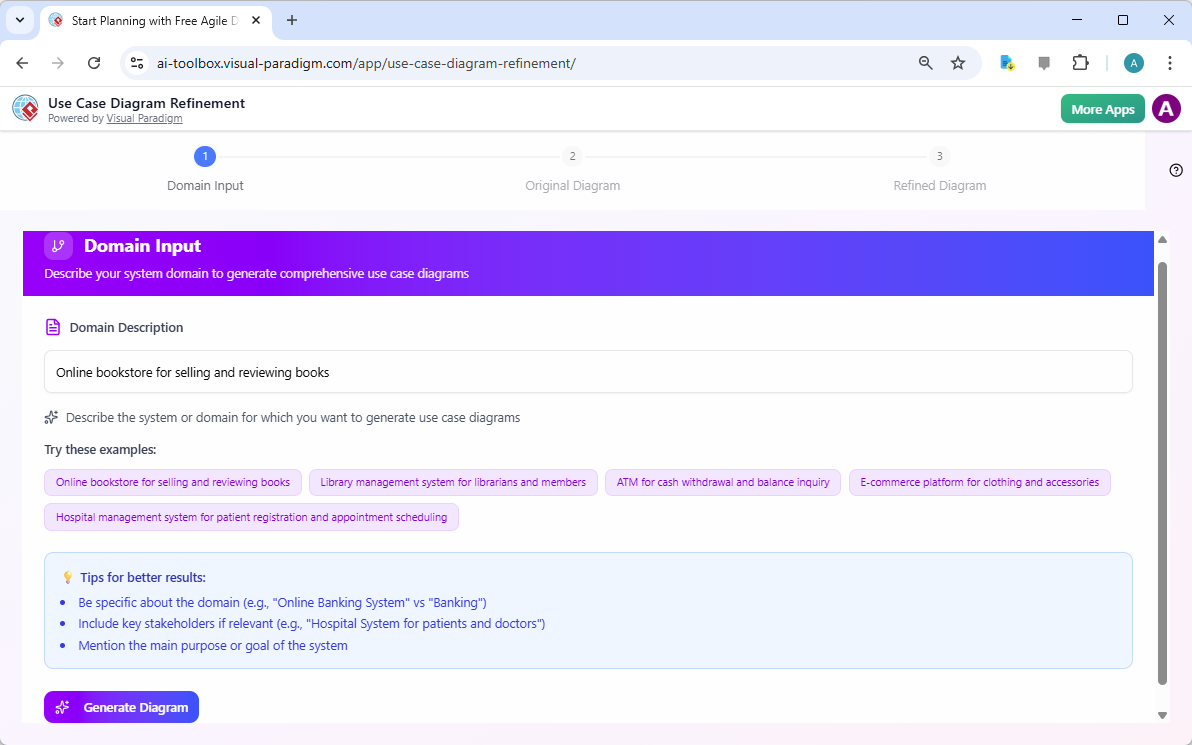
, the interface presents a text area where you can type your system’s purpose. The tool is designed for ease of use, so you don’t need to be a UML expert. Simply describe what the system does and who uses it. The tool provides helpful examples like “Online bookstore for selling and reviewing books” to guide you. The AI uses this text to understand the system’s scope and identify the key actors and functions. A well-defined domain description is crucial for the AI to generate a relevant and accurate initial diagram.
Step 2: See Your Initial Diagram Instantly
After inputting your domain description, the AI processes it and generates an initial use case diagram.
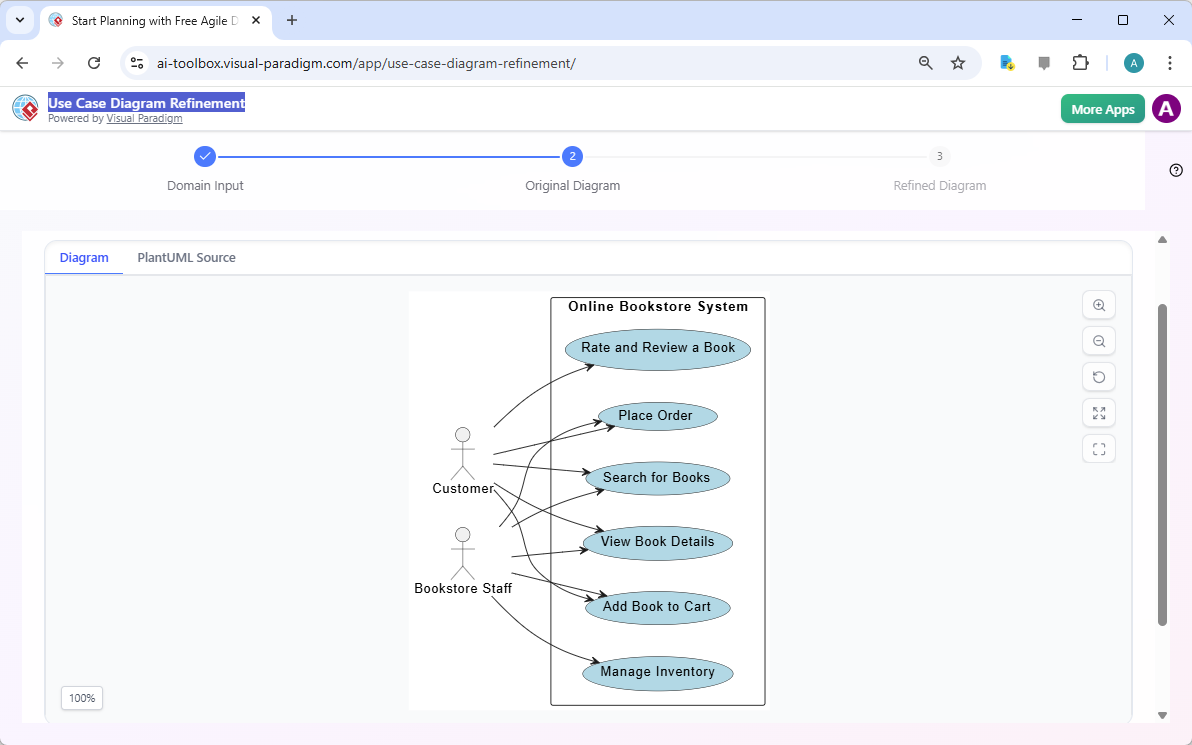
displays the result of this step. The tool automatically renders the diagram using PlantUML, a text-based language for creating UML diagrams. The visual representation shows the actors (like “Customer” and “Bookstore Staff”) and the primary use cases (like “Place Order” and “Search for Books”) within the system boundary. This initial diagram provides a foundational view of the system’s functionality. You can export this original version as an SVG file for immediate use or click the “Refine Diagram” button to proceed to the next stage. The live visualization ensures you can see the AI’s output in real-time.
Step 3: Enhance Your Diagram with AI Refinement
The true power of the Use Case Diagram Refinement Tool lies in its ability to refine the initial diagram. In Step 3, as seen in
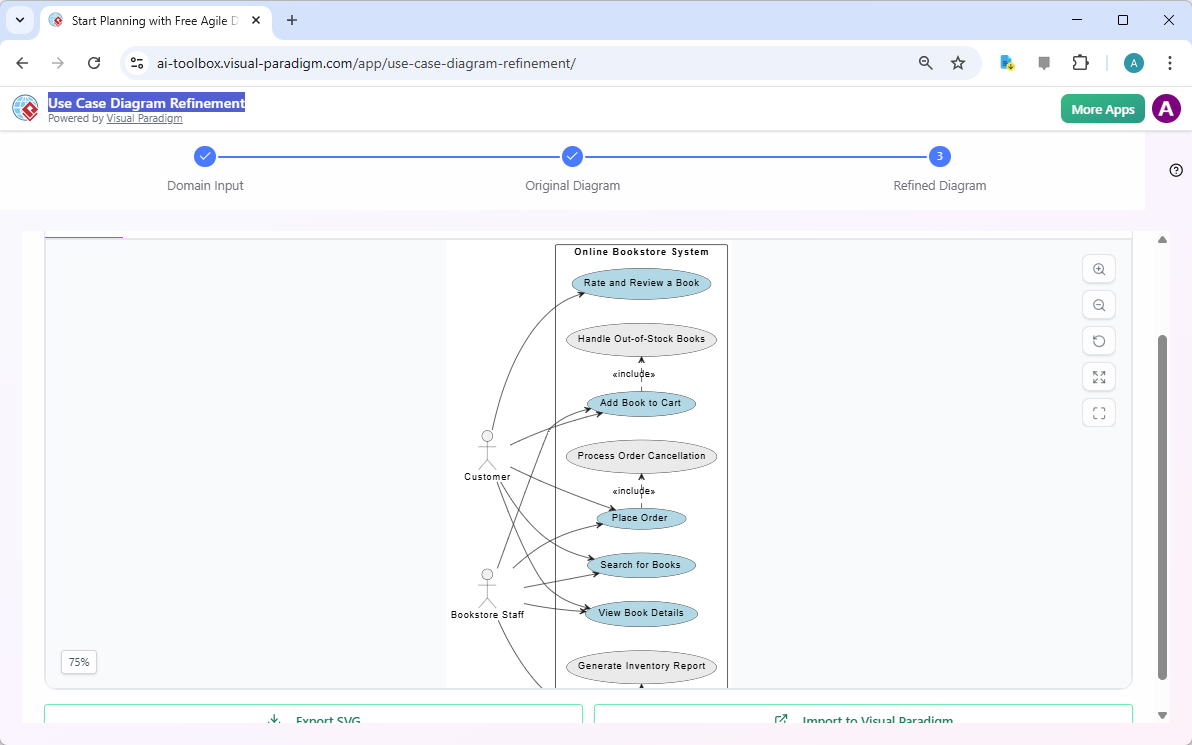
, the AI analyzes the generated diagram and applies UML best practices to improve its quality and completeness. This refinement process can add significant detail, such as “include” and “extend” relationships between use cases, which are essential for capturing complex system logic. For example, the AI might add that “Add Book to Cart” includes “Handle Out-of-Stock Books.” This transforms the basic diagram into a more sophisticated and accurate model. The refined diagram is then displayed, ready for export or further development in a full modeling environment.
Seamlessly Integrate with Visual Paradigm Online
For users who need to move beyond a simple diagram, the tool offers a seamless integration with Visual Paradigm Online. Both the original and refined diagrams can be imported directly into this comprehensive modeling platform. This allows you to leverage the full power of Visual Paradigm for collaborative work, detailed documentation, and creating a complete system model that includes other UML diagrams like sequence or activity diagrams. The integration ensures your initial concept can evolve into a robust, professional project. This makes the AI tool not just a standalone solution, but a powerful starting point for a full modeling workflow.
Who Benefits from This AI-Powered Tool?
This Use Case Diagram Refinement Tool is designed for a wide range of professionals. Business Analysts can quickly turn business requirements into visual diagrams to communicate with technical teams. Project Managers can use it to define project scope and identify key functionalities early. Software Architects can rapidly prototype and validate use case models. Students and Educators can use it as a practical learning tool to understand use case analysis. Any professional who needs to document system functionality can benefit from this AI-powered solution, which dramatically reduces the time and effort required to create high-quality use case diagrams.
Try the AI-Powered Use Case Diagram Refinement Tool Now
Stop letting diagram creation slow down your project. The Use Case Diagram Refinement Tool from Visual Paradigm is the easiest way to create professional diagrams from your system description. With its AI-powered generation and refinement, you can go from a simple text input to a detailed, UML-compliant diagram in minutes. It’s a powerful tool for anyone who needs to visualize system functionality. Ready to see it in action? Try the tool now and experience the speed and accuracy of AI-driven diagramming.
Related Links
-
AI-Powered Use Case Diagram Refinement Tool – Smart Diagram Enhancement: Leverage AI to automatically refine and optimize your use case diagrams for clarity, consistency, and completeness.
-
AI-Powered Sequence Diagram Refinement in Visual Paradigm: Discover how Visual Paradigm’s AI tool transforms use-case descriptions into precise and professional sequence diagrams with minimal manual effort.
-
AI-Powered Use Case Diagram Refinement Tool by Visual Paradigm: A smart AI feature that enhances and refines existing use case diagrams by suggesting improvements, identifying missing actors, and optimizing structure.
-
Using AI to Refine Use Case Diagrams in Visual Paradigm: Tutorial on utilizing Visual Paradigm’s AI-powered diagram refinement tool to enhance accuracy and completeness of use case diagrams.
-
Use Case Diagram Refinement Tool: AI-Powered Modeling Guide: This guide explains how AI-powered tools in Visual Paradigm enhance use case diagram creation and refinement through intelligent modeling assistance.
-
Accelerating Scrum Kickoff with AI-Powered Use Case Refinement: A case study demonstrating how AI-driven tools enhance use case diagram refinement during Scrum project initiation.

 English
 Arabic
 Chinese (Simplified)
 Dutch
Dutch French
 German
 Italian
 Japanese
 Korean
 Portuguese
 Russian
 Spanish