


Enterprise architecture is often described as the blueprint for an organization. It connects strategy with execution, ensuring that technology serves business goals effectively. However, a complex model can easily become a source of confusion if not presented correctly. This is where the concept of ArchiMate Viewpoints becomes essential. A viewpoint acts as a lens, allowing stakeholders to see only the information relevant to their specific role, interests, and responsibilities.
Understanding how to structure these views is critical for successful communication. This guide provides a detailed examination of the mechanics behind ArchiMate Viewpoints. We will explore the foundational layers, the cross-cutting concerns, and the practical application of selecting the right perspective for any given audience.
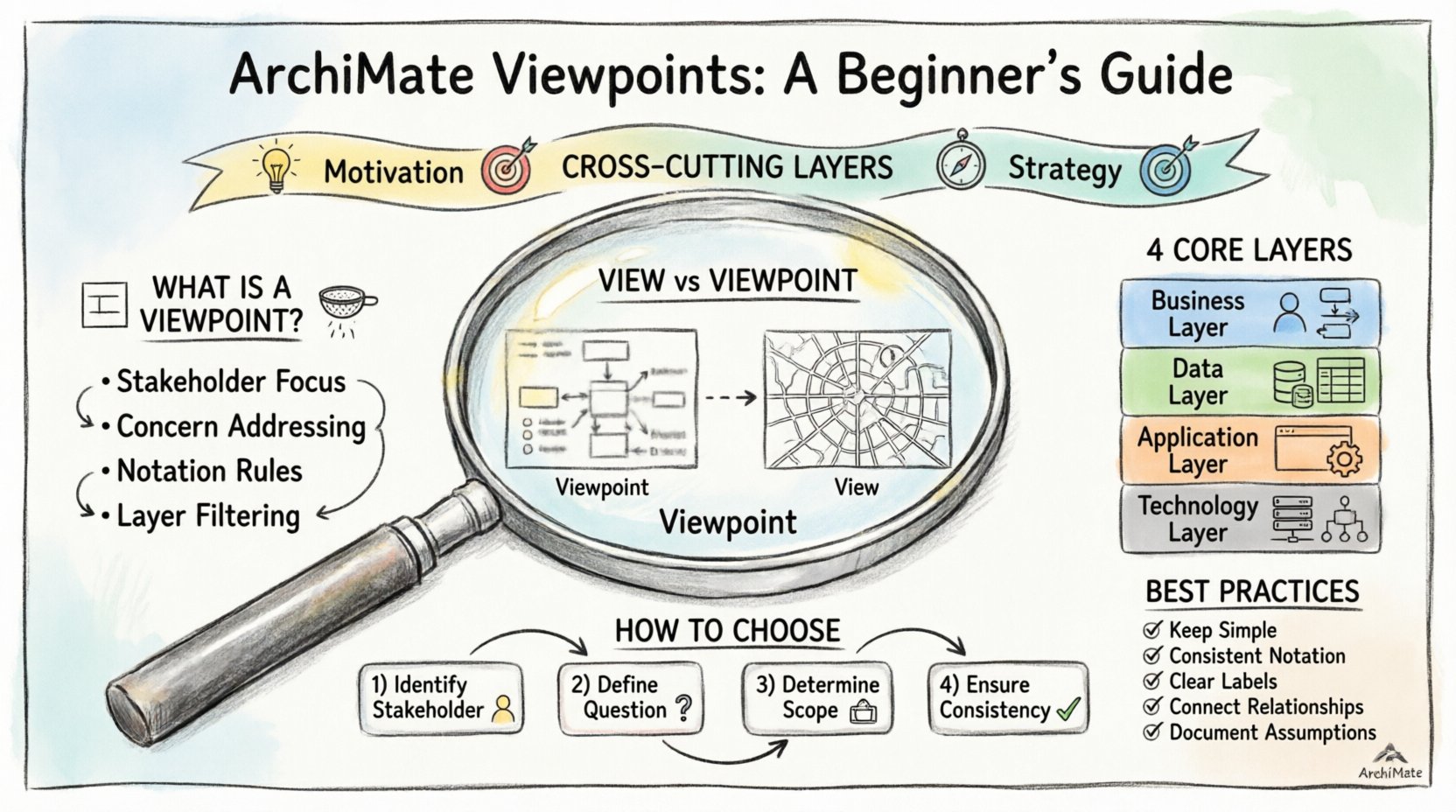
🧩 What Is an ArchiMate Viewpoint?
In the context of the ArchiMate standard, a viewpoint is not a diagram itself. Instead, it is a specification for a set of views. Think of it as a template or a set of rules that defines how to present information. It dictates which elements and relationships from the core metamodel should be visible and how they should be arranged.
Without a defined viewpoint, an architect might create a diagram containing every possible element. This leads to information overload. Stakeholders often struggle to find the specific data they need to make decisions. A viewpoint solves this by filtering complexity.
Key characteristics of a Viewpoint include:
- Stakeholder Focus: It is designed for a specific group, such as business managers, developers, or IT operations.
- Concern Addressing: It targets specific questions, such as “How does this process impact cost?” or “Where is the data stored?”.
- Notation Rules: It defines the specific visual language, colors, and layout styles used in the representation.
- Layer Filtering: It determines which architecture layers (Business, Application, Technology) are included in the view.
🔗 The Relationship Between View and Viewpoint
To understand the architecture fully, one must distinguish between a View and a Viewpoint. While often used interchangeably in casual conversation, they serve distinct functions within the modeling framework.
A View is the actual representation. It is the diagram, the document, or the report that is produced. It is the artifact that a person looks at.
A Viewpoint is the abstract definition. It is the logic behind why the view looks the way it does. It is the rulebook.
Analogy: Imagine a map of a city.
- The Viewpoint is the legend that says “This map shows only public transport routes, uses blue lines, and ignores private roads”.
- The View is the actual printed map showing those specific routes.
Using a standard set of ArchiMate Viewpoints ensures consistency across an organization. When a stakeholder sees a diagram created using the “Business Process Viewpoint,” they immediately know what elements to expect and what context is missing.
🏗️ The Core Architecture Layers
The ArchiMate standard organizes architecture into layers. Viewpoints often correspond to these layers or combinations of them. Understanding the four core layers is the prerequisite for selecting the right viewpoint.
1. Business Layer
This layer represents the functionality of the enterprise. It focuses on how the organization operates and delivers value to its customers.
- Key Elements: Business Processes, Business Roles, Business Functions, Business Objects, and Business Events.
- Typical Stakeholders: Department Heads, Process Owners, Business Analysts.
- Common Questions: Who performs the task? What is the sequence of activities? Where is the handoff between departments?
2. Data Layer
While sometimes integrated into the Business or Application layers, the Data Layer focuses specifically on the information objects managed by the enterprise. In ArchiMate 3.x, this is often part of the Business or Application layer depending on the specific modeling convention used.
- Key Elements: Data Objects, Data Structures, Data Entities.
- Typical Stakeholders: Data Stewards, Information Architects.
- Common Questions: What information is required for this process? Where is this data stored logically?
3. Application Layer
This layer describes the software components that support the business processes. It bridges the gap between business needs and technical implementation.
- Key Elements: Application Components, Application Services, Application Interfaces, Application Functions.
- Typical Stakeholders: Application Managers, Developers, System Architects.
- Common Questions: Which software supports this process? How do systems interact? What services are exposed?
4. Technology Layer
This layer represents the physical infrastructure. It includes the hardware, networks, and platforms that host the applications.
- Key Elements: Devices, Nodes, Communication Networks, System Software.
- Typical Stakeholders: Infrastructure Managers, Network Engineers, DevOps.
- Common Questions: Where is the application deployed? What servers are involved? How is data transmitted?
🔄 Cross-Cutting Layers
Beyond the functional layers, ArchiMate includes specific layers that address the context and intent of the architecture. These are crucial for aligning technical work with strategic goals.
Motivation Layer
This layer explains why an architecture exists. It captures the drivers, goals, and principles that guide decisions.
- Key Elements: Drivers, Goals, Principles, Assessments, Requirements.
- Importance: It connects the “what” (Business/Application) to the “why” (Strategy).
Strategy Layer
This layer defines the high-level plans and structures that guide the enterprise. It includes the mission, vision, and strategic themes.
- Key Elements: Strategic Goals, Business Capabilities, Value Streams.
- Importance: It ensures that lower-level architecture supports the long-term direction of the organization.
📊 Comparison of Standard Viewpoints
Selecting the correct viewpoint requires understanding the specific needs of the audience. The following table outlines common viewpoints and their primary focus areas.
| Viewpoint Name | Primary Layer | Target Audience | Key Focus |
|---|---|---|---|
| Business Process View | Business | Business Managers | Sequence of activities and roles |
| Application Deployment View | Application / Technology | IT Operations | Mapping software to hardware |
| Value Chain View | Business / Strategy | Executive Leadership | Flow of value to customers |
| Capability Map View | Business / Strategy | Strategic Planners | Organizational capabilities |
| Service-Oriented View | Application | Service Architects | Interfaces and services |
| Implementation Migration View | Implementation | Project Managers | Transition from As-Is to To-Be |
🎯 How to Choose the Right Viewpoint
Creating a new model or updating an existing one requires careful consideration of the viewpoint. There is no single “best” viewpoint. The choice depends entirely on the context.
1. Identify the Stakeholder
Who will be consuming this information? A CFO needs different data than a Database Administrator. If the audience is non-technical, avoid the Technology Layer. If the audience is technical, avoid high-level business jargon.
2. Define the Question
What decision needs to be made? If the question is about cost reduction, a Business Process Viewpoint combined with the Motivation Layer is appropriate. If the question is about system failure, the Technology and Application layers are necessary.
3. Determine the Scope
Is this a high-level overview or a deep-dive analysis? A high-level view might only include the Business and Application layers. A deep-dive implementation view requires the full stack, including Technology and Infrastructure.
4. Consider Consistency
Does this viewpoint align with the existing documentation? If the organization already has a standard set of viewpoints, deviating from them can cause confusion. Adopting standard viewpoints aids in knowledge transfer and training.
🛠️ Best Practices for Modeling Viewpoints
Once a viewpoint is selected, the execution of the model matters. Following established guidelines ensures clarity and utility.
- Keep It Simple: Avoid clutter. If an element does not contribute to the specific question being answered, omit it.
- Use Consistent Notation: Ensure that shapes and colors match the viewpoint definition. Do not mix Business Process notation with Application Service notation without clear distinction.
- Label Clearly: Every element should have a clear name. Avoid abbreviations unless they are standard across the organization.
- Connect the Dots: Relationships are just as important as elements. Ensure flows, assignments, and usage links are explicit.
- Document Assumptions: If a view relies on specific constraints or external factors, note them in the accompanying text.
⚠️ Common Pitfalls to Avoid
Even experienced architects can make mistakes when defining views. Awareness of common errors helps maintain quality.
1. The “Kitchen Sink” View
This occurs when an architect tries to show everything in one diagram. The result is a tangled web of lines that is impossible to read. Always prioritize relevance over completeness.
2. Ignoring the Motivation Layer
Models that show processes and systems without explaining why they exist often fail to gain buy-in. Stakeholders need to understand the business driver behind the technical change.
3. Inconsistent Layering
Do not place an Application Component in the Business Layer. While some tools allow flexibility, adhering to the standard layering prevents semantic errors. A Business Role should not directly connect to a Server Device without an intermediate Application or Process element.
4. Over-Engineering
Creating a complex viewpoint structure for a simple project wastes time. Use the simplest viewpoint that satisfies the requirement. If a simple list suffices, do not create a complex flow diagram.
🤝 Integrating Viewpoints with Stakeholders
The success of an architecture initiative depends on communication. Viewpoints are the primary vehicle for this communication.
Engagement Strategy:
- Workshops: Use viewpoints as the basis for workshops. Walk through the view with stakeholders to validate assumptions.
- Iterative Refinement: Present a draft view and ask for feedback. Does it answer their question? Is anything missing?
- Contextual Notes: Add text boxes to the view that explain the context. A diagram alone is rarely sufficient.
- Version Control: Track changes to viewpoints. When a stakeholder asks “Why did this process change?”, the version history provides the answer.
📈 Measuring the Success of Viewpoints
How do you know if a viewpoint is working? There are qualitative and quantitative indicators.
Qualitative Indicators:
- Stakeholders understand the model without needing a guided tour.
- Decisions are made faster because the relevant information is visible.
- Conflicts between teams are reduced because the boundaries are clear.
Quantitative Indicators:
- Number of questions asked during reviews decreases over time.
- Time spent explaining the model reduces.
- Frequency of model updates increases because it is used as a reference tool.
🚀 Expanding Your Architecture Practice
As you become more comfortable with the standard viewpoints, you can begin to create custom ones. This allows for specialized communication tailored to niche needs within the organization.
Custom Viewpoint Creation:
- Identify the Gap: Notice when a standard viewpoint fails to address a specific recurring question.
- Define the Rules: Write down the specific constraints for the new viewpoint.
- Validate: Test the new viewpoint with a small group of users before rolling it out widely.
- Document: Ensure the definition of the custom viewpoint is stored in the architecture repository for future reference.
Building a robust architecture practice is a continuous journey. It requires patience, attention to detail, and a commitment to clarity. By mastering the use of ArchiMate Viewpoints, you transform complex data into actionable intelligence.
🔍 Summary of Key Concepts
To recap the essential takeaways from this walkthrough:
- Viewpoints are filters: They reduce complexity by showing only relevant information.
- Layers define scope: Business, Application, and Technology layers serve different purposes.
- Motivation drives action: Always link technical changes to business drivers.
- Consistency builds trust: Use standard conventions to ensure everyone speaks the same language.
- Audience matters: Tailor the view to the person who needs to make the decision.
Effective architecture is not about drawing the most complex diagram. It is about providing the right information at the right time to the right people. ArchiMate Viewpoints provide the structure needed to achieve this balance.
By applying these principles, you can ensure that your architectural artifacts remain living documents that drive value rather than static files that gather dust. Start by reviewing your current models against these standards. Identify where the views are unclear or incomplete. Apply the principles of filtering and focus to improve the clarity of your communication.

 English
 Arabic
 Chinese (Simplified)
 Dutch
Dutch French
 German
 Italian
 Japanese
 Korean
 Portuguese
 Russian
 Spanish