


Enterprise architecture frameworks rely heavily on structure and clarity to communicate complex organizational realities. The ArchiMate specification provides a robust language for this purpose, but the true value emerges when Viewpoints are implemented correctly. A Viewpoint defines the perspective from which a model is viewed, ensuring that stakeholders receive information relevant to their specific concerns without being overwhelmed by unnecessary detail. However, implementing these Viewpoints often presents significant hurdles. Whether the issue stems from model consistency, stakeholder alignment, or structural integrity, unresolved challenges can undermine the entire architecture effort.
This guide addresses the practical difficulties encountered during the implementation of ArchiMate Viewpoints. We will explore the underlying mechanics, identify common friction points, and provide actionable troubleshooting strategies. By focusing on the core principles of the specification rather than specific tooling, we can build a resilient architecture practice that withstands organizational change.
Understanding the Viewpoint Construct 🧩
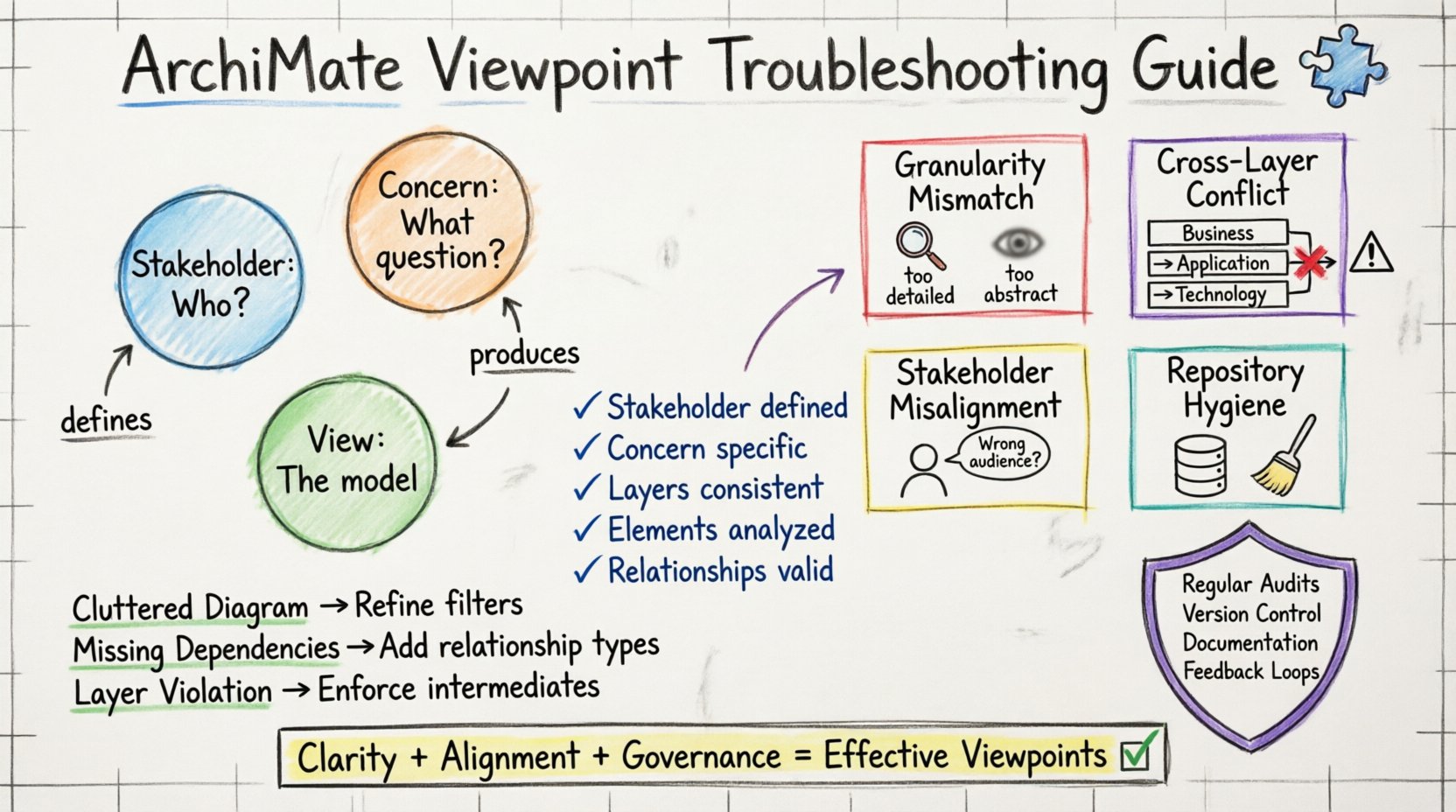
Before diagnosing issues, it is essential to understand the theoretical foundation. In the ArchiMate methodology, a Viewpoint is not merely a filter; it is a specification for creating a View. A Viewpoint defines three critical elements:
- Stakeholder: Who is the intended audience for this model?
- Concern: What specific question or issue does this model address?
- View: The actual representation derived from the repository based on the Viewpoint.
When these elements are misaligned, the resulting model fails to communicate effectively. Implementation challenges often arise when the model repository contains elements that are too granular or too abstract for the intended Viewpoint. For example, a technology-focused Viewpoint should not clutter a business capability map with server details. Conversely, a business strategy Viewpoint needs to abstract away infrastructure specifics to remain clear.
Proper implementation requires a disciplined approach to the metamodel. The ArchiMate metamodel consists of layers including Business, Application, Technology, Infrastructure, and Physical. Each layer interacts with the others through relationships. A Viewpoint must respect these boundaries to maintain logical coherence.
Identifying Common Implementation Friction 🔍
Problems in Viewpoint implementation rarely happen in isolation. They tend to cascade, creating a web of inconsistencies that are difficult to untangle. Below are the most frequent categories of issues encountered during the lifecycle of an enterprise architecture model.
1. Granularity Mismatches
One of the most persistent challenges is determining the appropriate level of detail. If a Viewpoint includes too many elements, the diagram becomes cluttered, and the core message is lost. If it includes too few, it fails to provide the necessary evidence for decision-making.
- Over-engineering: Attempting to model every single relationship in the repository for a high-level Viewpoint.
- Under-specification: Creating a Viewpoint that omits critical dependencies, leading to false positives during impact analysis.
2. Cross-Layer Conflicts
ArchiMate is designed to bridge layers, but this bridging can introduce complexity. A Viewpoint that mixes layers without clear justification often leads to confusion. For instance, linking a Business Service directly to a Technical Infrastructure element without passing through the Application layer violates standard architectural patterns.
3. Stakeholder Alignment Issues
Even with a technically perfect model, a Viewpoint can fail if the Stakeholder and Concern are not accurately defined. If the Viewpoint is built for a CTO but includes financial data without context, the intended audience will disregard it. This often happens when the Viewpoint is reused without adaptation for different user groups.
4. Repository Hygiene
The quality of the View is directly dependent on the quality of the underlying repository. If the source data contains orphaned elements, duplicate definitions, or incorrect relationship types, the Viewpoint will propagate these errors. Troubleshooting often requires cleaning the source data before adjusting the Viewpoint filters.
Diagnostic Framework for Viewpoint Issues 📋
To systematically resolve these challenges, a structured diagnostic approach is necessary. Rather than guessing, follow this checklist to isolate the root cause of the implementation problem.
- Verify the Stakeholder Definition: Ensure the Viewpoint explicitly names the target audience. If the audience is undefined, the Viewpoint lacks purpose.
- Review the Concern Statement: Does the Viewpoint answer a specific business question? If the concern is vague, the View will likely be unfocused.
- Check Layer Consistency: Are all elements within the Viewpoint adhering to the intended architectural layers? Are cross-layer relationships justified?
- Analyze Element Usage: Are the same elements appearing in multiple Viewpoints with conflicting attributes?
- Validate Relationship Types: Are the connections between elements (e.g., assignment, flow, access) semantically correct?
Specific Scenarios and Resolutions 🛠️
The following table outlines common implementation scenarios and the specific steps required to resolve them. This section moves from identification to action.
| Scenario | Symptom | Root Cause | Resolution Step |
|---|---|---|---|
| Cluttered Diagram | Too many elements visible in the View. | Viewpoint filter is too broad or missing constraints. | Refine the Viewpoint constraints to exclude non-relevant element types or layers. |
| Missing Dependencies | Relationships disappear when generating the View. | Viewpoint does not include the relationship type. | Update the Viewpoint definition to explicitly include the missing relationship types. |
| Inconsistent Naming | Elements appear differently across Views. | Viewpoint applies different rendering rules or filters. | Standardize the Viewpoint presentation settings and ensure a single source of truth for labels. |
| Layer Violation | Direct links between Business and Technology. | Viewpoint allows direct cross-layer connections. | Modify the Viewpoint to enforce intermediate layers or remove the invalid relationship. |
| Orphaned Elements | Elements appear with no connections. | Source model contains disconnected objects. | Run a repository cleanup to remove or connect orphaned elements before regenerating Views. |
Resolving Granularity Issues
When a Viewpoint is too detailed, the first step is to audit the element types included. Ensure that the Viewpoint explicitly excludes element types that belong to deeper layers. For example, a Business Viewpoint should typically exclude Application Components and Technical Services. If these elements are visible, they are likely included in the Viewpoint definition by default or inherited from a parent Viewpoint.
Conversely, if the View is too abstract, review the Aggregation and Association relationships. Ensure that the Viewpoint does not filter out the connections that provide context. Sometimes, the solution involves creating a hierarchy of Viewpoints. A high-level Viewpoint can link to a detailed Viewpoint, allowing the stakeholder to drill down only when necessary.
Addressing Cross-Layer Conflicts
ArchiMate defines specific patterns for cross-layer interactions. When troubleshooting, check if the Viewpoint is enforcing the Service layer as a mediator. A Business Service should typically be realized by an Application Function, which is then supported by a Technical Service. If a Viewpoint bypasses this flow, it creates an unrealistic representation of the architecture.
To fix this, inspect the Viewpoint’s View Constraints. These constraints define which relationships are visible. Ensure that the Viewpoint does not inadvertently allow direct connections that violate the metamodel rules. If the underlying model contains these violations, they must be corrected in the source repository, as a Viewpoint cannot magically fix invalid architecture.
Aligning with Stakeholder Concerns
If a Viewpoint is not resonating with the intended audience, the problem is likely semantic rather than structural. Review the Concern definition within the Viewpoint. Does it explicitly state the question being answered? For example, “Impact on Infrastructure” is a better concern than “Technology Overview.” The former guides the modeler to focus on specific elements, while the latter is too broad.
Additionally, consider the Stakeholder attributes. Are they assigned to the Viewpoint correctly? Some modeling environments allow Views to be generated dynamically based on user roles. Ensure that the Viewpoint logic matches the role definitions in your governance model.
Governance and Maintenance Strategies 🛡️
Implementation is not a one-time event. Viewpoints require ongoing maintenance to remain effective as the architecture evolves. Without governance, Viewpoints drift, and the repository becomes inconsistent.
Regular Audits
Schedule periodic reviews of all active Viewpoints. During these audits, verify that:
- Every Viewpoint has a defined Stakeholder and Concern.
- No Viewpoint is orphaned (no one is using it).
- All Views generated from the Viewpoint render correctly without errors.
Version Control
Changes to Viewpoints should be tracked. If a Viewpoint is modified to include new relationship types, ensure that previous Views are regenerated and validated. This prevents stakeholders from relying on outdated information that might have been filtered differently in the past.
Documentation
Documentation is critical for troubleshooting. For each Viewpoint, maintain a brief description of its purpose, the specific layers it covers, and any known limitations. This documentation serves as the first line of defense when users report issues with a generated View.
Alignment with Stakeholders 👥
Even the most technically perfect Viewpoint will fail if the people using it do not understand it. Training is a crucial part of implementation. Stakeholders need to know how to interpret the symbols and the scope of the View.
Workshops and Training
Conduct workshops where stakeholders can interact with the generated Views. Ask them to identify what information is missing and what is redundant. This feedback loop is the most effective way to refine Viewpoints. It shifts the focus from technical correctness to user utility.
Feedback Loops
Establish a mechanism for stakeholders to report issues directly. If a Viewpoint consistently causes confusion, it should be flagged for review. Do not assume that the model is the problem; sometimes the Viewpoint is simply not tailored to the specific context of the user.
Validation Checklist for Viewpoint Health ✅
Use this checklist before publishing a Viewpoint to ensure it meets quality standards.
- Definition: Is the Viewpoint name clear and descriptive?
- Scope: Does it cover the correct ArchiMate layers?
- Relationships: Are the visible relationships semantically correct?
- Performance: Does the View render quickly without crashing the environment?
- Consistency: Do similar Viewpoints follow the same styling and formatting rules?
- Relevance: Does the View address the stated Concern?
- Completeness: Are all necessary elements for the Concern present?
- Clarity: Is the diagram readable and free of overlapping elements?
Advanced Troubleshooting Techniques 🔬
For complex environments, standard checks may not suffice. Advanced troubleshooting involves deeper inspection of the model repository.
Dependency Analysis
Use the repository’s dependency analysis features to trace the lineage of elements. If a Viewpoint is missing an element, trace its dependencies to see if it is filtered out by a parent Viewpoint or if the relationship is broken. This helps distinguish between a filtering issue and a data issue.
Pattern Recognition
Look for recurring patterns of error. If multiple Viewpoints fail to show Application-to-Technology connections, the issue is likely a global configuration rather than a specific Viewpoint error. This suggests a need to adjust the global modeling standards or the Viewpoint template.
Metadata Inspection
Check the metadata of the elements. Sometimes, an element is marked as “deprecated” or “archived.” Viewpoints often filter out these statuses by default. If a stakeholder expects to see an archived element, the Viewpoint must be configured to include it, or the element must be reactivated in the repository.
Future-Proofing Your Implementation 🚀
As the enterprise evolves, the architecture must adapt. To ensure long-term success, design Viewpoints with flexibility in mind.
- Modular Design: Build Viewpoints from reusable components. This makes it easier to update one part of the View without breaking the whole.
- Scalability: Ensure the Viewpoint can handle an increase in data volume. A Viewpoint that works with 100 elements may fail with 10,000.
- Adaptability: Design Viewpoints that can be easily modified to address new concerns without creating entirely new models.
Final Considerations for Architecture Practitioners 💡
Successfully troubleshooting ArchiMate Viewpoint implementation challenges requires patience and a deep understanding of the framework. It is not merely about fixing errors; it is about aligning the technical representation with the organizational reality. By adhering to the diagnostic frameworks and governance strategies outlined above, you can ensure that your architecture remains a valuable asset rather than a burden.
Remember that the goal is clarity. If a Viewpoint is difficult to maintain or hard to understand, it is failing its primary purpose. Regular review, stakeholder engagement, and strict adherence to metamodel rules will keep your implementation robust. Focus on the value the Viewpoint provides to the decision-maker, and the technical details will fall into place.
Continue to monitor the repository for drift. Architecture is a living discipline, and the Viewpoints must evolve alongside it. With a disciplined approach, the challenges of implementation become opportunities to refine the architecture practice and deliver greater value to the enterprise.

 English
 Arabic
 Chinese (Simplified)
 Dutch
Dutch French
 German
 Italian
 Japanese
 Korean
 Portuguese
 Russian
 Spanish