


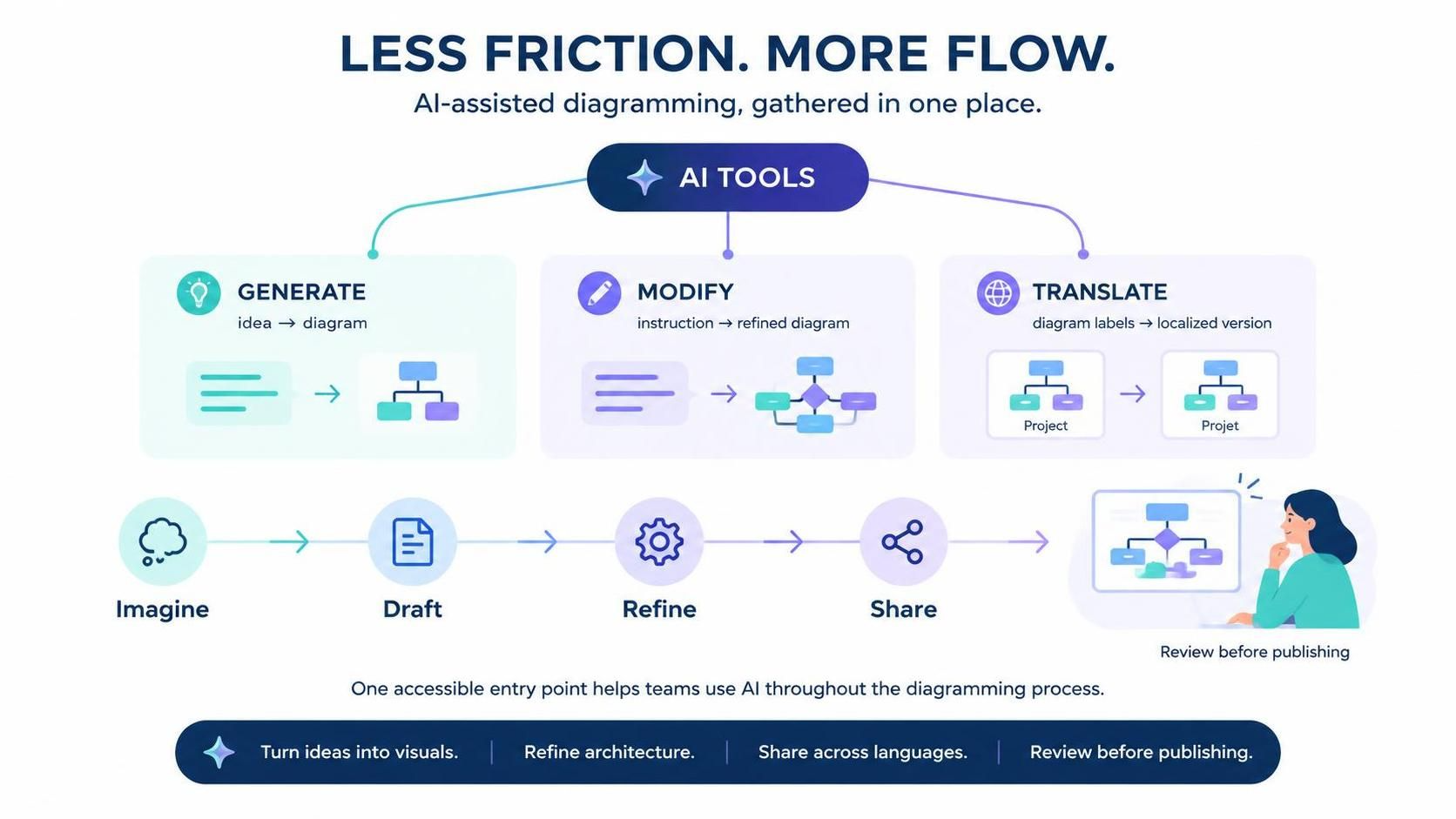
In the rapidly evolving landscape of software architecture and system design, the barrier between human creativity and digital representation is constantly being lowered. The introduction of the AI Tools menu in Visual Paradigm’s VPasCode represents a significant architectural shift in how we approach diagramming. Rather than treating AI as a standalone utility, VPasCode has integrated it directly into the core workflow, creating a seamless ecosystem for “Less Friction, More Flow.”
This tutorial explores the system architecture behind this new interface, breaking down the three pillars of AI-assisted modeling: Generation, Modification, and Translation. By understanding these concepts, you can transform vague ideas into concrete, localized, and refined visual assets in a fraction of the time.
The Architectural Philosophy: Reducing Friction
Traditional modeling tools often require users to navigate complex menus to find specific functions. The VPasCode update consolidates these capabilities into a single, easily accessible location. This design choice is not merely cosmetic; it is a strategic move to reduce “friction”—the cognitive load and time wasted switching contexts between thinking about an idea and actually drawing it.
The system operates on a continuous feedback loop:
- Imagine: The spark of an idea.
- Draft: The initial structure.
- Refine: The AI-assisted optimization.
- Share: Global accessibility.
Pillar 1: Generative Modeling (Idea → Diagram)
The first step in the modern workflow is Generate. Historically, converting a text-based requirement or a vague concept into a structured diagram (like a System Context Diagram or UML Class Diagram) required manual drawing and precise syntax knowledge.
VPasCode’s AI engine changes this dynamic by acting as a semantic translator. When you input a prompt describing a system, the AI parses the natural language and maps it to the underlying UML or modeling metamodel. It does not just “draw” lines; it understands relationships (e.g., “User” interacts with “System,” “System” processes “Data”).
- Concept: Semantic Parsing. The AI converts unstructured text into structured visual elements.
- Benefit: Eliminates the “blank canvas” syndrome. You can turn a paragraph of requirements into a visual hierarchy in seconds.
Pillar 2: Iterative Refinement (Instruction → Refined Diagram)
Once the draft is created, the Modify function allows for dynamic, iterative refinement. This is where the AI acts as a collaborative partner rather than a static tool.
In a traditional environment, refining a diagram might involve manually dragging nodes, resizing connectors, or redrawing entire sub-graphs. With AI assistance, you provide instructions. For example, you might ask to “add a database layer to the backend” or “split the payment module into microservices.”
The system architecture interprets these high-level commands and applies the necessary structural changes to the model. This allows for rapid prototyping where you can explore “what-if” scenarios without losing the integrity of the original design.
Key Refinement Strategies
- Structural Expansion: Ask the AI to expand a specific node into a sub-diagram to show internal logic.
- Architectural Consistency: Instruct the AI to ensure all connectors follow standard UML notation (e.g., ensuring solid lines are for associations and dashed lines are for dependencies).
- Complexity Reduction: Request the AI to simplify a crowded view by grouping related components.
Pillar 3: Localization and Global Reach (Labels → Translated Version)
One of the most powerful, yet often overlooked, features of modern diagramming is accessibility across languages. The Translate tool addresses the challenge of global collaboration.
Diagramming is not just about logic; it is about communication. When sharing architecture with international teams, language barriers can lead to misinterpretation of labels and documentation. The VPasCode AI engine allows for Auto Translation of diagram labels directly within the model.
- Function: It identifies text elements (nodes, edges, notes) and translates them into the target language.
- Context Awareness: Unlike simple text translation, this tool maintains the visual layout and hierarchy, ensuring that the translation fits within the existing node boundaries without breaking the diagram’s aesthetics.
Implementing the Workflow: A Step-by-Step Guide
To leverage the full power of the AI Tools menu in VPasCode, follow this structured approach:
Step 1: Initiate with a Prompt
Open the AI Tools menu and select Generate. Enter a clear description of your system. Be specific about actors and core processes.
Step 2: Review and Refine
Once the initial draft is generated, inspect the visual output. If the logic is missing components, use the Modify tool to provide instructions like “Add a security layer between the client and server.”
Step 3: Globalize the Model
When the architecture is finalized, switch to the Translate function. Select your target language (e.g., Japanese, German, or Spanish). The system will instantly produce a localized version of your diagram, ready for review by international stakeholders.
Step 4: Final Review and Publishing
Before publishing, perform a final review. The AI tools ensure that the diagram is not only visually accurate but also linguistically accessible. This ensures that the “Review before publishing” phase is efficient and error-free.
Conclusion
The integration of AI Tools in VPasCode marks a new era in system design. By unifying Generation, Modification, and Translation into a single interface, Visual Paradigm has removed the friction that traditionally slows down the creative process. Whether you are turning a vague idea into a concrete diagram, refining complex architectures, or making your work accessible to a global audience, the new AI Tools menu ensures that help is always just a click away.
Ready to experience a smoother, more intelligent diagramming workflow? Launch VPasCode today and explore the power of AI, all in one place.

 English
 Arabic
 Chinese (Simplified)
 Dutch
 French
 German
 Italian
 Japanese
 Korean
 Portuguese
 Russian
 Spanish