


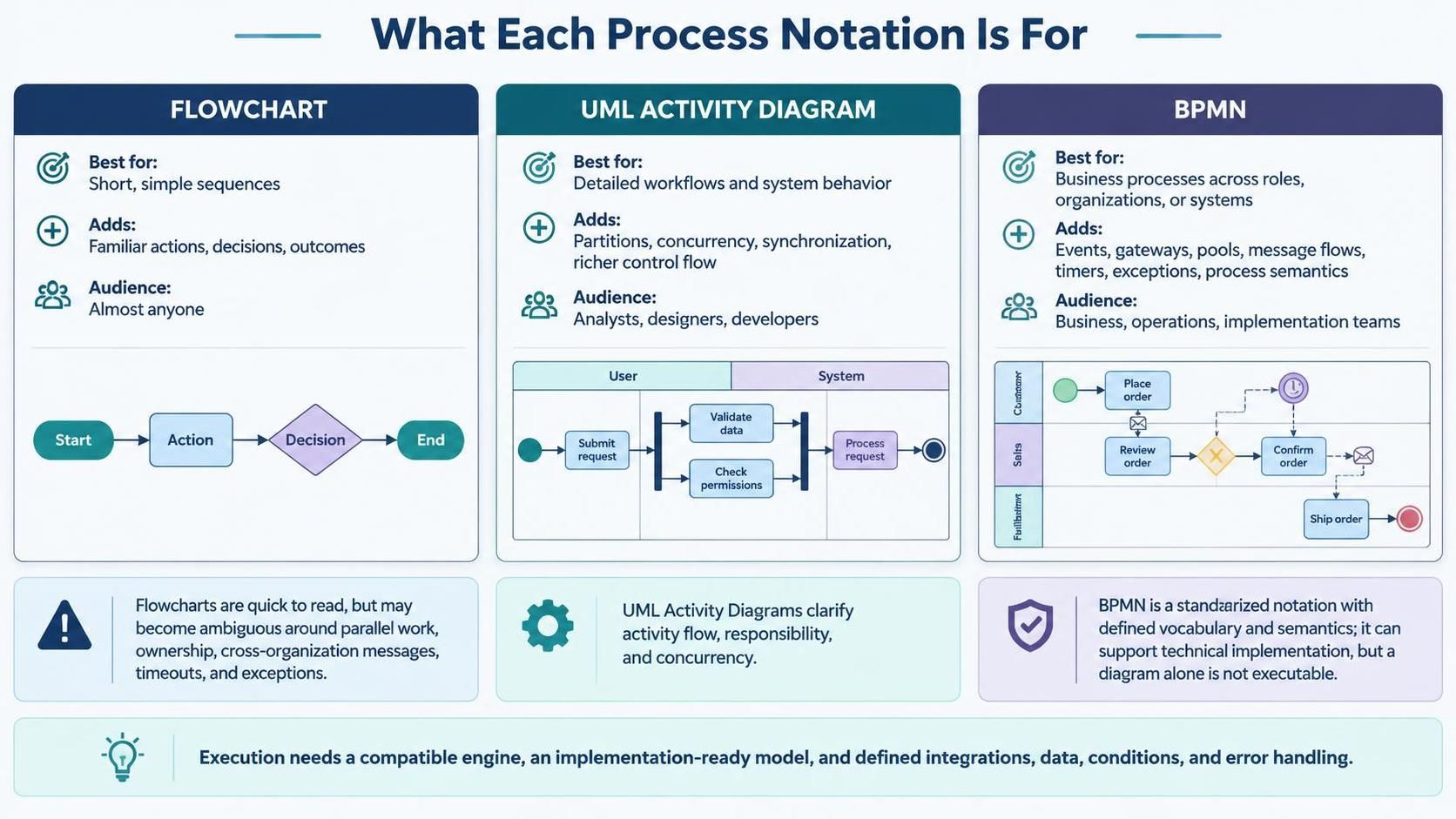
In the world of software architecture and business analysis, selecting the right notation is just as critical as writing the code itself. Visual Paradigm offers a robust suite of tools—including Flowcharting, UML Activity Diagrams, and BPMN—to help you visualize complex systems. This guide explores the distinct strengths of each notation, helping you decide which tool is best for your specific modeling needs.
1. The Simplicity of Flowcharts
Flowcharts are the “bread and butter” of process visualization. They are best suited for short, simple sequences where the primary goal is to explain a basic flow of actions, decisions, and outcomes. Because they rely on familiar shapes and arrows, the audience is almost anyone—from a developer to a non-technical stakeholder.
Why Use a Flowchart?
They are incredibly quick to read and draft. However, as processes grow in complexity, flowcharts can become ambiguous. They often struggle to show:
- Parallel work (concurrency)
- Task ownership (who does what)
- Cross-organization messages
- Timeouts and exception handling
2. The Precision of UML Activity Diagrams
When you need to model detailed workflows or specific system behavior, the UML Activity Diagram is the tool of choice. Visual Paradigm describes this as an advanced form of flowcharting. It adds significant power through partitions, which allow you to group activities (often by role, such as “User” vs. “System”) and explicitly define concurrency.
Key Advantages
- Responsibility Clarity: Using swimlanes (partitions), you can clearly see which actor is responsible for which step.
- Concurrency: It handles parallel branches much better than a standard flowchart, showing how multiple tasks happen simultaneously.
- Rich Control Flow: It supports complex synchronization bars and decision logic suitable for software design.
For analysts, designers, and developers, the UML Activity Diagram bridges the gap between a high-level idea and the technical logic required for implementation.
3. The Power of BPMN
BPMN (Business Process Model and Notation) is an OMG standard designed to be the universal language of business processes. It is best for modeling processes that span roles, organizations, or systems. Unlike the previous two, BPMN is intended to be understandable to business stakeholders while remaining precise enough for technical implementation.
The Semantic Advantage
The added power of BPMN comes from its defined vocabulary and semantics. It introduces specific elements like:
- Events: Start, end, timers, and errors.
- Gateways: Complex logic for decision paths (XOR, AND, OR).
- Pools & Lanes: Visualizing interactions between different organizations or departments.
- Message Flows: Explicitly showing communication between participants.
4. From Diagram to Execution
A common misconception is that a BPMN diagram is automatically executable. It is not. A diagram can be used for communication or analysis without being ready for a process engine. To achieve execution, you need:
- A compatible engine.
- An implementation-ready model.
- Concrete details such as service integrations, data mappings, conditions, and error behaviors.
Summary: Choosing Your Notation
- Use a Flowchart for quick, simple logic or user manuals where the audience is general.
- Use a UML Activity Diagram when you need to clarify technical concurrency, system behavior, and internal logic.
- Use BPMN when modeling business processes across departments or organizations, requiring a standard that supports both business analysis and potential technical execution.
By understanding the unique strengths of Flowcharts, UML Activity Diagrams, and BPMN, you can ensure your system architecture is communicated clearly and effectively.

 English
 Arabic
 Chinese (Simplified)
 Dutch
 French
 German
 Italian
 Japanese
 Korean
 Portuguese
 Russian
 Spanish