


In the realm of Business Process Model and Notation (BPMN), managing complex decision logic is crucial for creating accurate process models. One of the most powerful yet often misunderstood elements is the Event-Based Gateway. Unlike standard decision points that evaluate data immediately, event-based gateways allow a process to pause and wait for a specific external signal to determine its path forward.
In this tutorial, we will explore the architecture of the Event-Based Gateway using Visual Paradigm. We will deconstruct the specific scenario of a “Fine” management process, analyzing how the system branches into three distinct outcomes based on incoming events.
Understanding the Event-Based Gateway
An Event-Based Gateway is visually represented by a diamond shape with a circular icon containing a clock or event symbol. Its primary function is to define multiple outgoing paths, but unlike a standard Exclusive Gateway (XOR), it does not evaluate a condition immediately. Instead, it waits for the first event to occur.
Once the triggering event happens, the gateway transitions the process along that specific path, and all other waiting paths are immediately discarded.
The Scenario: Managing a Fine
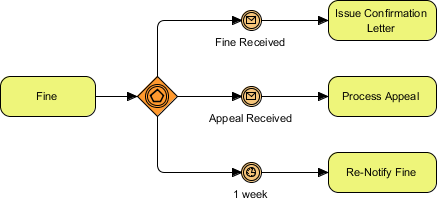
Consider a scenario where a “Fine” is issued. The system must handle the situation dynamically based on the response from the recipient. In our diagram, the process diverges into three potential outcomes:
- Fine Received: The recipient pays the fine immediately.
- Appeal Received: The recipient contests the fine.
- 1 Week Timeout: No response is received within a specific timeframe.
Modeling the Process in Visual Paradigm
To model this effectively in Visual Paradigm, we must define the incoming flow and the specific event types for each outgoing branch. The diagram below illustrates the exact architecture we are building.
Process Flow Logic:
- Start at the Fine event.
- Enter the Event-Based Gateway.
- Wait for one of the following events to trigger:
- Receive a “Fine Received” message.
- Receive an “Appeal Received” message.
- Wait for a timer to expire (1 week).
- Execute the corresponding task (Issue Confirmation, Process Appeal, or Re-Notify).
Visualizing the Diagram
Below is the structural representation of the BPMN diagram using a standard notation logic that you can replicate in Visual Paradigm’s modeling environment.
[Event: Fine]
    |
    v
[Gateway: Event-Based] <--- (Wait for first event)
    |
    +--- [Event: Message (Fine Received)] ---> [Task: Issue Confirmation Letter]
    |
    +--- [Event: Message (Appeal Received)] ---> [Task: Process Appeal]
    |
    +--- [Event: Timer (1 Week)] ---------------> [Task: Re-Notify Fine]
Deep Dive: The Three Paths
1. The Positive Response: Fine Received
If the recipient pays the fine, the “Fine Received” event is triggered. This is typically a message event, indicating data or a signal coming from an external system or human user. The process moves to the Issue Confirmation Letter task, finalizing the transaction.
2. The Dispute: Appeal Received
Alternatively, the recipient might disagree with the fine. The Appeal Received event triggers the Process Appeal task. This path allows the organization to handle disputes without blocking the initial fine issuance.
3. The Timeout: 1 Week
What happens if the recipient ignores the fine? We use a Timer Event set to “1 week”. If neither the payment nor the appeal arrives within this timeframe, the gateway activates the third path, leading to the Re-Notify Fine task. This ensures the process does not hang indefinitely waiting for a response that may never come.
Best Practices for Event-Based Gateways
When designing these diagrams, keep the following architectural principles in mind to ensure your model remains robust:
- Ensure Completeness: Every outgoing path from an Event-Based Gateway must have a distinct event trigger. Do not leave a path “floating” without an event type attached.
- Avoid Deadlocks: Ensure that the events are mutually exclusive or that the “first to occur” logic is clearly defined. If two events could theoretically happen at the exact same millisecond, the modeler must define a priority.
- Timeouts are Essential: In business processes, relying solely on user input (like “Fine Received”) is risky. Always include a Timer Event to handle delays or non-responses, as seen in the “1 week” branch of our diagram.
Conclusion
The Event-Based Gateway is a vital tool for modeling asynchronous processes where timing and external inputs are unpredictable. By using Visual Paradigm to visualize these flows, you can create clear, executable process models that handle real-world complexities like appeals, payments, and timeouts efficiently.

 English
 Arabic
 Chinese (Simplified)
 Dutch
Dutch French
 German
 Italian
 Japanese
 Korean
 Portuguese
 Russian
 Spanish