


When engineers or business analysts need to visualize complex processes, they often turn to UML Activity Diagrams. These diagrams map out the flow of control within a system, detailing how work moves from an initial state through various actions, decisions, and parallel tasks until it reaches a completion state. While traditional modeling tools rely heavily on drag-and-drop interfaces, PlantUML offers a powerful alternative: describing your entire diagram as text.
This approach transforms diagramming into a version-controlled, collaborative exercise. By writing code to generate visual models, teams can easily revise logic, review changes in pull requests, and keep diagrams tightly synchronized with their documentation.
Understanding the Core Components
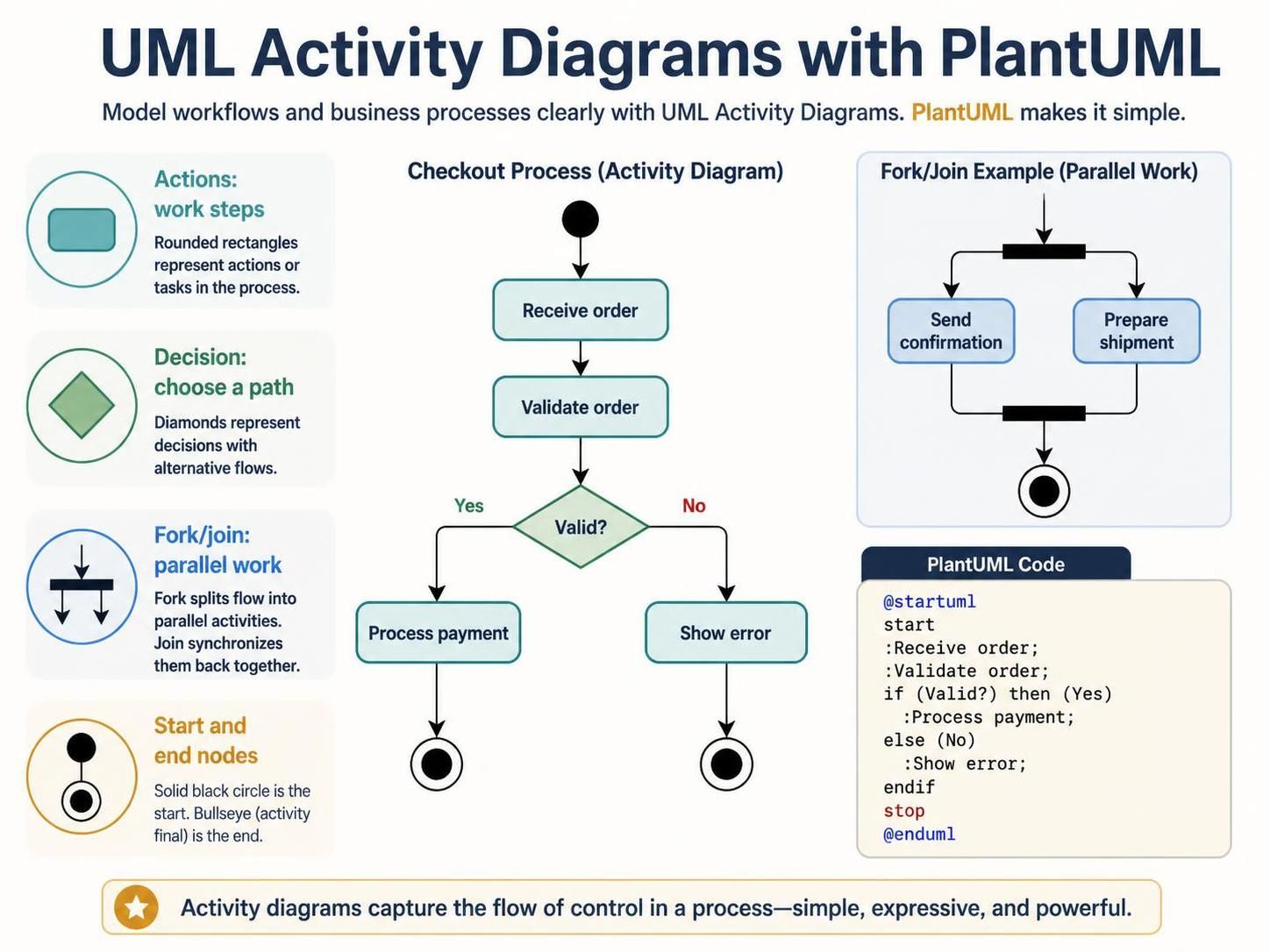
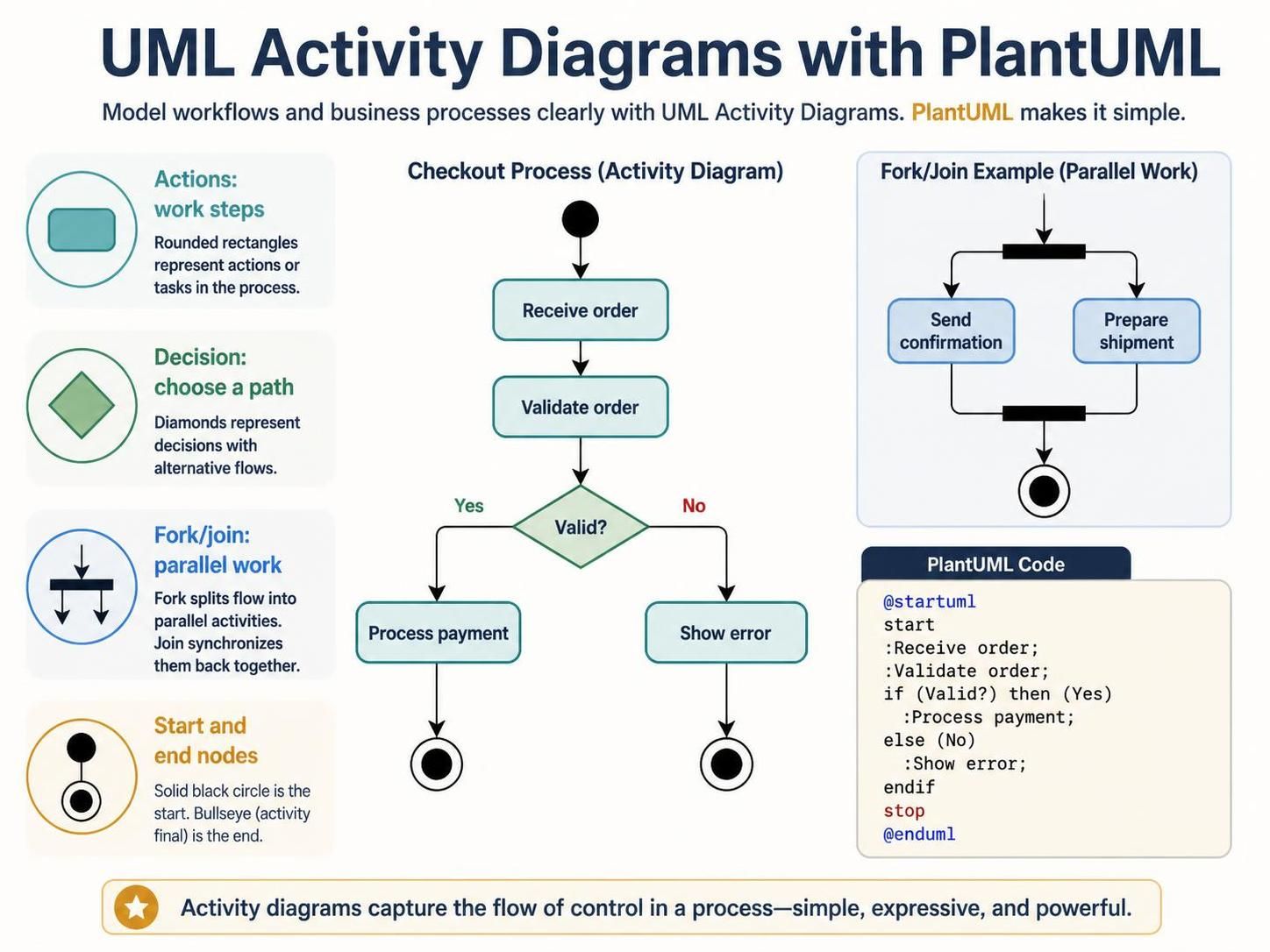
Before diving into the syntax, it is essential to understand the standard symbols used in UML activity diagrams. The image provided illustrates these foundational elements:
- Actions (Work Steps): Represented by rounded rectangles. These are the fundamental tasks or operations performed in the process (e.g., “Receive order”).
- Decisions (Choose a Path): Represented by diamonds. These nodes act as gateways where the flow splits based on a condition (e.g., “Valid?”).
- Fork/Join (Parallel Work): Represented by thick black bars. A Fork splits the control flow into multiple parallel threads, while a Join synchronizes them, waiting for all incoming paths to complete before continuing.
- Start and End Nodes: The process begins with a solid black circle and concludes with a “bullseye” symbol (a black circle with a white ring).
Writing Your First Activity Diagram
PlantUML allows you to define these visual elements using readable keywords. The syntax is designed to be intuitive, mapping directly to the concepts of flow control.
Consider a simple Checkout Process where an order must be validated before payment is processed. In the diagram above, we see that if the validation fails, an error is shown. The corresponding PlantUML code looks like this:
@startuml
start
:Receive order;
:Validate order;
if (Valid?) then (Yes)
  :Process payment;
else (No)
  :Show error;
endif
stop
@enduml
Let’s break down how this code constructs the logic:
- start / stop: Defines the entry and exit points of the diagram.
- Colon syntax (:Action): A line starting with a colon followed by text creates a standard action node.
- Conditional Logic: The
ifblock handles decision points. You specify the condition in parentheses, followed by the path taken when true(Yes)and the path taken when false(else).
Modeling Parallel Workflows
One of the most powerful features of activity diagrams is the ability to model concurrency. In the “Fork/Join Example” shown in the reference image, two tasks—”Send confirmation” and “Prepare shipment”—happen simultaneously.
In PlantUML, you achieve this using the fork and end fork keywords. The fork keyword splits the flow, and the end fork keyword acts as a Join, merging the threads back together.
@startuml
start
fork
  :Send confirmation;
fork
  :Prepare shipment;
end fork
stop
@enduml
Why Use Text-Based Modeling?
While a graphical interface is intuitive for drawing, text-based modeling offers distinct advantages for professional software engineering:
- Version Control: You can use Git to track changes in your diagrams just like code.
- Refactoring: Changing the order of steps or adding a new decision point is as simple as moving a line of text.
- Clarity: Complex logic is often easier to read in a structured list format than in a tangled web of arrows.
Conclusion
UML Activity Diagrams are a universal language for describing process flows. By leveraging PlantUML, you transform these diagrams from static images into dynamic, editable assets that can evolve alongside your software projects. Whether you are mapping a simple checkout flow or a complex parallel manufacturing process, the text-first approach ensures your documentation remains clean, concise, and precise.

 English
 Arabic
 Chinese (Simplified)
 Dutch
Dutch French
 German
 Italian
 Japanese
 Korean
 Portuguese
 Russian
 Spanish