


In the modern software development lifecycle, documentation is just as critical as the code itself. Among the various tools available for visualizing logic, flowcharts remain a cornerstone for defining business processes and system architectures. Mermaid.js has emerged as a powerful text-based diagramming tool that integrates seamlessly into Markdown documentation, version control systems, and AI-assisted modeling environments.
This tutorial explores the core anatomy of flowchart symbols, the underlying directed graph syntax that powers them, and how to leverage tools like Visual Paradigm AI Chatbot and VPasCode to generate professional-grade diagrams efficiently.
1. The Anatomy of a Mermaid Flowchart
Mermaid flowcharts are technically constructed as directed graphs. Unlike traditional drawing tools where you drag and drop shapes onto a canvas, Mermaid relies on a declarative syntax where you define nodes (steps) and edges (arrows) in text. The rendering engine then automatically calculates the layout.
Every element in a flowchart serves a specific purpose in guiding the viewer through a logical sequence:
- Nodes: These represent the individual steps, decisions, or data points.
- Edges: These are the arrows that dictate the direction of the flow.
- Subgraphs: These are used to group related nodes, often representing a specific subsystem or phase within a larger process.
2. Decoding the Core Symbols and Syntax
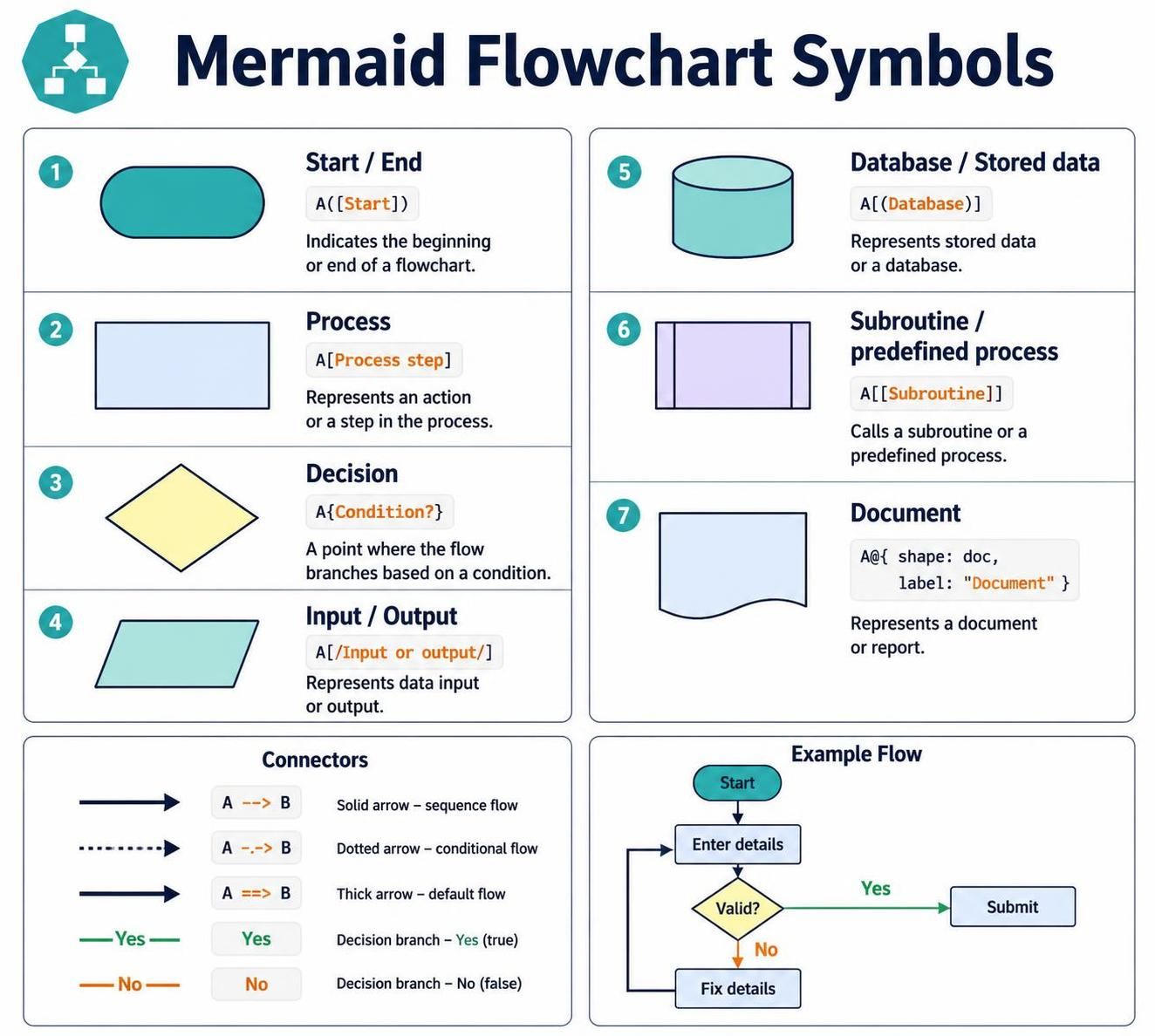
To master Mermaid, you must understand how specific shapes are triggered by specific syntax characters. The “bracket” or delimiter is the key to transforming a text label into a specific geometric shape.
Start and End Points
The lifecycle of any process begins and ends. In Mermaid, these are represented by rounded rectangles (terminators).
%% Syntax: NodeID([Label])
Start([Start]) --> End([End])
Process Steps
A standard process step is an action, such as a calculation or a function call. Visually, this is a simple rectangle.
%% Syntax: NodeID[Label]
Process[Validate Request]
Decision Points
Flowcharts differ from linear lists because they branch. A diamond shape indicates a decision point where the path splits based on a condition (e.g., “Is payment approved?”).
%% Syntax: NodeID{Label}
Decision{Is payment approved?}
Input and Output
When a user inputs data or the system generates a report, these are represented by parallelograms. The syntax requires square brackets with a forward slash.
%% Syntax: NodeID[/Label/]
Input[/Submitted Form/]
Output[/Generated Report/]
Database and Document Symbols
For system architecture, you often need to represent storage or physical documents. The database is a cylinder, and the document is a sheet of paper with a folded corner.
%% Syntax: NodeID((Label)) for Database
%% Syntax: NodeID@{shape: doc, label: "Doc Name"}
DB((Stored Data))
Doc@{shape: doc, label: "Invoice"}
3. Advanced Connector Logic
Visual Paradigm AI Chatbot and VPasCode Editor allow for sophisticated logic that goes beyond simple arrows. You can control line thickness, style, and labels.
- Sequence Flow:
A --> B(Solid arrow) - Conditional/Optional Flow:
A -.-> B(Dotted arrow) - Thick/Default Flow:
A ==> B(Thick arrow) - Labeled Branches: You can label the “Yes” or “No” paths directly on the arrow for clarity.
4. Practical Example: The Validation Loop
Let’s synthesize these concepts into a complete example. This diagram demonstrates a common pattern: a user enters details, the system validates them, and if they fail, the user loops back to fix them.
graph TD
    Start([Start])
    Enter[Enter Details]
    Valid{Valid?}
    Submit[Submit]
    Fix[Fix Details]

    %% Defining the connections
    Start --> Enter
    Enter --> Valid

    %% Decision Logic
    Valid -- Yes --> Submit
    Valid -- No --> Fix
    Fix --> Enter
5. Leveraging AI for Modeling
The integration of AI into tools like Visual Paradigm is changing how we build these diagrams. Instead of manually typing out the syntax, you can use the AI Chatbot to describe a process in natural language.
For instance, you might say: “Create a flowchart for an order process that includes a decision on inventory availability.” The AI will generate the Mermaid code, which you can then paste into the VPasCode Editor. This editor acts as a bridge, allowing you to visualize the text-based code in real-time and export it to high-resolution formats.
By understanding the underlying syntax rules, you are no longer just a consumer of diagrams; you become an architect of logic, capable of refining complex systems with precision.

 English
 Arabic
 Chinese (Simplified)
 Dutch
Dutch French
 German
 Italian
 Japanese
 Korean
 Portuguese
 Russian
 Spanish