


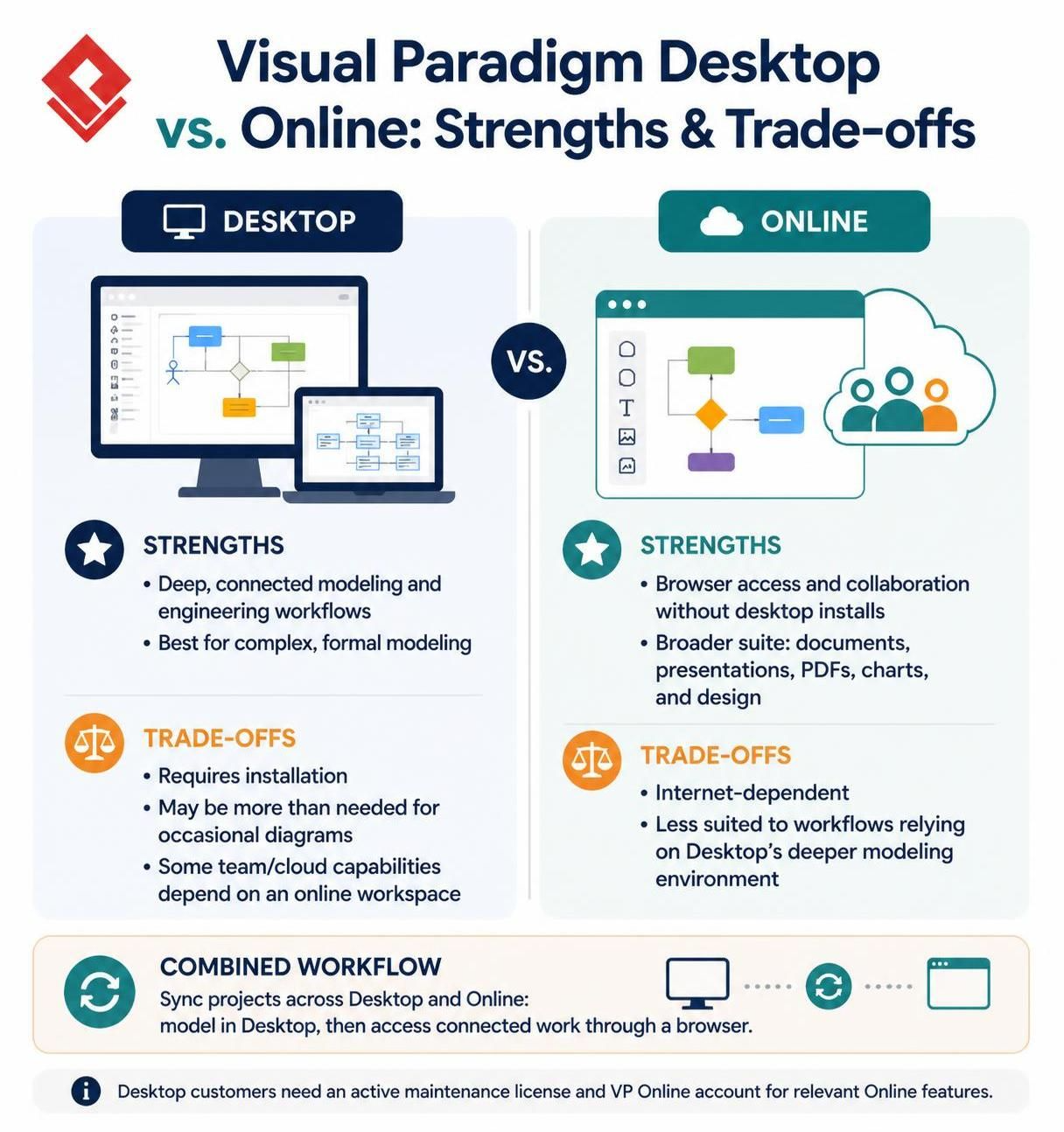
In the landscape of systems engineering and software design, the choice between a robust local installation and a flexible cloud-based platform often dictates the efficiency of the entire development lifecycle. Visual Paradigm offers both a powerful Desktop environment and a versatile Online workspace. This tutorial dissects the architectural differences between these two platforms, explaining when to utilize deep local modeling versus when to leverage browser-based collaboration.
1. The Desktop Architecture: Depth and Engineering Workflows
The Desktop version of Visual Paradigm is architected for “depth.” It functions as a comprehensive engineering suite designed for complex, connected models. When you are building a system where diagrams are not merely standalone visuals but part of a rigorous engineering workflow, the Desktop environment is the superior choice.
Key Architectural Strengths
- Connected Modeling: The application excels when diagrams are interlinked. It handles the complexity of formal modeling environments better than lightweight web tools.
- Offline Capability: Once installed, the core modeling engine runs locally, reducing dependency on immediate internet connectivity for heavy processing tasks.
- Comprehensive Toolset: It includes features that go beyond simple drawing, catering to systems engineering requirements.
The Trade-offs
While powerful, the Desktop architecture comes with specific constraints. It requires a local installation process, which can be a barrier for users who need quick access or for organizations with strict IT policies regarding software installation. Furthermore, if your needs are limited to occasional flowcharts or simple diagrams, the full weight of the Desktop application may be overkill.
2. The Online Architecture: Accessibility and Collaboration
Conversely, the Online version is architected for accessibility. It prioritizes the ability to work from any browser without the friction of installing applications. This makes it ideal for teams that need to collaborate in real-time without managing software versions locally.
Key Architectural Strengths
- Browser-Based Access: Users can access projects immediately via a URL, facilitating rapid onboarding and ad-hoc reviews.
- Collaboration: It removes the need for everyone to install the desktop application, streamlining teamwork.
- Versatility: The Online suite extends beyond pure modeling to include documents, presentations, PDFs, charts, and general design work, acting as a broader productivity platform.
The Trade-offs
The primary trade-off for this accessibility is a dependency on internet connectivity. Additionally, the Online environment is less “natural” for work that relies on the deep, rigorous modeling environment provided by the Desktop app. Complex systems engineering tasks may feel constrained within the browser interface.
3. The Combined Workflow: Syncing Environments
Visual Paradigm bridges these two architectural silos through a Combined Workflow. This system allows users to sync projects across both Desktop and Online environments. The strategy is to perform detailed, heavy-duty modeling in the Desktop app, and then access that connected work through the browser for sharing or lightweight review.
Technical Requirements for Sync
To utilize this hybrid approach effectively, specific licensing conditions must be met. Users must have an active maintenance license for the Desktop product and a valid VP Online account to access the relevant synchronization features.
4. Pricing and Licensing Considerations
Understanding the financial architecture is crucial for deployment planning. Visual Paradigm utilizes a subscription model with varying tiers based on capability.
Desktop Subscription Tiers
- Modeler: US$6/month (Entry-level modeling).
- Standard: US$19/month.
- Professional: US$35/month.
- Enterprise: US$89/month.
Note: Some plans are billed in multi-month periods, so the listed figures represent the monthly equivalent or rate, not necessarily the total single-payment amount.
Feature Parity Warning
It is vital to note that Desktop and Online have distinct product lines. A Desktop purchase includes access to certain VP Online features, but they are subject to license and account conditions. VP Online has its own plans and products. Therefore, do not assume that an Online subscription and a Desktop license include exactly the same features. Always check the plan details for the specific tools required before purchasing.

 English
 Arabic
 Chinese (Simplified)
 Dutch
 French
 German
 Italian
 Japanese
 Korean
 Portuguese
 Russian
 Spanish