


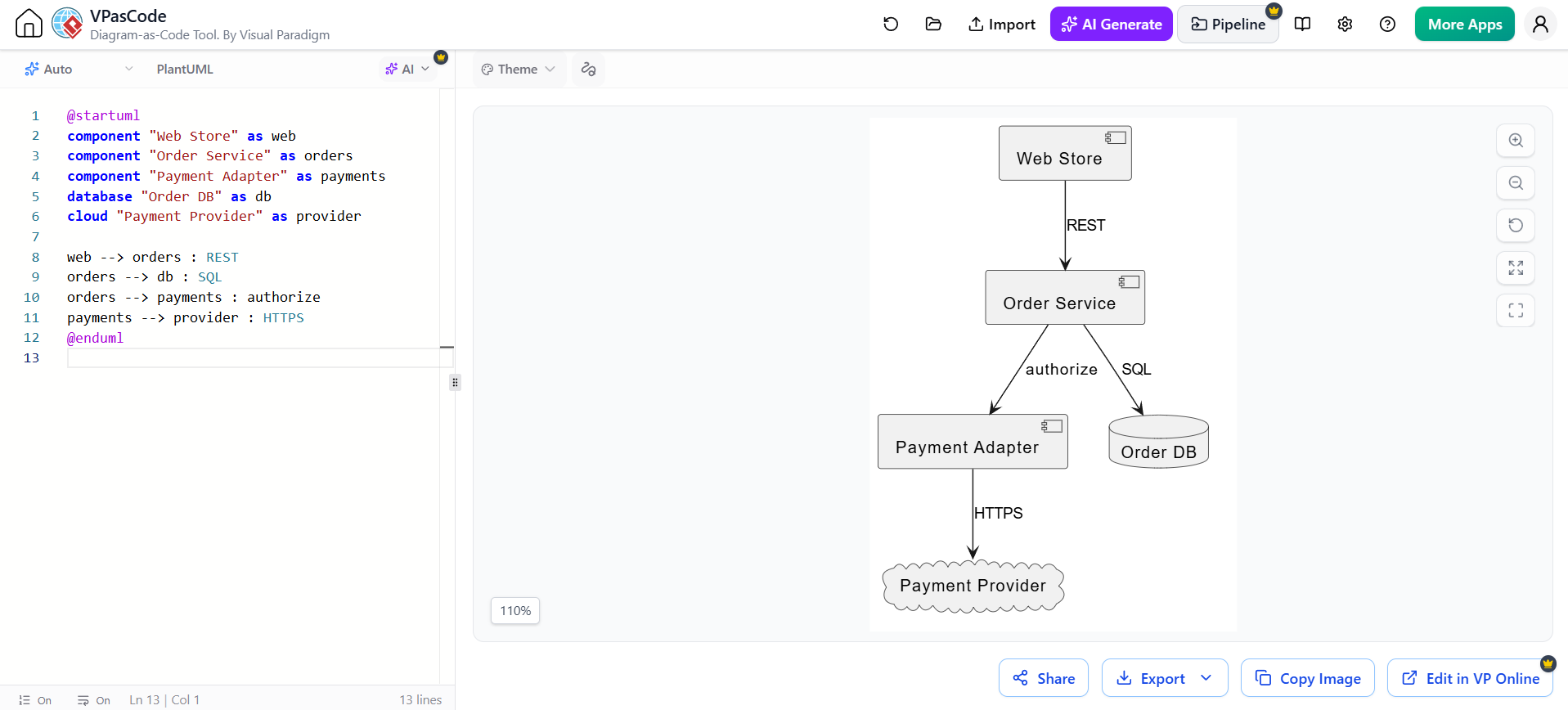
In modern software engineering, visualizing the interaction between on-premise services and external cloud providers is critical for system design. This tutorial explores how to model a Component Diagram using VPasCode, Visual Paradigm’s diagram-as-code tool. We will break down the architecture of a typical E-commerce system, demonstrating how to define deployable software parts and their dependencies through code.
Understanding the Component Diagram
A Component Diagram is a structural diagram that describes the organization of a system by defining its components. Unlike a class diagram, which focuses on internal logic, a component diagram is often used to communicate integration boundaries and deployment contexts. It shows how different software modules—ranging from local databases to remote cloud services—communicate with one another.
In this specific context, we are modeling a “Web Store” architecture where the core logic interacts with a database and an external payment provider. This “Diagram-as-Code” approach allows developers to manage architecture documentation using version control systems, ensuring the model stays in sync with the codebase.
Defining System Components
The foundation of any diagram is the definition of its parts. In PlantUML syntax, used by VPasCode, we declare specific types of components to represent different physical or logical entities. We use the component keyword for software modules and specific stereotypes like database and cloud for infrastructure.
@startuml
component "Web Store" as web
component "Order Service" as orders
component "Payment Adapter" as payments
database "Order DB" as db
cloud "Payment Provider" as provider
@enduml
Key Definitions:
component "Web Store" as web: Represents the frontend or entry point of the application.component "Order Service" as orders: The central business logic module handling order processing.database "Order DB" as db: A persistent storage layer for order data.cloud "Payment Provider" as provider: An external, third-party service hosted in the cloud (e.g., Stripe or PayPal).
Modeling Dependencies and Protocols
Once the components are defined, the next step is to establish the relationships between them. In a component diagram, these relationships are represented by arrows indicating data flow. Crucially, in system architecture, the protocol used for communication is often as important as the connection itself.
We use the --> operator to create directed arrows and the : syntax to label the communication protocol or action.
web --> orders : REST
orders --> db : SQL
orders --> payments : authorize
payments --> provider : HTTPS
This code snippet defines a clear architectural flow:
- REST API: The Web Store communicates with the Order Service using the Representational State Transfer (REST) architectural style, likely via HTTP requests.
- SQL Access: The Order Service directly queries the Order DB using Structured Query Language (SQL).
- Authorization: The Order Service delegates payment tasks to the Payment Adapter.
- Secure Cloud Communication: The Payment Adapter communicates with the external Payment Provider over HTTPS, ensuring data security.
Visualizing the Architecture
When the VPasCode tool processes this text, it renders a diagram that clearly separates concerns. Notice how the database and cloud keywords often trigger specific shapes (like a cylinder for DB and a cloud shape for external providers) in the rendering engine. This visual distinction helps stakeholders instantly understand which parts of the system are internal versus external.
The resulting diagram illustrates a classic Adapter Pattern implementation, where the Payment Adapter shields the internal Order Service from the complexities of the external provider’s API.

 English
 Arabic
 Chinese (Simplified)
 Dutch
Dutch French
 German
 Italian
 Japanese
 Korean
 Portuguese
 Russian
 Spanish