


Introduction
In today’s fast-paced software development landscape, clear communication between stakeholders, developers, and business analysts is paramount to project success. Use case specification stands as one of the most powerful techniques for capturing, documenting, and communicating functional requirements in a structured, actionable format. While visual diagrams provide an excellent high-level overview of system interactions, they alone cannot convey the nuanced details necessary for implementation, testing, and validation.
This comprehensive case study explores the art and science of use case specification—from foundational concepts to advanced modeling techniques. Whether you are working in traditional waterfall environments or agile iterative frameworks, understanding how to craft effective use case specifications ensures that your development team builds the right features, for the right users, with the right behavior. Through practical examples, standardized templates, and modern AI-assisted approaches, this guide equips practitioners with the knowledge to transform abstract business goals into precise, testable system requirements.
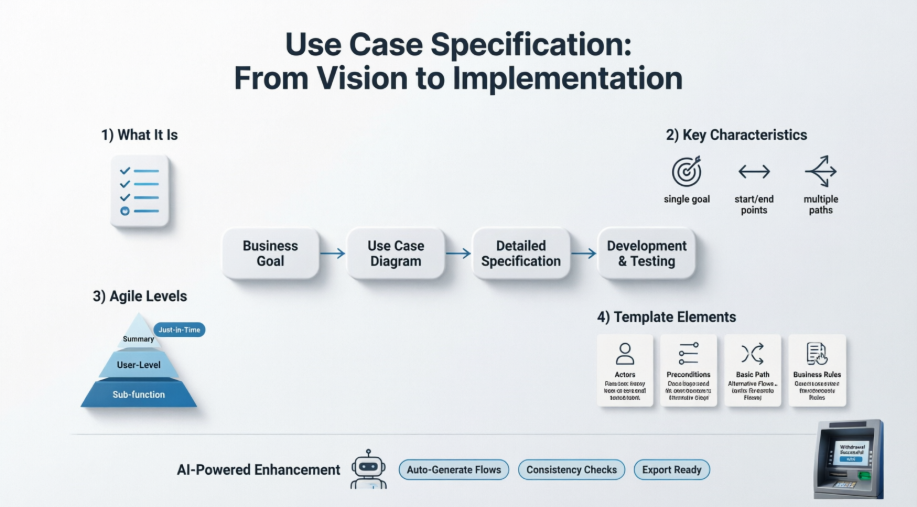
What is Use Case Specification?
Just showing the use case diagram in UML notation is not enough. Each use case must be accompanied by text explaining the purpose of the use case as well as what functionality is accomplished when a use case is executed.
The use case specification is typically created in analysis and design phase in an iterative manner:
-
At first, only a brief description of the steps needed to carry out the normal flow of the use case (i.e., what functionality is provided by the use case) is written.
-
As analysis progresses, the steps are fleshed out to add more detail.
-
Finally, the exceptional flows are added to the use case
-
Each project can adopt a standard use case template for the creation of the use case specification.
Use Case vs Use Case Specification
A Use Case describes a task that is performed by an actor yielding a result of business value for a business. A use case may be visualized as a use case diagram or/and in structured textual specification format:
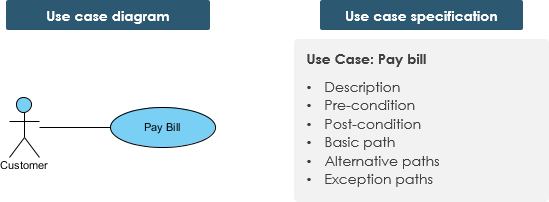
Use Case (task – a customer want to perform) may be:
-
Interactive – A system use case describes an actor’s interaction with a system in pursuit of the defined business goal
-
Manual – A sequence of actions performed by an actor
-
Automated – A sequence of steps performed by a program or script
Characteristics of Use Cases
A use case has:
-
Only one goal
-
A single starting point
-
A single ending point
-
Multiple paths for getting from start to finish
-
i.e. Specify behavior for a variety of possible conditions
-
Each conditions may require specific action(s)
-
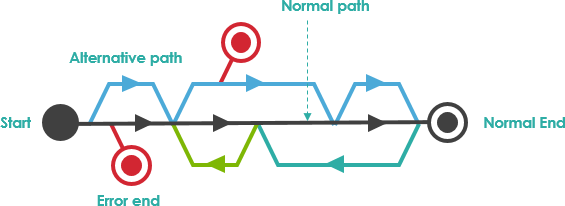
For Example – Customer pays bill:
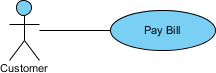
There are multiple paths to achieve the goal:
-
Telephone payment
-
By mail
-
In person
-
by check
-
by cash, etc.
A path that does not lead to the goal:
-
Credit card is declined
Agile Use Case Approach
The use case model and its individual use cases evolve level by level over time. Not all use cases of a model will necessarily need to be specified to the same level of detail.
Just-in-Time and Just-Enough
Use cases can be written at differing levels of data and scope, each serves a purpose:
-
Summary: General descriptions and sweeping overviews of system functionality or business processes.
-
User Level: Task-related descriptions of users and how they interact with the system; descriptions of a specific business process. User-Level use cases are usually considered to be at the level of task that is the main work of the user.
-
For example: getting cash out of the ATM machine is a useful task and would be a use case at the core level, but entering your PIN number would not be at this level, because it supports the main work.
-
Sub-function: Descriptions of lower-level activities that are used to complete subparts of a core use case.
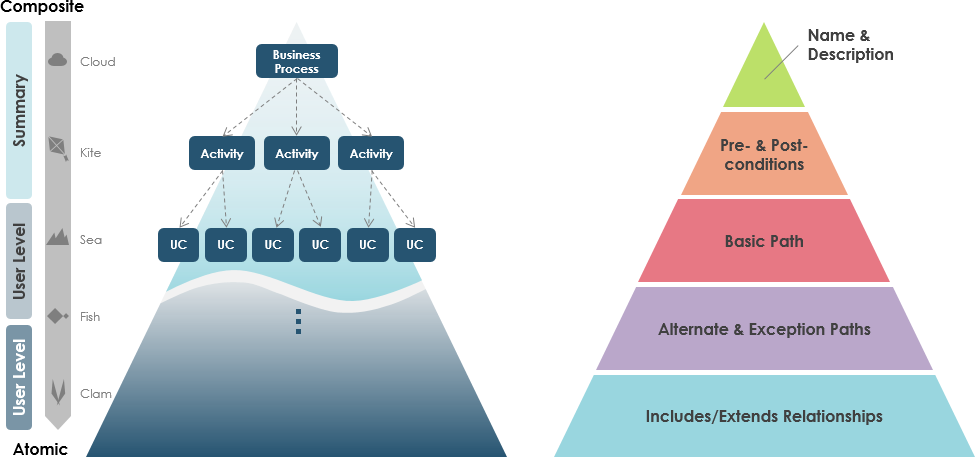
Note: Some use cases may be sufficiently specified up to level II. You stop when sufficient detail is achieved using just-in-time and just-enough manner.
A Detailed Use Case Specification
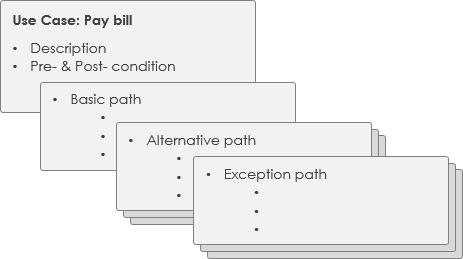
The detailed use case is a textual representation illustrating a sequence of events together with other related use case information in certain format. People typically adopt a standard use case template for recording the detailed information for the use cases
Draft Professional Use Case Specifications with AI
The real value of a use case lies in its specification. Visual Paradigm’s AI ecosystem automates the heavy lifting of writing Basic Paths, Alternative Flows, and Business Rules, ensuring your requirements are comprehensive, consistent, and ready for development.
Multi-Platform AI Support
-
VP Desktop: Generate structured use case specifications directly within the professional modeler and link them to your UML diagrams.
-
AI Chatbot: Narrate your system requirements and let the AI Chat draft a full textual specification for you.
-
OpenDocs: Create collaborative Specification Pages to document preconditions, postconditions, and flows in a structured format.
Specialized Specification Apps
📝 Description Generator: Instantly transforms problem domains into detailed Markdown specifications (Flows, Pre/Post-conditions).
🏗️ Modeling Studio: An AI workspace that guides you from system scope to AI-generated detailed use case descriptions.
🔄 Text-to-Behavior Bridge: Converts detailed textual flows into AI-generated Activity Diagrams and reports.
🚀 Development Assistant: Generates prioritization, Gherkin scenarios, and full specs from a single problem statement.
📑 Spec Report Generator: Automatically produces structured Markdown documentation from your visual use case models.
Unlock the full potential of AI-driven analysis:
AI Use Case Guide Full AI Ecosystem
Use Case Template – ATM Withdraw Case Example
As mentioned before, there are several notation styles for use cases (e.g. diagram style, unified modeling language, textual format). Whatever notation is used should be easy to understand. You can use templates, like the ones from Alistair Cockburn, but it is also an option to use what fits best for your team.
| Use Case Specification | |
|---|---|
| Use Case Name: | Withdraw Cash |
| Actor(s): | Customer (primary), Banking System (secondary) |
| Summary Description: | Allows any bank customer to withdraw cash from their bank account. |
| Priority: | Must Have |
| Status: | Medium Level of details |
| Pre-Condition: | The bank customer has a card to insert into the ATM
The ATM is online properly |
| Post-Condition(s): |
|
| Basic Path: |
|
| Alternative Paths: |
|
| Business Rules: |
|
| Non-Functional Requirements: |
|
Advanced Use Case Flow of Events Editing
Flow of events are the steps required to perform within a use case. Now, with Visual Paradigm, you can define complex flow structure by specifying control flows, such as if, while and jump, within the steps. This tutorial demonstrates how to define control flow within the flow of events.
-
Download Game.vpp. You can also find this file at the bottom of this tutorial.
-
Open the downloaded .vpp file in Visual Paradigm. To open a project, select Project > Open from the application toolbar.
-
Create a new use case diagram.
-
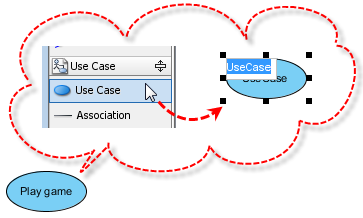
Create a use case using the diagram toolbar and name it Play game.
-
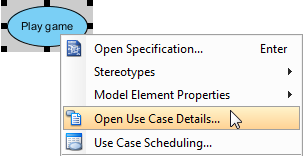
Right-click on the Play game use case and select Open Use Case Details… from the main menu.
-
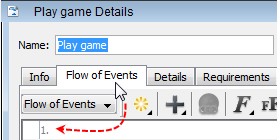
When the use case details are opened, click the Flow of Events tab to start editing steps in the flow of events editor.
-
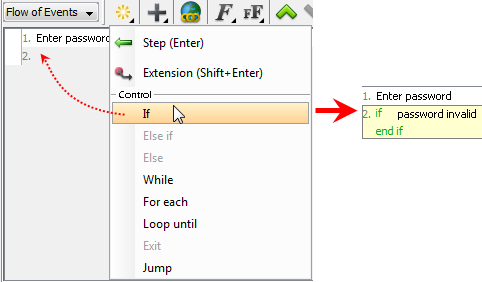
You can insert an If statement from the control menu to explain variable situations. In this example, the first step is Enter password, and the variable situation is that the player may enter an incorrect password. Let’s select If from the control menu and enter password invalid.
-
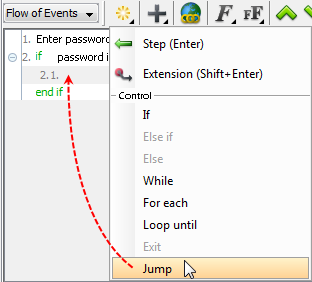
You can also insert a Jump to manipulate the sub-step after the variable situation occurs. In this example, when the player enters an incorrect password, he/she is expected to go back to the previous step to enter the password again. Let’s select Jump from the control menu.
-
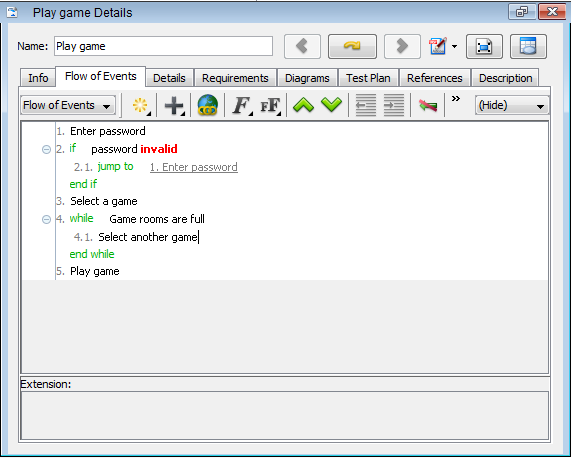
Click the upside-down triangle of jump to to select Select target from the pop-up menu. After you click the small yellow arrow of step 1, step 1 shows in step 2.1.

-
You can specify the formatting of the text in the flow of events by highlighting it and selecting a formatting setting from the Format button. Let’s turn the word invalid red and then bold it. Highlight invalid, select Font Color from the drop-down menu of the Font button, and select red. Similarly, bold invalid.

-
Below is the completed flow of events for the Play game use case using control flow:
Conclusion
Use case specification represents a critical bridge between business vision and technical execution. By moving beyond simple diagrams to rich, textual descriptions of system behavior, teams gain clarity on requirements, reduce ambiguity in development, and create testable criteria for quality assurance. The iterative nature of use case development—starting with high-level summaries and progressively adding detail—aligns perfectly with agile methodologies, allowing teams to deliver value incrementally while maintaining architectural coherence.
Modern tooling, particularly AI-assisted specification platforms, further accelerates this process by automating routine documentation tasks while preserving the strategic thinking that only human analysts can provide. Whether you are modeling a simple ATM withdrawal or orchestrating complex enterprise workflows, mastering use case specification empowers you to capture requirements with precision, communicate intent across disciplines, and ultimately deliver software that truly serves its users.
As systems grow more interconnected and user expectations rise, the discipline of thoughtful use case specification becomes not just a best practice, but a competitive advantage. Invest in this foundational skill, leverage the templates and tools available, and watch your requirements transform from vague wishes into actionable, valuable software features.
References
- What is Unified Modeling Language?: Comprehensive guide explaining UML notation and its application in software modeling
- A List of UML Tools: Directory of professional tools for creating and managing UML diagrams
- Try Visual Paradigm FREE: Download page for free trial of Visual Paradigm modeling software
- Alistair Cockburn Wikipedia: Biography of renowned use case methodology expert and agile software development pioneer
- Unified Modeling Language Wikipedia: Encyclopedic overview of UML standards, notation, and modeling practices
- AI Chatbot for Use Cases: AI-powered conversational tool for drafting use case specifications from natural language requirements
- OpenDocs Specification Pages: Collaborative documentation platform for structured use case specifications
- Use Case Description Generator: AI tool that transforms problem domains into detailed Markdown specifications with flows and conditions
- Use Case Modeling Studio: AI-guided workspace for developing system scope and detailed use case descriptions
- Text-to-Behavior Bridge: Tool that converts textual use case flows into AI-generated Activity Diagrams
- Development Assistant: AI assistant for generating prioritization, Gherkin scenarios, and specifications from problem statements
- Spec Report Generator: Automated documentation tool producing structured Markdown reports from visual use case models
- AI Use Case Guide: Tutorial guide for leveraging AI in use case diagram generation
- Full AI Ecosystem Guide: Comprehensive overview of Visual Paradigm’s AI-powered diagramming capabilities
- Advanced Flow of Events Tutorial PDF: Downloadable tutorial on editing complex control flows within use case specifications

 English
 Arabic
 Chinese (Simplified)
 Dutch
Dutch French
 German
 Italian
 Japanese
 Korean
 Portuguese
 Russian
 Spanish