


Enterprise Architecture (EA) frameworks provide the necessary structure for organizations to align their business strategy with their IT infrastructure. Among the various standards available, ArchiMate offers a robust language for modeling these relationships. However, a comprehensive model often becomes too complex for the average stakeholder to digest. This is where the concept of a Viewpoint becomes critical. A Viewpoint defines the perspective from which a specific audience interacts with the architecture.
Implementing ArchiMate Viewpoints is not merely a technical exercise; it is a communication strategy. When executed well, these viewpoints bridge the gap between abstract architectural concepts and practical business needs. This guide explores the methodologies for designing, implementing, and maintaining effective viewpoints within your enterprise architecture practice. We will focus on practical application, governance, and stakeholder engagement without relying on specific vendor tools.
Understanding the Core Concept 🧩
To implement viewpoints effectively, one must first distinguish between the Model, the View, and the Viewpoint. These terms are often conflated, leading to confusion during project execution.
- Model: The complete repository of information about the enterprise. It contains all the layers, relationships, and elements defined within the ArchiMate specification.
- View: A specific representation of the model tailored to a particular concern or stakeholder. It is the actual artifact shown to the user.
- Viewpoint: The definition of the view. It specifies the languages, notations, and conventions used to create the view.
Without a defined Viewpoint, a View lacks consistency. If you present a diagram to a business leader without a predefined Viewpoint, you risk showing them technical details they do not understand. Conversely, showing a technical architect a high-level business strategy view might lead to missed dependencies.
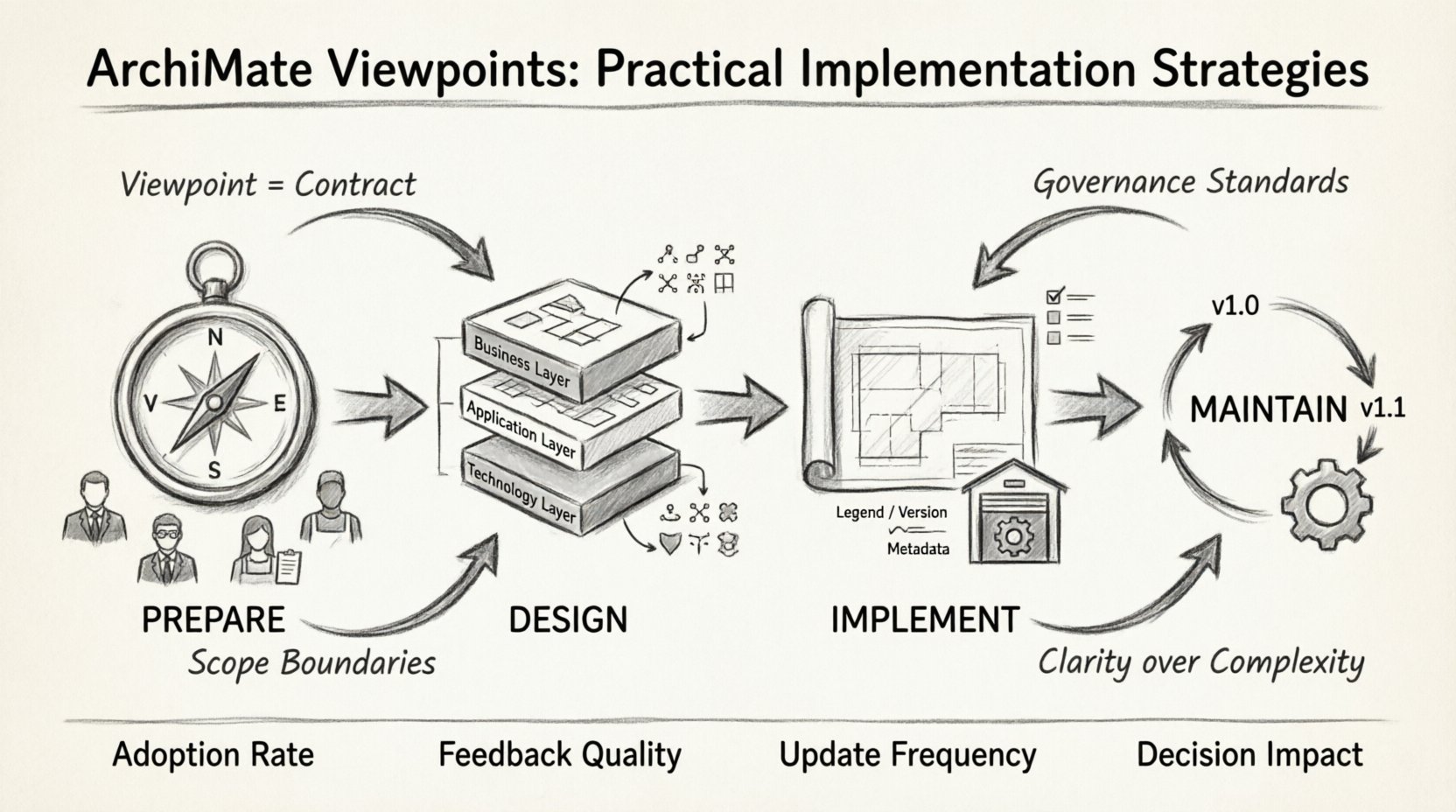
Effective implementation begins with recognizing that a Viewpoint is a contract between the architecture team and the stakeholder. It promises a certain level of abstraction, a specific set of symbols, and a defined scope. This contract ensures that when a stakeholder opens a diagram, they know exactly what they are looking at and what is excluded.
Pre-Implementation Preparation 📋
Before drawing a single line or defining a layer, thorough preparation is required. Rushing into the design of views often results in scattered artifacts that fail to serve their purpose. The preparation phase involves identifying needs, defining scope, and establishing governance rules.
1. Stakeholder Analysis
The primary driver for any Viewpoint is the audience. You must identify who will consume the architecture information. Different roles require different levels of detail.
- C-Suite Executives: Require high-level business capability maps and investment roadmaps. They need to see value, risk, and strategic alignment.
- Business Managers: Need process flows and organizational structures to understand operational efficiency and bottlenecks.
- Application Architects: Require detailed logical data models and application interaction diagrams to plan integrations.
- Infrastructure Teams: Focus on physical deployment and network topology to ensure reliability and performance.
Mapping these personas to specific viewpoints ensures that every diagram serves a purpose. Avoid creating views that no one reads. If a Viewpoint does not have a defined audience, it should be archived.
2. Defining Scope and Boundaries
One of the most common mistakes in EA is creating views that are too broad. A single Viewpoint should address a specific concern. For example, a “Security Viewpoint” should focus on security controls and compliance, not general application logic.
Establish clear boundaries for each Viewpoint:
- Geographic Scope: Does this view cover global operations or a specific region?
- Temporal Scope: Is this view current state, future state, or a transition roadmap?
- Domain Scope: Does it cover the entire enterprise or a specific business unit?
By limiting scope, you increase the clarity and relevance of the information presented. Stakeholders can trust the diagram because they know it is not cluttered with irrelevant data.
3. Governance and Standards
Consistency is key to adoption. You must establish a governance framework that dictates how Viewpoints are created and maintained. This includes naming conventions, color coding standards, and version control policies.
Define a style guide that specifies:
- Font sizes and types for different element types.
- Color palettes for different layers (Business, Application, Technology).
- Notation rules (e.g., when to use a dashed line versus a solid line).
When everyone follows the same style guide, the organization can scan diagrams quickly and understand the meaning without needing a legend every time.
Designing Effective Viewpoints 🎨
Designing a Viewpoint is an exercise in information architecture. You are curating information to reduce complexity while preserving critical relationships. The ArchiMate specification provides many layers and concepts, but you should not use all of them in every view.
1. Layering and Abstraction
ArchiMate is built on layers such as Business, Application, and Technology. A well-designed Viewpoint often focuses on one or two layers to avoid cognitive overload. However, cross-layer relationships are often where the most value lies.
Consider the following strategies for layering:
- Siloed Views: Focus deeply on a single layer. A “Process Model” might only show Business Actors and Activities, ignoring the underlying software.
- Integration Views: Show how layers interact. A “Service Implementation View” links Business Services to Application Components and Technology Nodes.
- Stratified Views: Show the hierarchy. For example, showing how a specific IT infrastructure supports a specific business capability.
The goal is to choose the right level of granularity. Too much detail obscures the main message; too little detail fails to answer the stakeholder’s question.
2. Selecting the Right Notation
Not all stakeholders are familiar with the ArchiMate syntax. While the standard provides precise definitions, the visual representation can vary. When designing a Viewpoint, consider the literacy of the audience.
- Standard Notation: Use standard shapes for actors, processes, and components. This ensures consistency with the specification.
- Custom Icons: If a specific business unit recognizes certain icons better, you may adapt them, but document this deviation in the Viewpoint definition.
- Minimalist Design: Remove unnecessary connectors. Only show relationships that are relevant to the specific concern of the view.
3. Relationship Mapping
ArchiMate defines various relationship types, such as “serves,” “accesses,” “realizes,” and “aggregates.” Using these correctly is vital for accurate modeling.
A common error is overusing relationships. A Viewpoint should highlight the *critical* paths. For example, in a financial audit Viewpoint, the “accesses” relationship between a user and a database is critical. In a strategic roadmap, the “realizes” relationship between a capability and an application is more important.
Limit the number of relationship types displayed in a single Viewpoint to prevent confusion. If a stakeholder sees five different arrow types, they may struggle to distinguish their meanings.
Implementation Steps 🚀
Once the design is ready, the implementation phase begins. This involves creating the actual artifacts, populating them with data, and distributing them to the stakeholders.
1. Creating the Viewpoint Template
Before modeling specific instances, create a template for the Viewpoint. This template defines the default settings, page layout, and standard elements. It acts as a blueprint for all future diagrams within that viewpoint.
Ensure the template includes:
- A clear title and version number.
- A legend or key for symbols used.
- A metadata section for author, date, and review status.
- Standardized margins and spacing.
2. Data Population and Validation
Populate the template with actual architecture data. This step requires coordination with subject matter experts (SMEs) to ensure accuracy. The data must reflect the current reality of the enterprise.
Validation is crucial. Before sharing a Viewpoint, perform a peer review:
- Check for orphaned elements (elements with no connections).
- Verify that relationships are directional and correct.
- Ensure that all elements comply with the defined Viewpoint rules.
3. Distribution and Accessibility
Once validated, the Viewpoints must be accessible to the intended audience. Accessibility is not just about having a file; it is about finding the file.
- Central Repository: Store all Viewpoints in a central location, such as an architecture repository or a dedicated portal.
- Indexing: Provide an index or catalog that lists all available Viewpoints, their descriptions, and their target audiences.
- Formats: Offer views in formats that are easy to consume, such as PDF for reading or interactive web formats for exploration.
Do not rely solely on email attachments. Ensure that stakeholders can access the latest version without confusion.
Common Pitfalls and Solutions ⚠️
Even with careful planning, challenges arise during the implementation of ArchiMate Viewpoints. Recognizing these pitfalls early allows for proactive management.
| Pitfall | Description | Solution |
|---|---|---|
| Over-Engineering | Creating views that are too detailed and complex for the audience. | Adhere strictly to the stakeholder analysis. Remove elements that do not answer the specific business question. |
| Lack of Governance | Viewpoints drift over time as different architects modify them independently. | Enforce a review process. Require sign-off from the Architecture Board before updating a Viewpoint. |
| Static Content | Views are created once and never updated, leading to outdated information. | Establish a maintenance schedule. Link Viewpoints to change management processes to trigger updates. |
| Confusing Notation | Using non-standard symbols or colors that confuse the reader. | Stick to the ArchiMate standard notation unless a strong business case exists for deviation. |
| Isolated Models | Viewpoints do not link to the underlying model data. | Ensure that every diagram is a dynamic representation of the central repository, not a static drawing. |
Maintaining Viewpoint Integrity 🛡️
A Viewpoint is not a one-time deliverable. It is a living artifact that must evolve as the enterprise changes. Maintenance involves monitoring usage, gathering feedback, and ensuring technical accuracy.
1. Feedback Loops
Regularly solicit feedback from the stakeholders who use the Viewpoints. Ask questions such as:
- Is this diagram clear and easy to understand?
- Does it answer the questions you asked when you requested it?
- Are there any missing elements that you need to see?
This feedback loop is essential for continuous improvement. If a Viewpoint is consistently ignored, it indicates a misalignment with stakeholder needs.
2. Version Control
Architecture changes constantly. When a Viewpoint is updated, it must be versioned. This ensures that historical decisions can be traced back to the state of the architecture at that time.
Implement a versioning strategy:
- Major Versions: Significant changes in scope or structure.
- Minor Versions: Updates to existing content without structural changes.
- Patch Versions: Corrections of errors or typos.
3. Integration with Change Management
The most effective way to maintain integrity is to integrate Viewpoint updates with the organization’s change management process. When a major change occurs in the business or IT landscape, trigger a review of relevant Viewpoints.
This ensures that the architecture models remain a true reflection of the enterprise. It prevents the “architecture graveyard” scenario where models exist but do not match reality.
Stakeholder Communication 🗣️
Technical accuracy is meaningless if the message is not understood. Communication is the final piece of the implementation puzzle. Even the most perfect Viewpoint fails if the stakeholder cannot interpret it.
1. Contextual Narratives
Never present a Viewpoint without context. Accompany every diagram with a brief narrative that explains:
- What is the purpose of this view?
- What is the scope of the information shown?
- What decisions should be made based on this information?
This narrative transforms a static image into a decision-support tool. It guides the stakeholder on what to look for.
2. Training and Enablement
Not all stakeholders are trained in reading architecture diagrams. Provide training sessions or quick reference guides that explain the basic symbols and conventions used in your Viewpoints.
- Workshops: Host sessions for specific business units to explain how to read their specific Viewpoints.
- Documentation: Create a “Viewpoint Dictionary” that defines every symbol and color used across the organization.
- Q&A Channels: Establish a channel where stakeholders can ask questions about specific diagrams.
Metrics for Success 📊
To determine if your implementation of ArchiMate Viewpoints is effective, you need measurable metrics. These metrics help justify the effort and guide future improvements.
- Adoption Rate: How many stakeholders actively access the Viewpoints?
- Feedback Quality: Are the feedback comments constructive and actionable?
- Update Frequency: How often are Viewpoints updated to reflect real changes?
- Decision Impact: Can you trace decisions made by stakeholders back to specific Viewpoints?
Tracking these metrics provides data-driven evidence of the value of your architecture practice. It shifts the perception of EA from a documentation exercise to a strategic asset.
Final Considerations 🔍
Implementing ArchiMate Viewpoints effectively requires a blend of technical discipline and human-centric design. It is about creating a shared language that allows the organization to understand its own complexity. By focusing on stakeholder needs, maintaining governance, and ensuring accessibility, you can build a robust architecture practice.
Remember that the goal is not perfection in the model, but clarity in the communication. As you refine your Viewpoints over time, you will find that the complexity of the enterprise becomes manageable. The investment in these practices pays dividends in reduced risk, better alignment, and faster decision-making.
Start small. Define a few key Viewpoints for critical stakeholders. Validate them, refine them, and then expand. This iterative approach ensures that the architecture practice grows in step with the organization’s maturity. With patience and consistency, ArchiMate Viewpoints become the backbone of your enterprise architecture strategy.

 English
 Arabic
 Chinese (Simplified)
 Dutch
Dutch French
 German
 Italian
 Japanese
 Korean
 Portuguese
 Russian
 Spanish