


New Introduction: Why Examples Beat Theory Every Time
When I first tried to learn Entity Relationship Diagramming, I drowned in textbooks explaining cardinality, normalization, and Chen notation. It wasn’t until I started reverse-engineering real-world examples that everything clicked. As a product manager who collaborates daily with engineering teams, I’ve since adopted a “learn by examples” approach—and it’s transformed how I prototype data models.
In this hands-on guide, I’ll walk you through five carefully selected ERD examples from Visual Paradigm’s Online ERD Tool. For each one, I’ll share what I learned, the key concepts it demonstrates, and practical tips you can apply immediately. No jargon overload—just real patterns, real workflows, and real results.
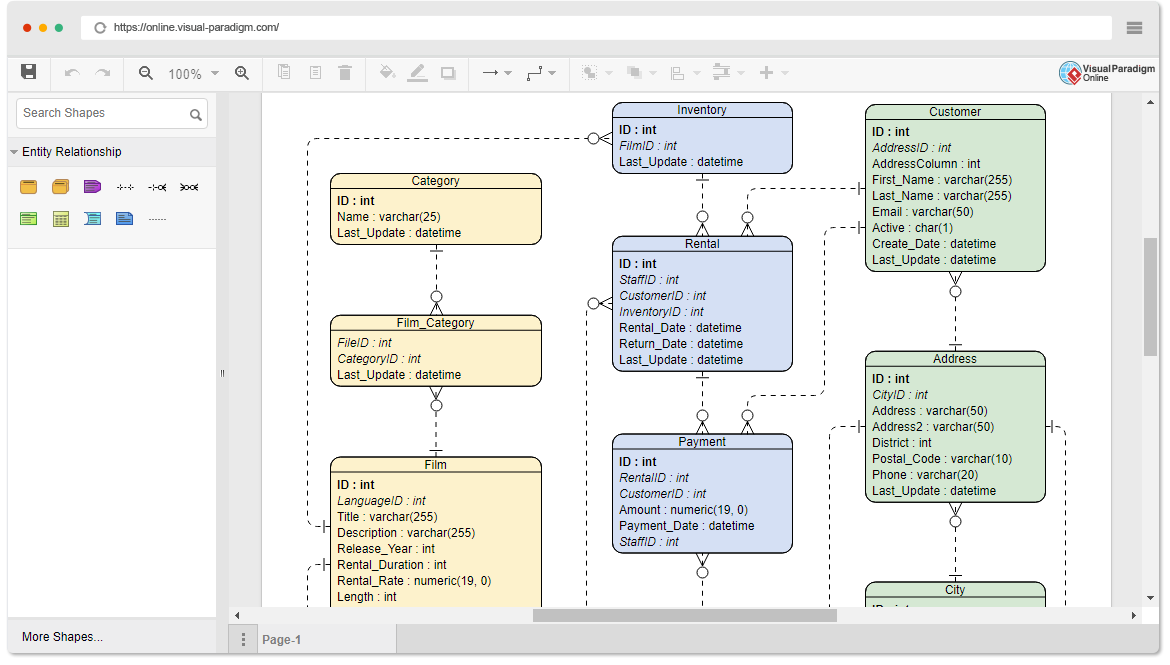
Quick Primer: 4 ERD Concepts You Actually Need
Before we dive in, here are the foundational concepts these examples will reinforce:
🔹 Entities: The “nouns” of your system (e.g., Customer, Order, Product)
🔹 Attributes: Properties that describe entities (e.g., Customer.email, Order.date)
🔹 Relationships: How entities connect (e.g., Customer places Order)
🔹 Cardinality: The “how many” rules (one-to-one, one-to-many, many-to-many)
Got it? Great. Let’s learn by building.
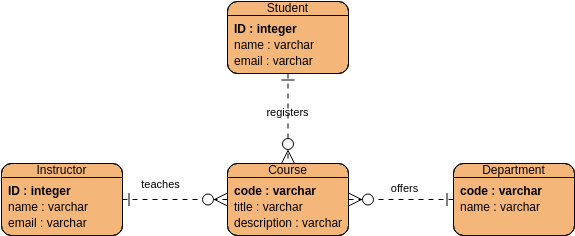
Example 1: Simple School and Student ERD (Perfect for Beginners)
What This Example Teaches
-
Basic entity definition (
Student,School,Course) -
One-to-many relationships (one school has many students)
-
Primary key identification (
student_id)
My “Aha!” Moment
I loved how this example kept attributes minimal. As a beginner, I used to clutter entities with every possible field. This taught me: start with what you need to uniquely identify and connect entities. You can always add attributes later.
Pro Tips for This Pattern
✅ Use singular entity names (Student not Students) for consistency
✅ Place primary keys at the top of each entity box for quick scanning
✅ Label relationship lines clearly (“enrolls in”, “belongs to”) to avoid ambiguity
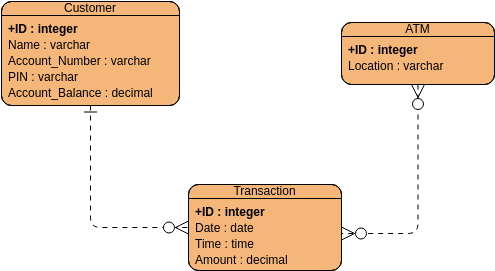
Example 2: ERD Example – ATM (Mastering Transactional Models)
What This Example Teaches
-
Modeling time-sensitive transactions (
Transactionentity with timestamp) -
Handling optional relationships (a card may have no transactions yet)
-
Separating authentication (
Card,PIN) from business logic (Account,Transaction)
My “Aha!” Moment
This example showed me how to model state changes over time. Instead of just storing a balance, the Transaction entity captures every action. This pattern is gold for audit trails, reporting, and debugging.
Pro Tips for This Pattern
✅ Always include created_at/updated_at timestamps on transactional entities
✅ Use weak entities (dashed boxes) for items that can’t exist independently (e.g., TransactionLine)
✅ Document cardinality directly on relationship lines: 1..* means “one or more”
Example 3: Entity Relationship Diagram: Online Bookstore (E-Commerce Patterns)
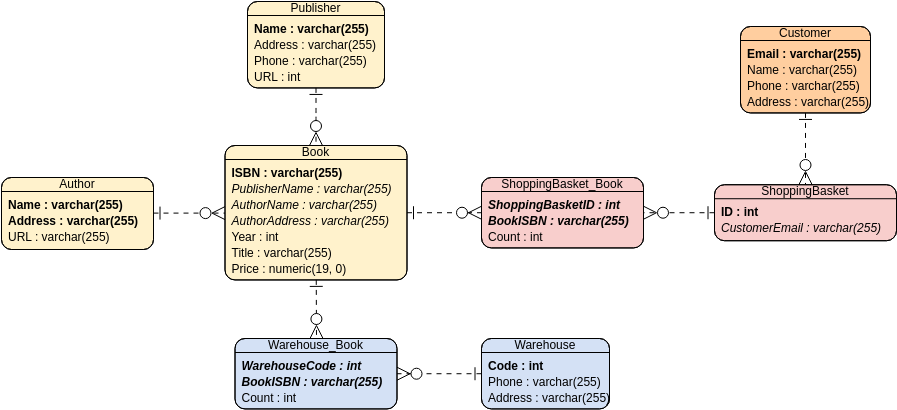
Entity Relationship Diagram: Online Bookstore
What This Example Teaches
-
Many-to-many relationships resolved with junction tables (
OrderItemconnectsOrderandBook) -
Hierarchical categories (
Categorywith self-referencing relationship) -
User-generated content patterns (
Review,Ratinglinked to bothUserandBook)
My “Aha!” Moment
The OrderItem entity was a revelation. I used to try connecting Order directly to Book with a many-to-many line, but this example showed why a junction entity is essential: it lets you store quantity, price-at-time-of-purchase, and other order-specific details.
Pro Tips for This Pattern
✅ Name junction entities clearly (OrderItem, not OrderBook) to reflect their purpose
✅ Store historical values (like unit_price) in junction tables—never rely on current product data
✅ Use recursive relationships sparingly; document the hierarchy depth limit in notes
Example 4: ERD Example: Hospital Management System (Complex Real-World Modeling)

ERD Example: Hospital Management System
What This Example Teaches
-
Modeling complex workflows (
Appointment→Diagnosis→Treatment→Billing) -
Handling role-based relationships (
StaffasDoctor,Nurse, orAdmin) -
Privacy-aware design (separating
Patientdemographic data fromMedicalRecord)
My “Aha!” Moment
This example taught me modular modeling. Instead of one giant Patient entity with 50 fields, related concerns are split into Patient, MedicalRecord, Insurance, and EmergencyContact. This makes the diagram readable and the database maintainable.
Pro Tips for This Pattern
✅ Use color coding or grouping boxes to visually cluster related entities (e.g., all billing entities)
✅ Add notes for business rules that can’t be shown graphically (“A patient must have one primary care physician”)
✅ Model audit requirements early: who accessed a record, when, and why
Example 5: ER Model: Student Score – Ternary Relationship (Advanced Concept)
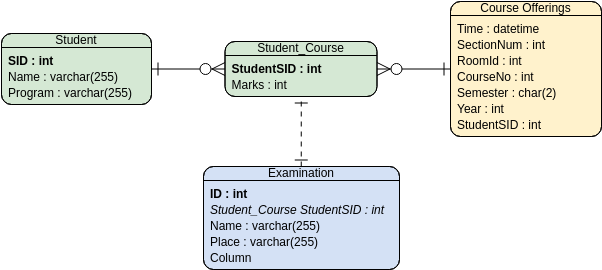
ER Model: Student Score – Ternary Relationship
What This Example Teaches
-
Ternary relationships: when three entities intersect meaningfully (
Student+Course+Semester→Grade) -
When to replace a ternary relationship with an associative entity for clarity
-
Modeling time-bound relationships (a student’s grade in a course depends on the semester)
My “Aha!” Moment
I used to force ternary relationships into multiple binary ones and lose critical context. This example showed that sometimes a three-way relationship is the most honest representation—but often, converting it to an associative entity (Enrollment) with attributes (grade, attendance) is more practical for implementation.
Pro Tips for This Pattern
✅ Ask: “Can this relationship have its own attributes?” If yes, use an associative entity
✅ Document the business rule that requires the ternary relationship in a diagram note
✅ In implementation, the associative entity usually becomes a table with three foreign keys
My Top 5 ERD Tips & Tricks (Earned the Hard Way)
After working through dozens of examples, these are the habits that save me hours:
-
Start conceptual, then refine
Sketch entities and relationships on paper first. Don’t get stuck on attribute details until the structure feels right. -
Name relationships as verbs
Customer places Orderis clearer than just a line. Future-you (and your teammates) will thank you. -
Use the example gallery as a cheat sheet
Visual Paradigm’s template library isn’t just inspiration—it’s a pattern library. Fork a similar example and adapt it. -
Validate cardinality with real scenarios
Ask: “Can this happen?” (e.g., “Can an order exist without a customer?” If yes, adjust cardinality). -
Add a “Legend” or “Notes” entity
For complex diagrams, include a floating note box explaining assumptions, business rules, or version info.

Conceptual ERD
Designed by @Gugu Dev
New Conclusion: Your Turn to Learn by Doing
Database design doesn’t have to be intimidating. By studying real-world examples—like the five we explored—you internalize patterns that textbooks can’t convey. Start with the Simple School ERD to build confidence, then progressively tackle more complex models like the Hospital System or Ternary Relationship examples.
My advice? Open Visual Paradigm’s Online ERD Tool, fork one of these examples, and change one thing. Add an attribute. Modify a relationship. Break it, then fix it. That hands-on experimentation is where true mastery happens.
The best ERD designers aren’t those who memorize notation—they’re the ones who’ve reverse-engineered enough real systems to recognize patterns instinctively. Your journey starts with a single example. Which one will you try first?
Reference List
-
Visual Paradigm Online ERD Tool: Comprehensive online platform for creating conceptual, logical, and physical ER diagrams with drag-and-drop simplicity.
-
Simple School and Student ERD: Beginner-friendly example demonstrating basic entities, attributes, and one-to-many relationships in an educational context.
-
ERD Example – ATM: Transactional system model showcasing time-sensitive entities, optional relationships, and authentication patterns.
-
Entity Relationship Diagram: Online Bookstore: E-commerce reference featuring many-to-many resolution via junction tables, hierarchical categories, and user-generated content modeling.
-
ERD Example: Hospital Management System: Complex real-world workflow example illustrating modular design, role-based relationships, and privacy-aware data separation.
-
ER Model: Student Score – Ternary Relationship: Advanced modeling example demonstrating when and how to represent three-way entity relationships effectively.

 English
 Arabic
 Chinese (Simplified)
 Dutch
Dutch French
 German
 Italian
 Japanese
 Korean
 Portuguese
 Russian
 Spanish