


Introduction
In the fast-paced world of modern software development, documentation often struggles to keep up with code. Traditional visual modeling tools, while powerful for high-level system design, can create friction when developers need to quickly document evolving architectures, data flows, or component relationships. This is where Diagram-as-Code (DaC) emerges as a game-changing paradigm.
Visual Paradigm VPasCode represents the next evolution in technical documentation—a unified platform that brings the precision of text-based workflows to diagram creation. By allowing developers to define system structures through code notation rather than manual drag-and-drop interactions, VPasCode bridges the gap between source code and visual documentation, enabling teams to maintain living, version-controlled architectural diagrams that evolve alongside their applications.
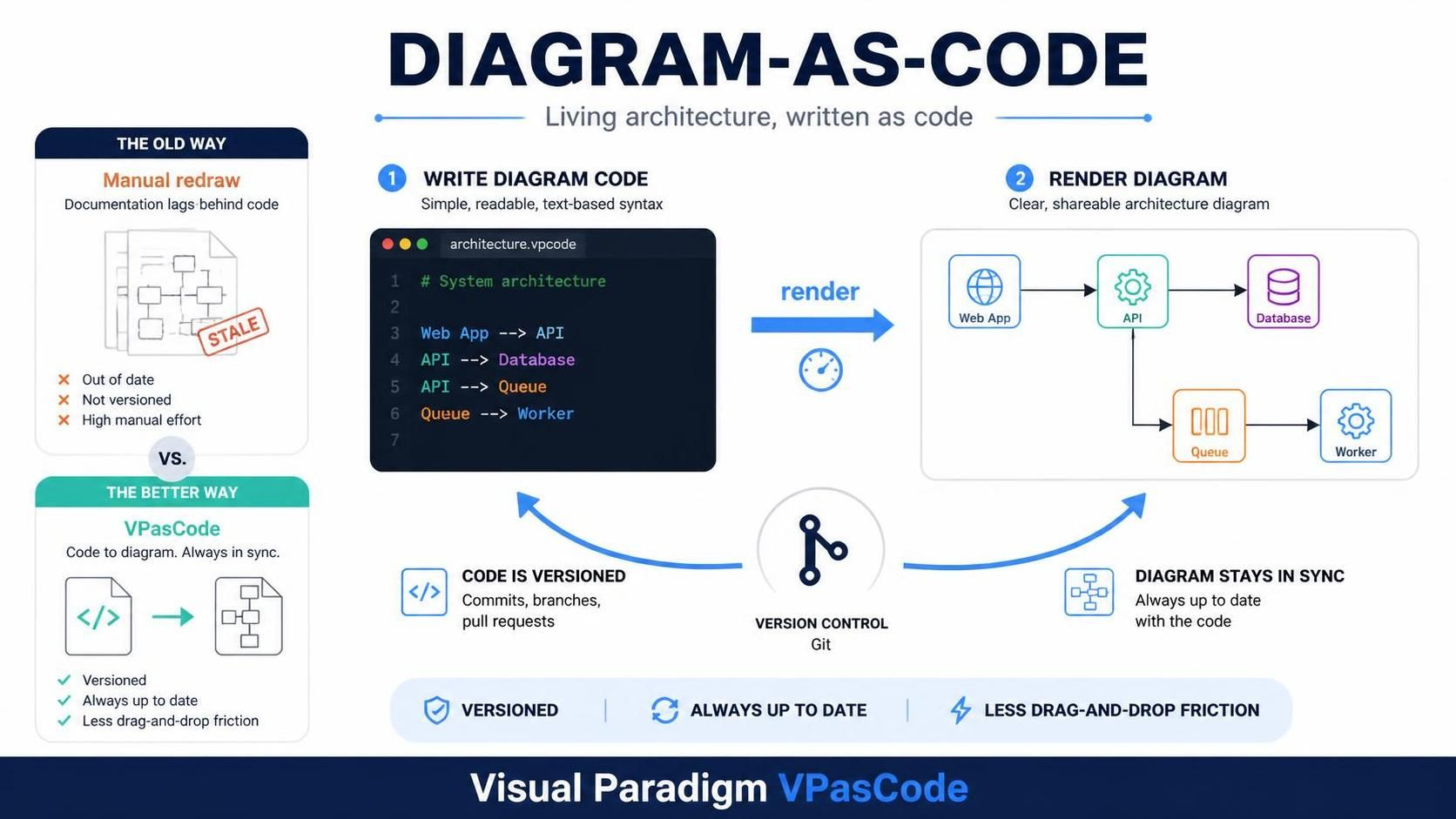
This comprehensive guide explores the core concepts, practical applications, and strategic advantages of adopting VPasCode in your development workflow. Whether you’re a developer looking to streamline documentation, a solution architect managing complex system designs, or an engineering team lead seeking better collaboration tools, this guide will equip you with the knowledge to leverage VPasCode effectively.
Key Concepts of Diagram-as-Code
What is Diagram-as-Code?
Diagram-as-Code is a methodology where diagrams are defined using text-based syntax rather than created through graphical interfaces. Similar to how Infrastructure-as-Code (IaC) revolutionized deployment processes, DaC transforms diagram creation into a declarative, version-controllable, and automatable process.
Core Principles:
-
Declarative Syntax: Define what the diagram should show, not how to draw it
-
Version Control Friendly: Text files integrate seamlessly with Git and other VCS
-
Automated Rendering: Layout engines handle spatial distribution automatically
-
Reproducibility: Same code always produces identical diagrams
-
Collaboration Ready: Code reviews apply to diagram changes
The VPasCode Philosophy
VPasCode operates on a simple yet powerful premise: developers work best in text editors. Rather than forcing teams to switch contexts between IDEs and visual modeling tools, VPasCode meets developers where they already are—in their code editors and documentation pipelines.
Key Advantages:
-
Speed and Iteration: Changes to diagrams happen at the speed of typing, not dragging
-
Consistency Enforcement: Text-driven scripts ensure uniform styling across all diagrams
-
Automated Layout: No manual line routing or box alignment required
-
Integration Ready: Fits naturally into CI/CD pipelines and documentation generators
The Unified Engine Ecosystem
One of VPasCode’s most significant innovations is its ability to unify multiple diagramming syntaxes under a single platform. Instead of managing separate tools for different diagram types, VPasCode provides a centralized workspace that auto-detects and renders multiple formats simultaneously.
Supported Syntax Engines
1. PlantUML
Best for: Enterprise architecture, UML diagrams, rich styling
PlantUML has long been the gold standard for creating detailed UML diagrams through text. VPasCode enhances this experience with:
-
Instant rendering without local Java dependencies
-
High-fidelity output matching Visual Paradigm’s enterprise styling
-
Support for all UML diagram types (class, sequence, activity, use case, etc.)
Example: Class Diagram
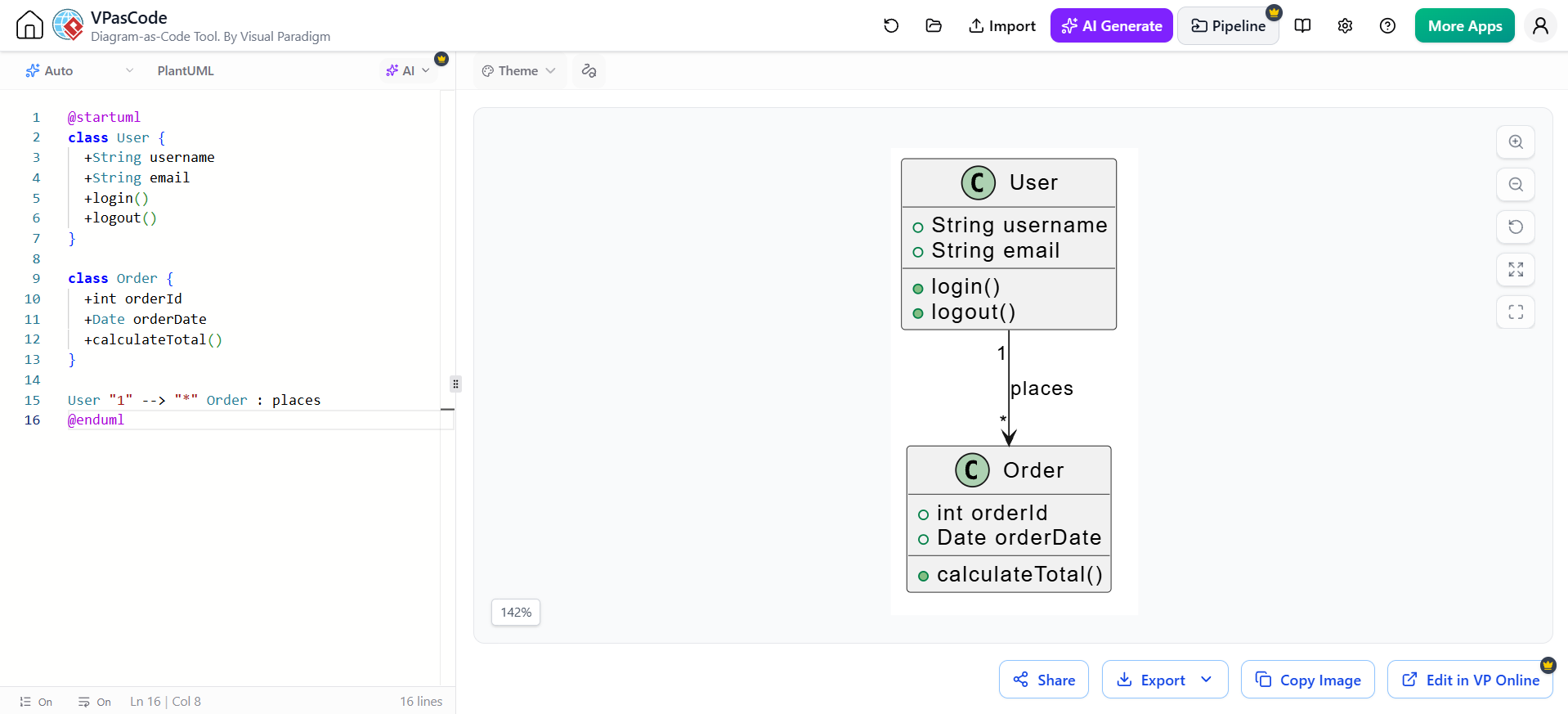
@startuml
class User {
  +String username
  +String email
  +login()
  +logout()
}

class Order {
  +int orderId
  +Date orderDate
  +calculateTotal()
}

User "1" --> "*" Order : places
@enduml
2. Mermaid.js
Best for: Agile documentation, markdown integration, web-friendly diagrams
Mermaid has gained massive adoption due to its simplicity and native support in platforms like GitHub, GitLab, and Notion. VPasCode extends Mermaid’s capabilities with:
-
Enhanced rendering quality
-
Additional diagram types beyond standard Mermaid
-
Seamless export options
Example: Flowchart
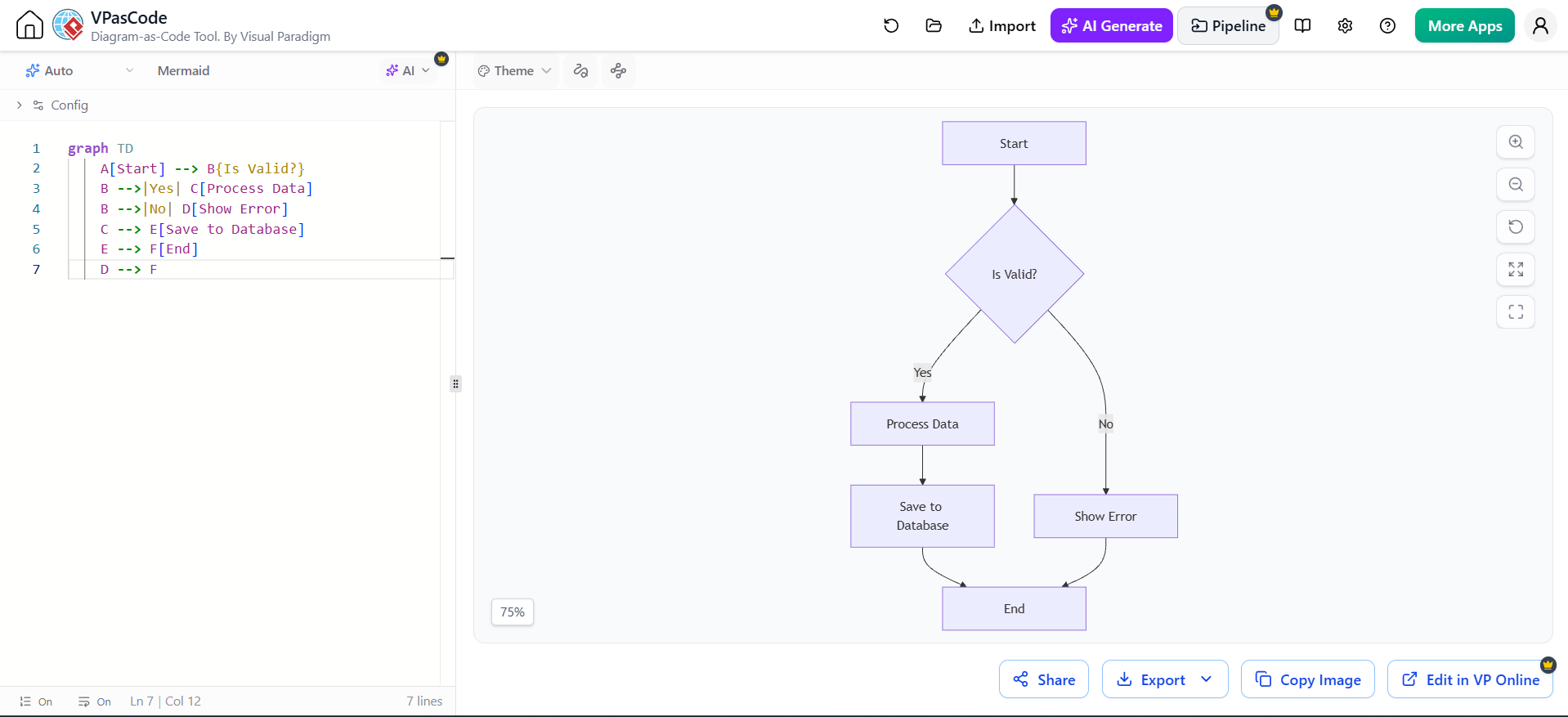
graph TD
    A[Start] --> B{Is Valid?}
    B -->|Yes| C[Process Data]
    B -->|No| D[Show Error]
    C --> E[Save to Database]
    E --> F[End]
    D --> F
3. Graphviz (DOT)
Best for: Network topologies, dependency graphs, complex hierarchical structures
Graphviz excels at automatic layout of complex node-link diagrams. VPasCode leverages Graphviz for:
-
Advanced network visualization
-
Dependency mapping
-
Pipeline topology diagrams
Example: System Architecture
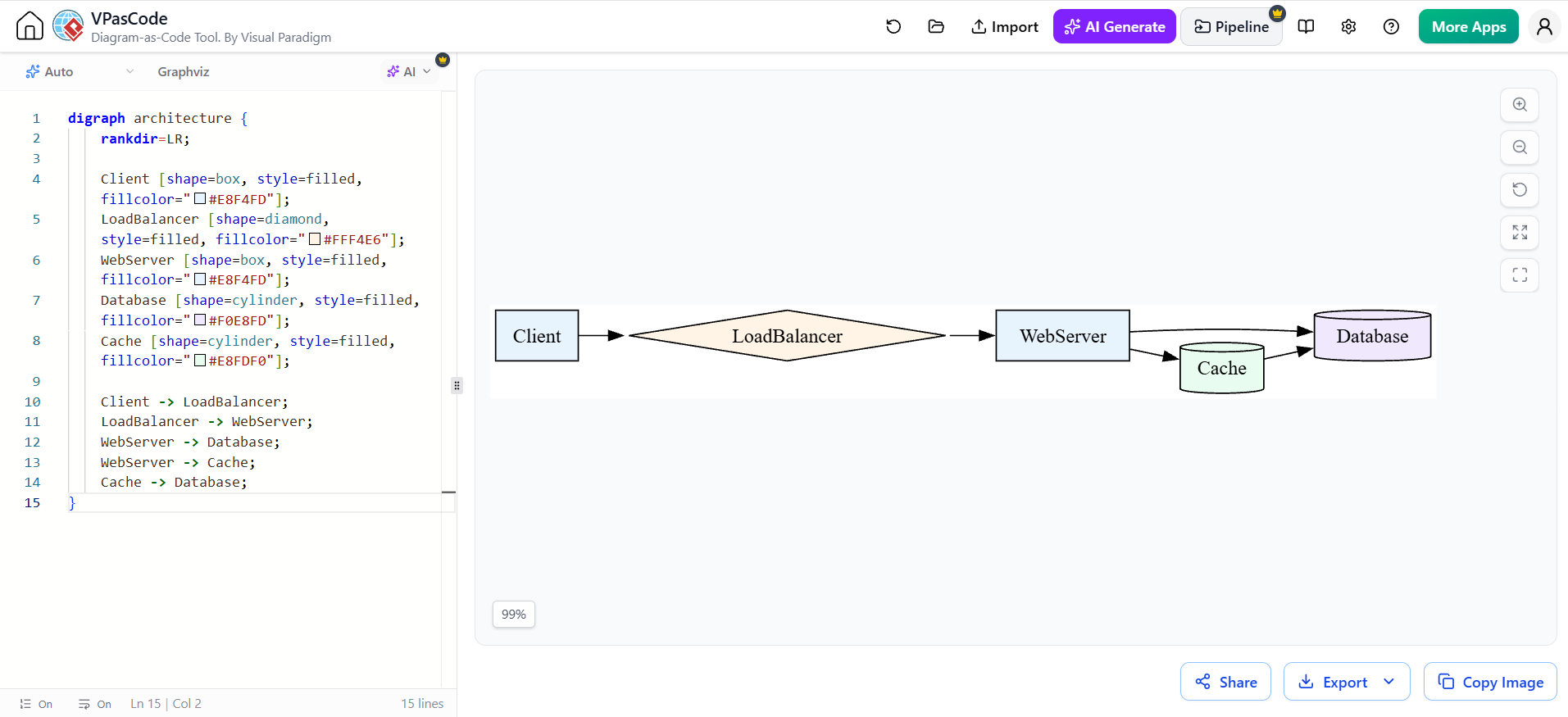
digraph architecture {
    rankdir=LR;

    Client [shape=box, style=filled, fillcolor="#E8F4FD"];
    LoadBalancer [shape=diamond, style=filled, fillcolor="#FFF4E6"];
    WebServer [shape=box, style=filled, fillcolor="#E8F4FD"];
    Database [shape=cylinder, style=filled, fillcolor="#F0E8FD"];
    Cache [shape=cylinder, style=filled, fillcolor="#E8FDF0"];

    Client -> LoadBalancer;
    LoadBalancer -> WebServer;
    WebServer -> Database;
    WebServer -> Cache;
    Cache -> Database;
}
The Dual-Panel Advantage
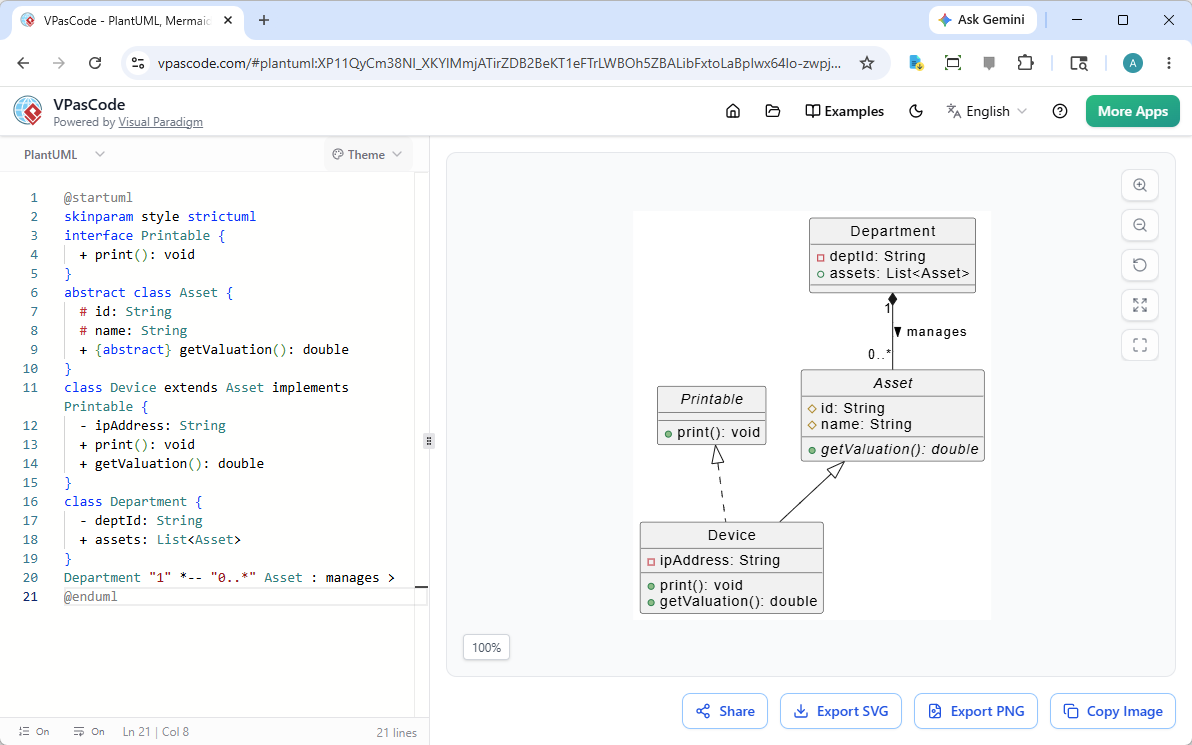
VPasCode’s interface features a dual-panel editing canvas that provides:
-
Left Panel: Code editor with syntax highlighting and auto-completion
-
Right Panel: Real-time rendered diagram preview
-
Auto-Detection: Automatically identifies syntax type (PlantUML, Mermaid, or Graphviz)
-
Instant Feedback: See changes reflected immediately as you type
Practical Applications and Use Cases
1. API Documentation
Maintain living API documentation that stays synchronized with your codebase.
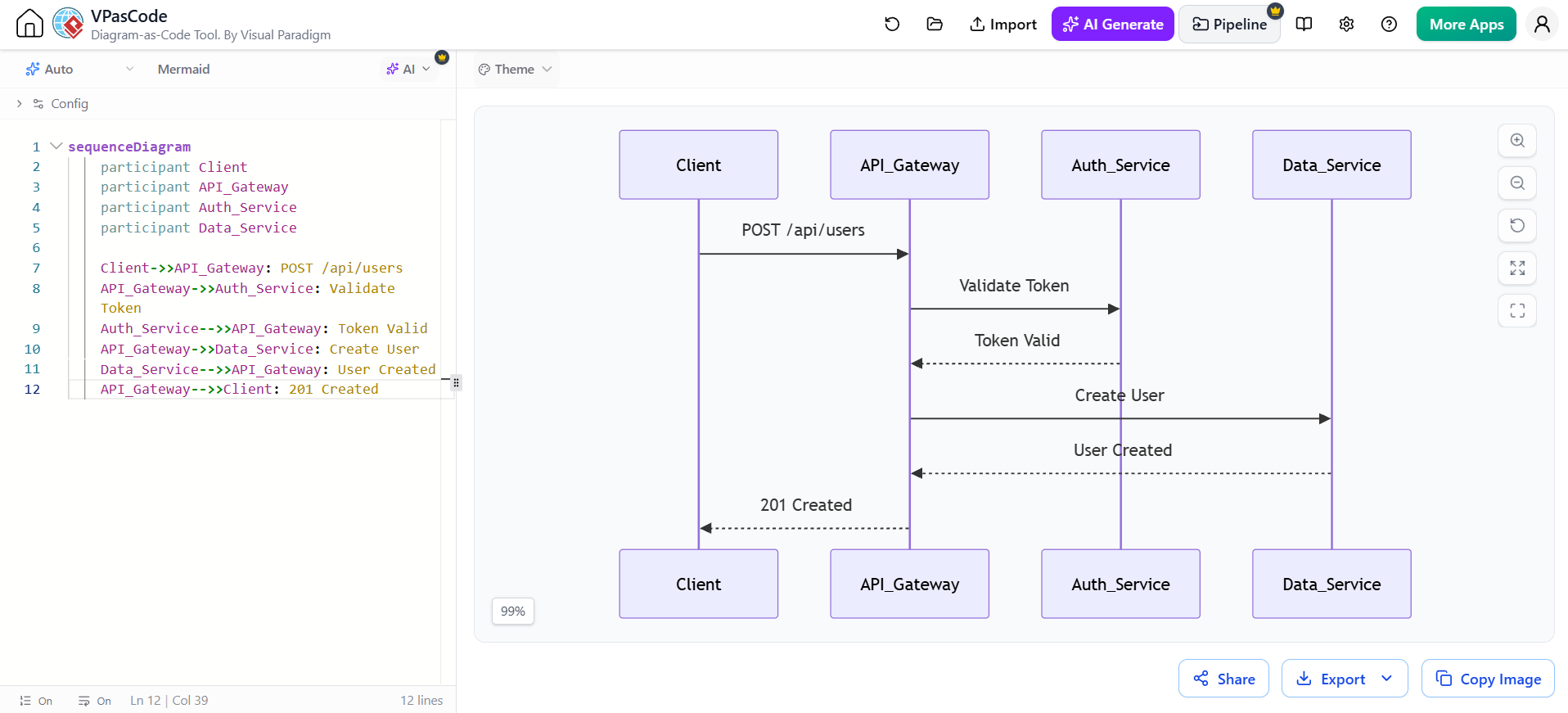
sequenceDiagram
    participant Client
    participant API_Gateway
    participant Auth_Service
    participant Data_Service

    Client->>API_Gateway: POST /api/users
    API_Gateway->>Auth_Service: Validate Token
    Auth_Service-->>API_Gateway: Token Valid
    API_Gateway->>Data_Service: Create User
    Data_Service-->>API_Gateway: User Created
    API_Gateway-->>Client: 201 Created
2. Microservices Architecture
Document service relationships and communication patterns.
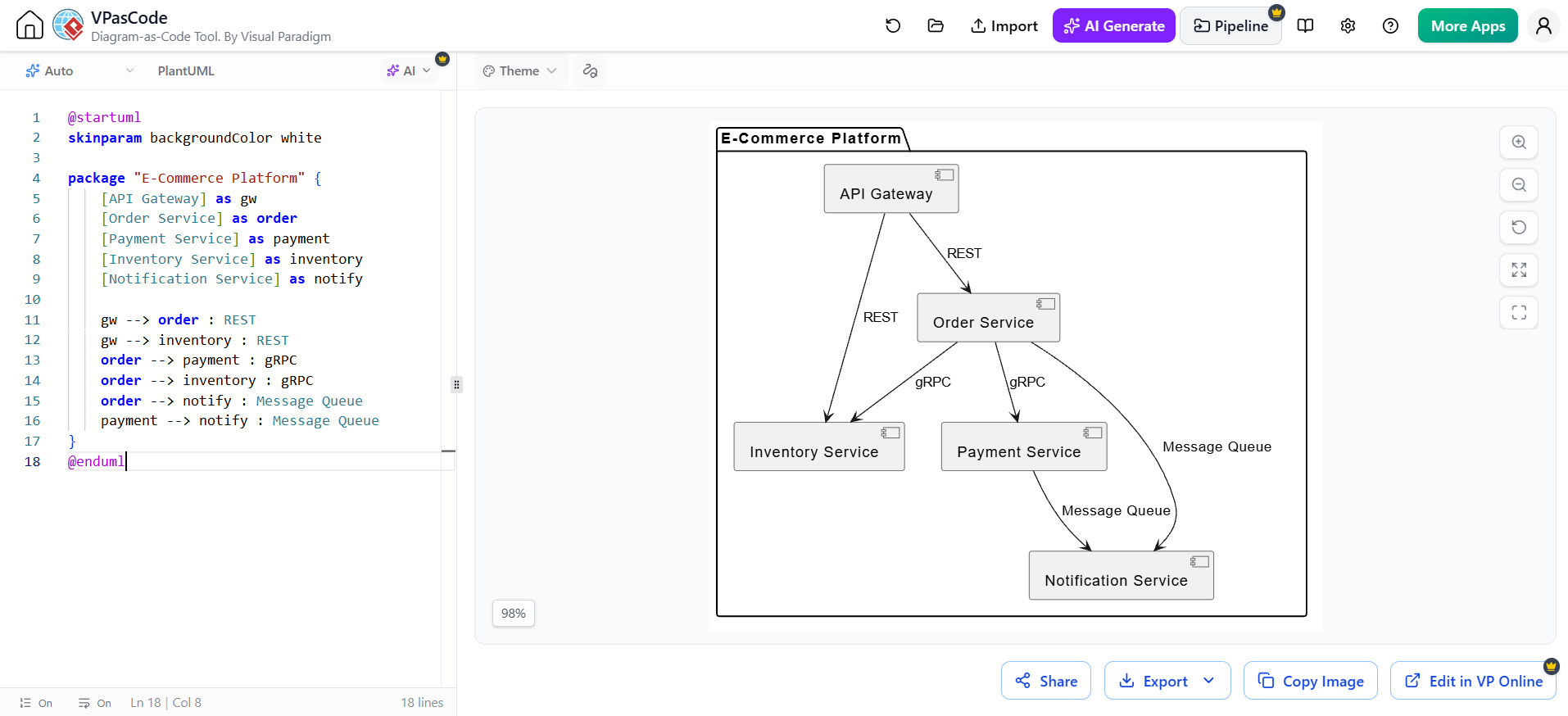
@startuml
skinparam backgroundColor white

package "E-Commerce Platform" {
    [API Gateway] as gw
    [Order Service] as order
    [Payment Service] as payment
    [Inventory Service] as inventory
    [Notification Service] as notify

    gw --> order : REST
    gw --> inventory : REST
    order --> payment : gRPC
    order --> inventory : gRPC
    order --> notify : Message Queue
    payment --> notify : Message Queue
}
@enduml
3. Database Schema Design
Visualize entity relationships before implementation.
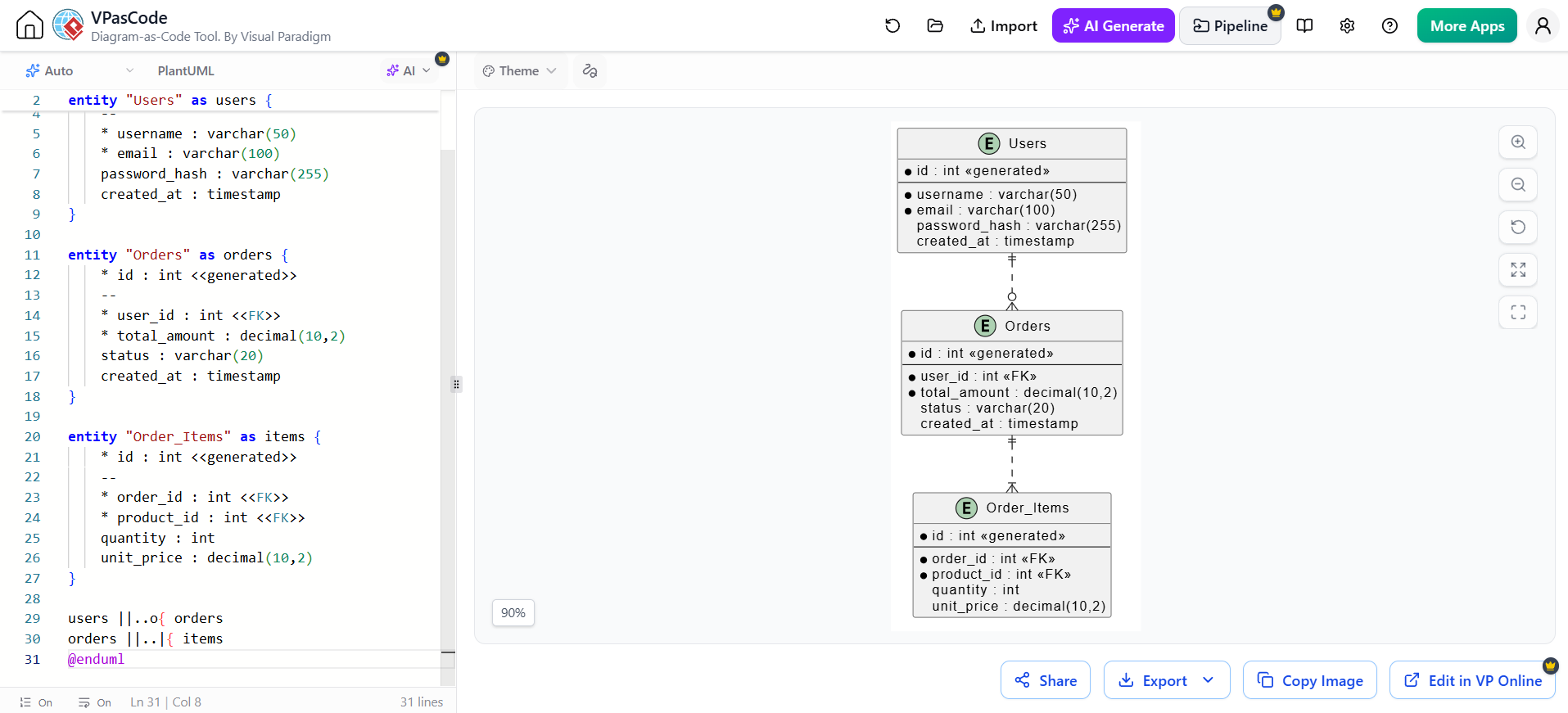
@startuml
entity "Users" as users {
    * id : int <<generated>>
    --
    * username : varchar(50)
    * email : varchar(100)
    password_hash : varchar(255)
    created_at : timestamp
}

entity "Orders" as orders {
    * id : int <<generated>>
    --
    * user_id : int <<FK>>
    * total_amount : decimal(10,2)
    status : varchar(20)
    created_at : timestamp
}

entity "Order_Items" as items {
    * id : int <<generated>>
    --
    * order_id : int <<FK>>
    * product_id : int <<FK>>
    quantity : int
    unit_price : decimal(10,2)
}

users ||..o{ orders
orders ||..|{ items
@enduml
4. CI/CD Pipeline Visualization
Map out deployment workflows and automation stages.
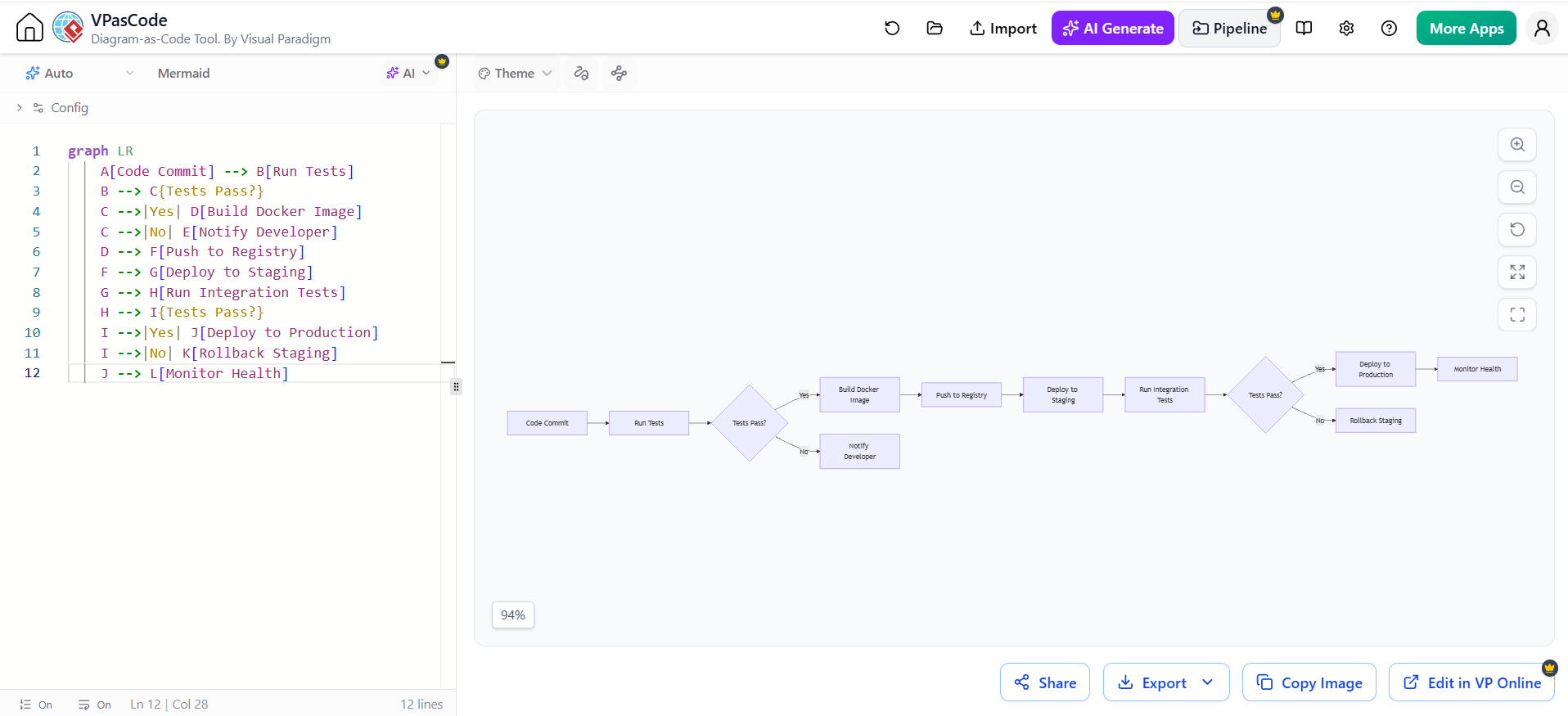
graph LR
    A[Code Commit] --> B[Run Tests]
    B --> C{Tests Pass?}
    C -->|Yes| D[Build Docker Image]
    C -->|No| E[Notify Developer]
    D --> F[Push to Registry]
    F --> G[Deploy to Staging]
    G --> H[Run Integration Tests]
    H --> I{Tests Pass?}
    I -->|Yes| J[Deploy to Production]
    I -->|No| K[Rollback Staging]
    J --> L[Monitor Health]
5. System State Machines
Document application state transitions clearly.
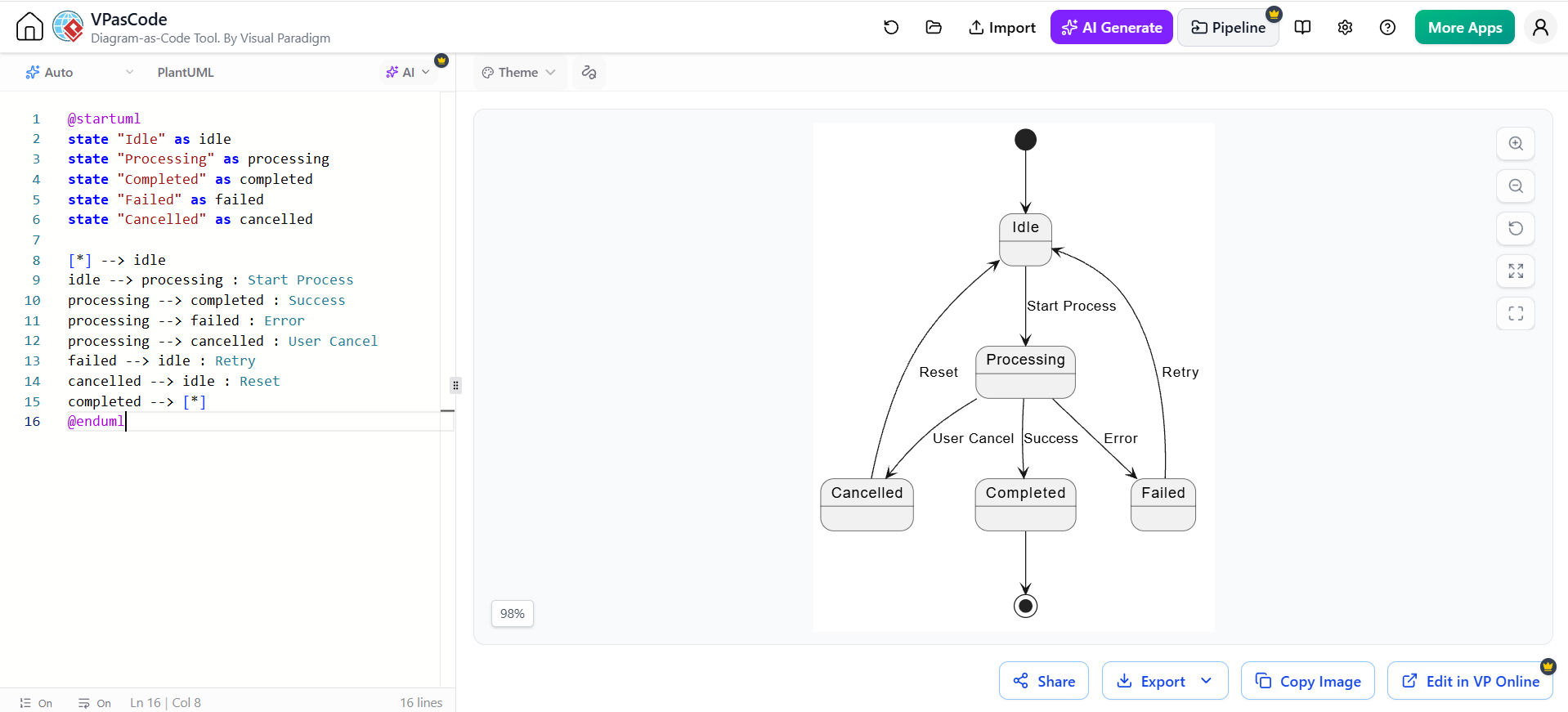
@startuml
state "Idle" as idle
state "Processing" as processing
state "Completed" as completed
state "Failed" as failed
state "Cancelled" as cancelled

[*] --> idle
idle --> processing : Start Process
processing --> completed : Success
processing --> failed : Error
processing --> cancelled : User Cancel
failed --> idle : Retry
cancelled --> idle : Reset
completed --> [*]
@enduml
Best Practices for VPasCode Adoption
1. Establish Naming Conventions
Create consistent naming standards for diagram files:
-
architecture-overview.puml– High-level system architecture -
api-auth-flow.mmd– Specific API flow in Mermaid -
database-schema.dot– Database structure in Graphviz
2. Integrate with Version Control
Store diagram source files alongside your code:
project-root/
├── docs/
│   ├── diagrams/
│   │   ├── architecture.puml
│   │   ├── api-flows/
│   │   │   ├── auth-flow.mmd
│   │   │   └── payment-flow.mmd
│   │   └── database/
│   │       └── schema.puml
│   └── README.md
├── src/
└── tests/
3. Leverage URL Sharing
VPasCode generates shareable URLs for each diagram, enabling:
-
Quick reviews without file transfers
-
Embedded diagrams in documentation
-
Real-time collaboration links
4. Export for Presentations
Use VPasCode’s high-resolution export capabilities:
-
SVG: For scalable web embedding
-
PNG: For presentations and documents
-
PDF: For formal documentation packages
5. Automate Diagram Generation
Integrate VPasCode into your CI/CD pipeline:
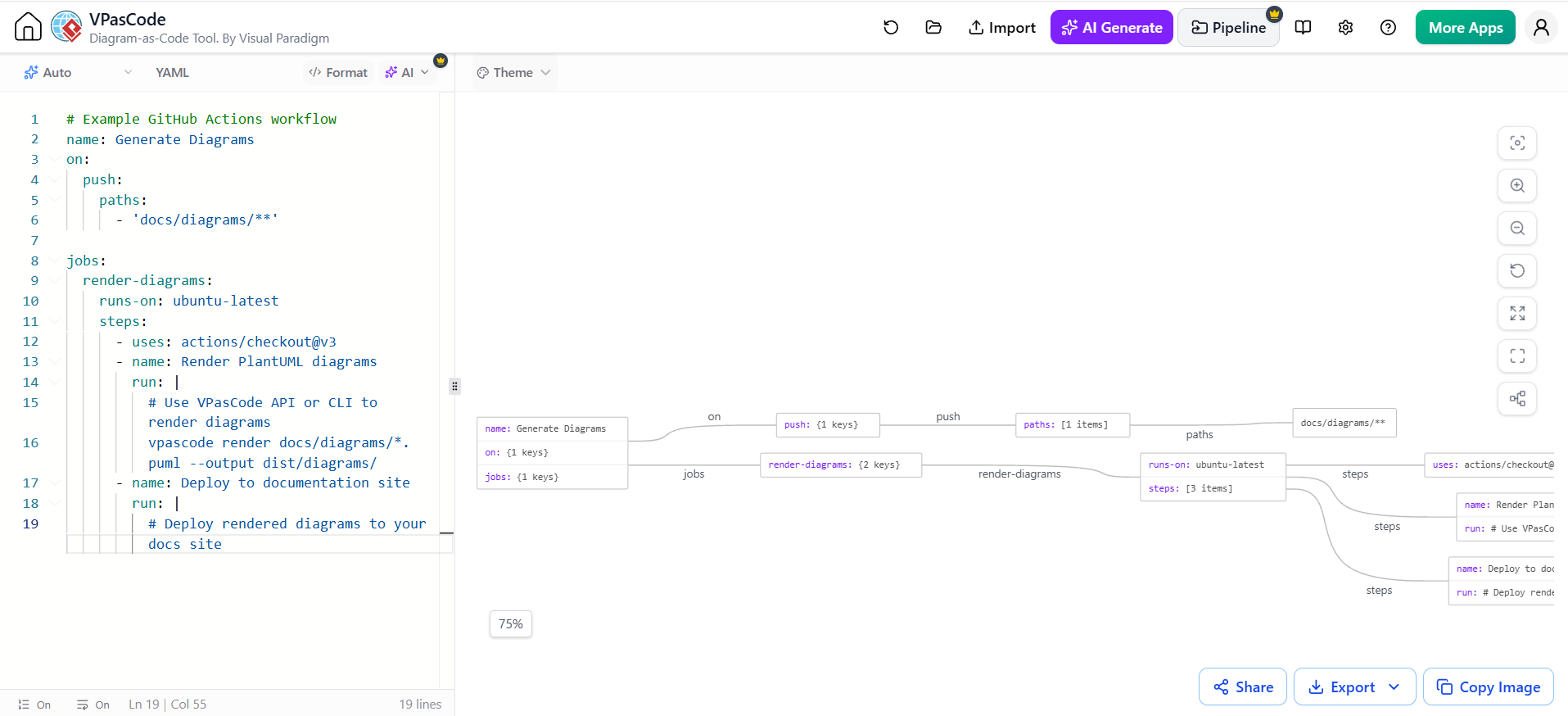
# Example GitHub Actions workflow
name: Generate Diagrams
on:
  push:
    paths:
      - 'docs/diagrams/**'

jobs:
  render-diagrams:
    runs-on: ubuntu-latest
    steps:
      - uses: actions/checkout@v3
      - name: Render PlantUML diagrams
        run: |
          # Use VPasCode API or CLI to render diagrams
          vpascode render docs/diagrams/*.puml --output dist/diagrams/
      - name: Deploy to documentation site
        run: |
          # Deploy rendered diagrams to your docs site
Collaboration and Team Workflows
Code Review for Diagrams
Treat diagram changes like code changes:
-
Create feature branches for diagram updates
-
Submit pull requests with diagram source files
-
Review syntax and accuracy in PR comments
-
Merge approved changes to main branch
Documentation as Living Artifacts
Unlike static images, VPasCode diagrams remain editable and version-controlled:
-
Update diagrams when architecture changes
-
Track who made changes and why
-
Maintain historical versions for reference
Cross-Team Alignment
Use VPasCode to ensure consistency across teams:
-
Share common diagram templates
-
Establish organization-wide styling standards
-
Create reusable component libraries
Advanced Features and Tips
Custom Styling
Both PlantUML and Mermaid support extensive customization:
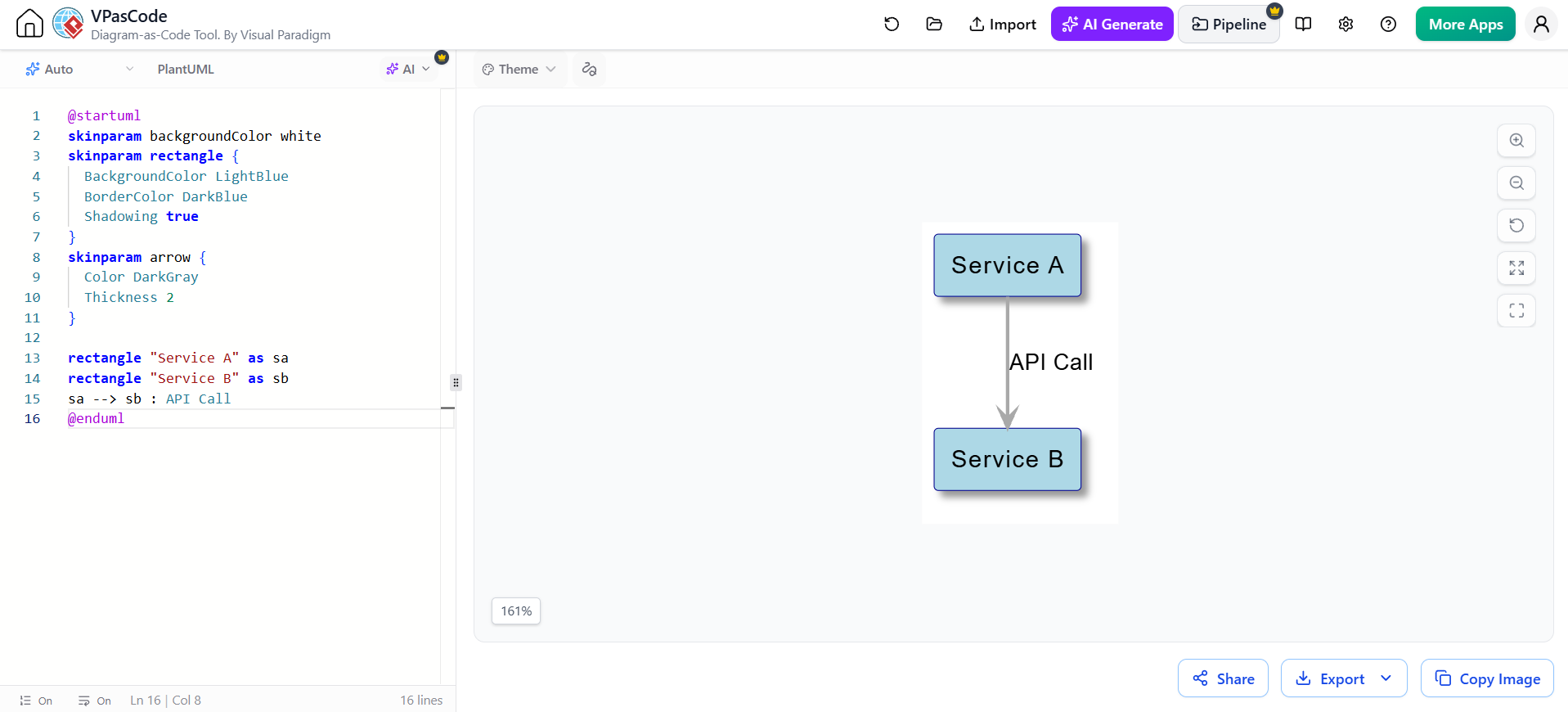
@startuml
skinparam backgroundColor white
skinparam rectangle {
  BackgroundColor LightBlue
  BorderColor DarkBlue
  Shadowing true
}
skinparam arrow {
  Color DarkGray
  Thickness 2
}

rectangle "Service A" as sa
rectangle "Service B" as sb
sa --> sb : API Call
@enduml
Conditional Logic in Diagrams
Some engines support dynamic content generation:
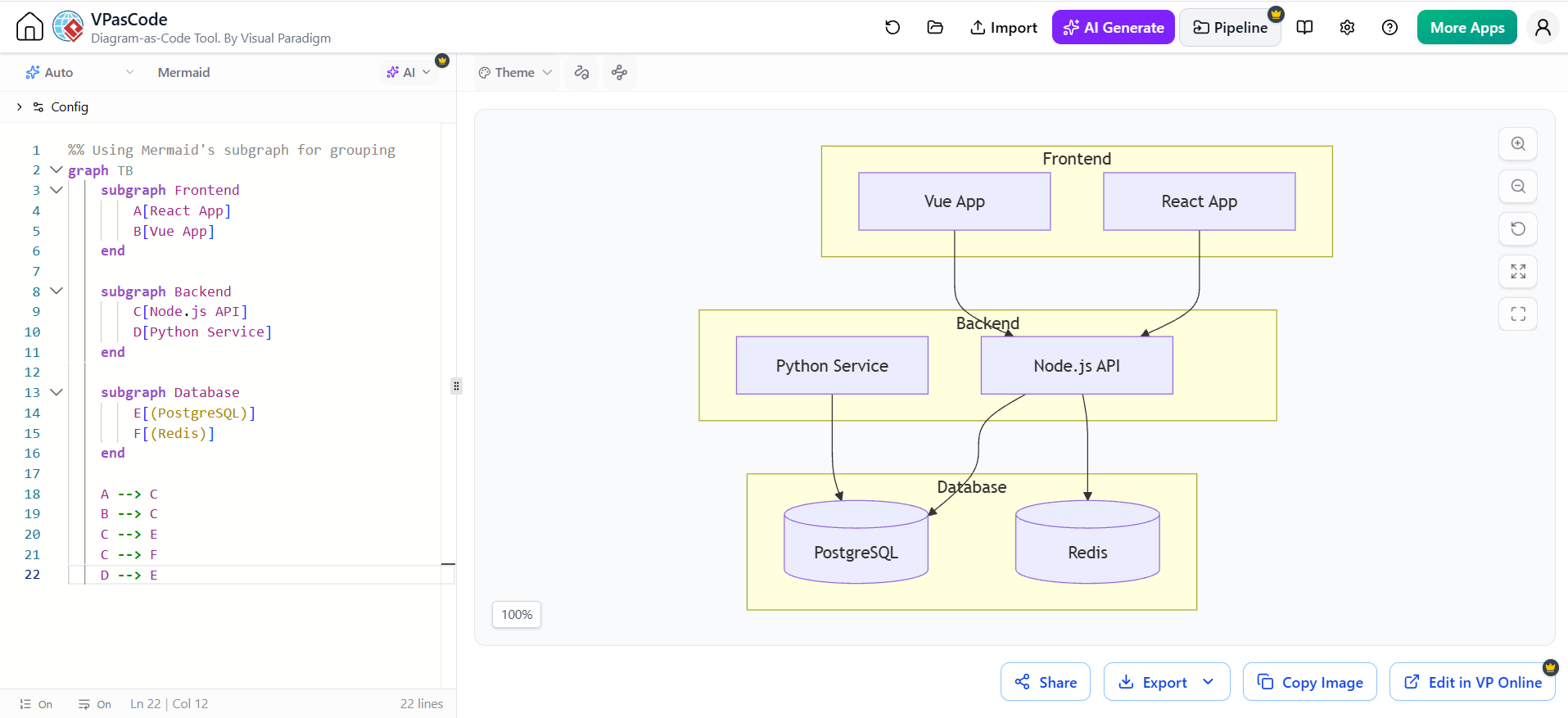
%% Using Mermaid's subgraph for grouping
graph TB
    subgraph Frontend
        A[React App]
        B[Vue App]
    end

    subgraph Backend
        C[Node.js API]
        D[Python Service]
    end

    subgraph Database
        E[(PostgreSQL)]
        F[(Redis)]
    end

    A --> C
    B --> C
    C --> E
    C --> F
    D --> E
Embedding in Documentation
VPasCode diagrams integrate seamlessly with popular documentation platforms:
Markdown Integration:
## System Architecture

```mermaid
graph TD
    A[Client] --> B[Load Balancer]
    B --> C[Web Server]
**HTML Embedding:**
```html
<div class="diagram-container">
  <img src="https://vpascode.com/render/diagram-id.svg"
       alt="System Architecture" />
</div>
Migration Strategies
From Visual Tools to VPasCode
If your team currently uses traditional visual modeling tools:
-
Start Small: Begin with new diagrams rather than converting existing ones
-
Identify Pain Points: Focus on diagrams that change frequently
-
Provide Templates: Create starter templates for common diagram types
-
Training Sessions: Conduct workshops on PlantUML/Mermaid syntax
-
Gradual Transition: Allow both approaches during transition period
Hybrid Approach
Many teams benefit from using both visual and code-based approaches:
-
Visual Paradigm Desktop: For complex enterprise modeling and deep analysis
-
VPasCode: For rapid documentation, iteration, and developer-facing diagrams
Conclusion
Visual Paradigm VPasCode represents a significant evolution in how technical teams create, maintain, and share architectural documentation. By embracing the Diagram-as-Code paradigm, organizations can achieve:
-
Faster Documentation: Create diagrams at the speed of thought
-
Better Version Control: Track changes with the same rigor as code
-
Improved Consistency: Enforce styling and structural standards automatically
-
Enhanced Collaboration: Enable code-review-style feedback on diagrams
-
Seamless Integration: Fit naturally into existing development workflows
The unified engine ecosystem—supporting PlantUML, Mermaid.js, and Graphviz—ensures that teams can leverage the best tool for each scenario while maintaining a single, cohesive workspace. Whether you’re documenting a simple API flow or mapping a complex microservices architecture, VPasCode provides the flexibility and power needed to keep your documentation alive and relevant.
As software systems continue to grow in complexity, the ability to maintain accurate, up-to-date visual documentation becomes increasingly critical. VPasCode empowers developers, architects, and engineering teams to meet this challenge head-on, transforming diagram creation from a burdensome afterthought into an integral part of the development process.
Ready to get started? Visit VPasCode to begin your Diagram-as-Code journey and experience the future of technical documentation today.
Remember: VPasCode is pronounced “V-P-as-code” (Visual Paradigm as Code). Embrace the text-driven approach, and watch your documentation productivity soar!

 English
 Arabic
 Chinese (Simplified)
 Dutch
Dutch French
 German
 Italian
 Japanese
 Korean
 Portuguese
 Russian
 Spanish