


Introduction: The AI Revolution in Software Architecture
In today’s fast-paced digital landscape, software development teams face mounting pressure to deliver complex, scalable systems faster than ever before. Traditional modeling approaches, while rigorous, often create bottlenecks: steep learning curves, time-consuming diagram creation, and the constant challenge of keeping documentation synchronized with evolving designs. These friction points can delay projects, increase costs, and limit collaboration between technical and non-technical stakeholders.
Enter artificial intelligence. Visual Paradigm has pioneered a transformative approach by embedding advanced AI capabilities directly into its industry-leading UML modeling ecosystem. This case study explores how organizations across industries are leveraging Visual Paradigm’s AI-powered tools to convert natural language requirements into professional, standards-compliant diagrams—dramatically reducing modeling time, improving design quality, and democratizing access to sophisticated software architecture practices.
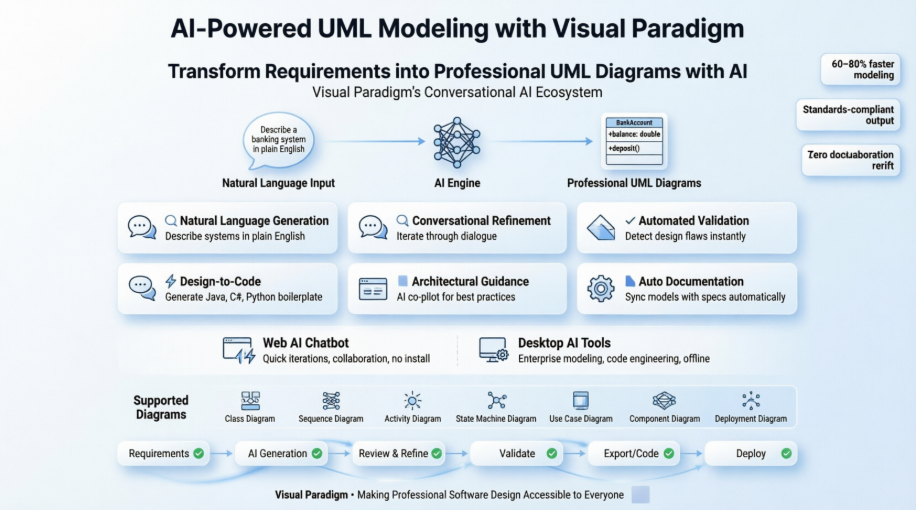
Through real-world workflows, practical examples, and measurable outcomes, we examine how Visual Paradigm’s dual-channel AI ecosystem—the web-based AI Chatbot for rapid collaboration and the integrated Desktop AI tools for enterprise-grade modeling—is reshaping the future of system design. Whether you’re a startup prototyping a minimum viable product or an enterprise architect orchestrating microservices at scale, this case study demonstrates how conversational AI can amplify human expertise and accelerate innovation.
The Challenge: Bridging the Gap Between Requirements and Design
Traditional Modeling Pain Points
Software teams commonly encounter these obstacles when adopting UML:
-
Steep Learning Curve: Mastering UML notation and tooling requires significant training
-
Time-Intensive Creation: Manually placing symbols, defining relationships, and validating syntax consumes valuable development time
-
Documentation Drift: Visual models and written specifications frequently fall out of sync
-
Collaboration Barriers: Non-technical stakeholders struggle to engage with complex diagrams
-
Design Inconsistencies: Human error can introduce logical flaws, circular dependencies, or standards violations
The AI Opportunity
Visual Paradigm recognized that natural language processing and machine learning could address these challenges by:
-
Automating repetitive diagram construction tasks
-
Providing real-time validation and architectural guidance
-
Enabling conversational refinement through intuitive interfaces
-
Synchronizing models with documentation and code automatically
The result: an AI-enhanced modeling ecosystem that preserves UML’s rigor while dramatically improving accessibility and efficiency.
The Solution: Visual Paradigm’s AI-Powered Modeling Ecosystem
Dual-Channel AI Architecture
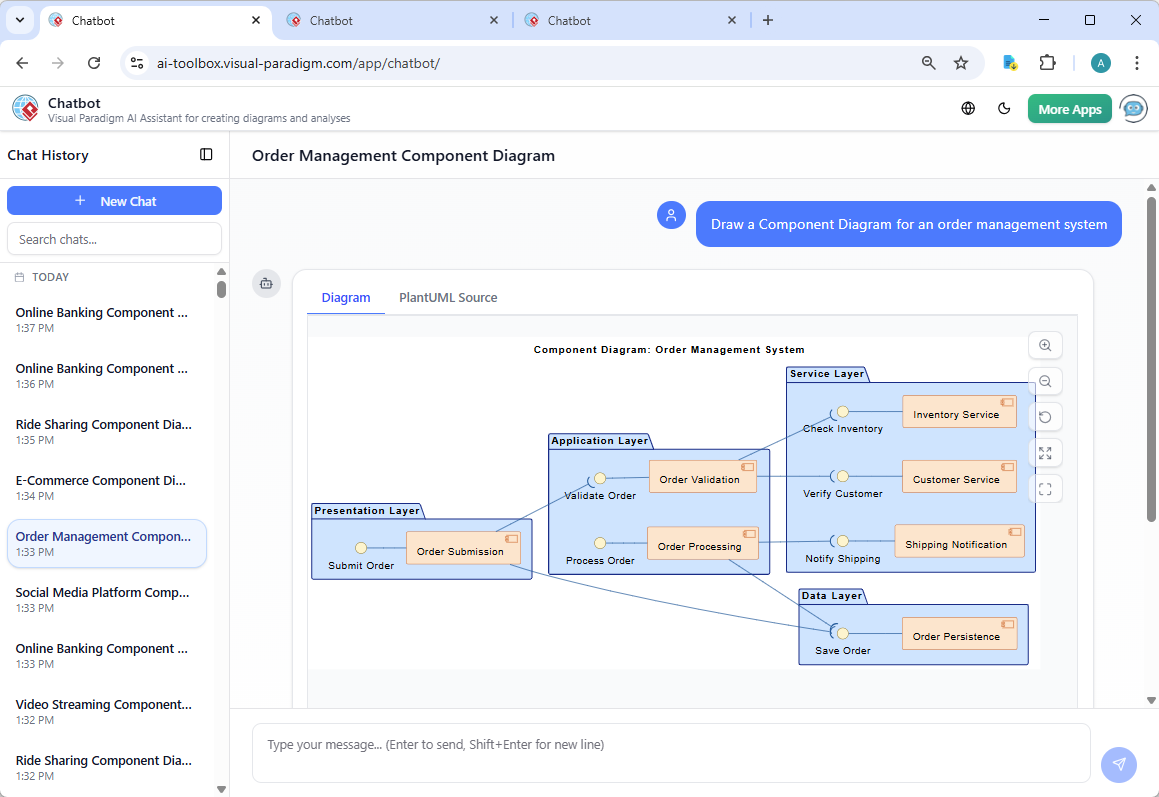
Visual Paradigm delivers AI capabilities through two complementary channels designed for different workflow needs:
AI Chatbot: Rapid Iteration & Collaboration
-
Best For: Brainstorming sessions, quick prototypes, cross-functional reviews
-
Key Features:
-
Browser-based access with zero installation
-
Natural language conversation interface
-
Real-time collaborative editing via shareable links
-
Instant generation of UML, BPMN, and ArchiMate diagrams
-
Export to PNG, SVG, PlantUML, and JSON formats
-
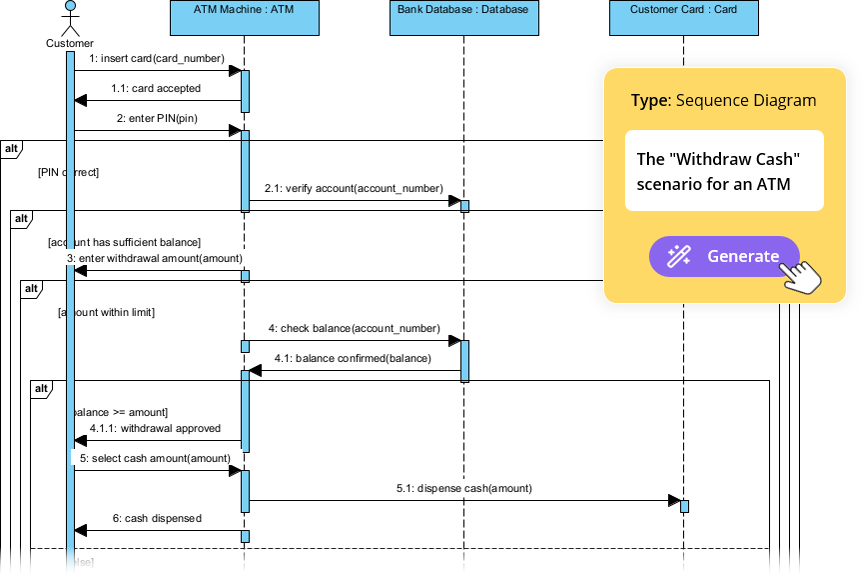
Visual Paradigm Desktop AI: Enterprise-Grade Modeling
-
Best For: Complex architectures, code engineering, regulated industries
-
Key Features:
-
Full-featured offline modeling environment
-
Advanced validation, analysis, and reporting
-
Round-trip engineering with code generation
-
Team collaboration with version control
-
Integration with CI/CD pipelines and project management tools
-
Core AI Capabilities in Action
1. Natural Language to Professional Diagrams
Users describe system requirements in plain English, and the AI generates standards-compliant UML diagrams instantly:
“Create a banking system with Account and Customer classes, where customers can have multiple accounts and perform transactions.”
The AI interprets intent, identifies entities, establishes relationships, and applies appropriate UML notation—eliminating manual symbol placement and syntax memorization.
2. Conversational Refinement
The AI Chatbot enables iterative design through natural dialogue:
-
“Add a Reservation class that links to Member and Book”
-
“Extract a common superclass from these three classes”
-
“Add error handling to this workflow”
-
“Make this relationship many-to-many”
Diagrams update in real-time, allowing rapid exploration of design alternatives.
3. Automated Validation & Error Detection
The AI proactively identifies design issues:
| Diagram Type | AI Detection Capabilities |
|---|---|
| State Machine | Unreachable states, deadlocks, missing transitions |
| Class Diagram | Inconsistent multiplicities, circular dependencies, pattern violations |
| Activity Diagram | Disconnected nodes, infinite loops, workflow bottlenecks |
| Sequence Diagram | Missing return messages, improper message ordering |
Actionable recommendations help teams improve model quality and adherence to UML standards.
4. Design-to-Code Automation
After finalizing diagrams, Visual Paradigm generates boilerplate code in multiple languages:
-
Java: Complete class definitions with attributes, methods, and relationships
-
C#: Property implementations and interface contracts
-
Python: Class structures with type hints and documentation strings
-
Other Languages: Customizable templates for additional language support
This bridges the gap between design and implementation, accelerating development workflows.
5. Architectural Guidance
The AI acts as an intelligent “co-pilot” throughout the design process:
-
Design Pattern Suggestions: Recommends Singleton, Factory, Observer, etc., based on requirements
-
Architectural Critiques: Provides feedback on coupling, cohesion, and scalability
-
Best Practice Recommendations: Suggests improvements aligned with industry standards
-
Alternative Designs: Proposes different architectural approaches to consider
6. Documentation Generation
The AI automatically generates comprehensive documentation:
-
Diagram summaries and descriptions
-
Requirements traceability matrices
-
Technical specifications
-
Slide-ready presentations for stakeholder reviews
Documentation stays synchronized with visual models, reducing maintenance overhead.
Supported UML Diagram Types: AI-Enhanced Capabilities
Visual Paradigm’s AI specifically targets key UML notations with specialized generation and refinement capabilities:
Class Diagrams
Purpose: Visualize static system structure—classes, attributes, operations, relationships.
AI Capabilities:
-
Automatically identifies classes from textual requirements
-
Suggests appropriate attributes and data types
-
Generates methods based on system behaviors
-
Establishes relationships (associations, inheritance, composition, aggregation)
-
Applies design patterns automatically
Example Prompt: “Generate a Class Diagram for an e-commerce system with Product, Customer, Order, and Shopping Cart classes”
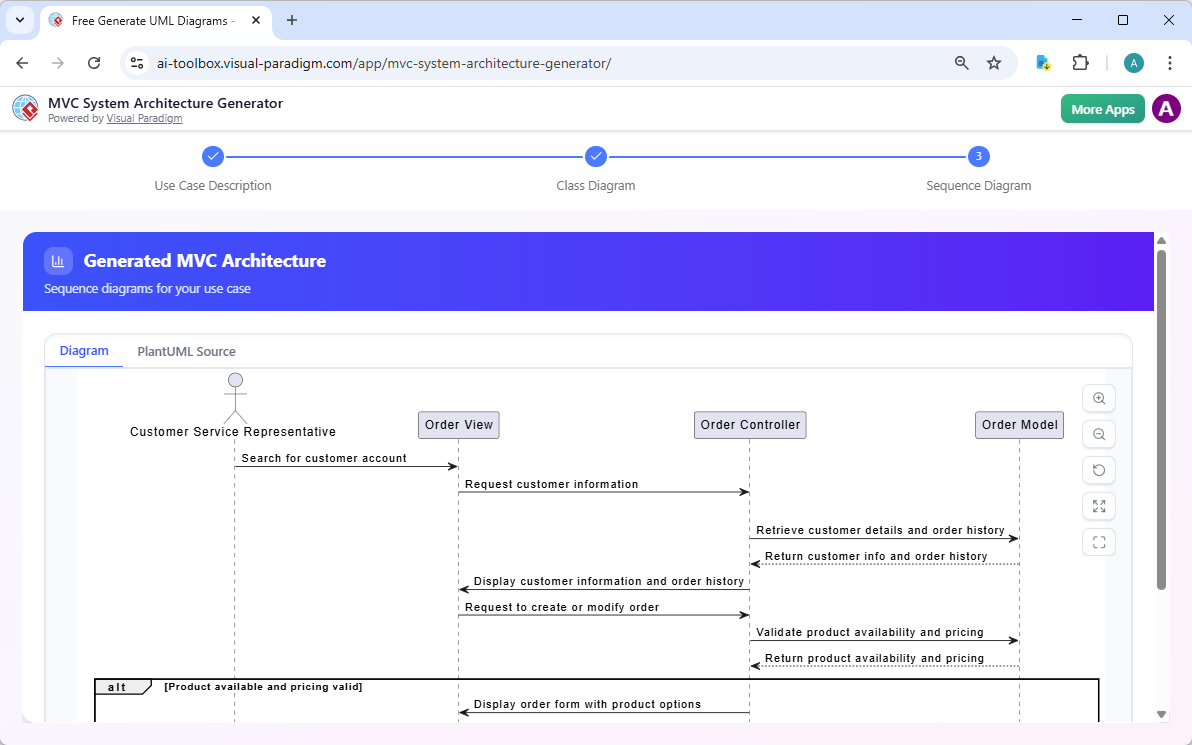
Sequence Diagrams
Purpose: Model dynamic interactions between objects over time.
AI Capabilities:
-
Converts use case narratives into interaction sequences
-
Identifies participants (lifelines) automatically
-
Generates synchronous and asynchronous messages
-
Creates interaction fragments (alt, opt, loop)
-
Suggests performance optimizations
Activity Diagrams
Purpose: Represent workflows of stepwise activities supporting choice, iteration, and concurrency.
AI Capabilities:
-
Transforms use case descriptions into visual workflows
-
Automatically handles decision nodes, forks, and joins
-
Identifies parallel processes and bottlenecks
-
Suggests process optimizations
State Machine Diagrams
Purpose: Visualize object lifecycles, showing states, transitions, and triggering events.
AI Capabilities:
-
Extracts states from behavioral descriptions
-
Identifies transition triggers and guards
-
Detects unreachable states and deadlocks
-
Validates lifecycle completeness
Use Case Diagrams
Purpose: Capture system functional requirements from the user’s perspective.
AI Capabilities:
-
Identifies actors from system descriptions
-
Extracts use cases from requirements
-
Suggests include/extend relationships
-
Detects missing scenarios
Additional Supported Diagrams
The AI also enhances:
-
Package Diagrams: Organize complex systems into logical groups
-
Deployment Diagrams: Visualize physical deployment to hardware nodes
-
Component Diagrams: Show how software components form larger systems
-
Object Diagrams: Illustrate class instances at specific points in time
-
Communication Diagrams: Model object collaborations emphasizing structure
-
Interaction Overview Diagrams: Provide high-level interaction flow overviews
-
Timing Diagrams: Show behavior over specific time periods with constraints
Implementation Workflow: From Concept to Production
Step-by-Step: Creating Your First AI-Generated Diagram
Method 1: Using the AI Chatbot
-
Access the Chatbot: Navigate to https://chat.visual-paradigm.com
-
Describe Your System: Enter a natural language description:
Create a Class Diagram for a hotel reservation system with Guest, Room, Reservation, and Payment classes -
Review the Generated Diagram: The AI creates a complete diagram with:
-
Classes with appropriate attributes
-
Methods for each class
-
Relationships (associations, dependencies)
-
Proper UML notation
-
-
Refine Through Conversation:
Add a method to check room availability Make the relationship between Guest and Reservation one-to-many Add a Cancellation class -
Export and Share:
-
Download as PNG, SVG, or PDF
-
Export PlantUML code
-
Share via unique link
-
Save to Visual Paradigm Desktop
-
Method 2: Using Visual Paradigm Desktop
-
Launch the Application: Open Visual Paradigm Desktop (latest version)
-
Access AI Diagram Generation:
-
Go to Tools > AI Diagram Generation
-
Or use the AI Toolbox panel
-
-
Select Diagram Type: Choose from available UML diagram types
-
Input Requirements:
-
Enter detailed system description
-
Or use step-by-step wizard
-
Upload existing documentation
-
-
Configure Generation Settings:
-
Choose level of detail
-
Select design patterns to apply
-
Set naming conventions
-
-
Generate and Refine:
-
Review AI-generated diagram
-
Use validation checklist
-
Apply AI suggestions
-
Make manual adjustments
-
-
Generate Analysis Report:
-
Get AI-powered critique
-
Review design quality metrics
-
Identify improvement opportunities
-
Practical Examples
Example 1: E-Commerce System
Prompt:
Generate a complete UML model for an online shopping platform with:
- Users who can browse products, add to cart, and place orders
- Products with categories, prices, and inventory
- Shopping cart functionality
- Order processing with payment and shipping
- Admin features for inventory management
AI Generates:
-
Class Diagram with all entities and relationships
-
Use Case Diagram showing actor interactions
-
Sequence Diagram for checkout process
-
Activity Diagram for order fulfillment workflow
Example 2: Library Management System
Prompt:
Create diagrams for a library system where:
- Members can borrow and return books
- Books have multiple copies
- Overdue books incur fines
- Librarians manage the catalog
- Reservations are supported
AI Generates:
-
Class Diagram with Member, Book, BookCopy, Loan, Reservation
-
State Machine Diagram for book lifecycle
-
Sequence Diagram for borrowing process
-
Activity Diagram for fine calculation
Example 3: Microservices Architecture
Prompt:
Design a microservices architecture for a food delivery app with:
- User Service for authentication
- Restaurant Service for menu management
- Order Service for order processing
- Payment Service for transactions
- Delivery Service for tracking
AI Generates:
-
Component Diagram showing service boundaries
-
Deployment Diagram for cloud infrastructure
-
Package Diagram for code organization
-
Sequence Diagram for order placement
Advanced Features: Extending AI Capabilities
AI-Powered System Architecture Generator
Generate high-level Model-View-Controller (MVC) architectures from natural language:
Example:
Generate an MVC architecture for an e-learning platform where students
can enroll in courses, watch video lectures, submit assignments, and
receive grades
The AI creates:
-
Controller classes for each use case
-
Model classes for domain entities
-
View components for user interfaces
-
Complete interaction flows
DBModeler AI
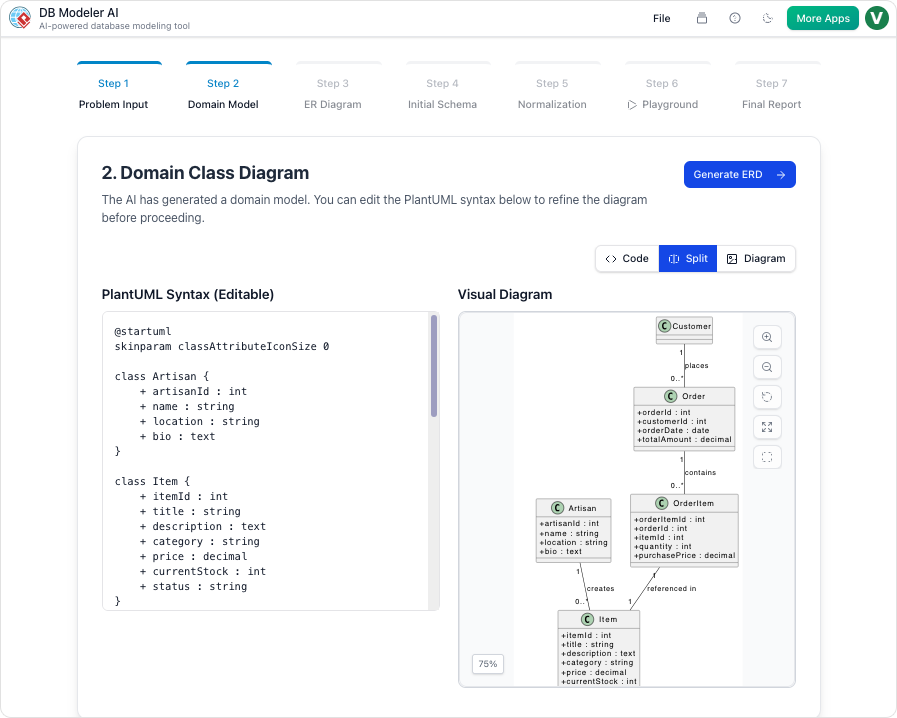
Automatically map class models to database schemas:
Features:
-
Forward engineering: Classes → Database schema
-
Reverse engineering: Database → Class diagram
-
Support for multiple database systems (MySQL, PostgreSQL, Oracle, etc.)
-
Automatic relationship detection
-
Index and constraint generation
Use Case to Activity Diagram Converter
Transform textual requirements into visual workflows:
Process:
-
Define use case with actors and preconditions
-
Detail main, alternate, and exception flows
-
AI generates activity diagram automatically
-
Review and export with comprehensive report
Textual Analysis
Convert natural language documents into structured models:
Capabilities:
-
Extract classes from requirements documents
-
Identify actors and use cases
-
Detect relationships and dependencies
-
Generate initial diagram drafts
Best Practices for Maximizing AI Modeling Success
Writing Effective AI Prompts
Be Specific and Detailed:
-
✅ Good: “Create a Class Diagram for a banking system with Account, Customer, and Transaction classes. Accounts have account numbers, balances, and creation dates. Customers have names, addresses, and can own multiple accounts.”
-
❌ Poor: “Make a banking diagram”
Use Domain Terminology:
-
✅ Good: “Model an MVC architecture for a blog with Post, Comment, and User models, including RESTful API controllers”
-
❌ Poor: “Make a website diagram”
Specify Relationships Clearly:
-
✅ Good: “A Customer can place multiple Orders, but each Order belongs to one Customer. Orders contain multiple OrderItems, each referencing one Product”
-
❌ Poor: “Connect customers to orders”
Iterate and Refine:
-
Start with a broad description
-
Review the initial diagram
-
Provide specific refinement instructions
-
Repeat until satisfied
Design Quality Guidelines
Follow SOLID Principles:
-
Single Responsibility: Each class should have one reason to change
-
Open/Closed: Open for extension, closed for modification
-
Liskov Substitution: Subtypes must be substitutable for base types
-
Interface Segregation: Many specific interfaces > one general interface
-
Dependency Inversion: Depend on abstractions, not concretions
Apply Design Patterns Appropriately:
-
Creational: Singleton, Factory, Builder for object creation
-
Structural: Adapter, Decorator, Facade for class composition
-
Behavioral: Observer, Strategy, Command for object interaction
Maintain Low Coupling and High Cohesion:
-
Minimize dependencies between classes
-
Group related functionality together
-
Use interfaces to reduce coupling
Collaboration Strategies
Share Early and Often:
-
Generate shareable links for team review
-
Embed diagrams in documentation
-
Present to stakeholders regularly
-
Gather feedback iteratively
Version Control:
-
Save projects in JSON format
-
Use meaningful version names
-
Document design decisions
-
Track changes over time
Common Pitfalls to Avoid
-
Over-Engineering: Don’t create unnecessary complexity
-
Under-Specification: Provide enough detail for accurate generation
-
Ignoring AI Suggestions: Review and consider AI recommendations
-
Skipping Validation: Always run validation checks
-
Poor Naming: Use clear, consistent naming conventions
-
Neglecting Documentation: Keep diagrams and docs synchronized
Measurable Outcomes: Impact Across Industries
Organizations implementing Visual Paradigm’s AI-powered modeling report significant improvements:
| Metric | Typical Improvement |
|---|---|
| Modeling Time | 60-80% reduction in diagram creation time |
| Onboarding Speed | New team members productive 3x faster |
| Design Quality | 40% fewer architectural flaws detected post-implementation |
| Stakeholder Engagement | Non-technical participants contribute meaningfully to design sessions |
| Documentation Accuracy | Near-zero drift between models and specifications |
| Code Generation Efficiency | 50% less boilerplate code written manually |
Industry Applications
-
Financial Services: Rapid prototyping of compliance-critical systems with automated validation
-
Healthcare: Modeling complex patient workflows with state machine diagrams and activity flows
-
E-Commerce: Scaling microservices architectures with component and deployment diagrams
-
Education: Teaching UML fundamentals through conversational AI guidance
-
Government: Documenting legacy system modernization with synchronized models and reports
Conclusion: Amplifying Human Expertise Through Conversational AI
Visual Paradigm’s AI-powered UML modeling ecosystem represents more than a technological upgrade—it signifies a fundamental shift in how teams conceive, design, and communicate software architecture. By transforming natural language into professional, standards-compliant diagrams, Visual Paradigm removes traditional barriers to effective modeling while preserving the rigor and precision that UML provides.
The true power of this approach lies not in replacing human expertise, but in amplifying it. Architects and developers spend less time wrestling with notation and tooling, and more time focusing on what matters most: designing elegant, robust, and scalable systems. Non-technical stakeholders gain a voice in the design process through intuitive conversational interfaces. Documentation stays synchronized automatically, reducing maintenance overhead and improving project transparency.
As AI capabilities continue to evolve, Visual Paradigm remains committed to empowering teams of all sizes and skill levels. Whether you’re a student learning UML fundamentals, a startup prototyping a minimum viable product, or an enterprise architect orchestrating complex distributed systems, the combination of conversational AI and industry-standard modeling provides the capabilities needed to succeed in today’s competitive landscape.
The future of software design is conversational, intelligent, and human-centered. With Visual Paradigm’s AI-powered tools, that future is available today.
Getting Started Today
-
Try the AI Chatbot: Visit https://chat.visual-paradigm.com for instant diagram generation
-
Download Visual Paradigm: Get the free Community Edition or professional desktop version
-
Explore Tutorials: Access comprehensive guides and documentation
-
Join the Community: Connect with other users and share best practices
-
Start Modeling: Transform your ideas into professional diagrams today
References
- What is Unified Modeling Language (UML)?: Comprehensive guide covering UML fundamentals, history, diagram types, and the 4+1 views of software architecture.
- AI-Powered UML Class Diagram Creation in Visual Paradigm: Overview of Visual Paradigm’s AI ecosystem for automated class diagram generation, including chatbot and desktop integration.
- Comprehensive Review: Visual Paradigm’s AI Diagram Generation Features: Detailed review of AI-powered diagram generation capabilities, strengths, limitations, and practical applications across UML, BPMN, and ArchiMate.
- Generate UML Class Diagrams with AI: Step-by-step guide demonstrating AI class diagram generation from natural language descriptions with real-world examples.
- AI-Assisted UML Class Diagram Generator: Feature documentation for the guided 10-step wizard that combines AI assistance with educational tips for creating professional class diagrams.
- UML Class Diagram: The Definitive Guide to Modeling System Structure with AI: Comprehensive guide to generating and refining class diagrams through conversational AI, with practical examples and best practices.
- Comprehensive Guide to UML State Machine Diagrams with Visual Paradigm and AI: In-depth exploration of state machine diagram creation using AI, covering lifecycle modeling and state-based system design.
- AI Use Case Diagram Refinement Tool: Feature guide for AI-powered use case diagram enhancement, including actor identification and relationship suggestions.
- UML Practical Guide – All You Need to Know About UML Modeling: Complete reference covering all 14 UML diagram types with examples, notation guides, and modeling best practices.
- How to Visualize Your System Infrastructure with an AI Deployment Diagram Generator: Guide to generating deployment diagrams from natural language descriptions of system architecture and infrastructure.
- UML Sequence Diagram: A Definitive Guide to Modeling Interactions with AI: Comprehensive tutorial on creating sequence diagrams through AI, covering message flows, interaction fragments, and dynamic behavior modeling.
- Visual Paradigm Desktop AI Activity Diagram Generation: Release announcement and feature overview of AI-powered activity diagram generation in Visual Paradigm Desktop.
- Use Case to Activity Diagram: Tool documentation for automatically transforming textual use case descriptions into UML activity diagrams with AI assistance.
- AI Diagram Generator: Package Diagrams in Visual Paradigm: Feature release detailing AI capabilities for generating package diagrams to organize complex software architectures.
- AI-Enhanced Education: Transforming UML Learning: Research publication showcasing the transformative potential of AI-enhanced UML modeling in educational contexts and replicable teaching strategies.
- Visual Paradigm AI Chatbot: Web-based conversational AI interface for instant UML diagram generation, refinement, and collaborative modeling sessions.

 English
 Arabic
 Chinese (Simplified)
 Dutch
Dutch French
 German
 Italian
 Japanese
 Korean
 Portuguese
 Russian
 Spanish