


In the rapidly evolving landscape of software development and enterprise architecture, the gap between technical documentation and visual modeling has long been a source of friction. Traditional knowledge management platforms treat diagrams as static images—snapshots that quickly become obsolete as systems evolve. This disconnect leads to documentation drift, where written specifications no longer match the actual system design, creating confusion, inefficiency, and risk .
Visual Paradigm OpenDocs emerges as a transformative solution to this challenge. As an AI-powered, web-based knowledge management platform, it unifies technical documentation with visual modeling and diagramming into a single source of truth. By treating diagrams as live, interactive elements rather than static images, OpenDocs ensures that documentation remains synchronized with design changes in real-time .
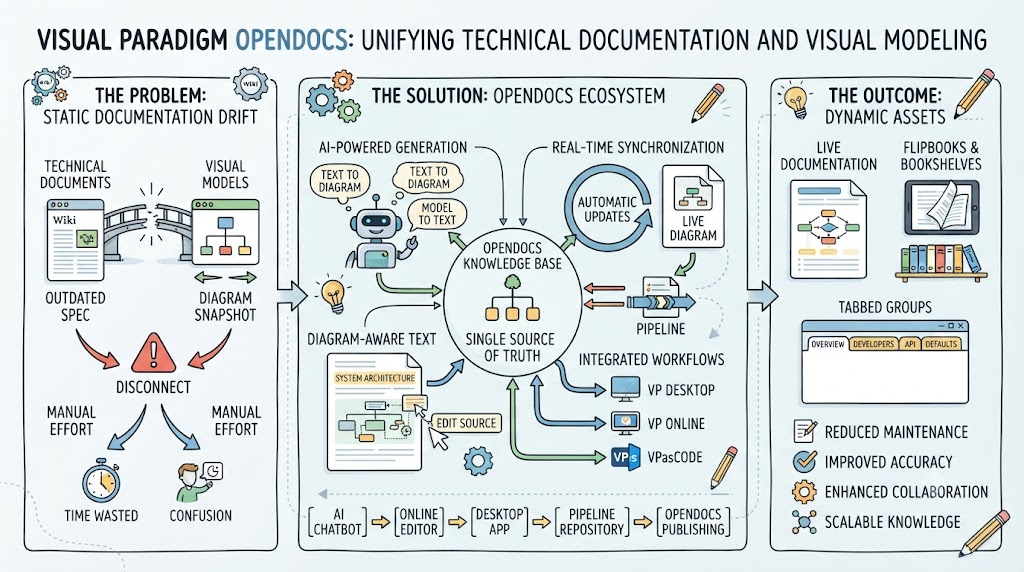
This comprehensive guide explores how OpenDocs revolutionizes knowledge management, providing key concepts, practical examples, and detailed guidelines for leveraging Visual Paradigm’s tooling ecosystem.
Part 1: The Problem—Why Static Documentation Fails
The Documentation Drift Crisis
In complex engineering ecosystems, communication failure is rarely a failure of language—it is a failure of translation . Software systems, business workflows, and enterprise architectures are multi-dimensional realities. Yet for decades, technical teams have attempted to document these systems using two entirely separate, isolated mediums:
Linear prose (text documents, wikis, runbooks) and static visual models (screenshots, exported images, embedded PNGs).
When a software engineer updates a UML diagram in a desktop application, that change rarely broadcasts itself to product requirement documents, system runbooks, or API user guides. Instead, documentation becomes a game of manual catch-up—text and visuals drift out of sync, creating conflicting sources of truth .
The Cost of Fragmented Workflows
This disconnect slows development velocity, introduces costly deployment errors, and breeds frustration across cross-functional teams. Consider a typical “static snapshot” workflow:
- An architect creates a system diagram in a modeling tool
- They export it as a PNG or JPG
- They upload it to a wiki or document platform
- They write explanatory text around the image
- Two weeks later, the system changes—the architect updates the model
- They repeat steps 2-4, manually replacing the image
Each iteration takes 15-20 minutes, and over a project lifecycle, this adds up to hours wasted on manual synchronization work . The result? Outdated diagrams, broken links, and a knowledge base that doesn’t reflect reality .
Part 2: The Solution—Visual Paradigm OpenDocs
Core Philosophy: Text and Modeling in One Semantic Ecosystem
OpenDocs shatters the traditional walls between authoring environments and diagramming canvases, creating a single unified workspace where text and visual data interact dynamically . The platform is built around three architectural pillars :
- The Semantic AI Engine: A built-in natural language engine that processes text commands, generates descriptive software explanations, and converts conversational prose into live structural diagrams.
- The Knowledge Tree Core: A structural paradigm that replaces messy file folders with an infinitely scalable, drag-and-drop page hierarchy for organizing engineering systems.
- The Desktop Pipeline: A secure bridge linking offline Visual Paradigm Desktop modeling tools directly to online OpenDocs spaces—eliminating manual exports and ensuring automatic synchronization.
Key Concepts
Diagram-Aware Text
Unlike standard text platforms such as Confluence or Google Docs where images are static snapshots, embedded visuals in OpenDocs remain live vectors. Users can click an element directly inside the document to open the source model and update it. This interactivity transforms documentation from a passive reference into an active workspace .
What this means in practice: A sequence diagram embedded in your API documentation isn’t just a picture—it’s a window into the actual model. Clicking it opens the editable source, and updates propagate back through the pipeline.
Tree-Structured Spaces
Documentation is organized using a deep, hierarchical nested folder-tree structure. Users can easily drag and drop pages or diagrams to reorganize growing knowledge repositories. The tree structure mirrors the logical organization of complex systems, making it intuitive for teams to navigate and maintain large documentation sets .
Automated Synchronization and Revisions
When a source diagram changes in Visual Paradigm, an indicator appears in the document’s Pipeline panel. Users can selectively review revisions and swap out elements with one click. This ensures documentation stays current without requiring manual intervention, while still giving authors control over when and how changes are incorporated .
Key benefit: Each revision is preserved. You can roll back, compare versions, and maintain a complete audit trail of your documentation evolution .
Model-to-Text AI Generation
The AI system can analyze structural diagram flows and automatically generate corresponding descriptive textual narratives, keeping functional documentation from drifting out of date with the models. This bidirectional synchronization means changes in either the diagram or the text can inform updates to the other .
Part 3: The Pipeline—Architecture and Workflow
What Is the Pipeline?
The Pipeline is the high-speed connective tissue of the Visual Paradigm ecosystem—a secure, cloud-based centralized repository designed to store, manage, and transfer artifacts (visual assets created across platforms) .
Think of it as a secure, centralized repository for “artifacts”—all the assets you create across the Visual Paradigm ecosystem, from AI-generated UML diagrams to professional desktop models .
The Five Execution Environments
The Pipeline bridges five distinct creation environments, each suited to different stages of the modeling lifecycle :
| Source Platform | Modeling Nature | Best For | Revision Behavior |
|---|---|---|---|
| AI Chatbot | Code-driven / Prompt-based | Rapid brainstorming, text-to-diagram generation | Static snapshots; immediate export |
| Online Editor | Visual canvas-driven | Styling tweaks, presentation graphics | Manual tracking; each push creates an isolated revision |
| Desktop App | Model-driven and validated | Enterprise architecture, validated engineering models | Automatic revisions on project commit; full relational integrity |
| Web Apps (C4 Wizards) | Context-driven | Complex framework modeling, multi-layer architectures | Structural streaming with dependency preservation |
| OpenDocs | Consumer and native authoring | Final documentation assembly, publishing workflows | Live link insertion; selective upgrades |
The Pipeline Flow: From Concept to Docs
The modern documentation lifecycle is a specialized, multi-stage toolchain where each platform handles a distinct phase of artifact maturation :
[AI Chatbot] ➔ [Online Editor] ➔ [Desktop App] ➔ [Pipeline Repository] ➔ [OpenDocs]
(Rapid Draft)  (Visual Polish)  (Semantic Check)  (Versioned Artifact)  (Published Doc)
Stage by stage:
- AI Chatbot generates raw structural outlines and prompt-driven concept mapping
- Online Editor handles web-formatted content, styled tables, and quick UI tweaks
- Desktop App performs deep logic testing, dependency verification, and local rendering
- Pipeline Repository provides version control, CI/CD triggers, and automated build artifacts
- OpenDocs delivers the user-facing, searchable, versioned documentation site
The Golden Rule: Just-in-Time (JIT) Source Modification
A pervasive anti-pattern in multi-platform workflows is downstream patching—when a diagram fails validation in a desktop environment, engineers manually edit the generated asset directly. This breaks the lineage between the source prompt and the published output, creating silent data drift .
The JIT Source Modification approach:
- Never patch downstream: Treat compiled artifacts as immutable outputs
- Return to the source: Use ecosystem hyperlinks or embedded source pointers to launch the exact AI chatbot session or online editor context where the asset originated
- Regenerate and push: Adjust the prompt, parameters, or source text upstream. Allow the AI to rebuild the asset, then re-inject it into the pipeline
This transforms documentation from a fragile manual process into a resilient, auditable system.
Part 4: Tooling Guidelines—Step-by-Step Workflows
Workflow 1: Desktop App to OpenDocs
Best for: Enterprise architects creating validated UML, SysML, or BPMN models.
Step 1: Prepare Your Diagram
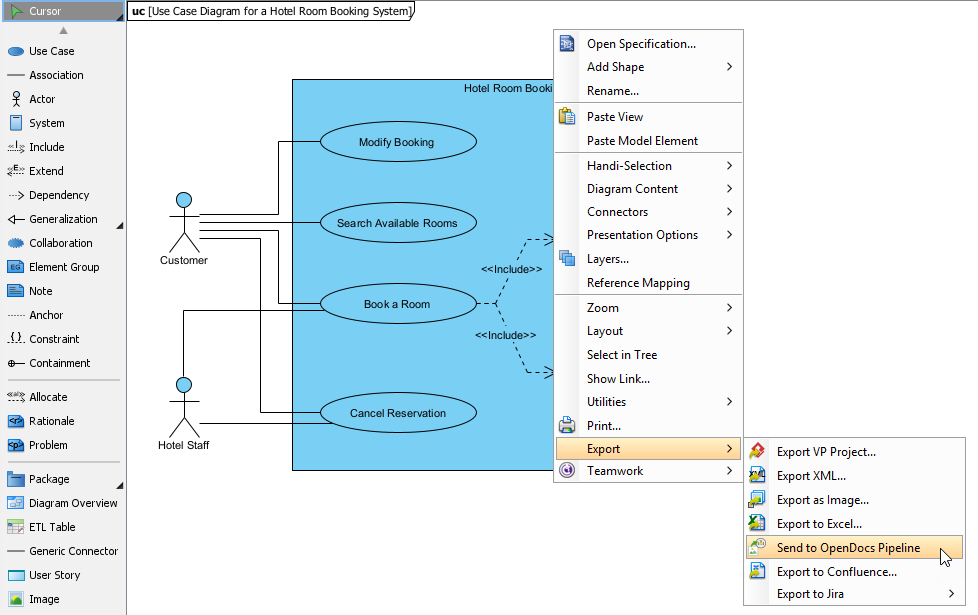
In Visual Paradigm Desktop, open the diagram you wish to send—whether created manually or using Visual Paradigm’s AI generation tool .
Step 2: Initiate the Export
Right-click on the diagram and select Export > Send to OpenDocs Pipeline from the popup menu .
Step 3: Save and Add Context
When prompted, save your project by clicking OK. Enter an optional comment (e.g., “Auth flow v2.1 – Added refresh token handling”). This appears in the Pipeline pane within OpenDocs and helps identify the version or purpose of the artifact .
Step 4: Confirm and Upload
Confirm the export; your diagram is uploaded to the cloud in under 30 seconds .
Step 5: Insert in OpenDocs
- Open your document page in OpenDocs and click Edit
- Position your cursor where you want the diagram
- Click Insert > Pipeline from the toolbar
- Browse the shared team collection; filter by comment, date, or source platform
- Select your diagram—it renders instantly with full resolution and interactive capabilities
Workflow 2: AI Chatbot to OpenDocs
Best for: Rapid prototyping and brainstorming.
Step 1: Generate Your Diagram
Open the AI Chatbot and prompt it using natural language or structured DSL:
"Generate a sequence diagram for our microservices authentication flow"
"Create a C4 System Context diagram for an e-commerce platform"
"Create a flowchart for a refund process"
Step 2: Review and Refine
Review the generated diagram layout; use follow-up prompts to adjust styling or content .
Step 3: Export to Pipeline
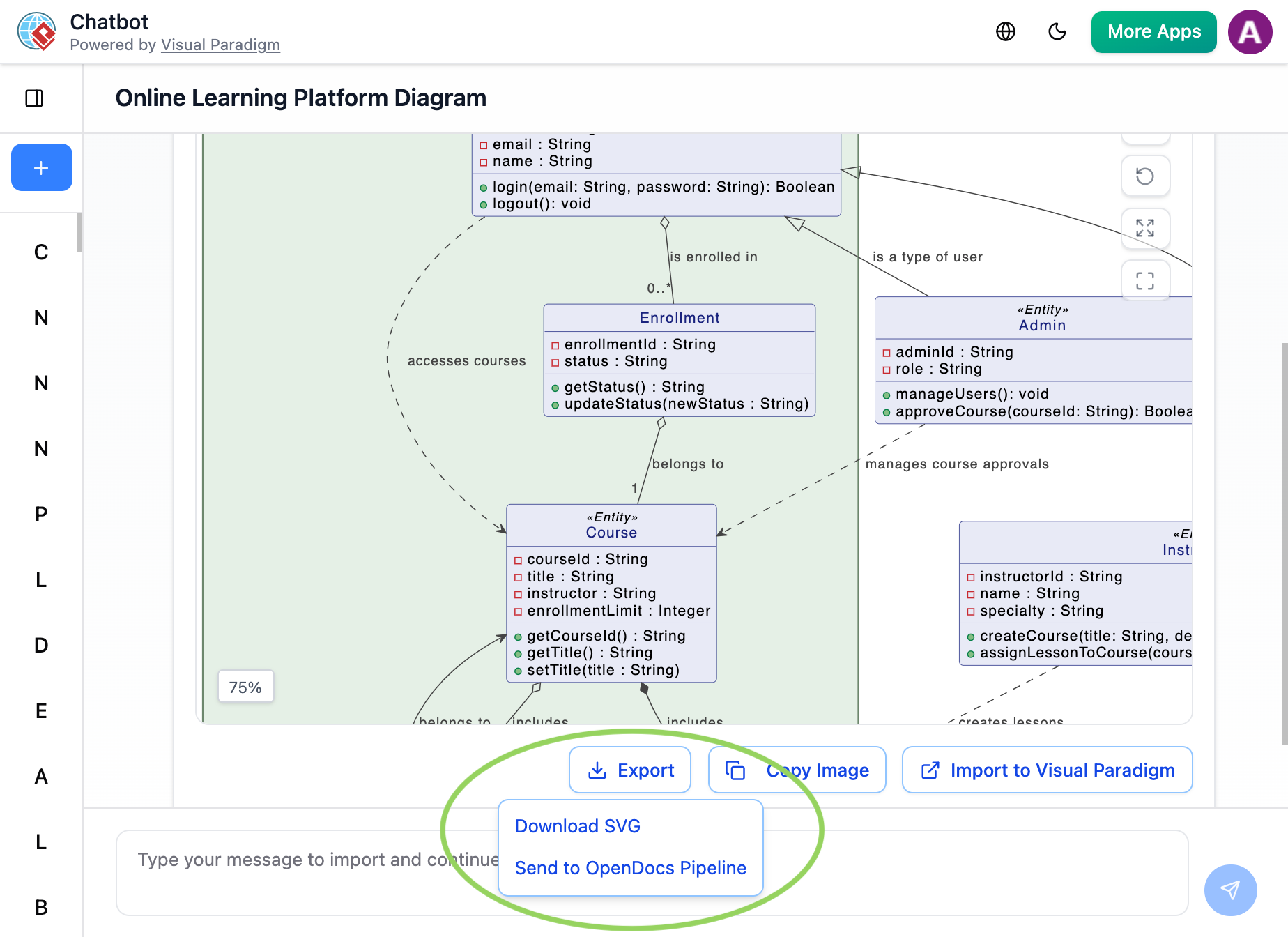
Click the Export icon (top-right) → Select Send to OpenDocs Pipeline .
Step 4: Add Metadata
Include a descriptive comment like “Baseline auth flow draft – Q2 2026” to aid version identification .
Step 5: Insert in OpenDocs
Navigate to your OpenDocs page, click Insert > Pipeline, and select your AI-generated diagram from the asset list .
Workflow 3: Visual Paradigm VPasCode to OpenDocs (Diagram-as-Code)
Best for: Developers who prefer text-based diagramming.
VPasCode allows you to create diagrams using simple text syntax (PlantUML, Mermaid.js, Graphviz). The magic happens when you connect it to OpenDocs via the Pipeline .
Step 1: Create Your Diagram in Code
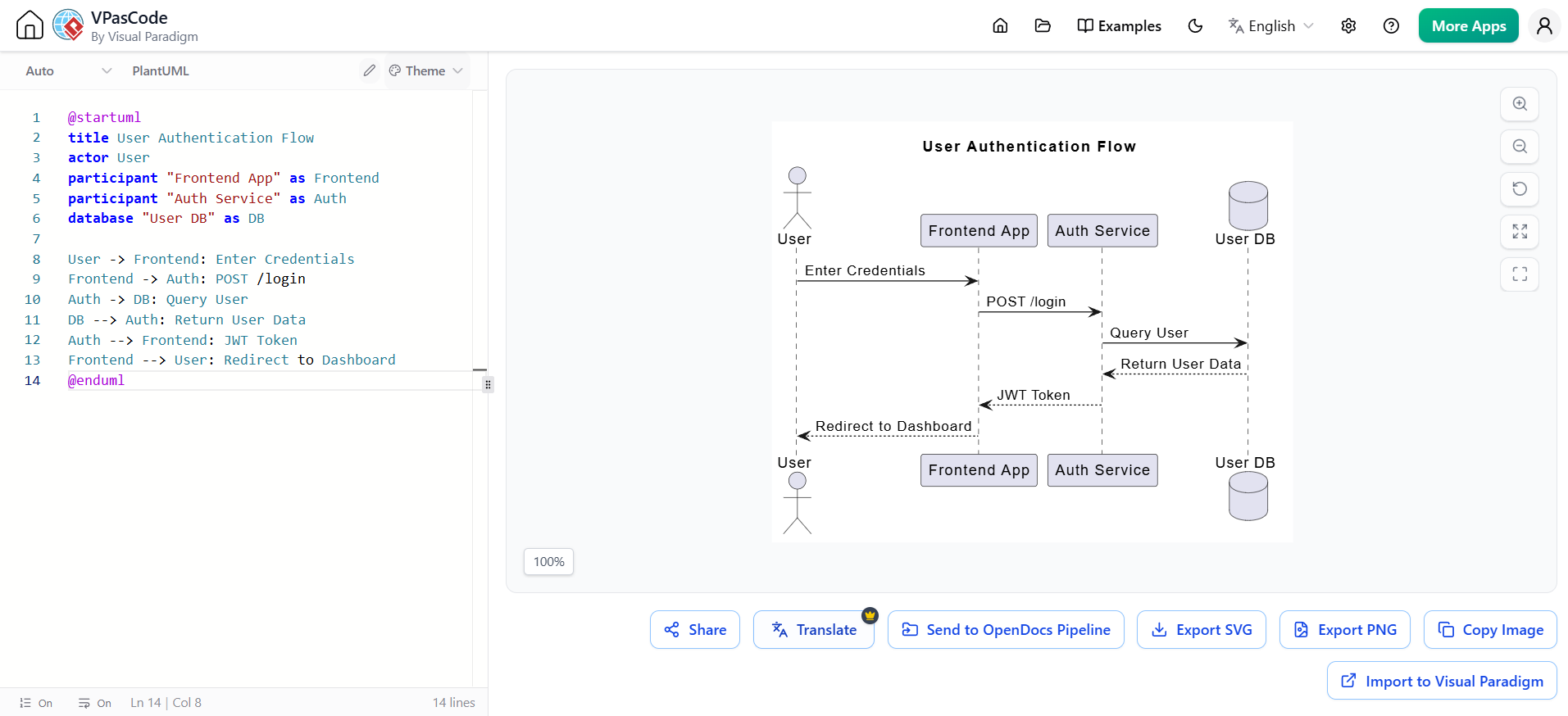
In VPasCode, write your diagram using PlantUML syntax. Here’s a sequence diagram example:
@startuml
title User Authentication Flow
actor User
participant "Frontend App" as Frontend
participant "Auth Service" as Auth
database "User DB" as DB

User -> Frontend: Enter Credentials
Frontend -> Auth: POST /login
Auth -> DB: Query User
DB --> Auth: Return User Data
Auth --> Frontend: JWT Token
Frontend --> User: Redirect to Dashboard
@enduml
Step 2: Send to Pipeline
Once rendered, click the “Send to OpenDocs Pipeline” button in VPasCode. The diagram is securely routed to your OpenDocs workspace .
Step 3: Insert and Iterate
In OpenDocs, use the Pipeline pane to insert the diagram. Need to update it? Click the pencil icon in OpenDocs to reopen it in VPasCode, make changes, resend, and replace the old version seamlessly .
Part 5: Examples in Practice
Example 1: Financial Technology Modernization
Who: A Lead Enterprise Architect and a Senior Business Analyst at a financial technology firm .
Scenario: A major application modernization initiative where legacy core microservices are being redesigned.
Workflow:
- Brainstorming: The Business Analyst speaks to the integrated AI assistant inside OpenDocs to instantly map out user journeys and generate basic flowcharts for a payment sequence
- Refinement: The Enterprise Architect links OpenDocs to Visual Paradigm Desktop to refine the generated workflow into highly precise, strict UML sequence and architecture diagrams
- The Pipeline Bridge: Instead of exporting images, the Architect pushes the diagrams directly to the OpenDocs Pipeline, establishing the live connection between source model and documentation
- Documentation Compilation: The team writes technical specifications alongside live system elements
- Managing Revisions: Two weeks later, engineering alters a compliance route. The Architect edits the diagram block in Desktop. OpenDocs flags a sync change to the authoring team, who swap the live document view to the new latest revision without breaking manual formatting
- Delivery: The dynamic workspace is published as a secure, read-only link for deployment stakeholders to examine
Example 2: Microservices Architecture Documentation
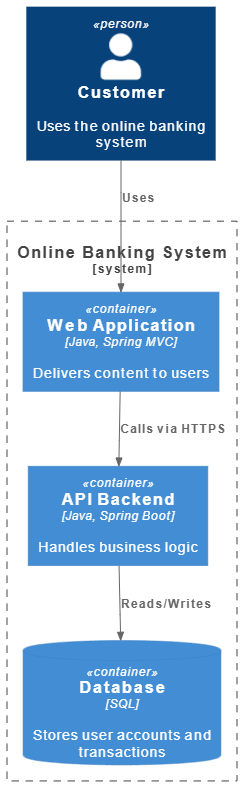
Scenario: Documenting a microservices architecture using the C4 model.
VPasCode input:
@startuml
!include <C4/C4_Context>
!include <C4/C4_Container>

Person(user, "Customer", "Uses the online banking system")

System_Boundary(bank, "Online Banking System") {
    Container(web_app, "Web Application", "Java, Spring MVC", "Delivers content to users")
    Container(api, "API Backend", "Java, Spring Boot", "Handles business logic")
    ContainerDb(db, "Database", "SQL", "Stores user accounts and transactions")
}

Rel(user, web_app, "Uses")
Rel(web_app, api, "Calls via HTTPS")
Rel(api, db, "Reads/Writes")
@enduml
This visual helps stakeholders understand system boundaries without getting bogged down in code details. Once sent through the Pipeline, it becomes a live artifact that updates automatically when the architecture evolves.
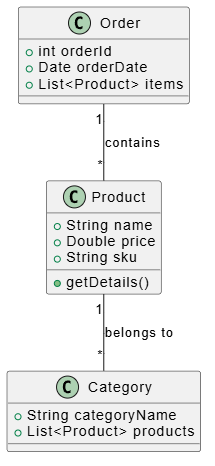
Example 3: Product Catalog Data Model
Scenario: Modeling a product catalog with class relationships.
VPasCode input:
@startuml
class Product {
    +String name
    +Double price
    +String sku
    +getDetails()
}

class Category {
    +String categoryName
    +List<Product> products
}

class Order {
    +int orderId
    +Date orderDate
    +List<Product> items
}

Product "1" -- "*" Category : belongs to
Order "1" -- "*" Product : contains
@enduml
Part 6: AI-Powered Features
AI Code Error Fixing
Made a syntax mistake in PlantUML? The AI can detect and suggest fixes, saving time debugging .
AI Translation
Need to localize documentation? Use AI to translate diagram labels or descriptions into multiple languages .
Prompt-to-Diagram Generation
In OpenDocs, use the AI chatbot to generate a diagram from a natural language prompt. For example, type “Create a sequence diagram for a payment processing flow” and the AI generates the PlantUML code, which you can refine further .
AI-Assisted Diagram Generation
Users can create diagrams just-in-time using natural language prompts—such as typing /create a sequence diagram for user authentication—to instantly draft layout options. The AI suggests structurally sound templates, accelerating ideation while maintaining modeling rigor .
Model-to-Text AI Generation
The AI system can analyze structural diagram flows and automatically generate corresponding descriptive textual narratives, keeping functional documentation from drifting out of date with the models .
Part 7: Synchronizing Documentation—The Game Changer
Managing Revisions
Here’s where the integration truly shines. When your models evolve, here’s how you keep documentation synchronized :
- Open the Source Diagram: In OpenDocs, click the Edit icon at the top right of the diagram image. Copy the diagram link provided. In Visual Paradigm Desktop, go to Project > Open, paste the link, and the software opens the source model automatically
- Edit and Re-send: Make modifications to the diagram in Visual Paradigm Desktop. Right-click the diagram and select Export > Send to OpenDocs Pipeline again. Alternatively, commit your changes to VP Online, which automatically creates a new revision
- Swap to the Latest Revision: Back in the OpenDocs editor, click Pipeline at the top right. When you select your diagram, a list of revisions appears. With a single click on the latest revision, the old diagram is instantly swapped for the updated version
Time saved: What used to take 15-20 minutes (export, upload, replace, reformat) now takes under a minute .
Revision Indicator
A floating Revision Indicator (🔄) appears next to embedded diagrams when newer Pipeline versions exist. Clicking it lets you view chronological timestamps, commit notes, and source platform side-by-side. You can select the preferred revision to update your master document instantly .
Part 8: Distribution—From Documentation to Published Asset
Flipbooks
Flipbooks are interactive, page-turning digital publications that transform standard flat layouts into engaging brochures, ebooks, or technical manuals. When to use Flipbooks :
- Product catalogs
- Training manuals
- Portfolio showcases
- Annual reports
Creating a Flipbook in Visual Paradigm Online and sending it through the Pipeline into OpenDocs adds high-fidelity reading experiences straight into documentation pages. Readers can flip through content without leaving your knowledge base .
Bookshelves
A Bookshelf is a virtual display case used to catalog and present multiple Flipbooks together. For teams managing large documentation suites—product training series, compliance resource libraries, or multi-volume technical manuals—the Bookshelf feature addresses organization challenges by consolidating multiple documents into a single, visually organized library interface .
Tabbed Groups
A Tabbed Group is a structural layout container component inside the OpenDocs editor that groups complex, related information into horizontal or vertical tabs to reduce visual clutter and improve scannability .
Practical applications:
- Separate content by audience (e.g., “Developers” vs. “End Users”)
- Group related diagrams and explanatory text together
- Combine Flipbooks, Bookshelves, and standard content within the same tabbed structure
Sharing
Clicking the Share button on OpenDocs’ top navigation bar generates instant public or private links, embed codes for external websites, or direct exports to WordPress pages. Options include :
- Live Updates: Documentation that automatically reflects the latest artifact revisions
- Static Snapshots: Frozen versions for formal releases or compliance documentation
- Password Protection: Secure access for sensitive content
WordPress Integration
Secure live publishing capabilities include :
- Secure Embedding via HTML iframe: Publish documentation directly into external platforms like WordPress sites or internal company portals
- Revision Synchronization: When a diagram is updated, a central indicators system flags the change instantly
- Automated Global Updates: The system pushes specified revision updates globally—no need to manually replace image links, re-export files, or coordinate deployment windows
Part 9: Best Practices and Guidelines
Use Descriptive Titles
Add titles to your PlantUML diagrams (e.g., title User Login Flow) for clarity in documentation .
Leverage the Pipeline Pane
In OpenDocs, use the Pipeline pane to organize sent diagrams. Hover over thumbnails to insert them quickly .
Iterate with the Pencil Button
If a diagram needs updates, click the pencil icon in OpenDocs to reopen it in VPasCode. Make changes, resend, and replace the old version seamlessly .
Text-Based Formats over Raster Images
Store diagrams as code (Mermaid.js, PlantUML, D2, Structurizr) instead of raster/vector images. This enables diffing, version control, AI parsing, and cross-platform rendering .
Embed Source Metadata
Append a cryptographic hash, short UUID, or deep-link URL to the footer of every artifact to provide instant traceability to the original prompt/editor context for JIT fixes .
Lock Downstream Permissions
Configure Pipeline Repository and OpenDocs as read-only mirrors for compiled assets to enforce upstream-only edits, preventing unauthorized downstream patching .
Use Descriptive Commit Messages
Include intent, scope, and stakeholder in every manual push (e.g., “Auth flow v2.1 – Added MFA branch for security review”) .
Leverage Automated Desktop Sync
Make major architectural changes in Desktop; let cloud commits update embedded docs automatically .
Structure Pipeline Repositories by Project/Team
Configure folder permissions early to prevent accidental overwrites .
Anti-Patterns to Avoid
| Anti-Pattern | Risk |
|---|---|
| Manual screenshot exports | Loses editability, version tracking, and semantic relationships |
| Skipping Desktop validation for production models | Risks introducing undetected modeling errors into documentation |
| Overusing static snapshots for evolving systems | Creates documentation drift as diagrams fall out of sync |
| Generic export comments (“update”, “fix”) | Makes revision selection ambiguous during document updates |
Part 10: Benefits and Impact
For Technical Teams
- Reduced Maintenance Overhead: Automatic synchronization eliminates the need for manual diagram updates
- Improved Accuracy: Live connections ensure documentation always reflects current system design
- Enhanced Collaboration: Shared workspace enables real-time collaboration between architects, developers, and analysts
For Business Stakeholders
- Better Understanding: Interactive diagrams make complex systems more accessible to non-technical audiences
- Faster Decision-Making: Up-to-date documentation supports informed decision-making
- Reduced Risk: Accurate documentation reduces the risk of miscommunication and errors
For Organizations
- Single Source of Truth: Unified platform eliminates information silos
- Scalable Knowledge Management: Tree-structured organization supports growing documentation needs
- AI-Powered Efficiency: Automated generation and synchronization reduce manual effort
Measurable ROI
- Time savings: Manual export/upload cycles shrink from minutes to seconds per artifact
- Reduced tool sprawl: Consolidate diagramming, writing, collaboration, and publishing into one platform
- Faster onboarding: New team members gain context faster through visually rich, interactive documentation
Part 11: Licensing and Access Requirements
| Feature | Required Edition |
|---|---|
| AI Chatbot → Pipeline export | Online Combo or Professional |
| Online Editor → Pipeline | Online Standard or above |
| Desktop App → Pipeline (manual) | Professional or Enterprise |
| Desktop App → Pipeline (auto-sync) | Professional or Enterprise |
| C4 Web App Wizards → Pipeline | Professional or Enterprise |
| OpenDocs Pipeline insertion | Any OpenDocs subscription |
| Advanced permissions and audit logs | Enterprise |
Security Note: All Pipeline artifacts are encrypted in transit and at rest. Enterprise customers can configure SSO and IP restrictions .
Conclusion
Visual Paradigm OpenDocs represents a fundamental evolution in how organizations manage technical knowledge. By bridging the gap between visual modeling and textual documentation, it addresses one of the most persistent challenges in software development and enterprise architecture: keeping documentation aligned with evolving systems .
The platform’s unique approach—treating diagrams as live, interactive elements rather than static images—transforms documentation from a maintenance burden into a dynamic asset. The integration with the broader Visual Paradigm ecosystem, powered by the Pipeline infrastructure, ensures seamless synchronization while maintaining version control and change management .
For teams engaged in complex projects involving multiple stakeholders, evolving requirements, and intricate system architectures, OpenDocs offers a compelling solution. The combination of AI-powered generation, automated synchronization, and interactive visualization creates a knowledge management environment that scales with organizational needs while reducing the overhead traditionally associated with maintaining accurate documentation .
As enterprises continue to grapple with increasing system complexity and the need for agile response to changing requirements, platforms like OpenDocs that unify modeling and documentation will become increasingly essential. The future of technical knowledge management lies not in separate tools for different purposes, but in integrated environments where visual and textual information coexist as complementary aspects of a single, living knowledge base .
Related posts:
 Getting Started with AI-Powered ERD Creation in OpenDocs: A Complete Beginner’s Guide
 Visual Paradigm OpenDocs: The Complete Developer’s Guide to AI-Powered Technical Documentation
 Solving the Documentation Chaos: How Visual Paradigm’s Pipeline Creates a Frictionless Concept-to-Docs Workflow
 From Static Diagrams to Living Knowledge: A Case Study on Visual Paradigm’s Unified AI-Driven Documentation Ecosystem

 English
 Arabic
 Chinese (Simplified)
 Dutch
Dutch French
 German
 Italian
 Japanese
 Korean
 Portuguese
 Russian
 Spanish