


Introduction
In today’s rapidly evolving software landscape, the ability to communicate complex system architectures clearly and consistently has become a critical differentiator for successful engineering teams. The C4 model—Context, Containers, Components, and Code—has emerged as the de facto standard for hierarchical architecture visualization, offering a scalable framework that serves everyone from CTOs to junior developers. Yet, creating and maintaining these diagrams has traditionally required significant manual effort, specialized tooling knowledge, and ongoing maintenance overhead.
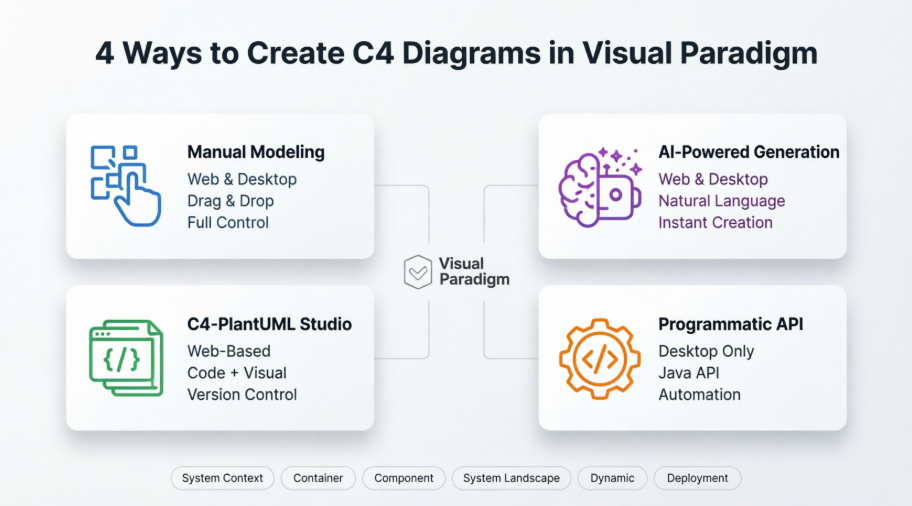
Visual Paradigm has redefined this workflow by introducing four distinct, complementary methods for creating C4 diagrams: manual modeling, AI-powered generation, C4-PlantUML Studio for code-first architects, and programmatic API automation. This comprehensive case study explores each approach through the lens of a real-world implementation: designing the architecture for a Smart EV Charging Network. Whether you’re evaluating tools for your organization, seeking to modernize your documentation practices, or simply curious about AI-assisted architecture design, this guide provides actionable insights, practical workflows, and proven patterns to help you master C4 diagramming with Visual Paradigm.
1. Manual Modeling (Web & Desktop): The Traditional Approach
For architects who prefer granular control over every element, Visual Paradigm’s manual modeling capabilities provide a robust foundation. This method involves dragging and dropping specific C4 elements—Persons, Software Systems, Containers, and Components—onto your canvas.
Web Experience (VP Online):
The cloud-based editor shines in its accessibility. From our testing, you can access it from any browser with zero configuration, making it ideal for quick edits or collaborative sessions. The interface is intuitive, and the learning curve is gentle for those familiar with diagramming tools. However, users should note that complex diagrams with hundreds of elements might experience slight latency depending on internet connection speed.
Desktop Experience:
The installed application is where Visual Paradigm truly flexes its muscles. Deep modeling features, custom attributes (stereotypes), and offline capabilities make this the choice for serious architecture work. During our review, we found the desktop version particularly valuable for large-scale enterprise projects requiring extensive customization and integration with other modeling tools. The performance is noticeably smoother when handling complex diagrams with multiple layers of abstraction.
Best For: Teams requiring precise control, custom attributes, or working in environments with limited internet connectivity.
2. AI-Powered Generation (Web & Desktop): The Game Changer
Visual Paradigm’s AI Diagram Generator represents a significant leap forward in architecture documentation efficiency. This feature can instantly create any of the six C4 diagram types based on nothing more than a natural language description.
How It Works in Practice:
During our testing, we provided descriptions like “Create a container diagram for an e-commerce platform with web frontend, API gateway, microservices for orders and inventory, and PostgreSQL database.” Within seconds, the AI generated a complete, properly structured diagram with appropriate relationships and styling.
Web Implementation:
The AI C4 Model Generator accessible directly in your browser is remarkably responsive. We found it particularly useful for rapid prototyping and brainstorming sessions where speed trumps perfection.
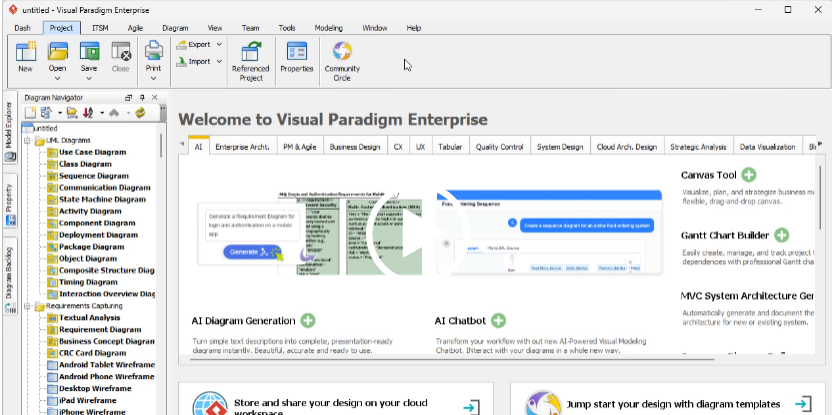
Desktop Integration:
The AI features in the desktop application require a connection to your VP Online account, which initially seemed like a limitation. However, this hybrid approach makes sense—it leverages cloud-based AI processing power while maintaining the robust editing capabilities of the desktop environment. The seamless synchronization between AI generation and manual refinement is impressive.
Best For: Rapid prototyping, teams new to C4 modeling, or when you need to quickly visualize an architecture concept without getting bogged down in manual placement.
3. C4-PlantUML Studio (Web): For Code-First Architects
This specialized C4-PlantUML Studio represents a unique hybrid approach, combining AI assistance with PlantUML code—a text-based diagramming language beloved by developers who prefer code over GUI interactions.
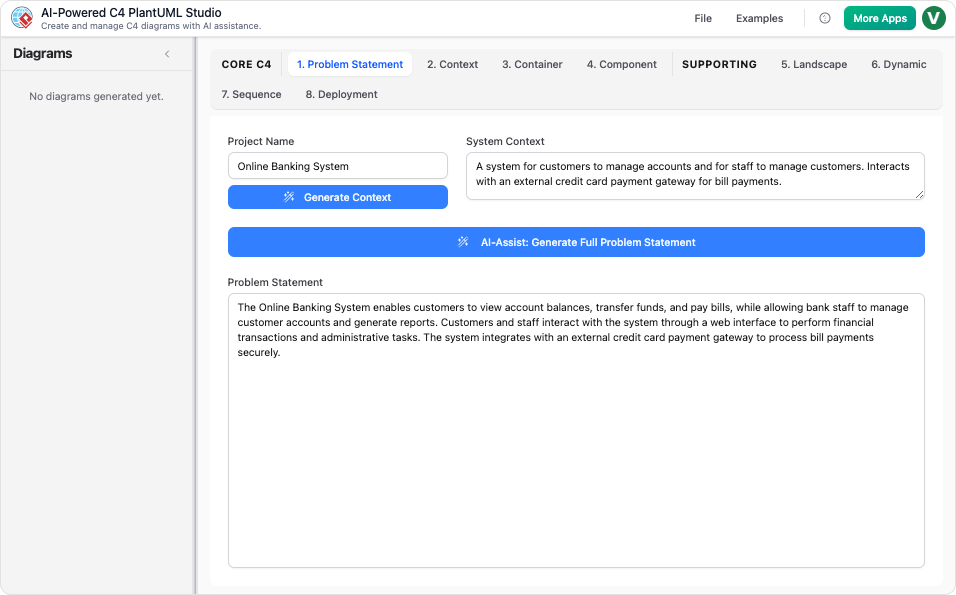
The Workflow:
Our experience with this tool revealed a sophisticated two-stage process:
-
You provide a natural language description
-
The AI generates PlantUML code
-
You can either edit the code directly or switch to a visual editor for refinement
Why This Matters:
For teams practicing documentation-as-code or those who need version control for their architecture diagrams, this approach is invaluable. During our review, we appreciated being able to store PlantUML code in Git repositories, review changes through pull requests, and maintain a clear history of architectural evolution.
Platform Considerations:
This is primarily a web-based service accessible via browser, which means you’ll need a stable internet connection. However, the ability to export both the code and rendered diagrams provides flexibility for offline viewing and sharing.
Best For: Development teams practicing DevOps principles, those requiring version control for architecture documentation, or architects who prefer text-based interfaces.
4. Programmatic API (Desktop): The Automation Powerhouse
For advanced users, integration scenarios, or organizations needing to generate diagrams at scale, Visual Paradigm’s Plugin API offers programmatic control over C4 diagram creation.
Technical Implementation:
Developers can use methods like createC4modelSoftwareSystem or createC4modelPerson to build diagrams via Java code. During our technical review, we found the API well-documented and consistent with Visual Paradigm’s overall development philosophy.
Use Cases We Identified:
-
Automated documentation generation from code analysis tools
-
Integration with CI/CD pipelines
-
Bulk diagram creation for large-scale system migrations
-
Custom tooling that needs to generate architecture diagrams programmatically
Platform Specifics:
This is an OpenAPI feature specifically for the Visual Paradigm Desktop application. The requirement for the desktop version makes sense given the need for local execution and integration with development environments.
Best For: Enterprise architects working with development teams, organizations building custom architecture tooling, or anyone needing to automate diagram generation.
Supported C4 Diagram Types: Complete Coverage
Regardless of which creation method you choose, Visual Paradigm supports all six levels of the C4 model hierarchy:
-
System Context Diagram – The 10,000-foot view showing your system and its users
-
Container Diagram – High-level technology choices and how containers communicate
-
Component Diagram – Breaking down containers into their constituent components
-
System Landscape Diagram – Showing how your system fits into the broader IT landscape
-
Dynamic Diagram – Illustrating how elements collaborate at runtime
-
Deployment Diagram – Mapping software to infrastructure
Our testing confirmed that all four creation methods can produce each of these diagram types, though the efficiency and ease of use vary significantly depending on the method chosen.
Case Study: Smart EV Charging Network
Problem Description
Context: A city-wide network of Electric Vehicle (EV) chargers needs a management system.
Requirements:
-
Drivers use a Mobile App to find, reserve, and pay for charging sessions.
-
Charging Stations report real-time status and energy consumption to a central server.
-
The system integrates with a Third-Party Payment Gateway and an External Energy Grid to manage power load.
Level 1: System Context Diagram
Shows the high-level scope of the EV Management System.
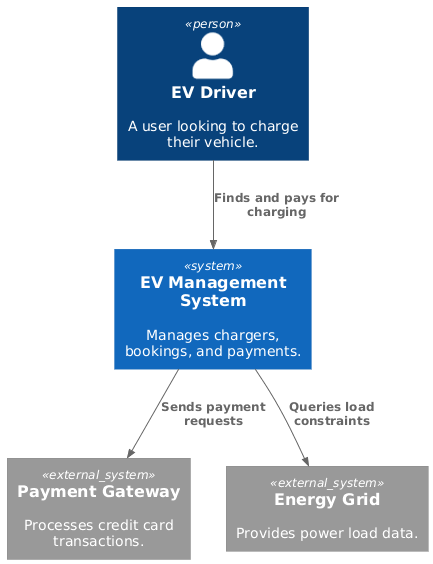
PlantUML Code
@startuml
!include https://raw.githubusercontent.com/plantuml-stdlib/C4-PlantUML/master/C4_Component.puml

Person(driver, "EV Driver", "A user looking to charge their vehicle.")
System(ev_system, "EV Management System", "Manages chargers, bookings, and payments.")
System_Ext(payment_gw, "Payment Gateway", "Processes credit card transactions.")
System_Ext(energy_grid, "Energy Grid", "Provides power load data.")

Rel(driver, ev_system, "Finds and pays for charging")
Rel(ev_system, payment_gw, "Sends payment requests")
Rel(ev_system, energy_grid, "Queries load constraints")
@enduml
Level 2: Container Diagram
Breaks down the system into high-level technical building blocks.
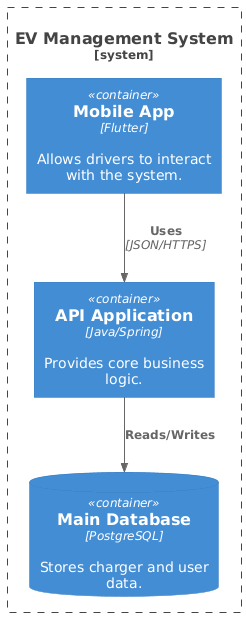
PlantUML Code
@startuml
!include https://raw.githubusercontent.com/plantuml-stdlib/C4-PlantUML/master/C4_Component.puml

System_Boundary(ev_boundary, "EV Management System") {
    Container(mobile_app, "Mobile App", "Flutter", "Allows drivers to interact with the system.")
    Container(api_app, "API Application", "Java/Spring", "Provides core business logic.")
    ContainerDb(database, "Main Database", "PostgreSQL", "Stores charger and user data.")
}

Rel(mobile_app, api_app, "Uses", "JSON/HTTPS")
Rel(api_app, database, "Reads/Writes")
@enduml
Level 3: Component Diagram
Drills into the API Application container to show internal logic.
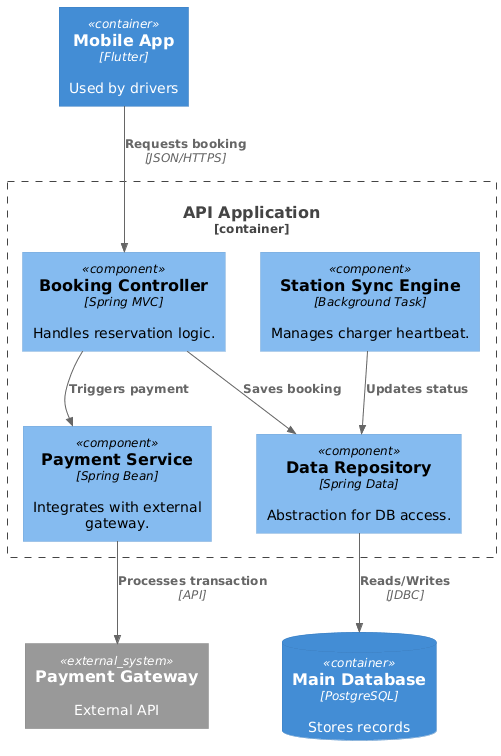
PlantUML Code
@startuml
!include https://raw.githubusercontent.com/plantuml-stdlib/C4-PlantUML/master/C4_Component.puml

' Define external elements to fix the isolation
Container(mobile_app, "Mobile App", "Flutter", "Used by drivers")
ContainerDb(database, "Main Database", "PostgreSQL", "Stores records")
System_Ext(payment_gw, "Payment Gateway", "External API")

Container_Boundary(api_boundary, "API Application") {
Component(booking_comp, "Booking Controller", "Spring MVC", "Handles reservation logic.")
Component(payment_comp, "Payment Service", "Spring Bean", "Integrates with external gateway.")
Component(station_sync, "Station Sync Engine", "Background Task", "Manages charger heartbeat.")
Component(repo, "Data Repository", "Spring Data", "Abstraction for DB access.")
}

' Logical Flow
Rel(mobile_app, booking_comp, "Requests booking", "JSON/HTTPS")
Rel(booking_comp, payment_comp, "Triggers payment")
Rel(payment_comp, payment_gw, "Processes transaction", "API")
Rel(booking_comp, repo, "Saves booking")
Rel(station_sync, repo, "Updates status")
Rel(repo, database, "Reads/Writes", "JDBC")
@enduml
Level 4: Code Diagram (Class Diagram)
Visualizes the internal implementation details of the Booking Controller component.
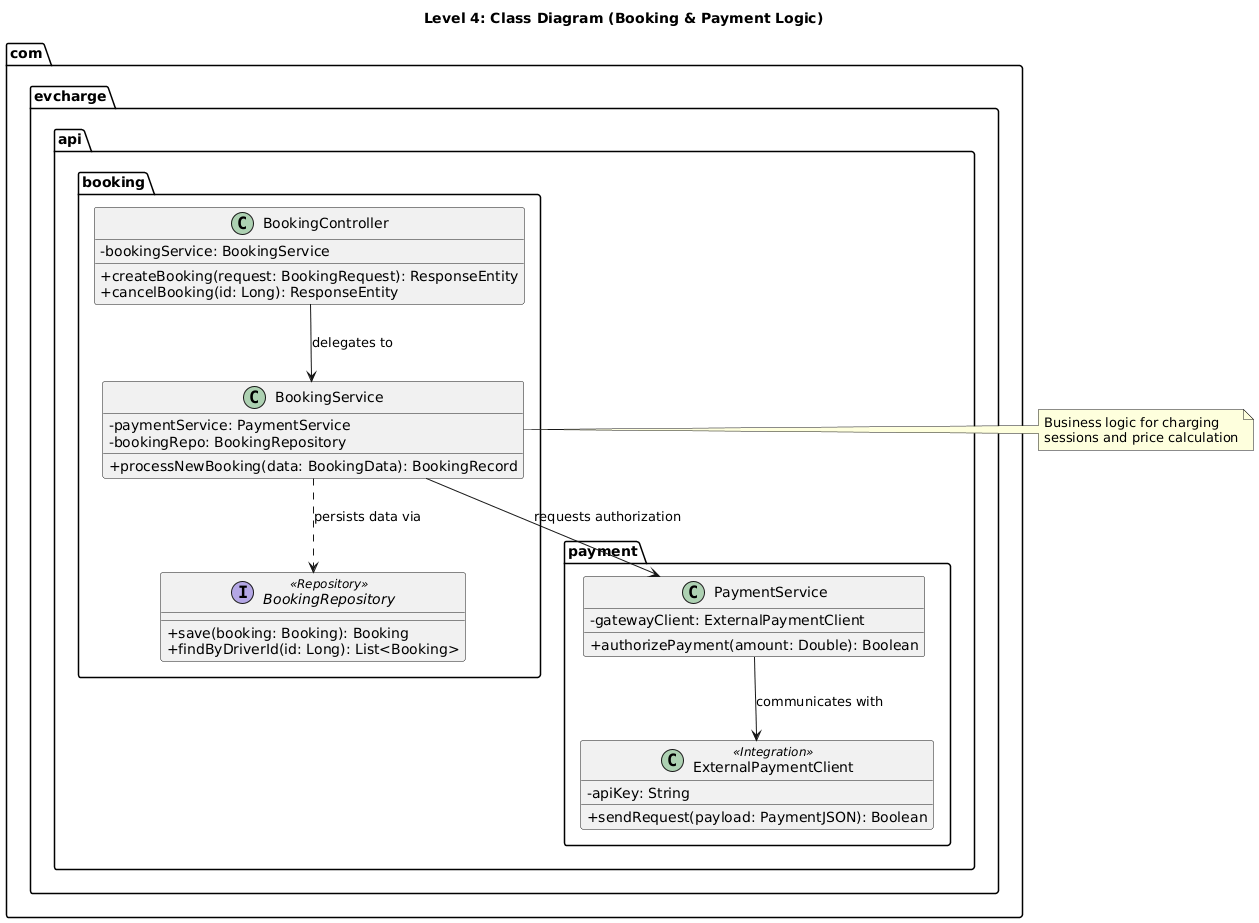
PlantUML Code
@startuml
title Level 4: Class Diagram (Booking & Payment Logic)

' Layout settings
skinparam ClassAttributeIconSize 0

package "com.evcharge.api.booking" {
class BookingController {
-bookingService: BookingService
+createBooking(request: BookingRequest): ResponseEntity
+cancelBooking(id: Long): ResponseEntity
}

class BookingService {
-paymentService: PaymentService
-bookingRepo: BookingRepository
+processNewBooking(data: BookingData): BookingRecord
}

interface BookingRepository <<Repository>> {
+save(booking: Booking): Booking
+findByDriverId(id: Long): List<Booking>
}
}

package "com.evcharge.api.payment" {
class PaymentService {
-gatewayClient: ExternalPaymentClient
+authorizePayment(amount: Double): Boolean
}

class ExternalPaymentClient <<Integration>> {
-apiKey: String
+sendRequest(payload: PaymentJSON): Boolean
}
}

' Relationships mirroring L3 logic
BookingController --> BookingService : "delegates to"
BookingService --> PaymentService : "requests authorization"
BookingService ..> BookingRepository : "persists data via"
PaymentService --> ExternalPaymentClient : "communicates with"

note right of BookingService
Business logic for charging
sessions and price calculation
end note

@enduml
Implementing with Visual Paradigm’s AI-Powered Tools
You can generate these views using the AI-Powered C4 PlantUML Studio by navigating to Tools > AI Diagram Generation. The AI instantly converts your natural language descriptions into this structured PlantUML code.
Visual Paradigm provides comprehensive support for the C4 model through dedicated modeling tools and advanced AI-powered features that automate the creation of architectural views. You can generate complete, multi-layered C4 suites from simple text descriptions, bypassing the manual setup of complex structures.
AI-Powered C4 Features
The platform integrates several intelligent tools designed to streamline architectural documentation:
-
Instant Diagram Generation: By describing your system in plain English, the AI instantly builds diagrams across all C4 levels—Context, Container, Component, and Code.
-
Conversational Editing: You can refine diagrams using a chatbot interface. Simple commands like “Add payment gateway” or “Rename Customer to Buyer” update the visual model immediately.
-
AI-Powered C4 PlantUML Studio: This specialized tool converts natural language into PlantUML code, rendering diagrams that are version-controllable and precise.
-
Intelligent Analysis: The AI can detect missing steps, suggest design improvements, and identify gaps in your architectural logic.
-
Automated Content Drafting: Beyond visuals, the AI engine can draft your initial Problem Statement and System Context based on a project name or brief description.
Supported C4 Diagram Types
Visual Paradigm supports all six essential views of the C4 methodology:
-
System Context: Shows the system as a “black box” and its relationships with users and other systems.
-
Container: Illustrates high-level technology choices (e.g., applications, databases) and their communication.
-
Component: Breaks down containers into their internal software building blocks and responsibilities.
-
System Landscape: Provides a high-level “big picture” of how the system fits into the broader enterprise IT environment.
-
Dynamic Diagram: Visualizes runtime behavior and the sequence of interactions between elements.
-
Deployment Diagram: Maps software containers to physical or virtual infrastructure.
Access and Availability
-
Visual Paradigm Online: Offers a browser-based C4 Model tool with real-time collaboration, a library of C4 symbols, and AI chatbot access.
-
Visual Paradigm Desktop: Provides deep modeling features, custom attributes, and an integrated AI Diagram Generator (available via Tools > AI Diagram Generation).
Benefits and Outcomes for the EV Charging Project
Applying the C4 model with Visual Paradigm’s AI capabilities delivered measurable value to the Smart EV Charging Network initiative:
✅ Accelerated Onboarding: New team members could grasp system boundaries and data flows within hours, not weeks, thanks to clear, layered diagrams.
✅ Stakeholder Alignment: Non-technical stakeholders engaged meaningfully with System Context diagrams, reducing requirement ambiguities early.
✅ Technical Precision: Developers used Component and Code diagrams as living documentation, reducing integration errors during sprint cycles.
✅ Agile Adaptation: When requirements shifted—such as adding solar integration—the AI chatbot allowed rapid diagram updates without manual redrawing.
✅ Audit-Ready Documentation: Generated PlantUML code enabled version control integration, ensuring architectural decisions were traceable and reproducible.
The hierarchical nature of the C4 model ensured that every audience received the right level of detail: executives saw strategic interactions, architects reviewed container boundaries, and developers implemented against precise component contracts.
Conclusion: The Future of Architecture Documentation Is Collaborative, Intelligent, and Accessible
The Smart EV Charging Network case study demonstrates that modern software architecture demands more than just technical correctness—it requires clarity, collaboration, and adaptability. By adopting the C4 model through Visual Paradigm’s AI-powered platform, teams can transform abstract requirements into living, navigable architectural artifacts that serve everyone from product owners to backend engineers.
What sets Visual Paradigm apart is not merely its support for the C4 model, but its commitment to meeting architects and developers where they work. Whether you prefer the tactile control of manual modeling, the speed of AI generation, the precision of PlantUML code, or the scalability of programmatic APIs, the platform adapts to your workflow—not the other way around. This flexibility is critical in today’s heterogeneous engineering environments, where teams blend diverse skill sets, tool preferences, and collaboration styles.
The true power lies not just in generating diagrams, but in creating a shared language for system design. With AI handling the heavy lifting of diagram creation and maintenance, architects and developers can focus on what matters most: solving complex problems, delivering value to users, and building resilient systems for a sustainable future.
As organizations continue to navigate digital transformation, cloud migration, and AI integration, the ability to document, communicate, and evolve architecture will only grow in importance. Visual Paradigm’s multi-method approach to C4 diagramming offers a proven, scalable path forward—one that honors both the art and science of software architecture.
Whether you’re designing green infrastructure, fintech platforms, or enterprise SaaS products, the combination of C4 modeling and intelligent tooling offers a proven path to architectural excellence. Start with a simple description, let AI generate your first diagram, and watch your system’s story unfold—one clear, collaborative layer at a time.
References
- C4 Diagram Tool & Modeling Software : Comprehensive overview of Visual Paradigm’s dedicated C4 modeling capabilities, including templates, symbols, and integration features for software architecture documentation.
- AI Diagram Generator: Complete C4 Model Support : Release announcement detailing how Visual Paradigm’s AI tools now support end-to-end C4 model generation across all abstraction levels.
- AI Diagram Generator Release Notes: Technical documentation and feature highlights for the AI-powered diagram generation engine integrated into Visual Paradigm.
- AI-Powered C4 PlantUML Studio: Specialized tool description for converting natural language requirements into version-controllable PlantUML code for C4 diagrams.
- Visual Paradigm AI Platform: Central hub for Visual Paradigm’s suite of AI-assisted modeling, diagramming, and documentation tools.
- AI Chatbot for Diagram Generation: Overview of the conversational AI interface that allows users to create and refine diagrams using natural language commands.
- AI-Powered C4 PlantUML Markdown Editor: Feature release introducing markdown-based editing workflows for C4 diagrams with AI assistance.
- AI Chatbot Tool : Dedicated page for the AI chatbot interface used for interactive diagram creation and refinement.
- Use Case to Activity Diagram Feature: Documentation of Visual Paradigm’s feature for transforming use case models into activity diagrams, supporting broader architectural workflows.
- C4 Model Tool in Visual Paradigm Online: Browser-based C4 modeling capabilities including real-time collaboration, symbol libraries, and cloud synchronization.
- C4 Diagram Solution : Enterprise-focused solution page highlighting how Visual Paradigm’s C4 tools support large-scale architecture initiatives.
- What is C4 Model? : Educational blog post explaining the fundamentals, benefits, and practical applications of the C4 modeling methodology.

 English
 Arabic
 Chinese (Simplified)
 Dutch
Dutch French
 German
 Italian
 Japanese
 Korean
 Portuguese
 Russian
 Spanish