


In today’s hyper-competitive digital landscape, software architecture is no longer just a technical concern—it is a strategic business asset. As organizations scale, the complexity of their systems grows exponentially, making clear communication, maintainable design, and stakeholder alignment more critical than ever. Yet, many teams struggle to document and visualize their architectures in ways that are both technically precise and accessible to non-technical audiences.
Enter the C4 Model: a lightweight, hierarchical framework for visualizing software architecture that bridges the gap between high-level business context and low-level implementation details. When combined with AI-powered tooling like Visual Paradigm, the C4 Model transforms from a documentation exercise into an intelligent, collaborative design process.
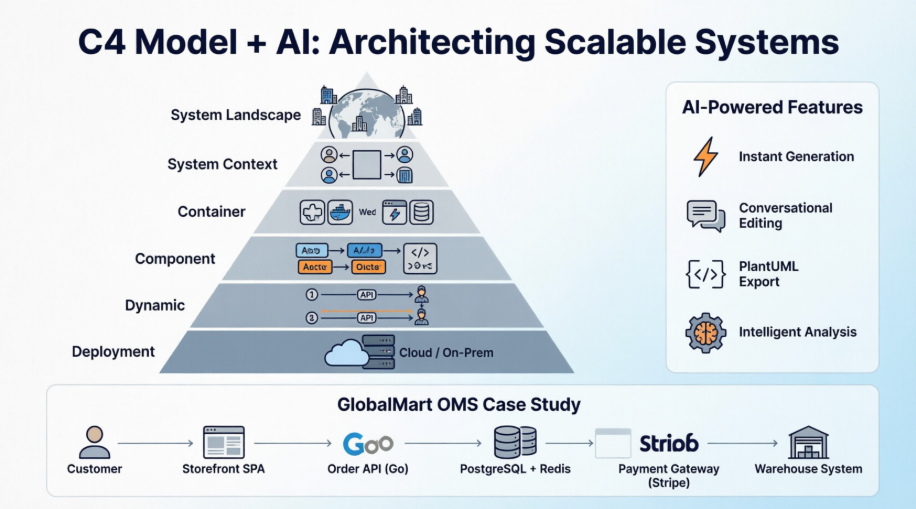
This comprehensive case study explores how modern engineering teams can leverage Visual Paradigm’s AI-enhanced C4 modeling capabilities to design, document, and communicate complex software systems. Through a practical example—architecting a scalable Order Management System for a global e-commerce retailer—we demonstrate how to move from abstract requirements to deployable architecture with clarity, speed, and confidence.
What Are C4 Model Diagrams?
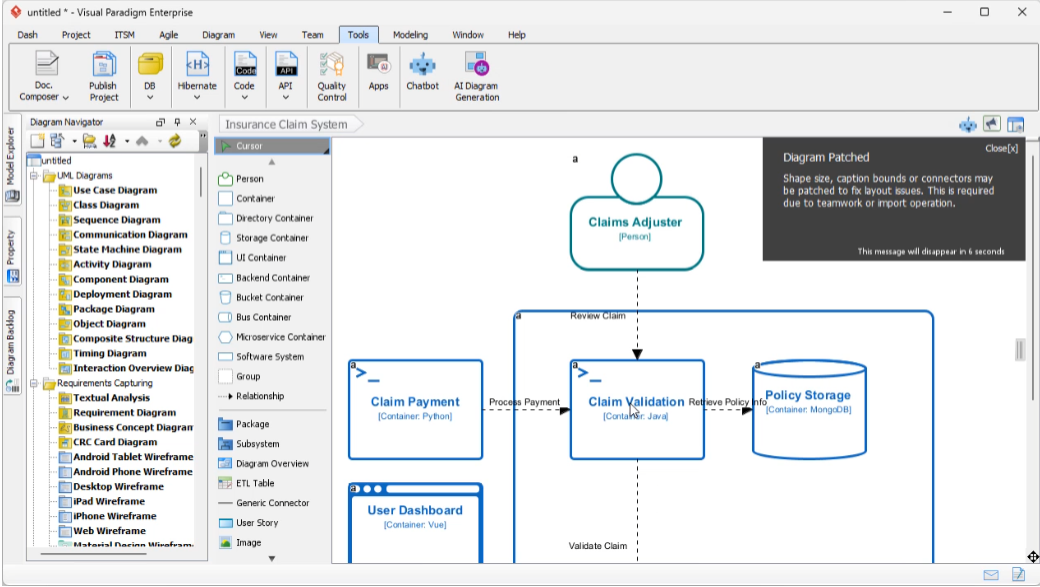
C4 Model Diagrams in Visual Paradigm Desktop now support complete C4 Model diagramming with six essential diagram types. Create architecture visualizations following the C4 methodology—from high-level system contexts down to detailed component deployments—for modern software teams and enterprise architects.
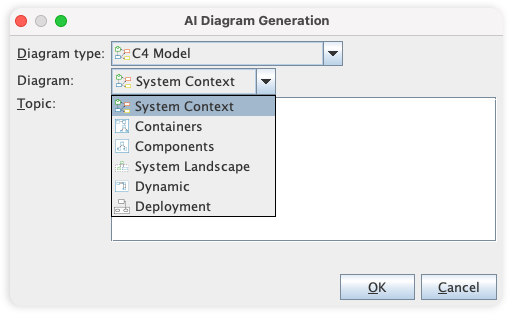
Master Complex Architectures with AI-Powered C4 Modeling
The AI C4 Diagram Generator revolutionizes software architecture documentation by supporting all six essential views: System Context, Containers, Components, Landscape, Dynamic, and Deployment. By eliminating the “blank canvas” hurdle, it empowers teams to generate professional, standards-compliant documentation for complex systems in a fraction of the time.
- The AI Diagram Generator leverages deep understanding of C4 standards to instantly map your description to any of the six required diagram levels.
- Supports all six C4 diagram types: System Context, Containers, Components, Landscape, Dynamic, and Deployment.
- Allows for stakeholder-specific customization based on audience needs (General Readers vs. Engineers).
AI Content Generation
Stop wrestling with boxes and arrows. Our AI C4 Diagram Generator takes you from a simple idea to a professional, multi-layered architecture suite in seconds.
- Type your project name and get a professional starting point instantly—no more dragging boxes one by one.
- The AI follows C4 standards automatically, ensuring your diagrams are logically sound and easy for teams to read.
- Generate every view from the big picture down to the code level (Context to Deployment) in a single click.
Covers All 6 C4 Diagram Types
From a high-level overview to the deployment of your system, our tool supports all six C4 diagram types, providing a comprehensive and multi-level view of your software architecture.
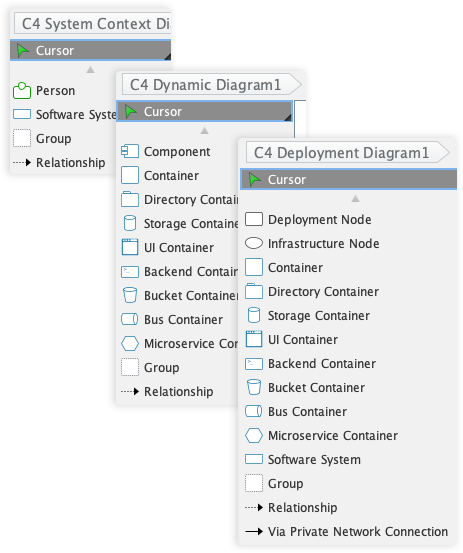
The six types of C4 diagrams are:
- System Context Diagram: Shows the system as a black box and its relationships with users and other systems.
- Container Diagram: Decomposes the system into a set of interacting containers (e.g., applications, data stores, microservices).
- Component Diagram: Breaks down containers into their constituent components and their interactions.
- System Landscape Diagram: Shows the software systems and their relationships at a high level.
- Dynamic Diagram: Shows the dynamic behavior of the system, such as the sequence of interactions between components.
- Deployment Diagram: Illustrates how containers are mapped to infrastructure.
Comprehensive Symbol Library for C4 Modeling
While the C4 model is notation-independent, our tool provides a comprehensive library of symbols for the core C4 elements, ensuring you can create clear and consistent diagrams. The primary elements are:
- Person: Represents the users of your system.
- Software System: The highest level of abstraction, representing a system that delivers value.
- Container: A deployable unit, such as a web application or database.
- Component: The building blocks of a container.
Powerful and Intuitive Diagramming
Our tool is packed with features that make diagramming fast, easy, and precise.
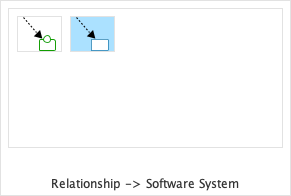
Resource-Centric Interface
Create and connect elements with ease using a drag-and-drop interface that is optimized for speed and accuracy.
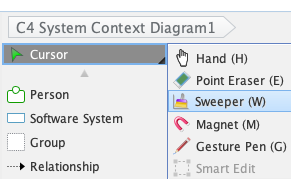
Sweeper
Easily create space for new elements or clean up your diagram layout with the sweeper tool, which intelligently moves shapes and connectors.
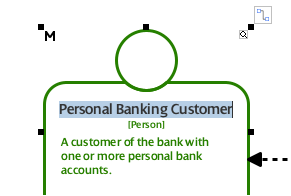
Inline Editing
Edit text and properties directly on the diagram, without the need for separate dialog boxes, for a faster and more intuitive workflow.
Manage Complexity with Advanced Modeling Features
Our tool helps you to manage complex models by breaking them down into smaller, more manageable parts.
- Sub-Diagrams: Decompose complex diagrams into multiple layers of abstraction. This is extremely useful for drilling down from a C4 Context Diagram into a detailed Container Diagram.
- Referenced Diagrams: Create links between diagrams to establish relationships and navigate your model easily, even across different projects.
Share Your Vision with Powerful Reporting and Publishing
Our tool provides flexible options to generate documents and share your C4 diagrams with a wider audience.
- Project Publisher: Export your project into an interactive HTML website for easy sharing and browsing.
- Report Composer: Generate comprehensive reports in various formats (PDF, Word, etc.) to document your architecture.
Collaborate and Innovate as a Team
Our tool is built for teamwork, with features that help you to work together efficiently and effectively.
- Centralized Repository: Store your projects in a central repository for easy access and management.
- Version Control: Track changes, compare revisions, and resolve conflicts with our built-in version control system.
- Cloud-Based Platform: Collaborate with your team in real-time, from anywhere in the world, with our cloud-based platform.
C4 Diagram Gallery
These C4 diagrams were automatically created using our AI Diagram Generator, turning system architecture ideas into clear, structured visuals in seconds.
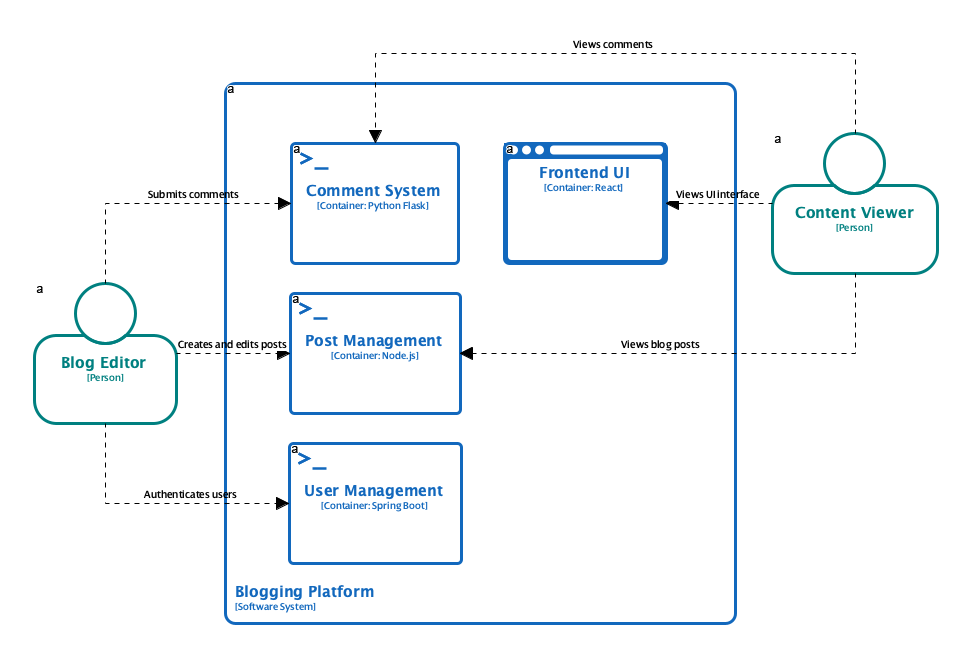
C4 Containers Diagram
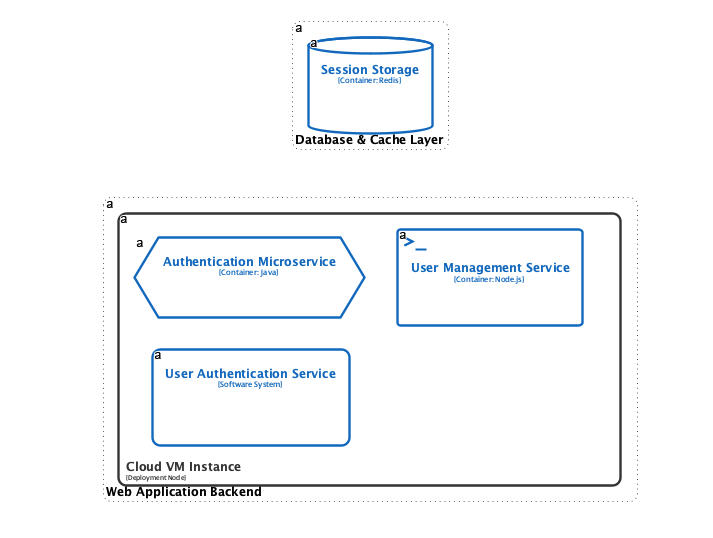
C4 Deployment Diagram
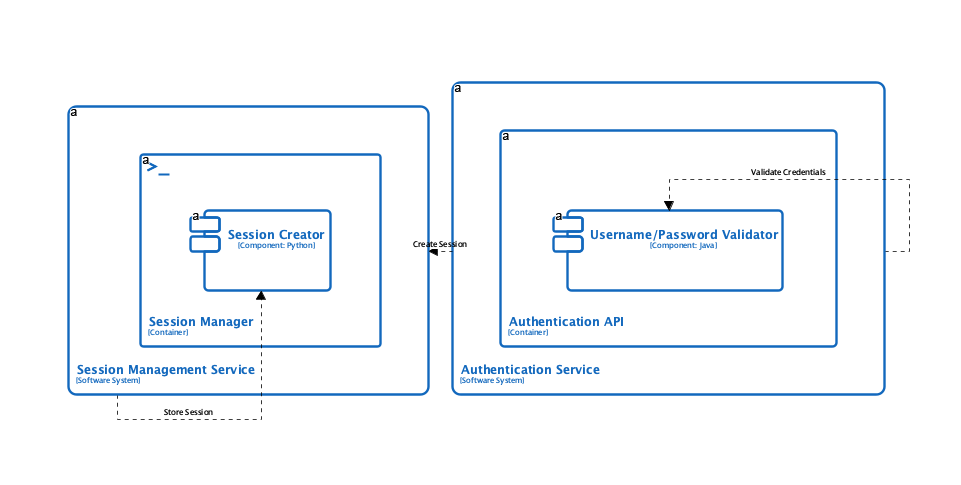
C4 Dynamic Diagram
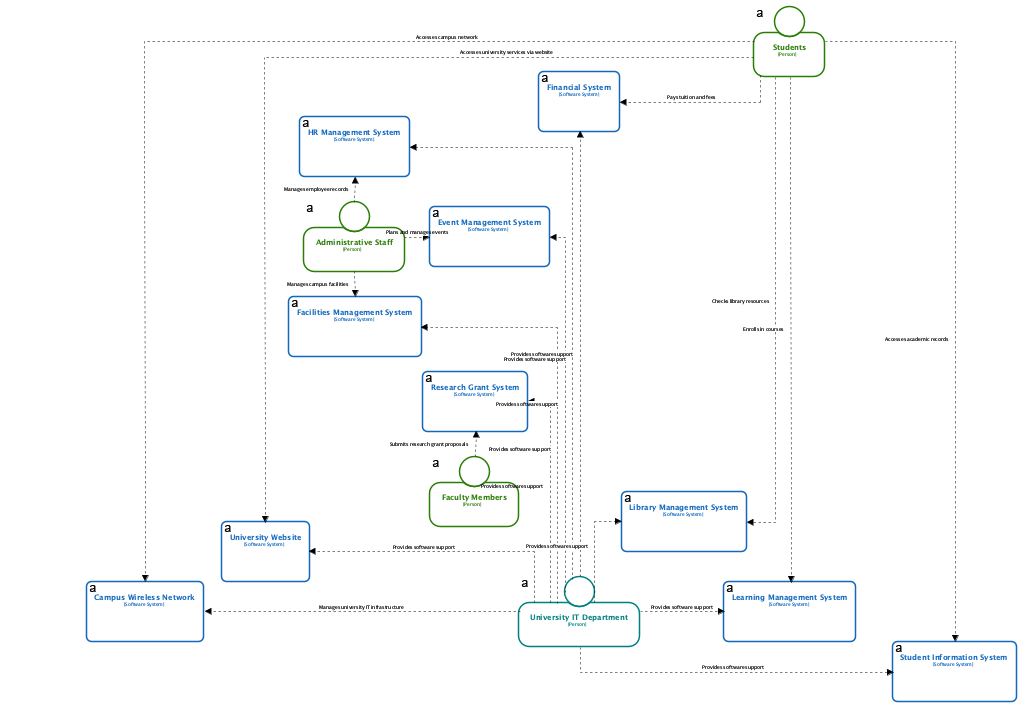
C4 System Landscape Diagram
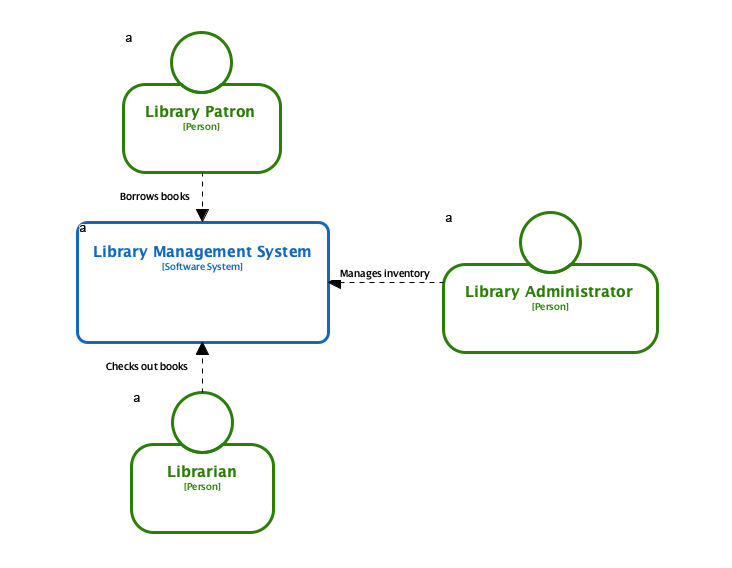
C4 System Context Diagram
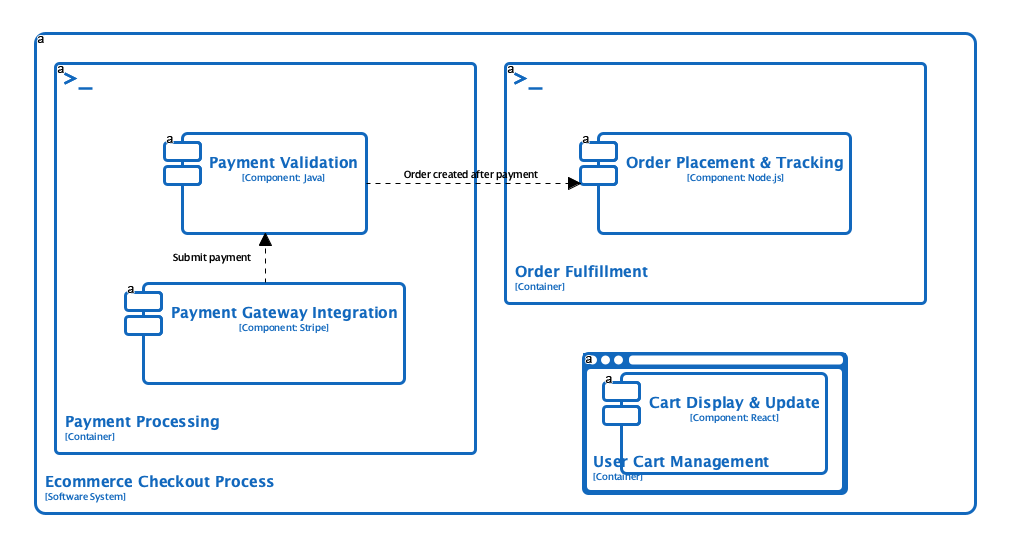
C4 Components Diagram
Use Cases
- Software Architects: Quickly generate comprehensive C4 diagrams from system descriptions to visualize architecture.
- System Engineers: Create documentation for complex systems with multiple interconnected components.
- DevOps Teams: Document deployment architectures with AI-generated deployment diagrams.
- Technical Leads: Communicate system design to both technical and non-technical stakeholders.
Tips & Best Practices
- Define your audience clearly to generate diagrams with appropriate level of abstraction and detail.
- Use the full C4 hierarchy to document all aspects of your architecture for comprehensive understanding.
- Review and validate AI-generated diagrams with your team to ensure accuracy and completeness.
Case Study: Architecting a Scalable Retail Order Management System
In today’s fast-paced e-commerce landscape, delivering a seamless customer experience hinges on robust, scalable backend systems. When order processing falters during peak traffic—resulting in duplicate charges, lost tracking, or unresponsive interfaces—the business impact is immediate and severe. Modern retail organizations need more than just code; they need a clear, communicable architecture that aligns technical execution with business outcomes.
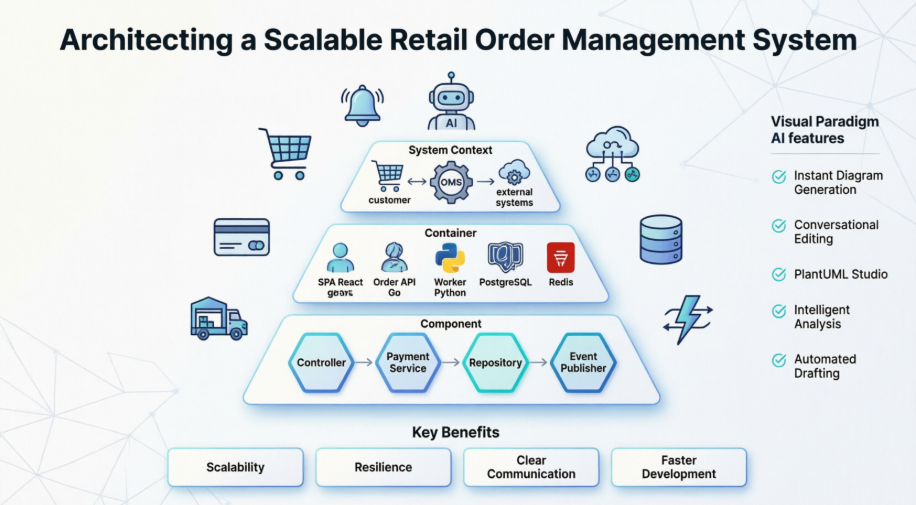
Figure: Architecting a Scalable Retail Order Management System – by Visual Paradigm
This guide walks through the design of a high-performance Order Management System (OMS) for “GlobalMart,” a rapidly growing e-commerce retailer. Using the C4 model—a hierarchical approach to visualizing software architecture—and leveraging Visual Paradigm’s AI-powered diagramming tools, teams can transform complex requirements into actionable, maintainable system designs. Whether you’re an architect, developer, or product leader, this resource provides a practical framework for building resilient, microservices-inspired order platforms that scale with demand.
Case Study Overview: GlobalMart’s OMS Challenge
Problem Statement
GlobalMart’s legacy monolithic order processor struggles under peak traffic, causing system hangs, duplicate charges, and lost order tracking. The business requires a modern Order Management System that:
- Enables customers to place orders and view real-time status
- Integrates securely with external payment gateways (e.g., Stripe)
- Communicates reliably with Warehouse Management Systems (WMS) for fulfillment
- Notifies customers via SMS/email services without blocking core workflows
Technical Direction
The engineering team has chosen a microservices-inspired container architecture featuring:
- A secure API layer for business logic
- A responsive Storefront SPA for customer interactions
- A dedicated background worker for high-volume warehouse synchronization
- Asynchronous messaging to ensure UI responsiveness during heavy load
C4 Modeling Approach: From Context to Components
The C4 model provides a structured way to visualize software architecture at four levels of granularity. Below are the PlantUML diagrams designed for GlobalMart’s OMS.
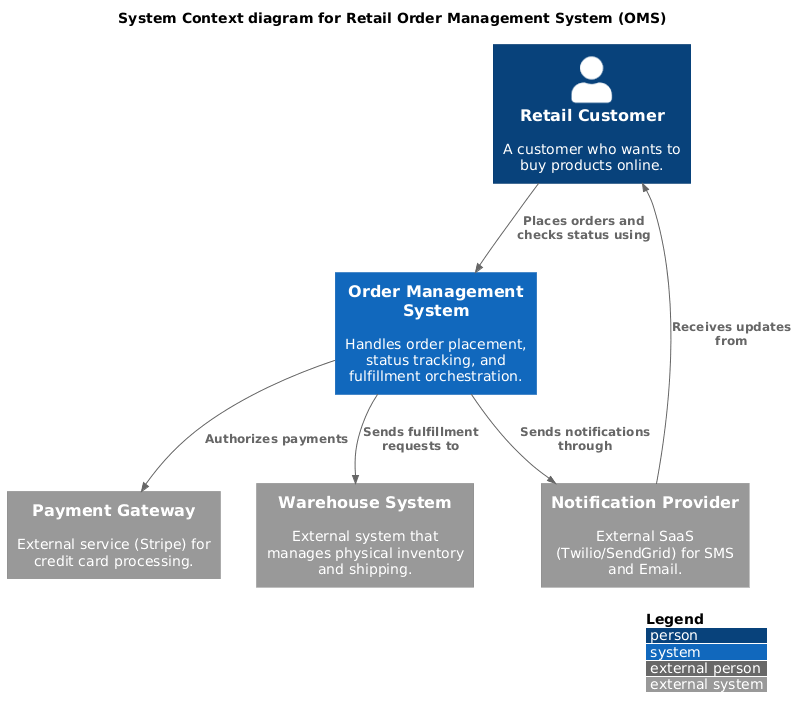
Level 1: System Context Diagram
This diagram positions the OMS within its ecosystem, showing interactions with users and external systems.
PlantUML Code
@startuml
!include https://raw.githubusercontent.com/plantuml-stdlib/C4-PlantUML/master/C4_Context.puml

LAYOUT_WITH_LEGEND()

title System Context diagram for Retail Order Management System (OMS)

Person(customer, "Retail Customer", "A customer who wants to buy products online.")
System(oms, "Order Management System", "Handles order placement, status tracking, and fulfillment orchestration.")

System_Ext(payment_gateway, "Payment Gateway", "External service (Stripe) for credit card processing.")
System_Ext(wms, "Warehouse System", "External system that manages physical inventory and shipping.")
System_Ext(notification_service, "Notification Provider", "External SaaS (Twilio/SendGrid) for SMS and Email.")

Rel(customer, oms, "Places orders and checks status using")
Rel(oms, payment_gateway, "Authorizes payments")
Rel(oms, wms, "Sends fulfillment requests to")
Rel(oms, notification_service, "Sends notifications through")
Rel_Back(customer, notification_service, "Receives updates from")
@enduml
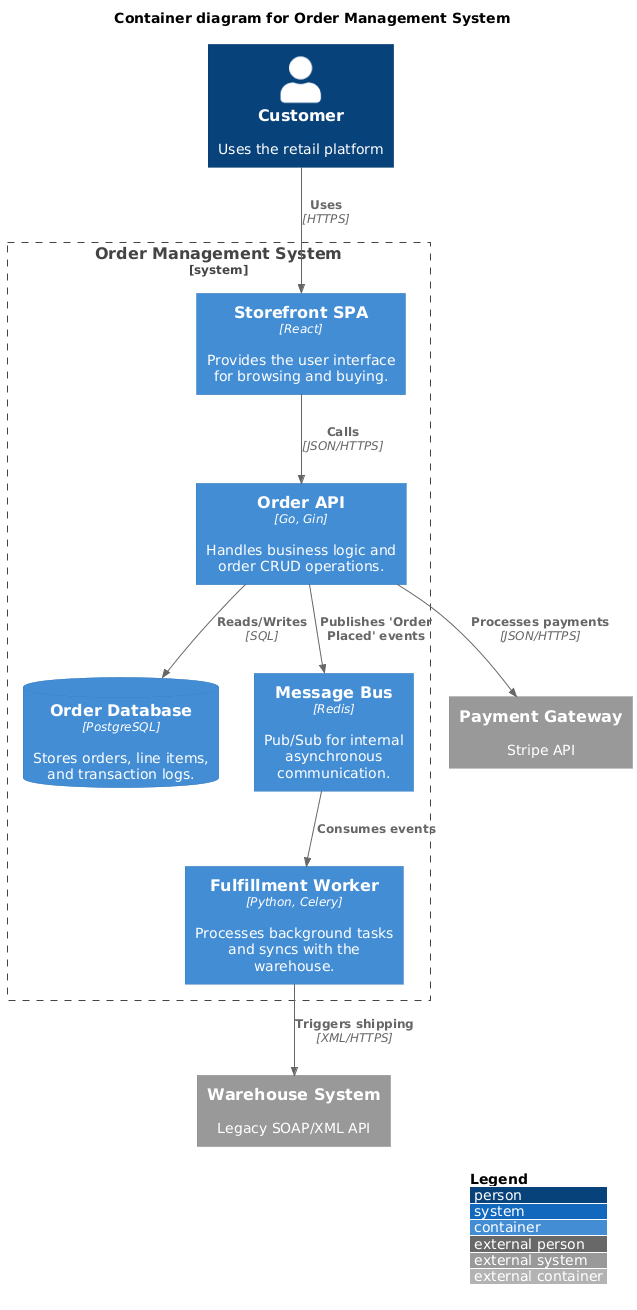
Level 2: Container Diagram
This view breaks the OMS into high-level technical building blocks, clarifying technology choices and communication patterns.
PlantUML Code
@startuml
!include https://raw.githubusercontent.com/plantuml-stdlib/C4-PlantUML/master/C4_Container.puml

LAYOUT_WITH_LEGEND()

title Container diagram for Order Management System

Person(customer, "Customer", "Uses the retail platform")

System_Boundary(oms_boundary, "Order Management System") {
    Container(spa, "Storefront SPA", "React", "Provides the user interface for browsing and buying.")
    Container(api_app, "Order API", "Go, Gin", "Handles business logic and order CRUD operations.")
    Container(worker, "Fulfillment Worker", "Python, Celery", "Processes background tasks and syncs with the warehouse.")
    ContainerDb(db, "Order Database", "PostgreSQL", "Stores orders, line items, and transaction logs.")
    Container(message_bus, "Message Bus", "Redis", "Pub/Sub for internal asynchronous communication.")
}

System_Ext(payment_gateway, "Payment Gateway", "Stripe API")
System_Ext(wms, "Warehouse System", "Legacy SOAP/XML API")

Rel(customer, spa, "Uses", "HTTPS")
Rel(spa, api_app, "Calls", "JSON/HTTPS")
Rel(api_app, db, "Reads/Writes", "SQL")
Rel(api_app, message_bus, "Publishes 'Order Placed' events")
Rel(message_bus, worker, "Consumes events")
Rel(worker, wms, "Triggers shipping", "XML/HTTPS")
Rel(api_app, payment_gateway, "Processes payments", "JSON/HTTPS")
@enduml
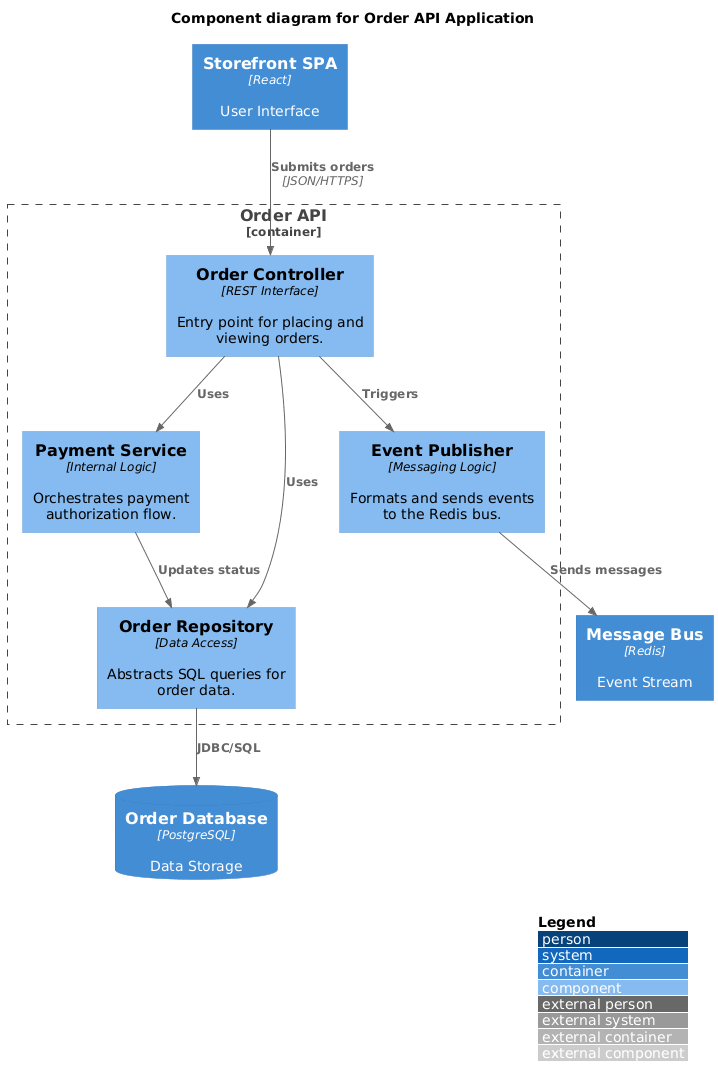
Level 3: Component Diagram (Order API)
Zooming into the Order API container, this diagram reveals internal logical components and their responsibilities.
PlantUML Code
@startuml
!include https://raw.githubusercontent.com/plantuml-stdlib/C4-PlantUML/master/C4_Component.puml

LAYOUT_WITH_LEGEND()

title Component diagram for Order API Application

Container(spa, "Storefront SPA", "React", "User Interface")
ContainerDb(db, "Order Database", "PostgreSQL", "Data Storage")
Container(bus, "Message Bus", "Redis", "Event Stream")

Container_Boundary(api_logic, "Order API") {
    Component(order_ctrl, "Order Controller", "REST Interface", "Entry point for placing and viewing orders.")
    Component(pay_svc, "Payment Service", "Internal Logic", "Orchestrates payment authorization flow.")
    Component(repo, "Order Repository", "Data Access", "Abstracts SQL queries for order data.")
    Component(event_pub, "Event Publisher", "Messaging Logic", "Formats and sends events to the Redis bus.")

    Rel(order_ctrl, pay_svc, "Uses")
    Rel(order_ctrl, repo, "Uses")
    Rel(pay_svc, repo, "Updates status")
    Rel(order_ctrl, event_pub, "Triggers")
}

Rel(spa, order_ctrl, "Submits orders", "JSON/HTTPS")
Rel(repo, db, "JDBC/SQL")
Rel(event_pub, bus, "Sends messages")
@enduml
Leveraging Visual Paradigm’s AI-Powered C4 Features
Visual Paradigm enhances C4 modeling with intelligent automation that accelerates design, documentation, and collaboration. Key capabilities include:
Instant Diagram Generation
Describe your system in plain English, and the AI instantly generates diagrams across all C4 levels—Context, Container, Component, and Code—reducing manual setup time.
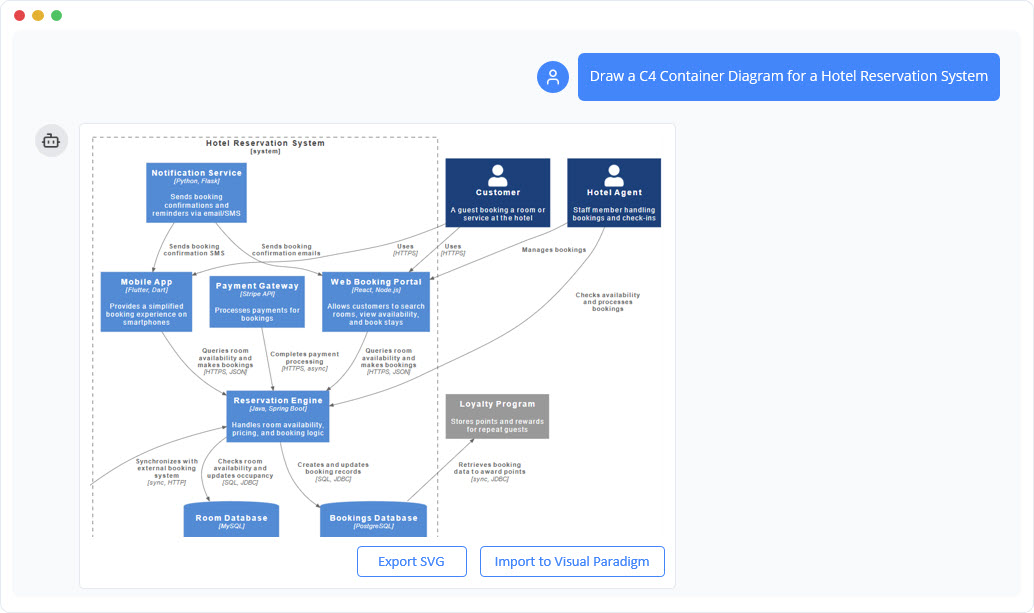
Conversational Editing
Refine diagrams through a chatbot interface. Simple commands like “Add payment gateway” or “Rename Customer to Buyer” update the visual model in real time.
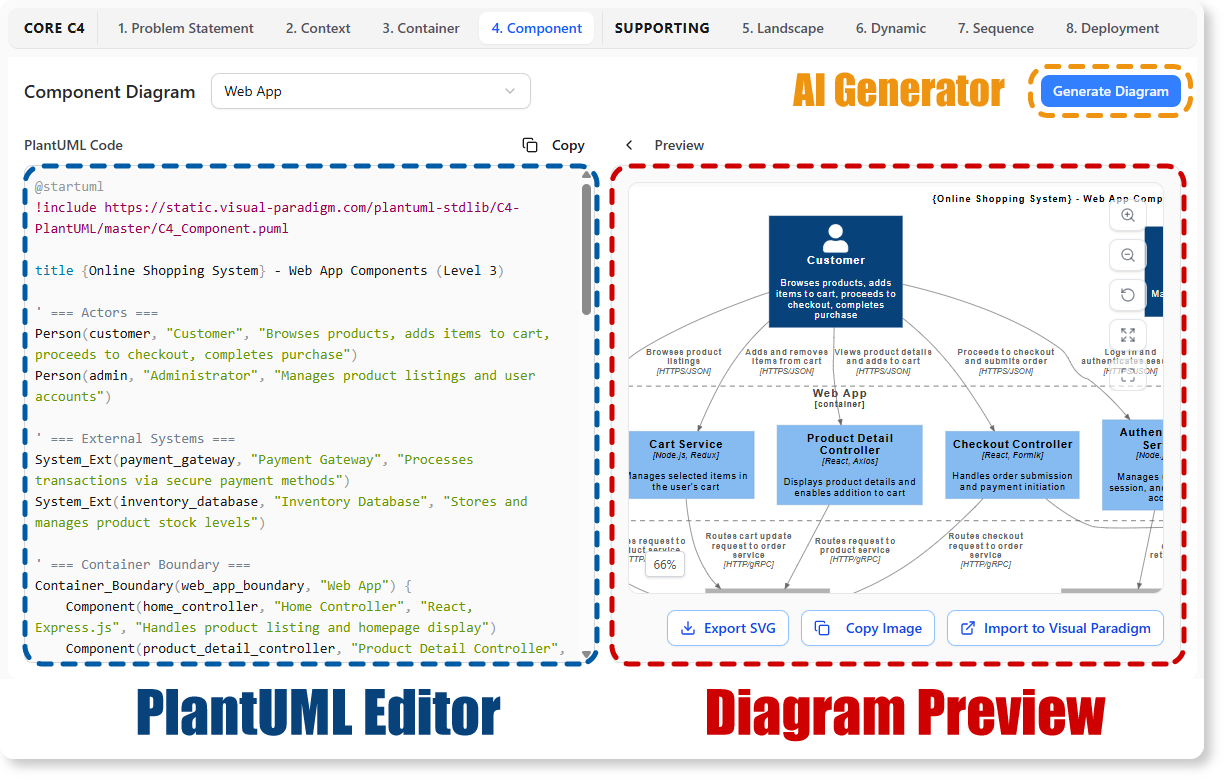
AI-Powered C4 PlantUML Studio
Convert natural language descriptions directly into version-controllable PlantUML code, ensuring precision and reproducibility across teams.
Intelligent Analysis
The AI detects architectural gaps, suggests design improvements, and validates logical flow to strengthen system resilience before implementation begins.
Automated Content Drafting
Beyond visuals, the AI engine drafts initial problem statements, system context descriptions, and technical specifications based on minimal input—jumpstarting documentation efforts.
Supported C4 Diagram Types in Visual Paradigm
Visual Paradigm fully supports the six essential views of the C4 methodology, enabling comprehensive architectural communication:
- System Context: Shows the system as a “black box” and its relationships with users and external systems.
- Container: Illustrates high-level technology choices (applications, databases) and their communication patterns.
- Component: Breaks containers into internal software building blocks with clear responsibilities.
- System Landscape: Provides an enterprise-level view of how the system integrates into broader IT infrastructure.
- Dynamic Diagram: Visualizes runtime behavior and interaction sequences between components.
- Deployment Diagram: Maps software containers to physical or virtual infrastructure for operational clarity.
Getting Started: Access and Availability
Visual Paradigm offers flexible deployment options to suit team workflows:
Visual Paradigm Online
A browser-based C4 modeling tool featuring real-time collaboration, a library of C4 symbols, and integrated AI chatbot access. Ideal for distributed teams needing quick setup and shared workspaces.
Visual Paradigm Desktop
A powerful desktop application with deep modeling capabilities, custom attributes, and an integrated AI Diagram Generator accessible via Tools > AI Diagram Generation. Best for architects requiring advanced customization and offline access.
Both platforms support importing/exporting PlantUML, enabling seamless integration with existing documentation pipelines and version control systems.
Conclusion
Building a high-performance Order Management System demands more than technical prowess—it requires clear communication, strategic decomposition, and iterative validation. By adopting the C4 model, teams can articulate architecture at the right level of detail for each stakeholder, from executives to developers. When combined with Visual Paradigm’s AI-powered tooling, this approach transforms architectural design from a documentation burden into a collaborative, intelligent process.
For GlobalMart and organizations like it, the path forward is clear: start with context, decompose with intention, automate with AI, and validate continuously. The result is not just a scalable OMS, but a living architectural artifact that evolves with your business. Whether you’re modernizing a legacy system or greenfielding a new platform, the C4 model—supercharged by AI—provides the clarity and agility needed to thrive in competitive digital markets.
As software systems continue to grow in complexity, the ability to visualize, communicate, and iterate on architecture becomes a core competitive advantage. Visual Paradigm’s AI-enhanced C4 modeling suite empowers teams to meet this challenge head-on—turning architectural ambiguity into actionable insight, and technical debt into strategic opportunity.
References
- C4 Diagram Tool & Modeling Software: Comprehensive overview of Visual Paradigm’s C4 modeling capabilities, including tool features, use cases, and enterprise architecture support.
- AI Diagram Generator: Complete C4 Model Support: Release announcement detailing AI-powered generation of full C4 model suites from natural language descriptions.
- AI Diagram Generator Release Notes: Technical updates and feature enhancements for Visual Paradigm’s AI diagram generation engine.
- AI-Powered C4 PlantUML Studio: Dedicated tool page for converting plain English into precise, version-controllable PlantUML diagrams.
- Visual Paradigm AI Platform: Central hub for Visual Paradigm’s AI-powered diagramming and modeling tools.
- AI Chatbot for Diagramming: Feature page describing conversational AI capabilities for refining and editing architectural diagrams.
- AI-Powered C4 PlantUML Markdown Editor: Release notes for the integrated markdown editor that combines natural language input with PlantUML rendering.
- AI Chatbot Tool Page: Direct access to the AI chatbot interface for interactive diagram refinement and architectural guidance.
- Use Case to Activity Diagram Feature: Documentation on automated transformation of use case models into activity diagrams within the Visual Paradigm suite.
- C4 Model Tool in Visual Paradigm Online: Feature overview of the browser-based C4 modeling environment with collaboration and AI integration.
- What Is C4 Model? : Educational article introducing the C4 model methodology, its levels, and benefits for software architecture communication.

 English
 Arabic
 Chinese (Simplified)
 Dutch
Dutch French
 German
 Italian
 Japanese
 Korean
 Portuguese
 Russian
 Spanish