


Introduction
In today’s rapidly evolving digital landscape, enterprise architects face mounting pressure to deliver clear, actionable architectural models that align business strategy with technology execution. Traditional approaches to creating ArchiMate diagrams—while powerful—often require significant manual effort, deep notation expertise, and considerable time investment. This case study explores how Visual Paradigm Desktop’s AI Diagram Generator transforms this workflow by introducing intelligent automation without sacrificing precision or control.
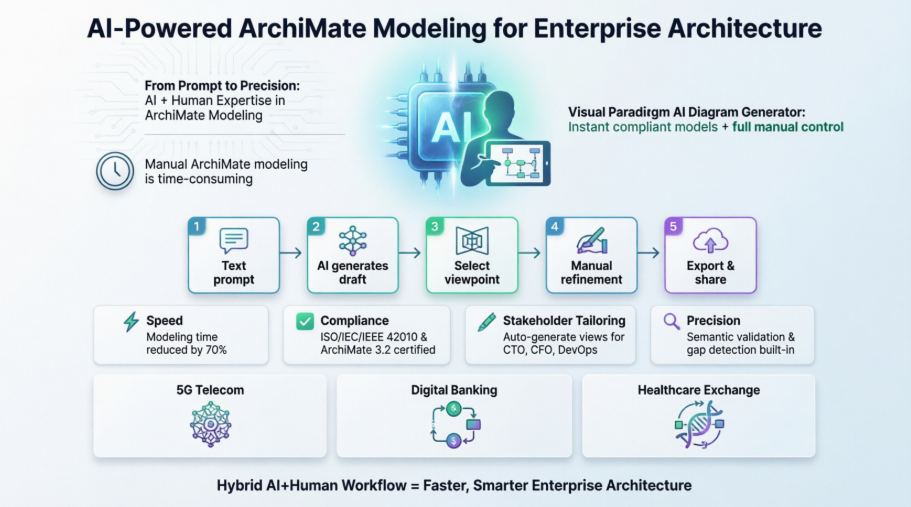
Through a detailed examination of capabilities, implementation workflows, and real-world applications, this study demonstrates how combining AI-driven diagram generation with manual refinement creates a superior modeling experience. Organizations seeking to modernize their enterprise architecture practices will find practical guidance on leveraging this hybrid approach to accelerate delivery, improve stakeholder communication, and maintain architectural rigor.
1. The Power of AI in ArchiMate Diagram Generation
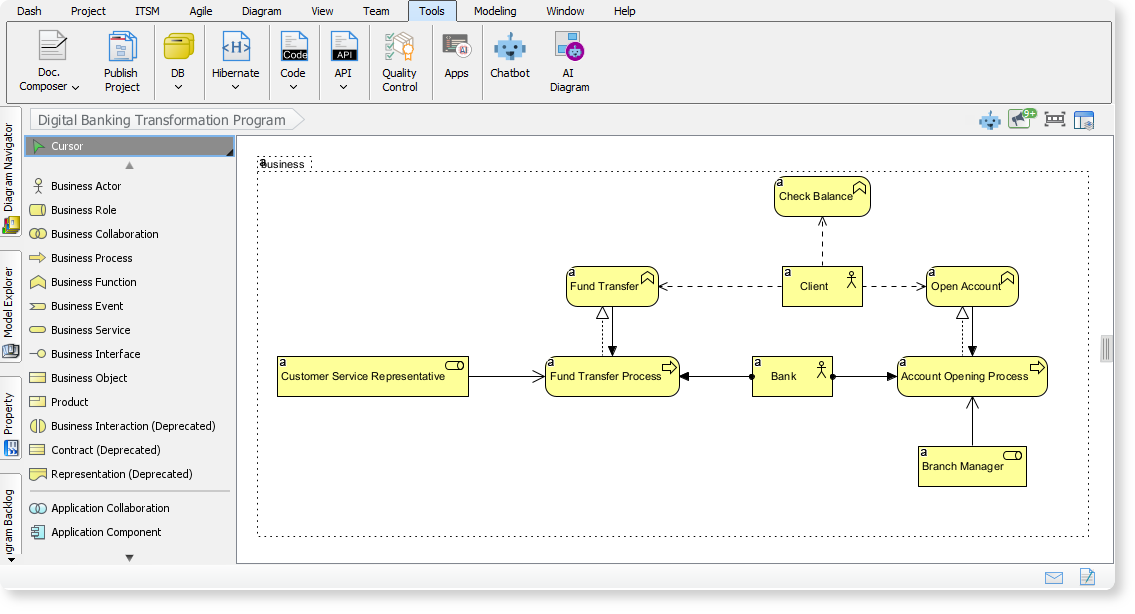
What’s New in Visual Paradigm Desktop?
The latest update introduces AI-powered ArchiMate diagram generation, which:
-
Instantly creates fully compliant ArchiMate models from high-level prompts.
-
Supports all official ArchiMate viewpoints, ensuring diagrams are tailored for specific stakeholders.
-
Reduces manual effort, allowing architects to focus on strategy and validation.
Key Features
| Feature | Benefit |
|---|---|
| AI-Generated Diagrams | Enter a topic or requirement, and the AI drafts a comprehensive model. |
| Official Viewpoints | Choose from 20+ viewpoints (e.g., Business Process, Technology Usage, Capability Map). |
| Customizable Output | Define audience (e.g., engineers, executives) and tone (e.g., formal, technical). |
| Editable Drafts | Refine and fact-check AI-generated models to align with organizational standards. |
2. Why AI + Manual Editing Outperforms AI-Only Generation
Limitations of AI-Only Generation
-
Non-editable outputs may not fully match user needs.
-
Lack of context can lead to generic or inaccurate diagrams.
-
No flexibility for unique organizational requirements.
Advantages of AI + Manual Editing
| AI-Only Generation | AI + Manual Editing |
|---|---|
| Fixed, non-editable output | Editable, customizable drafts |
| Generic, one-size-fits-all | Tailored to specific stakeholders |
| Limited accuracy | Human validation ensures precision |
| No room for refinement | Iterative improvement possible |
Result: AI accelerates the initial draft, while manual editing ensures accuracy, relevance, and alignment with business goals.
3. Step-by-Step Guide: Generating ArchiMate Diagrams with AI
Step 1: Access the AI Diagram Generator
-
Open Visual Paradigm Desktop.
-
Click Tools > AI Diagram.
Step 2: Select an ArchiMate Viewpoint
-
Choose from the dropdown menu (e.g., Product Viewpoint, Technology Usage, Business Process).
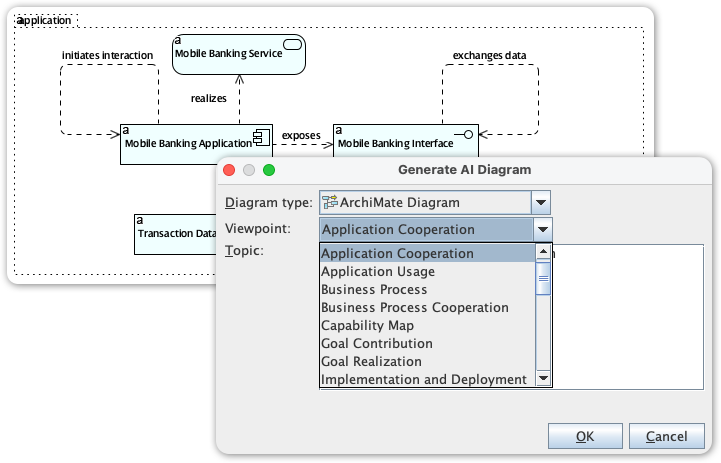
Step 3: Enter a Topic
-
Example prompts:
-
“Telecom 5G Network Rollout Architecture”
-
“Digital Banking Transformation Program”
-
“Healthcare Information Exchange Platform”
-
Step 4: Generate and Customize
-
Click OK to generate the diagram.
-
Edit the draft to refine elements, adjust relationships, or add details.
Step 5: Export and Share
-
Save the diagram in your preferred format (e.g., PNG, SVG).
-
Share with stakeholders for feedback.
4. Practical Use Cases
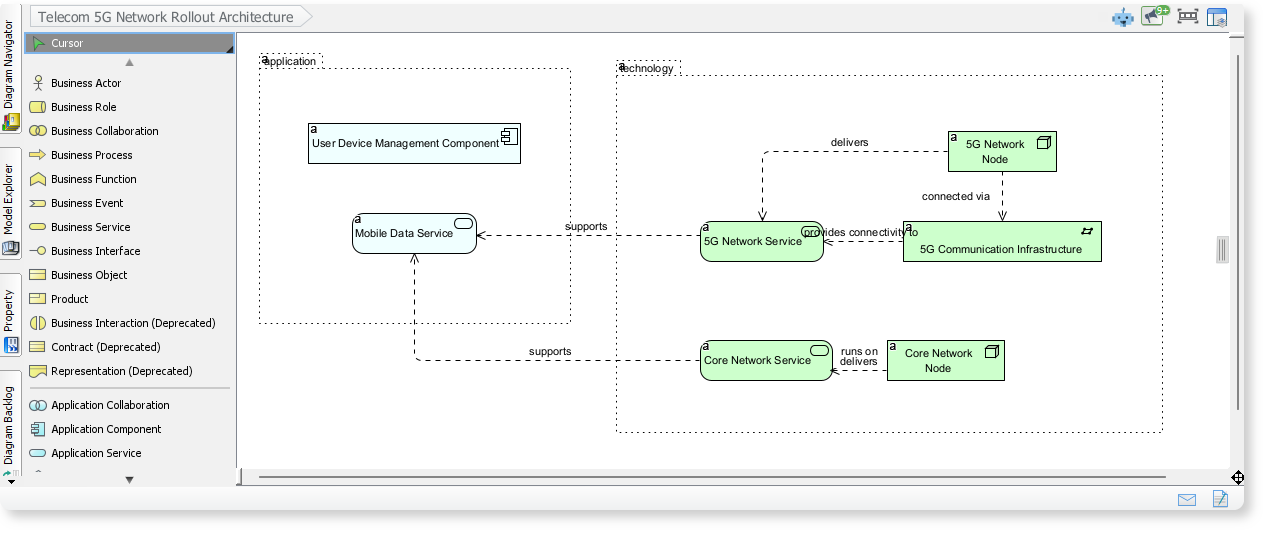
Example 1: Telecom 5G Network Rollout
-
Prompt: “Telecom 5G Network Rollout Architecture”
-
Output: A diagram showing application services, network services, and infrastructure elements working together for 5G connectivity.
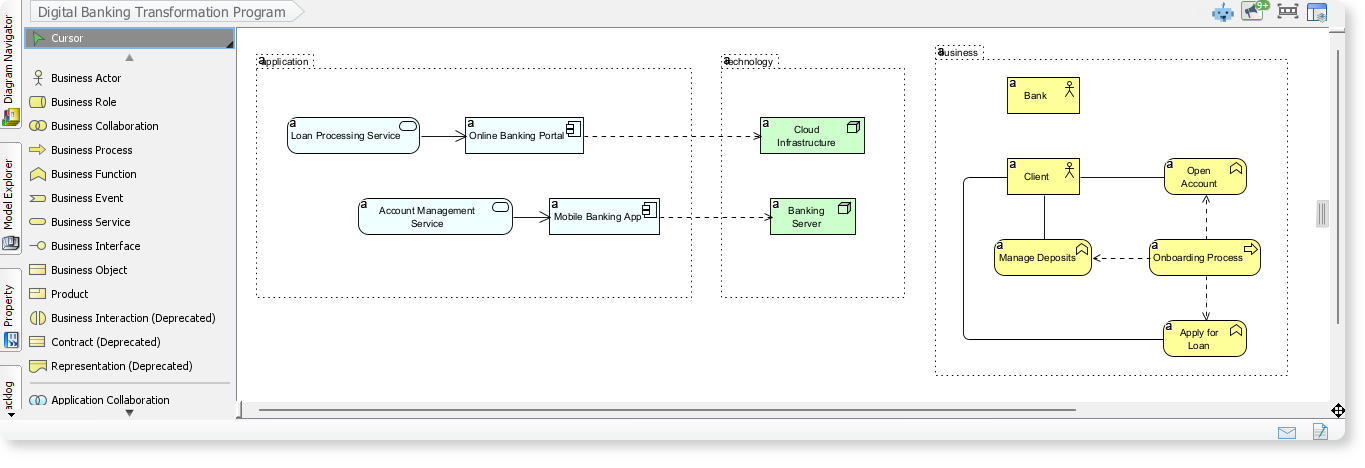
Example 2: Digital Banking Transformation
-
Prompt: “Digital Banking Transformation Program”
-
Output: A model illustrating business processes, application services, and technology components in digital banking.
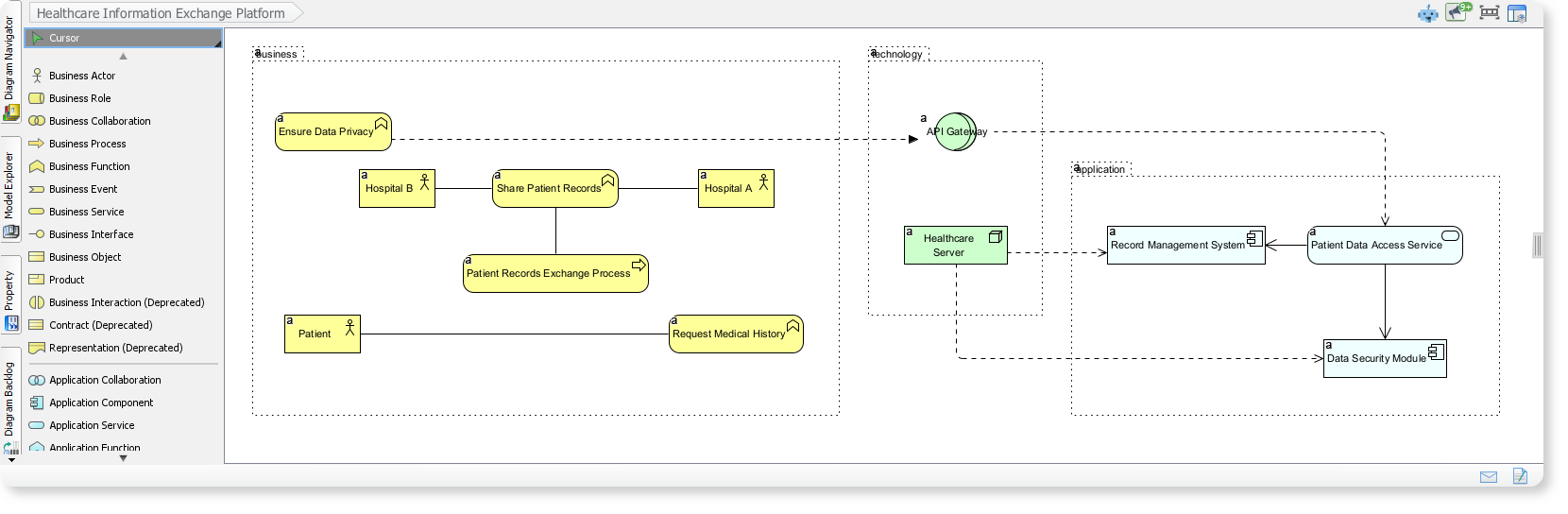
Example 3: Healthcare Information Exchange
-
Prompt: “Healthcare Information Exchange Platform”
-
Output: A visualization of how hospitals, patients, and applications collaborate to exchange medical records securely.
5. Best Practices for AI-Assisted EA Modeling
For Architects:
-
Use AI to draft initial models quickly.
-
Manually refine to ensure accuracy and relevance.
-
Leverage viewpoints to tailor diagrams for different stakeholders.
For Teams:
-
Collaborate on AI-generated drafts.
-
Validate diagrams with subject matter experts.
-
Iterate based on feedback.
ArchiMate Diagram: Interactive AI Chatbot Capabilities
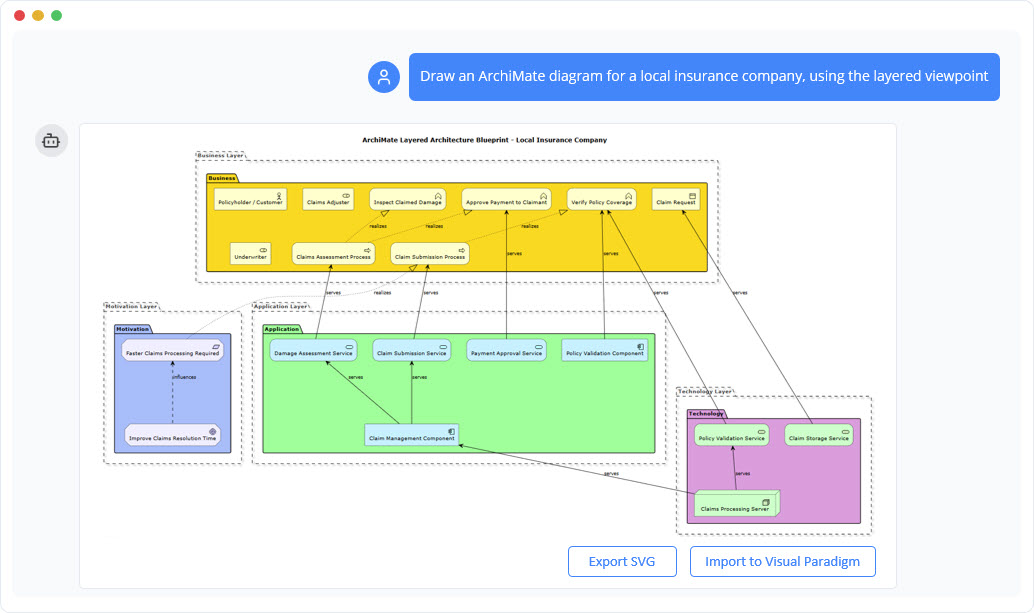
The ArchiMate Diagram models enterprise architecture, linking business processes, applications, and technology layers for holistic analysis.
Instant ArchiMate Model Generation
The AI chatbot turns complex enterprise concepts into clear ArchiMate models in moments. You can describe your business capabilities, application landscape, or technology setup in plain language, and the AI converts your description into a structured, multi-layer model. Each element is created using proper ArchiMate notation, ensuring accuracy while removing the need to manually look up shapes or relationships.
Shape and Extend Architecture Through Dialogue
Enterprise architectures often evolve as new insights emerge. With conversational refinement, you can adjust your model instantly—add missing application components, update business processes, introduce infrastructure nodes, or generate specific viewpoints for different teams. This interactive approach helps you explore alternatives, validate alignment across layers, and maintain a living architectural picture that adapts as the organization grows.
Benefits of Creating ArchiMate Diagrams with the AI Chatbot
 Generates full models across Business, Application, and Technology layers from simple text.
Automatically applies correct ArchiMate symbols, colors, and relationship rules.
Supports quick creation of viewpoints tailored to each stakeholder’s needs.
Helps teams visualize dependencies, flows, and strategic alignment at scale.
Streamlines architecture governance through clear, consistent modeling.
Reduces manual diagramming time, letting architects focus on analysis and decision-making.
Examples of Generating ArchiMate Diagram
Use simple text prompts to generate this diagram in seconds. Here are a few examples to get you started:
Disaster Response Coordination System
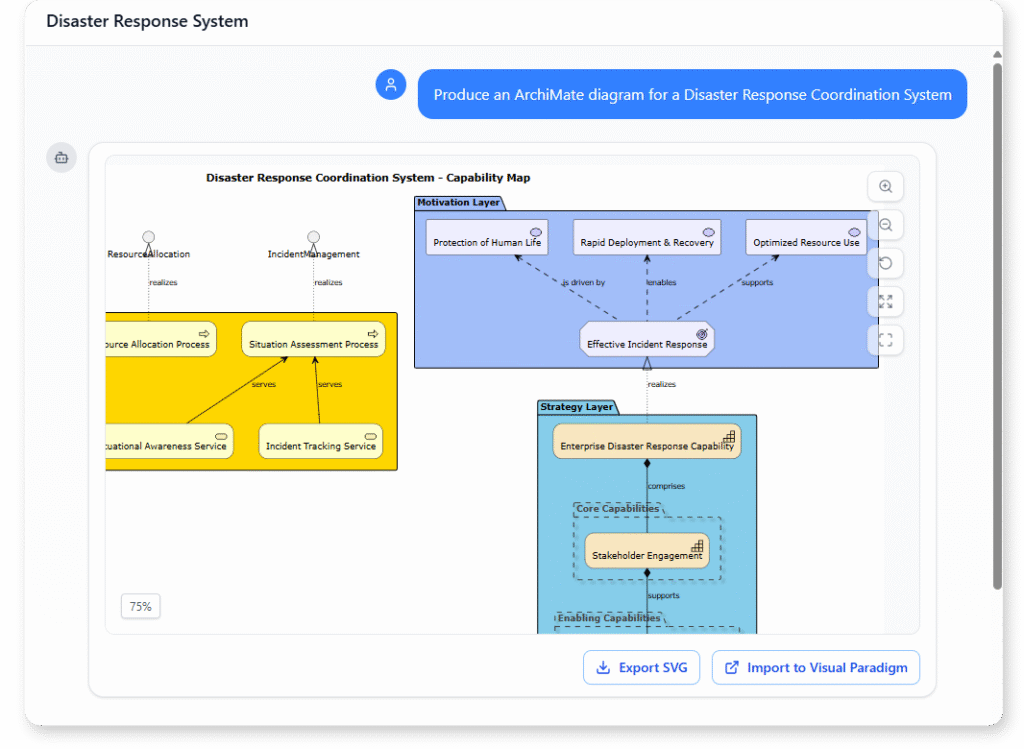
“Produce an ArchiMate diagram for a Disaster Response Coordination System.”
Fleet Management System
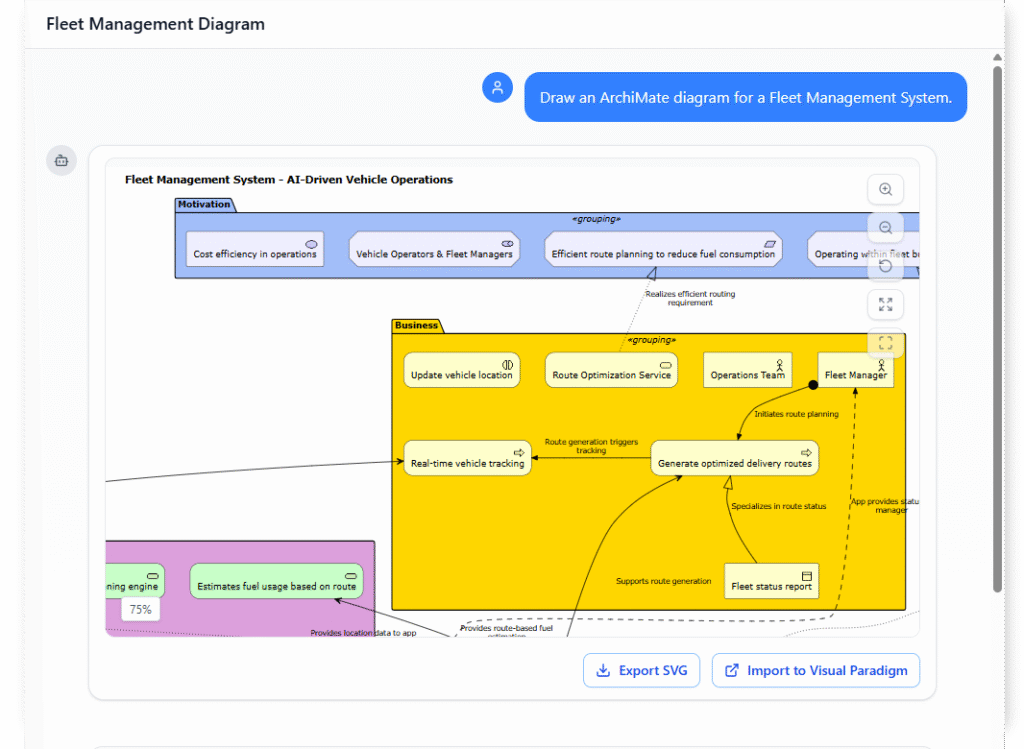
“Draw an ArchiMate diagram for a Fleet Management System.”
Smart Parking Management System
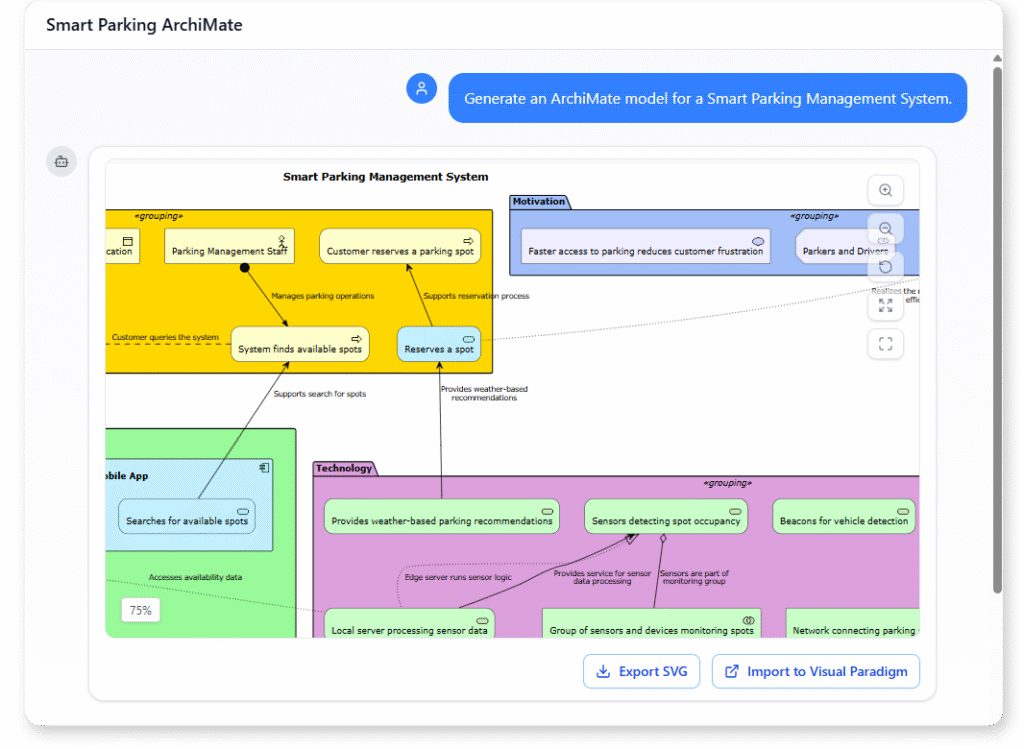
“Generate an ArchiMate model for a Smart Parking Management System.”
What Is an ArchiMate Diagram?
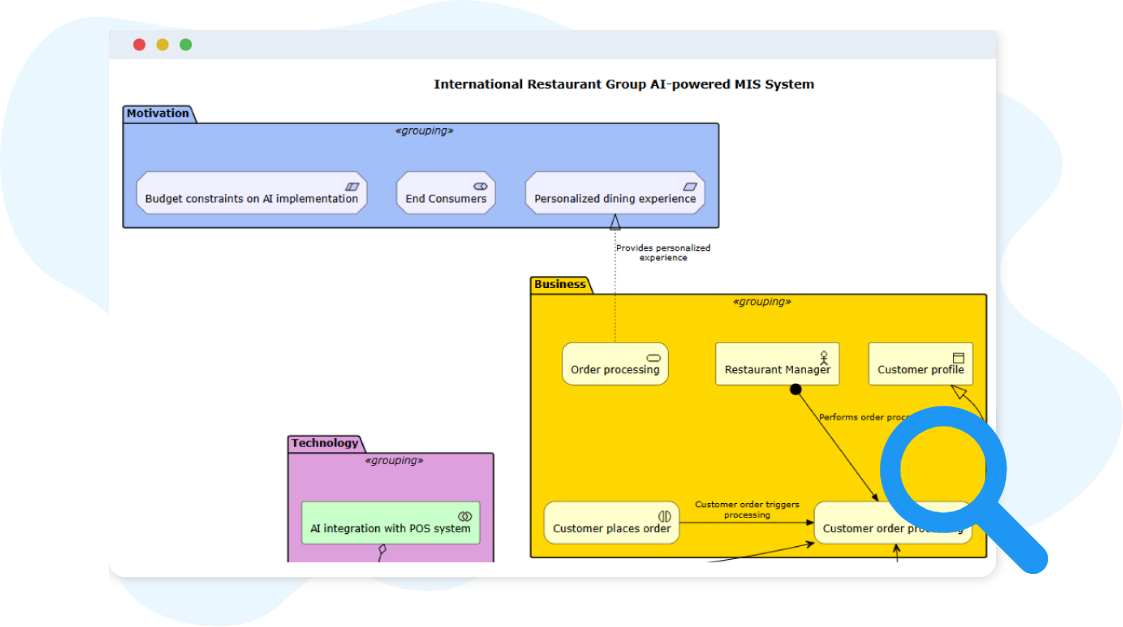
An ArchiMate diagram is a standardized visual model used to describe how an organization’s business, applications, and technology work together. It provides a unified language that helps teams understand capabilities, processes, systems, and infrastructure in one integrated view.
By connecting concepts across layers, ArchiMate diagrams reveal how strategic goals translate into operational structures. This makes it easier to analyze dependencies, identify gaps, and guide enterprise-wide change with clarity and precision.
Key Concepts
ArchiMate Diagram
An ArchiMate diagram visualizes enterprise architecture by modeling relationships among business, application, technology, and physical layers. It helps stakeholders understand strategy, processes, systems, and infrastructure at a high level.
he Architecture Layer Model: Aligning Vision with Execution
Modern enterprise architecture relies on a layered model to translate strategic intent into operational reality. Rather than treating technology as an isolated function, this framework maps the organization across interconnected levels of abstraction. Each layer answers a distinct question, yet all work in concert to ensure traceability, agility, and value delivery.
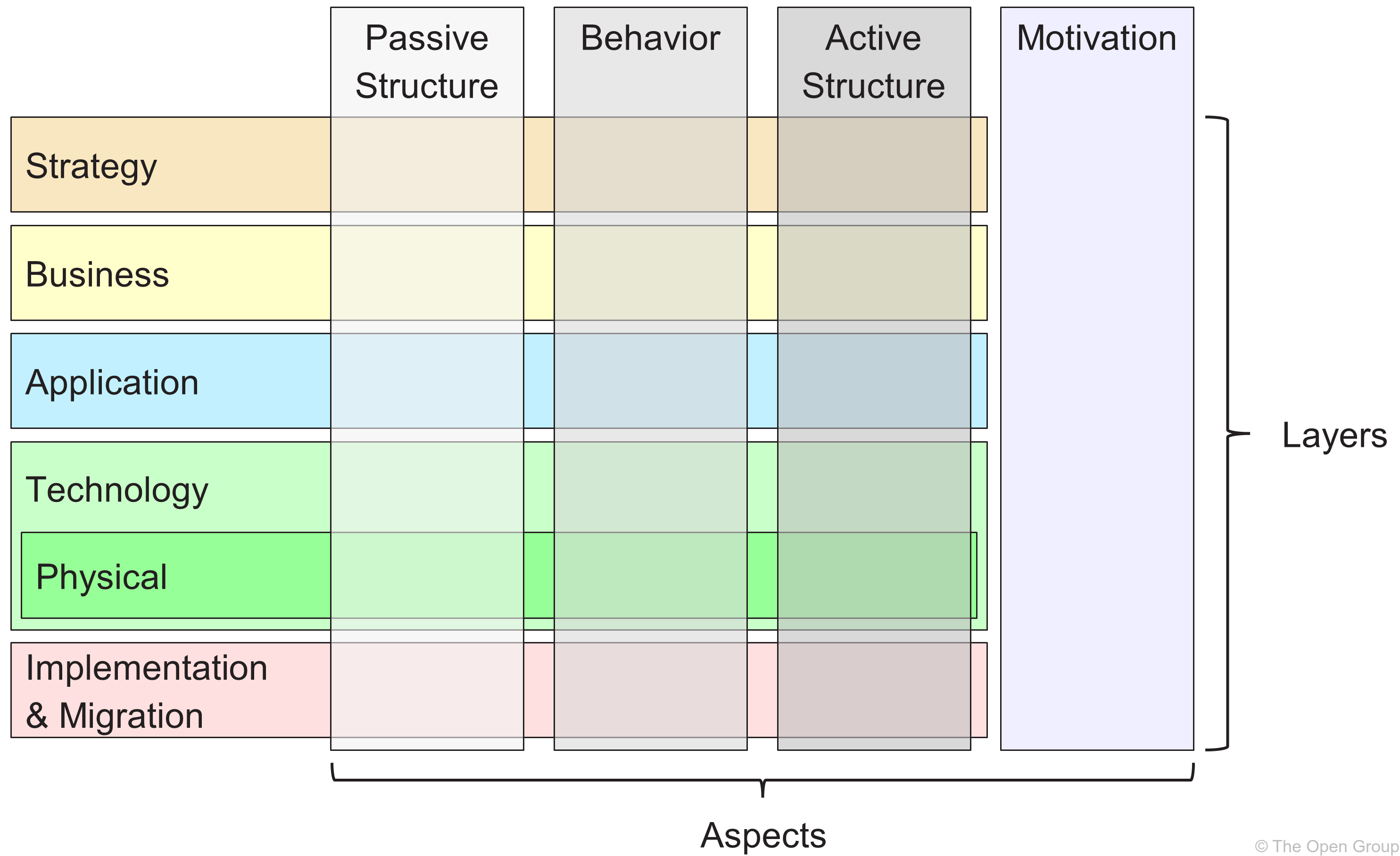
- Strategy Layer defines the organization’s long-term direction. It maps vision to measurable capabilities, outlines strategic initiatives, and establishes the boundaries within which all architecture work must operate.
- Motivation Layer captures the “why” behind every architectural decision. By modeling stakeholders, drivers, goals, and constraints, it ensures that design choices remain tightly aligned with real business intent rather than technical convenience.
- Business Layer translates strategy into operation. It models core processes, services, roles, and business objects, revealing how the organization creates, delivers, and captures value for its customers.
- Application Layer represents the software landscape that enables business functions. It focuses on application components, services, and data exchanges, deliberately abstracted from underlying infrastructure to maintain flexibility and reusability.
- Technology Layer provides the digital foundation. It encompasses servers, networks, platforms, databases, and middleware, ensuring that applications run securely, scalably, and with interoperability across environments.
- Physical Layer bridges the digital and tangible worlds. It models devices, equipment, facilities, and distribution networks, making it critical for manufacturing, logistics, retail, and IoT-driven enterprises where hardware and operations intersect with software.
- Implementation & Migration Layer orchestrates the journey from current state to target architecture. Through projects, work packages, sequencing, and transition plans, it manages risk, resource allocation, and change control during transformation.
ArchiMate Viewpoint
A viewpoint defines the perspective or focus of a diagram, e.g., business, application, or technology. It guides which elements are shown to address specific stakeholder concerns.
Core ArchiMate Feature & Viewpoint Engine
Visual Paradigm fully supports the ArchiMate specification across all structural and dynamic layers.
-
Layered Modeling Support: Seamlessly links components across the Strategy, Motivation, Business, Application, Technology, Physical, and Implementation layers.
-
Official Viewpoints: Includes native support for all official viewpoints (e.g., Layered, Application Cooperation, Business Process Cooperation, Technology Usage, and Strategy). These viewpoints structure your models specifically to address targeted stakeholder concerns.
-
Custom Viewpoints: Enables architects to design and apply custom viewpoints to model specific corporate framework perspectives.
-
Model Synchronization: Reuses elements across multiple diagrams. Any change made to a single component automatically updates across every viewpoint instance to ensure model integrity.
AI-Powered Support for ArchiMate & Viewpoints
The built-in AI Diagram Generator transforms text-based strategic briefs into standards-compliant models.
-
Text-to-Diagram Generation: You can input a plain-text prompt (e.g., “Generate an ArchiMate diagram for an end-to-end e-commerce ecosystem using the Layered Architecture viewpoint”) and the AI instantly generates a fully editable diagram.
-
Automated Element Mapping: The AI automatically selects the correct standard shapes, connectors (such as realization, assignment, or serving), and structural boundaries.
-
Viewpoint Enforcement: The AI configures and filters the diagram according to the chosen official viewpoint. It handles complex visibility rules so that stakeholders see exactly what is relevant to them.
-
Rule Validation: The engine matches its generation against official ArchiMate syntax rules, checking that element interactions are valid according to the underlying framework.
Interactive Knowledge & Documentation AI
The intelligence layer extends past initial layout creation to assist with ongoing architectural management.
-
Interactive Refinement: Use conversational commands through the Visual Paradigm AI Chatbot to add layers, alter node dependencies, or swap out viewpoints dynamically.
-
Instant Documentation: The AI auto-generates structured reports, element summaries, and impact matrices directly from your visual model, ensuring your project documentation remains aligned with the visual architecture.
-
Cross-Standard Flexibility: The underlying AI workspace is trained across multiple modeling standards. If your project blends architectures, it easily handles bridges between ArchiMate, UML, SysML, and BPMN.
Conclusion
The integration of artificial intelligence into enterprise architecture modeling represents a pivotal shift in how organizations design, communicate, and govern their technology landscapes. Visual Paradigm Desktop’s AI Diagram Generator exemplifies this evolution by delivering a powerful hybrid workflow: AI accelerates the creation of compliant, viewpoint-specific ArchiMate diagrams, while manual editing ensures precision, contextual relevance, and alignment with organizational standards.
This case study demonstrates that the true value of AI in EA modeling lies not in replacing human expertise, but in augmenting it. Architects gain the ability to rapidly prototype complex architectures, explore alternative viewpoints, and engage stakeholders with clear, tailored visualizations—while retaining full control over model accuracy and strategic intent.
For organizations embarking on digital transformation, cloud migration, or enterprise modernization initiatives, adopting an AI-assisted ArchiMate workflow offers tangible benefits: faster time-to-insight, improved cross-functional communication, reduced modeling overhead, and stronger architectural governance. As the field of enterprise architecture continues to evolve, tools that intelligently balance automation with human judgment will become indispensable partners in driving strategic technology decisions.
The future of enterprise architecture is not about choosing between AI and human expertise—it is about harnessing both to build clearer, more adaptable, and more impactful architectural models. Visual Paradigm’s approach provides a proven pathway to achieve that balance today.
References
- ArchiMate Resources for FREE: Free resources on using ArchiMate as a visual language in Visual Paradigm for capturing EA relationships and visualizations.
- Visualizing Enterprise Architecture: A Practical Guide to ArchiMate and TOGAF: Practical guide focusing on Visual Paradigm’s user-friendly interface for ArchiMate diagrams, stakeholder presentations, and EA visualization examples.
- AI ArchiMate Viewpoints Generator Release: Announcement of Visual Paradigm’s AI-powered ArchiMate diagram generation feature with official viewpoint support.
- ArchiMate Tools Overview: Comprehensive feature set for ArchiMate modeling, including layered architecture support and viewpoint management.
- ArchiMate Diagram Chatbot: Interactive AI chatbot interface for generating and refining ArchiMate diagrams through natural language prompts.
- Enhanced AI Diagram Generator: ArchiMate & SysML Update: Release notes detailing improvements to AI diagram generation for ArchiMate and SysML standards.
- AI-Generated ArchiMate Diagram: Cloud Migration Initiative: Practical example demonstrating AI-powered creation of an ArchiMate model for cloud migration planning.
- What Makes Visual Paradigm’s AI Chatbot Different: Comparative analysis of Visual Paradigm’s AI chatbot capabilities versus other diagram generation tools.
- Using ArchiMate Tool with TOGAF ADM: Guide on integrating ArchiMate modeling with TOGAF Architecture Development Method workflows.
Related posts:
 Revolutionizing Enterprise Architecture in 2026: Visual Paradigm’s Generative AI for ArchiMate
 How AI Accelerates TOGAF ADM for Enterprise Architecture
Maximizing Enterprise Architecture: A Comprehensive Guide to Visual Paradigm 18.0’s Support for ArchiMate 4
Comprehensive Guide: Using ArchiMate 4 in Visual Paradigm 18.0
How AI Accelerates TOGAF ADM for Enterprise Architecture
Maximizing Enterprise Architecture: A Comprehensive Guide to Visual Paradigm 18.0’s Support for ArchiMate 4
Comprehensive Guide: Using ArchiMate 4 in Visual Paradigm 18.0

 English
 Arabic
 Chinese (Simplified)
 Dutch
Dutch French
 German
 Italian
 Japanese
 Korean
 Portuguese
 Russian
 Spanish