


Enterprise architecture demands clarity. Without structure, complexity spirals. ArchiMate provides a standardized language to describe business processes, applications, and technology infrastructure. However, the language itself can seem abstract. This is where the concept of the Viewpoint becomes essential.
A viewpoint defines the specific lens through which stakeholders examine the architecture. It determines what information is relevant, how it is represented, and which concerns are addressed. Understanding these structures is vital for effective communication between business leaders, IT architects, and developers.
🤔 What Exactly Is an ArchiMate Viewpoint?
In the context of the ArchiMate standard, a viewpoint is a specification that defines a set of concerns for a particular set of stakeholders. It acts as a template. It tells you what to include, what to exclude, and how to present the data.
- Stakeholders: Who needs to see the information?
- Concerns: What specific problems or goals are they trying to solve?
- Contents: Which elements and relationships from the metamodel are allowed?
- Notation: How should the diagram look? (Lines, shapes, colors).
- Conventions: Naming rules and formatting standards.
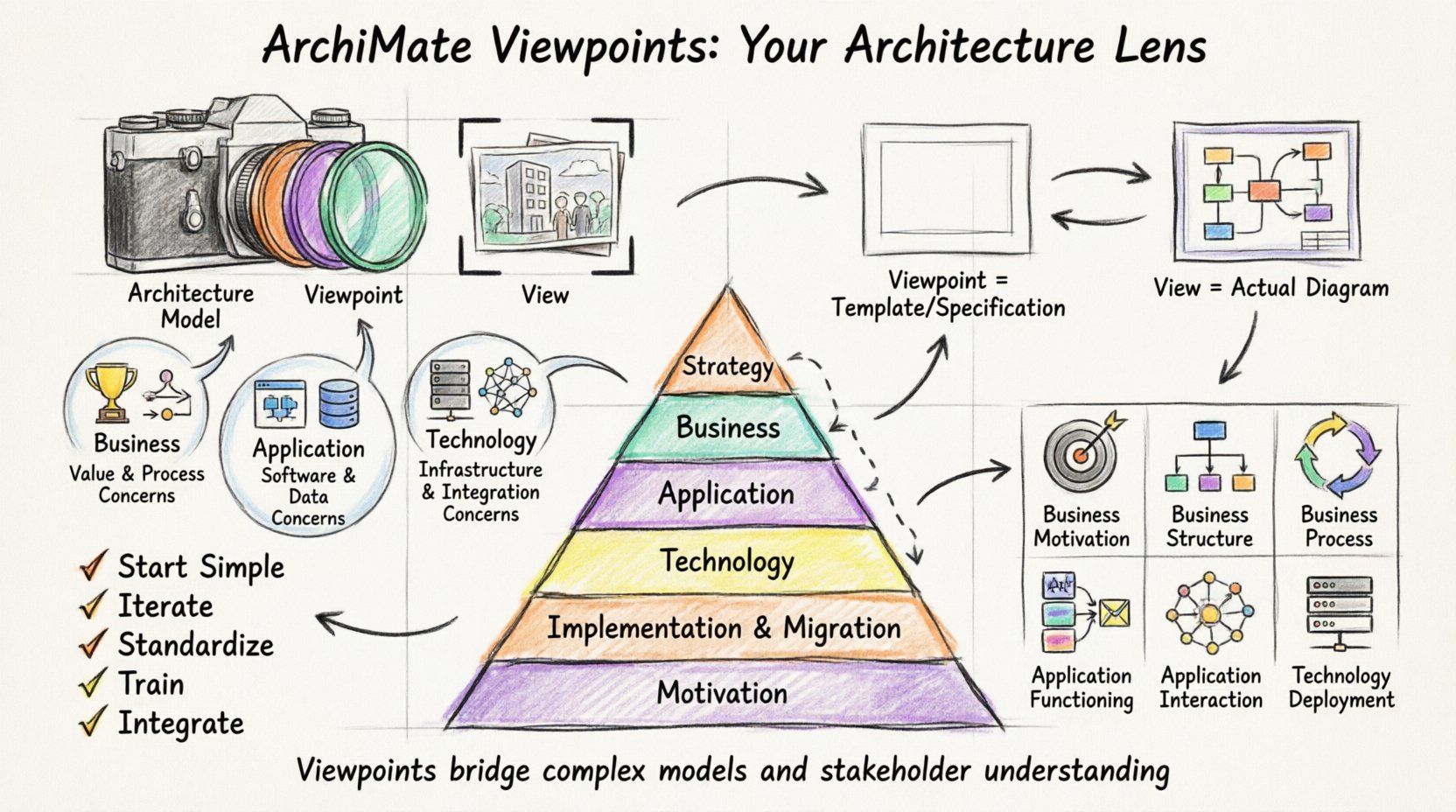
Think of a viewpoint as a camera filter. The camera (the architecture model) captures everything. The filter (the viewpoint) highlights specific colors and blurs the rest, making the image useful for the photographer.
⚖️ View vs. Viewpoint: Understanding the Difference
Confusion often arises between the terms View and Viewpoint. They are related but distinct concepts within the architecture definition.
| Feature | Viewpoint | View |
|---|---|---|
| Definition | A specification or template. | A representation of a set of architecture models. |
| Usage | Defines rules for creating a view. | The actual diagram or document produced. |
| Abstraction | High-level, abstract concept. | Concrete, instantiated artifact. |
| Example | Standard Business Process Viewpoint. | The specific Business Process Map for Project X. |
A viewpoint is reusable. You can use the same Business Process Viewpoint to create five different views for different departments. A view is a one-time output derived from that template.
👥 Aligning Viewpoints with Stakeholders
Architecture is not just about technology; it is about communication. Different stakeholders require different information.
1. Business Stakeholders
- Focus: Value delivery, processes, organizational structure.
- Concern: Efficiency, cost, compliance, speed to market.
- Viewpoint Type: Business Motivation, Business Structure, Business Process.
2. Application Stakeholders
- Focus: Software capabilities, data, services.
- Concern: Functionality, integration, data consistency.
- Viewpoint Type: Application Functioning, Application Interaction.
3. Technology Stakeholders
- Focus: Infrastructure, hardware, network.
- Concern: Performance, availability, security.
- Viewpoint Type: Technology Deployment, Technology Interface.
When designing a viewpoint, you must ask: Who is looking at this? If a CIO looks at a low-level technology deployment diagram, they may be overwhelmed. If a developer looks at a high-level strategy map, they may lack necessary detail.
🧩 The Six ArchiMate Layers
ArchiMate organizes concepts into layers. Viewpoints often span one or more of these layers to provide a holistic view.
- Strategy Layer: Goals, principles, drivers, and principles.
- Business Layer: Processes, functions, roles, and organizational units.
- Application Layer: Applications, software components, and services.
- Technology Layer: Hardware, networks, and physical devices.
- Implementation & Migration Layer: Projects, deliverables, and actions.
- Motivation Layer: Needs, value, and expectations.
A common mistake is to restrict a viewpoint to a single layer. Complex issues often require cross-layer views. For instance, understanding how a new business goal (Strategy) impacts server load (Technology) requires a layered perspective.
📋 Standard Viewpoints Explained
The ArchiMate specification includes standard viewpoints designed to address common architectural concerns. Below is a detailed breakdown of the most frequently used ones.
1. Business Motivation Viewpoint
- Primary Layer: Motivation.
- Purpose: Links business goals to actual implementation.
- Key Elements: Goal, Objective, Principle, Requirement, Stakeholder, Assessment.
- When to Use: During strategic planning or when justifying a budget.
2. Business Structure Viewpoint
- Primary Layer: Business.
- Purpose: Shows the organizational structure and responsibilities.
- Key Elements: Role, Actor, Business Function, Business Object, Business Process.
- When to Use: When defining departmental boundaries or responsibilities.
3. Business Process Viewpoint
- Primary Layer: Business.
- Purpose: Describes the flow of activities.
- Key Elements: Process, Flow, Event, Assignment.
- When to Use: To analyze efficiency or identify bottlenecks in operations.
4. Application Functioning Viewpoint
- Primary Layer: Application.
- Purpose: High-level view of software capabilities.
- Key Elements: Application Service, Application Function, Application Component.
- When to Use: To understand what software does, not how it is built.
5. Application Interaction Viewpoint
- Primary Layer: Application.
- Purpose: Shows data exchange between applications.
- Key Elements: Application Interface, Data Object, Communication Path.
- When to Use: To map integrations and data flows between systems.
6. Technology Deployment Viewpoint
- Primary Layer: Technology.
- Purpose: Maps software to physical hardware.
- Key Elements: Device, System Software, Network, Artifact.
- When to Use: For infrastructure planning and deployment strategies.
🛠️ Creating Custom Viewpoints
While standard viewpoints cover many scenarios, unique organizational needs often require custom definitions.
Steps to Define a Custom Viewpoint
- Identify the Audience: Who needs this view? (e.g., Security Team).
- Define the Scope: Which layers are relevant? (e.g., Application and Technology).
- Select Elements: Choose specific metamodel elements that add value.
- Set Notation Rules: Define colors for security risks, line styles for connections.
- Establish Naming Conventions: Ensure consistency across the diagram.
Custom viewpoints allow you to enforce governance. For example, a Security Compliance Viewpoint might only show interfaces that handle sensitive data and highlight them in red.
🔗 Mapping and Consistency
One of the greatest challenges in architecture is ensuring that different views of the same system do not contradict each other. This is known as consistency.
Key Principles for Consistency
- Traceability: Every element in a view must trace back to a model element.
- Traceability: Links between views should be explicit.
- Version Control: Ensure all views reference the same model version.
- Validation: Use rules to check for orphaned elements or broken links.
If a Business Process Viewpoint shows a process using a specific Application, that application must exist in the Application Viewpoint. Mismatches lead to confusion and implementation errors.
⚠️ Common Pitfalls to Avoid
Even experienced architects fall into traps when designing viewpoints. Here are the most frequent errors.
1. Overloading the View
Trying to show everything in one diagram. This creates clutter and reduces readability. A viewpoint should focus on a specific concern. If you need to show data and flow, split them into separate views.
2. Ignoring the Stakeholder
Creating a technical view for a non-technical audience. Avoid jargon where possible. Use business terms when talking to business stakeholders.
3. Inconsistent Notation
Using different shapes for the same element type across different diagrams. This confuses readers. Stick to the standard ArchiMate notation unless a custom convention is strictly documented.
4. Lack of Context
A diagram without a legend or title is useless. Always include metadata: author, date, scope, and version.
❓ Frequently Asked Questions (FAQ)
Below are specific questions often asked regarding the application of ArchiMate viewpoints in real-world scenarios.
Q1: Can I use multiple layers in a single viewpoint?
Yes. In fact, it is often necessary. A Business-Application Interaction Viewpoint might show how a business function triggers an application service. This cross-layer mapping is crucial for understanding the end-to-end value chain.
Q2: Do I need to create a viewpoint for every diagram?
No. A single viewpoint can generate multiple views. You define the rules once in the viewpoint specification, and then apply that specification to create various diagrams. This saves time and ensures consistency.
Q3: How do I handle legacy systems in a viewpoint?
Legacy systems often do not fit modern patterns. In your viewpoint, define a specific element type or category for Legacy Infrastructure. This helps stakeholders recognize technical debt without cluttering the new architecture design.
Q4: Is ArchiMate a tool or a language?
ArchiMate is a modeling language. It is not a software product. It defines the syntax and semantics of the concepts. You can model ArchiMate using various tools, or even on paper, as long as you follow the standard.
Q5: How do viewpoints help in TOGAF?
TOGAF (The Open Group Architecture Framework) is a methodology. ArchiMate is the notation language. TOGAF often recommends using ArchiMate. Viewpoints in ArchiMate help implement the Architecture Definition Document within the TOGAF ADM cycle. They provide the visual artifacts needed for stakeholder engagement.
Q6: What is the difference between an interface and an access point?
In the Technology layer, an Interface is the point where a component communicates. An Access Point is where an actor or application accesses that interface. Viewpoints dealing with security or integration often distinguish between these to clarify who is initiating the connection.
Q7: Can viewpoints evolve over time?
Yes. As the enterprise changes, so do the concerns. A viewpoint created for a project launch might be too detailed for annual planning. Viewpoints should be reviewed and updated periodically to remain relevant.
Q8: How do I document a viewpoint?
Documentation should include:
- Stakeholder profile.
- Specific concerns addressed.
- Allowed elements and relationships.
- Notation and color guidelines.
- Examples of valid views.
🚀 Best Practices for Implementation
To ensure success when working with ArchiMate viewpoints, follow these guidelines.
- Start Simple: Begin with standard viewpoints before creating custom ones.
- Iterate: Draft a viewpoint, show it to stakeholders, get feedback, and refine it.
- Standardize: Create a library of approved viewpoints for the organization.
- Train: Ensure everyone understands the notation. Ambiguity kills architecture.
- Integrate: Link architectural models with other data sources (e.g., risk registers, project plans).
📊 Summary of Key Concepts
Effective enterprise architecture relies on clear communication. ArchiMate Viewpoints are the bridge between complex models and stakeholder understanding. By defining clear rules for what is shown and how, you reduce noise and increase clarity.
Key takeaways include:
- Viewpoints define the how and what of a view.
- Views are the concrete diagrams produced from viewpoints.
- Different stakeholders require different layers and details.
- Consistency across views is mandatory for trust.
- Standard viewpoints exist, but customization is allowed for specific needs.
Investing time in defining these structures pays off in reduced miscommunication and faster decision-making. Whether you are mapping business processes or planning technology infrastructure, the right viewpoint makes the difference between confusion and clarity.

 English
 Arabic
 Chinese (Simplified)
 Dutch
Dutch French
 German
 Italian
 Japanese
 Korean
 Portuguese
 Russian
 Spanish