


BPMN activities represent work performed within a business process. They may describe a single unit of work, a group of related activities, or a reusable process definition. Choosing the right activity notation helps readers understand who performs the work, how it is executed, whether it is automated, and how the activity fits into the broader process.
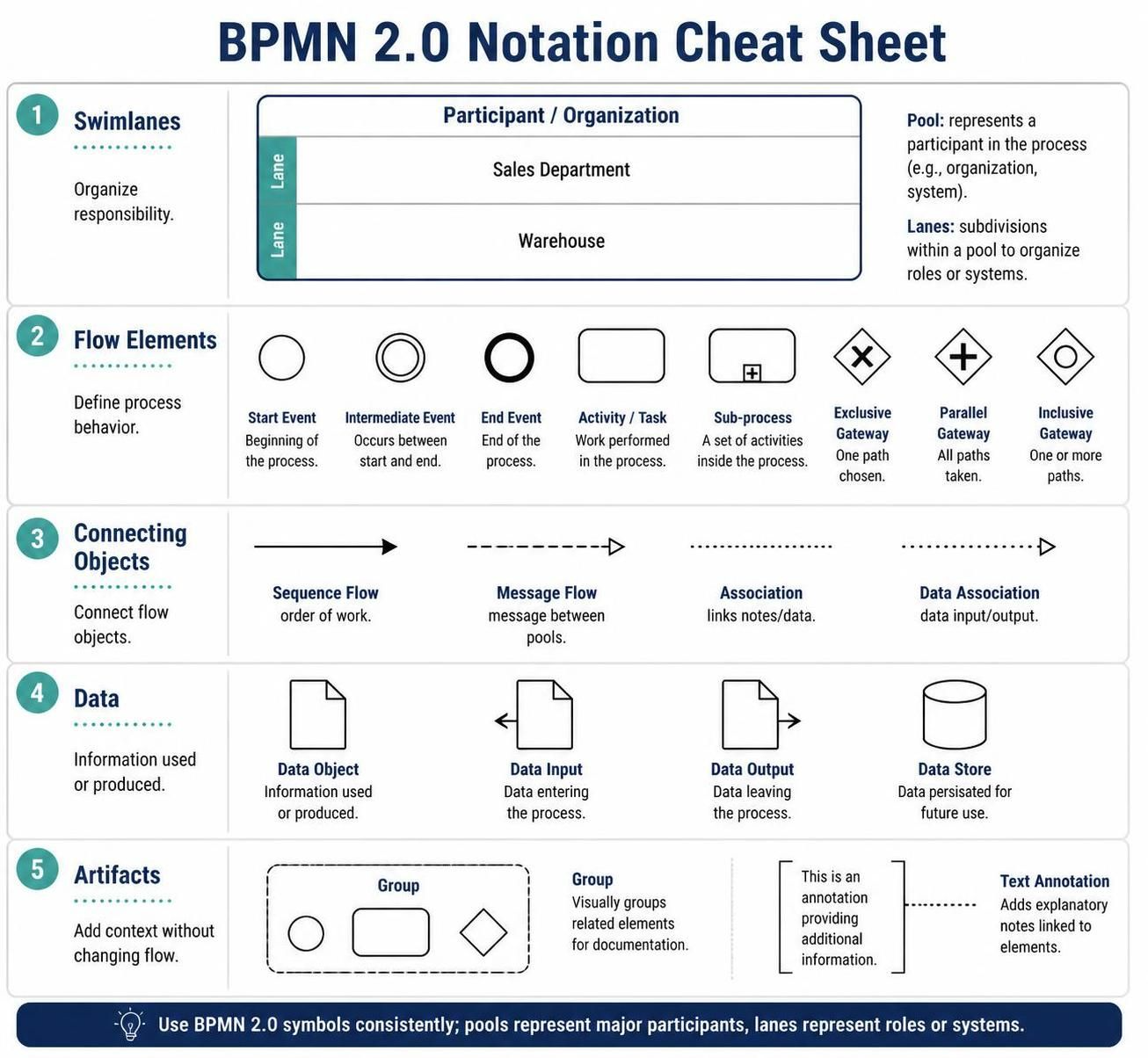
1. Activity Hierarchy
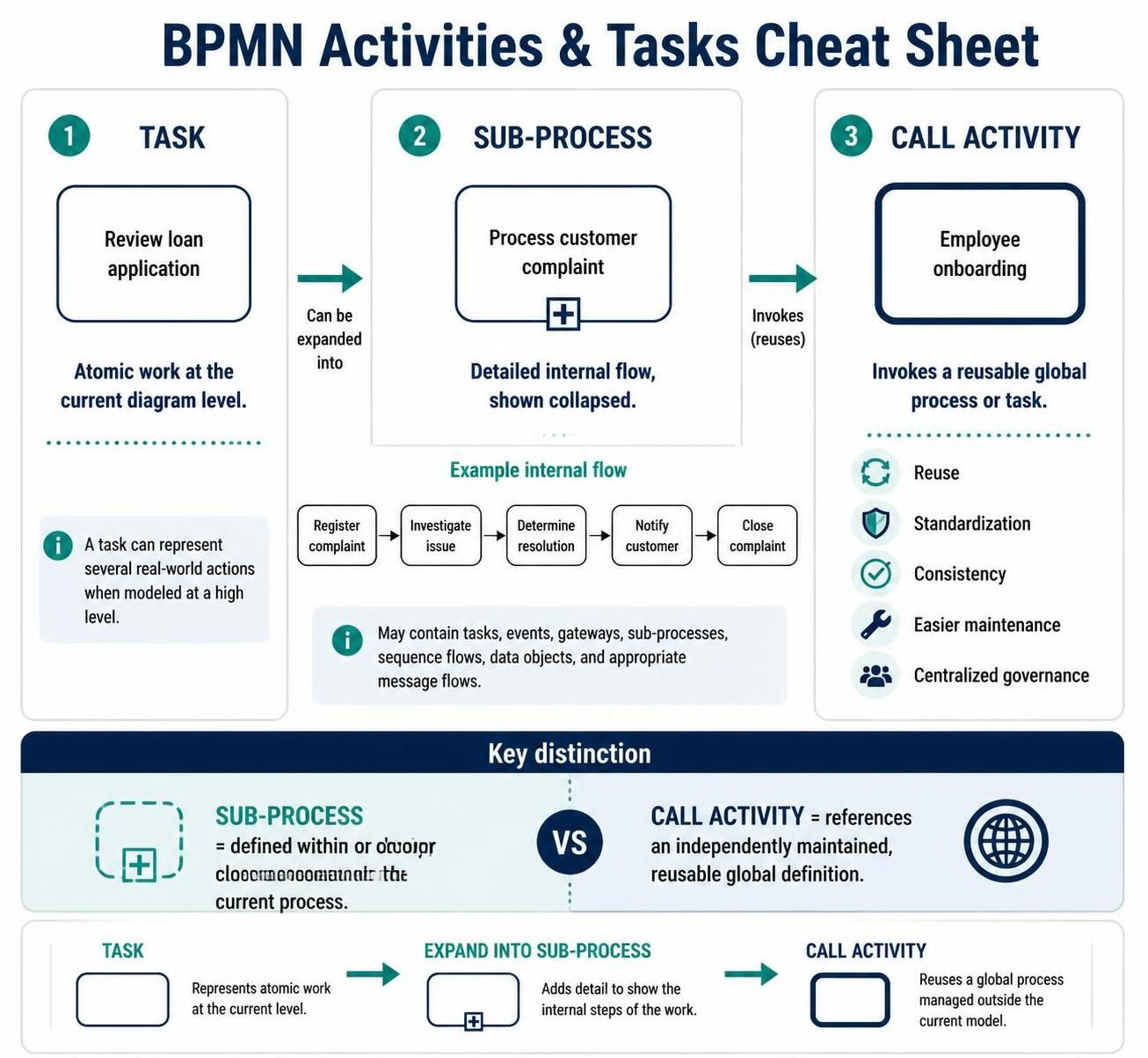
BPMN activities are organized into three main categories:
| Activity type | Meaning | Typical use |
|---|---|---|
| Task | An atomic unit of work that is not broken down in the current diagram | Send an email, approve an order, calculate a fee |
| Sub-Process | A compound activity containing its own internal sequence flow | Handle an insurance claim, onboard an employee |
| Call Activity | A reference to a globally reusable process or task | Invoke the organization-wide employee onboarding process |
Task
A task is represented by a rounded rectangle. It describes work at the level of detail appropriate for the current diagram.
For example:
Review loan application
The task may be atomic in a high-level process model, even if the actual work involves several smaller actions. If those actions need to be modeled separately, the task can be expanded into a sub-process.
Sub-Process
A sub-process is also shown as a rounded rectangle, but it includes a small plus marker at the bottom center when it is collapsed.
Example:
Process customer complaint
The internal process might contain:
-
Register complaint
-
Investigate issue
-
Determine resolution
-
Notify customer
-
Close complaint
Sub-processes are useful for controlling diagram complexity. A high-level process can show the collapsed activity, while a separate diagram presents its detailed internal flow.
A sub-process may contain:
-
Tasks
-
Events
-
Gateways
-
Other sub-processes
-
Sequence flows
-
Data objects
-
Message flows, where appropriate
Call Activity
A call activity invokes a globally defined process or task. It is visually distinguished by a thick border.
Example:
Employee onboarding
If several departments use the same onboarding procedure, each process can call the same global onboarding definition rather than duplicating the complete workflow.
Call activities support:
-
Reuse
-
Standardization
-
Consistency across departments
-
Easier maintenance
-
Centralized process governance
A useful distinction is:
-
A sub-process is defined within or closely associated with the current process.
-
A call activity references a reusable definition maintained independently of the current process.
2. BPMN Task Types
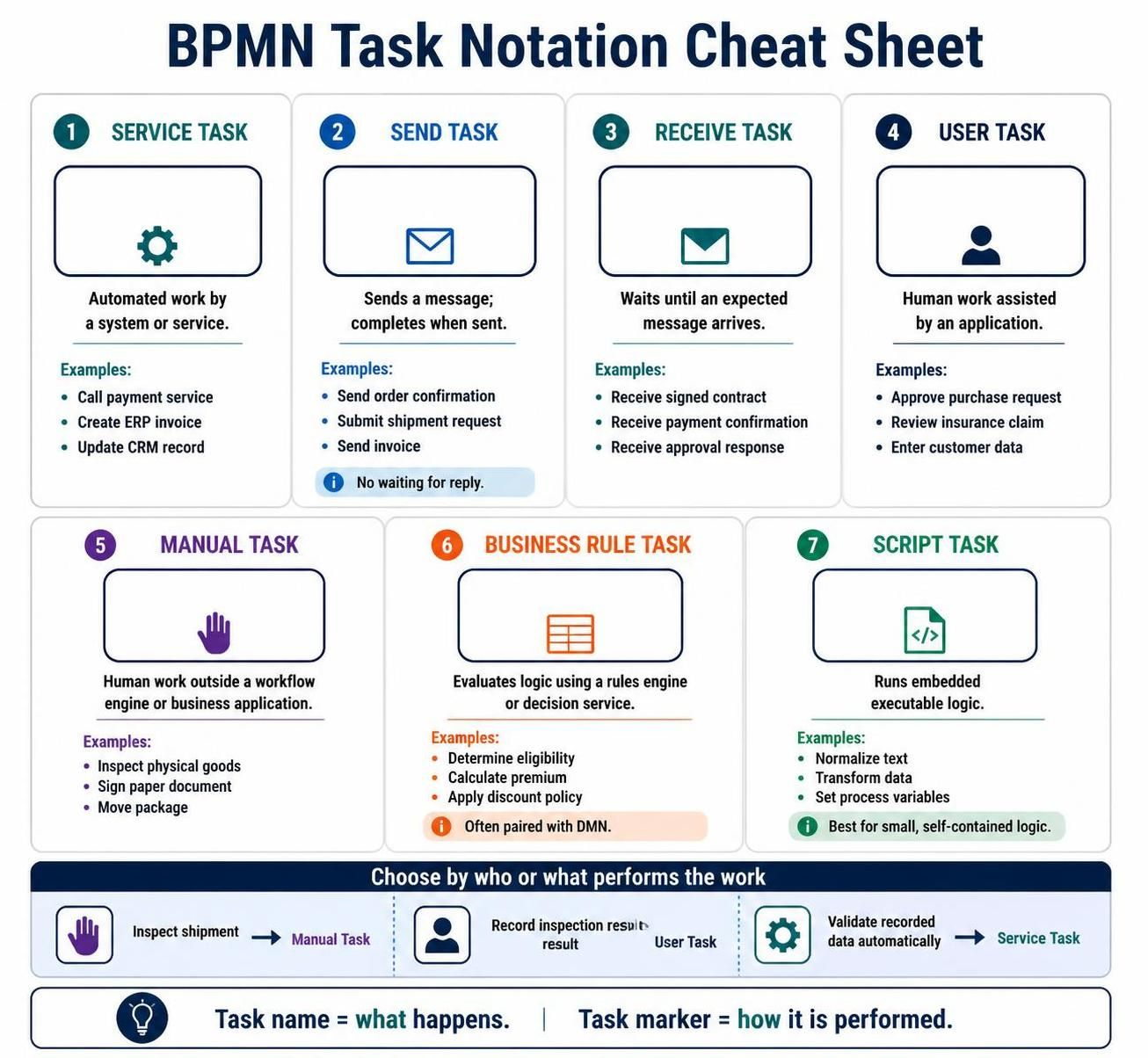
BPMN task types identify how a task is performed. The task name explains what happens; the task marker explains its execution method.
Service Task
A service task represents work performed automatically by a system or service without direct human involvement.
The notation typically includes a small gear symbol.
Examples include:
-
Call a payment service
-
Retrieve a customer credit score
-
Create an invoice in an ERP system
-
Publish an article through an API
-
Update a CRM record
Use a service task when the process engine invokes an application, web service, API, or automated function.
Example flow:
Validate order → Charge payment service → Confirm payment
A service task should not be used simply because software is involved. If a person performs the main work through an application, a user task is usually more appropriate.
Send Task
A send task represents the dispatch of a message to another participant, system, or process.
The notation uses a message or envelope-style marker.
Examples include:
-
Send order confirmation to customer
-
Send rejection notice to applicant
-
Submit shipment request to logistics provider
-
Send invoice to business partner
The task completes when the message has been sent. It does not represent waiting for a reply.
For example:
Send approval request
is a send task, while:
Wait for approval response
is typically modeled as a receive task or an intermediate message catch event.
Receive Task
A receive task represents a process activity that waits for a message to arrive.
Examples include:
-
Receive customer pickup request
-
Receive payment confirmation
-
Receive signed contract
-
Receive delivery status
-
Receive approval response
The process remains at the receive task until the expected message arrives.
A receive task is useful when message reception is a significant step in the process. For more event-oriented designs, an intermediate message catch event may be preferable, especially when the process is waiting for one of several possible events.
Example flow:
Send contract → Receive signed contract → Activate account
User Task
A user task represents work performed by a person with assistance from a software application.
The notation commonly uses a person-shaped marker.
Examples include:
-
Approve purchase request in procurement system
-
Review insurance claim in claims portal
-
Enter customer information into CRM
-
Validate an expense report
-
Assign a support ticket
The key characteristic is that the work is human-performed but application-supported.
A user task is appropriate when:
-
A person must make a decision or enter data.
-
The work occurs through a workflow system or business application.
-
The system can assign, track, or manage the task.
Example:
Buyer reviews order in procurement dashboard
Manual Task
A manual task represents work performed by a person outside a workflow engine or business application.
Examples include:
-
Inspect physical goods
-
Sign a paper document
-
Move a package to a loading area
-
Count inventory manually
-
Deliver a physical item
Manual tasks are not normally managed or completed by a process engine.
Compare:
-
Inspect shipment in warehouse: Manual task
-
Record inspection result in quality system: User task
-
Automatically validate recorded inspection data: Service task
This distinction helps clarify where human work occurs and whether it is digitally controlled.
Business Rule Task
A business rule task evaluates business logic using a rules engine or decision service.
Examples include:
-
Determine customer eligibility
-
Calculate insurance premium
-
Assess credit risk
-
Apply discount policy
-
Classify a claim
-
Determine approval authority
The business rule task generally provides input data to a business rules engine and receives a result.
For example:
Evaluate loan eligibility
may return:
-
Eligible
-
Ineligible
-
Requires manual review
Business rule tasks are valuable when decision logic is maintained separately from the process flow. This allows policies to change without redesigning the entire process.
For complex or highly visible decisions, BPMN decision elements such as a Business Rule Task combined with a Business Rule Task implementation or a separate DMN decision model may be appropriate.
Script Task
A script task represents executable logic performed directly by the process engine or execution environment.
Examples include:
-
Normalize a text field
-
Calculate a simple value
-
Transform data
-
Format a message
-
Set process variables
-
Generate a reference number
A script task is appropriate for small, self-contained pieces of logic that do not require an external service.
For example:
Calculate total order value
could be a script task if the calculation is simple and embedded directly in the process implementation.
Avoid using script tasks for large or business-critical application logic. In those cases, a service task or business rule task usually provides better separation, reuse, testing, and governance.
3. Choosing the Correct Task Type
The following questions can help identify the appropriate notation:
-
Is the work performed automatically by a system?
Use a service task. -
Is the process sending a message?
Use a send task. -
Is the process waiting for a message?
Use a receive task or message event. -
Is a person working through an application?
Use a user task. -
Is a person performing physical or offline work?
Use a manual task. -
Is a rules engine making a policy-based decision?
Use a business rule task. -
Is the process engine executing embedded logic?
Use a script task. -
Does the activity contain multiple internal steps?
Use a sub-process. -
Does the organization reuse the same process definition in multiple places?
Use a call activity.
4. Sub-Process Markers
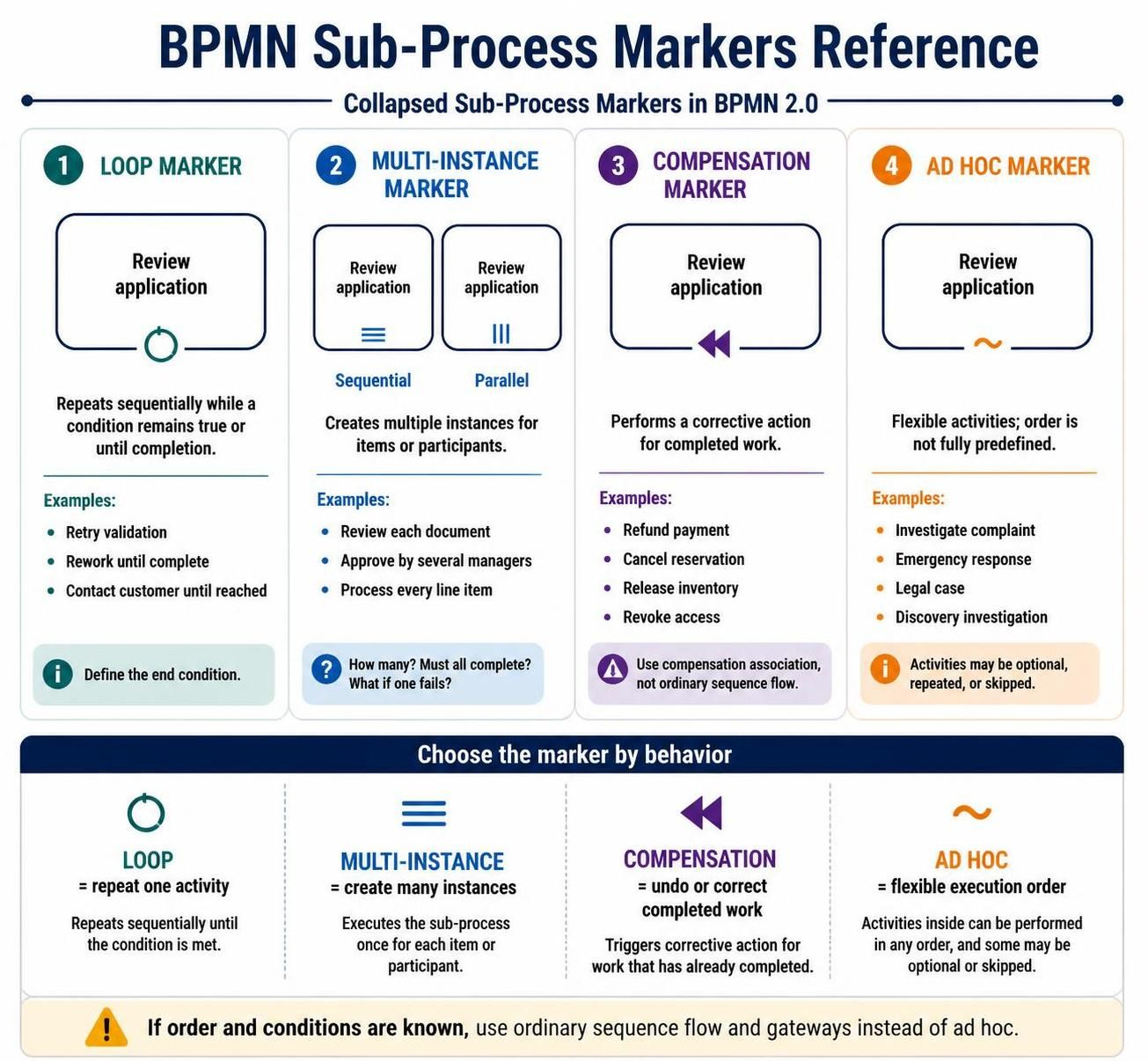
Sub-process markers modify the behavior of an activity. They explain whether the activity repeats, runs multiple times, compensates for previous work, or allows flexible execution.
Loop Marker
The loop marker indicates that the activity repeats sequentially while a condition remains true or until a completion condition is reached.
Example:
Review application
The review may repeat until:
-
All required information is complete
-
The reviewer confirms approval
-
The maximum number of attempts is reached
A loop is appropriate when the same activity is performed again and again within a single process instance.
Typical examples:
-
Retry failed validation
-
Continue reviewing until accepted
-
Rework an application until complete
-
Contact a customer repeatedly until reached
The loop condition should be clearly defined. A vague label such as “Review repeatedly” does not explain when the repetition ends.
Multi-Instance Marker
The multi-instance marker indicates that multiple instances of an activity are created for a collection of items or participants.
Examples include:
-
Review each document in a submission
-
Obtain approval from several managers
-
Process every line item in an order
-
Send a survey to all selected customers
There are two primary forms:
-
Sequential multi-instance: Instances execute one after another.
-
Parallel multi-instance: Instances execute at the same time.
The marker is commonly represented by:
-
Three horizontal lines for sequential execution
-
Three vertical lines for parallel execution
For example, an expense report may require approval from three managers. A parallel multi-instance activity can send all approval requests at once, while a sequential multi-instance activity can request them one at a time.
Important modeling questions include:
-
How many instances are created?
-
What collection determines the number of instances?
-
Must all instances complete?
-
Can the process continue after the first successful result?
-
What happens if one instance fails?
Compensation Marker
The compensation marker identifies an activity that can be used to undo or compensate for work already completed.
Compensation is especially useful in long-running transactions where a conventional database rollback is not possible.
Example transaction:
-
Reserve hotel room
-
Charge customer
-
Book transportation
If transportation booking fails, the process may trigger compensation activities:
-
Refund customer
-
Cancel hotel reservation
Compensation does not necessarily restore the exact original state. Instead, it performs a corrective business action.
Examples include:
-
Cancel shipment
-
Refund payment
-
Reverse account allocation
-
Release reserved inventory
-
Revoke previously granted access
Compensation activities are normally connected to the activity they compensate through compensation associations rather than ordinary sequence flow.
Ad Hoc Marker
An ad hoc sub-process represents a flexible collection of activities whose execution order is not fully predefined.
The marker is usually shown as a tilde.
Examples include:
-
Investigate a complex customer complaint
-
Perform an emergency response
-
Resolve a legal case
-
Conduct a discovery investigation
-
Perform a consulting assessment
In an ad hoc process, participants may choose which activities to perform and in what order. Some activities may be optional, repeated, or skipped.
Ad hoc modeling is suitable when the work is guided by objectives rather than a strict predefined workflow. It should not be used merely because a process has many branches. If the order and conditions are known, ordinary sequence flow and gateways are usually clearer.
5. Activity Naming Guidelines
Good activity names make BPMN diagrams easier to understand.
Use a concise verb–object format:
-
Review application
-
Approve purchase
-
Send confirmation
-
Validate address
-
Calculate premium
-
Receive payment notice
Avoid vague names such as:
-
Process request
-
Handle issue
-
Work on order
-
Complete task
A strong activity label should communicate:
-
What action is performed
-
What object is affected
-
Sometimes, the relevant business context
Compare:
-
Weak: Process customer
-
Better: Verify customer identity
-
Strong: Verify customer identity in CRM
Avoid embedding too much implementation detail in the label. Technical details such as endpoint names, database tables, or programming functions are generally better represented through documentation or implementation attributes.
6. Distinguishing Similar Activities
User Task vs. Manual Task
Use a user task when the person works through a system.
Use a manual task when the person performs the work offline or physically.
| Scenario | Appropriate activity |
|---|---|
| Approve invoice in finance application | User task |
| Sign a printed invoice | Manual task |
| Enter approval result into workflow system | User task |
| Inspect a package physically | Manual task |
Service Task vs. Script Task
Use a service task when the process calls an external service, application, or reusable system function.
Use a script task when the process engine executes small embedded logic directly.
| Scenario | Appropriate activity |
|---|---|
| Call credit bureau API | Service task |
| Calculate a subtotal internally | Script task |
| Create customer record in CRM | Service task |
| Convert a date format in process data | Script task |
Send Task vs. Service Task
A service task emphasizes automated system work. A send task emphasizes message dispatch.
For example:
-
Send customer notification: Send task
-
Create notification in messaging service: Service task
In some implementations, a send operation may technically be performed through a service. The modeling choice should reflect the business meaning most important to the audience.
Receive Task vs. Message Event
Use a receive task when message reception is represented as a distinct activity in the process.
Use a message catch event when the process is primarily waiting for an event to occur.
For example:
-
Receive signed contract: Receive task
-
Wait for customer response: Intermediate message catch event
The correct choice depends on whether the model should emphasize the act of receiving or the waiting state.
Sub-Process vs. Call Activity
Use a sub-process when the detailed flow belongs specifically to the current process.
Use a call activity when the detailed flow is reusable across multiple process definitions.
For example:
-
Resolve complaint: Local sub-process
-
Standard employee onboarding: Call activity
7. Modeling Activity Execution
Activities can also be affected by boundary events, gateways, data, and sequence flows.
A typical activity flow might look like:
Receive order → Validate order → Calculate price → Approve order → Send confirmation
Each activity communicates a different kind of work:
-
Receive order: Incoming information
-
Validate order: Rule-based or automated verification
-
Calculate price: Script or service calculation
-
Approve order: Human decision
-
Send confirmation: Outbound message
Activities should be connected using sequence flows within the same pool. Message flows should be used to represent communication between separate participants or pools.
8. Practical Example: Loan Approval Process
A loan approval process might contain the following activities:
-
Receive loan application
Receive task or message catch event. -
Validate application data
Service task if validation is automated. -
Evaluate credit policy
Business rule task connected to a rules engine. -
Review application
User task assigned to a loan officer. -
Request additional documents
Send task. -
Receive additional documents
Receive task. -
Calculate loan offer
Script task for a simple calculation or service task if an external pricing system is used. -
Approve loan
User task. -
Create loan account
Service task. -
Send approval notification
Send task.
If the application must be corrected and reviewed repeatedly, the review stage may use a loop marker. If multiple documents must be reviewed independently, a multi-instance sub-process may be more suitable.
9. Practical Example: Employee Onboarding
An employee onboarding process could be modeled as follows:
-
Receive hiring confirmation
Receive task. -
Create employee record
Service task. -
Prepare equipment
Manual task if equipment is physically prepared. -
Create system accounts
Service task. -
Complete employment forms
User task. -
Collect signed documents
Receive task. -
Conduct orientation
User task or sub-process. -
Complete department onboarding
Call activity if the organization has a reusable departmental onboarding process.
If onboarding activities must be completed for several new employees in a batch, a multi-instance sub-process may be used.
10. Common Modeling Mistakes
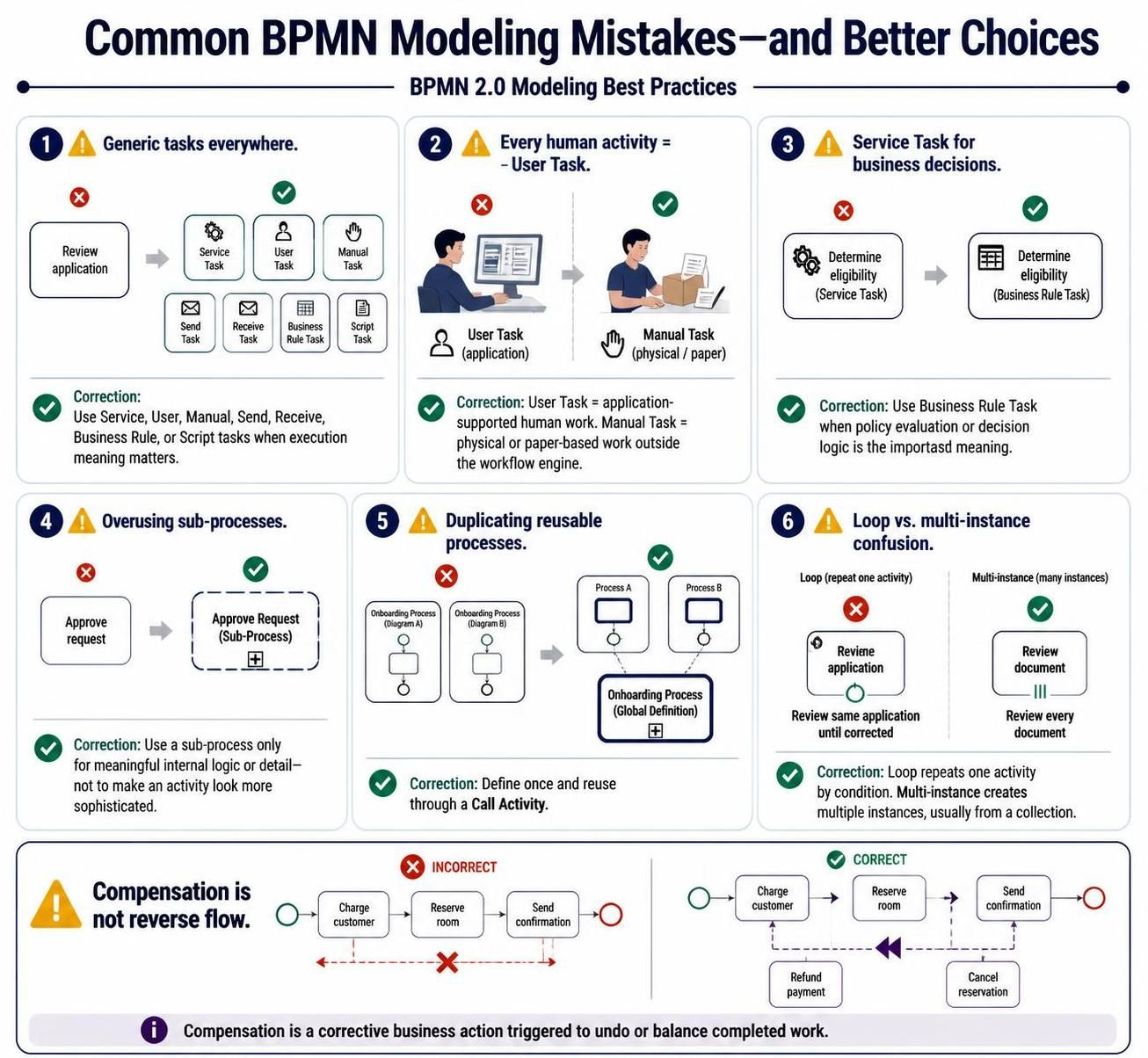
Using generic tasks everywhere
A plain task is valid, but it may hide important execution information. If automation, human involvement, or message handling matters, use the appropriate specialized type.
Treating every human activity as a user task
Not all human work is application-supported. Physical inspection, paper-based signing, and moving materials are better represented as manual tasks.
Using service tasks for business decisions
A service task may invoke a decision service, but when the important meaning is policy evaluation, a business rule task communicates the intent more clearly.
Overusing sub-processes
A sub-process should group meaningful internal logic. It should not be used simply to make an activity look more sophisticated.
Duplicating reusable processes
If the same procedure appears in multiple diagrams, consider defining it once and referencing it through a call activity.
Confusing loops with multi-instance activities
A loop repeats one activity based on a condition. A multi-instance activity creates multiple instances, usually based on a collection.
For example:
-
Review the same application until corrected: Loop
-
Review every document in an application: Multi-instance
Modeling compensation as ordinary reverse flow
Compensation is not simply a backward sequence flow. It represents a corrective business action triggered when a prior transaction needs to be undone or balanced.
11. Recommended Modeling Workflow
A practical approach to modeling activities is:
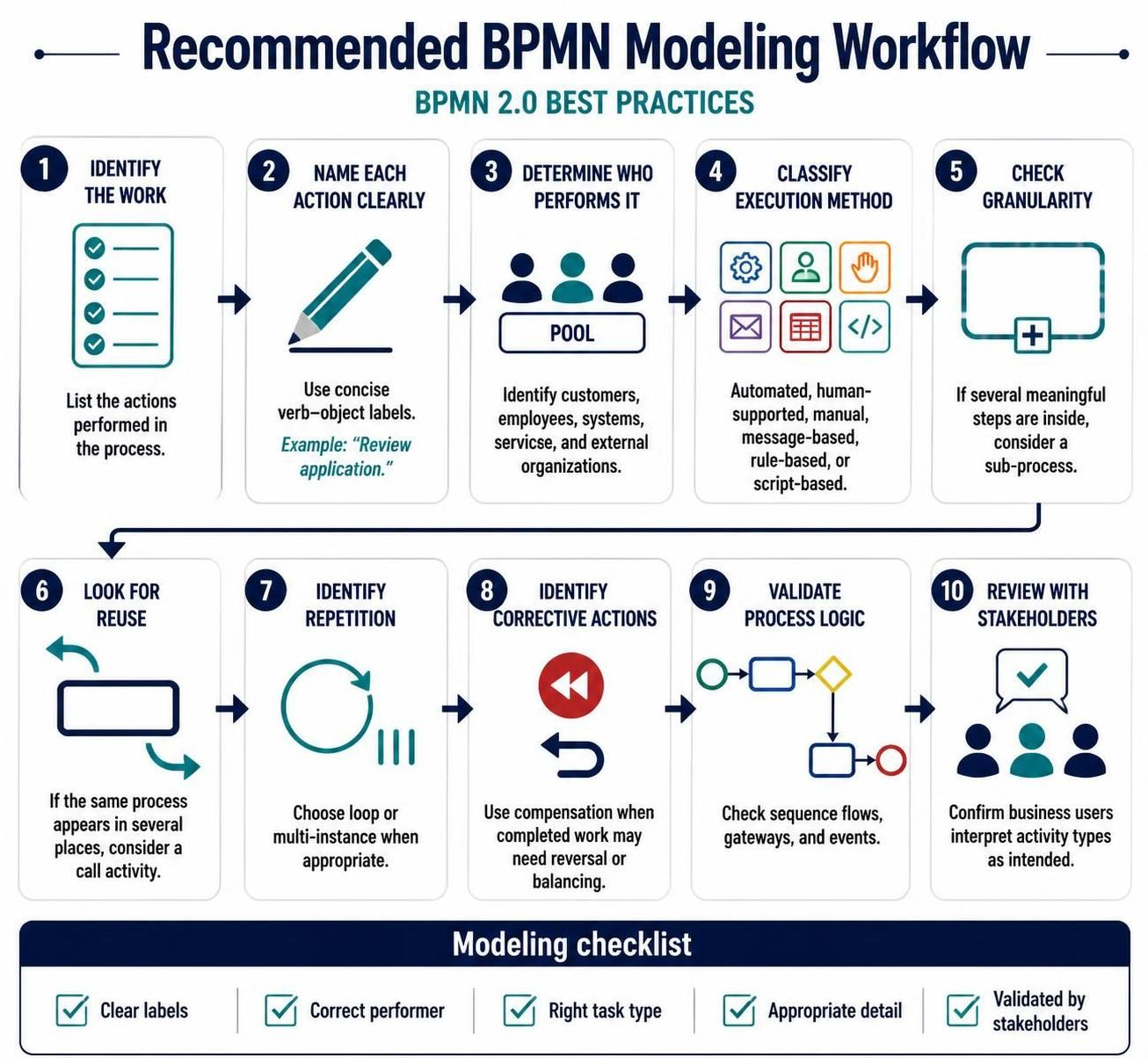
-
Identify the work.
List the actions performed in the process. -
Name each action clearly.
Use concise verb–object labels. -
Determine who performs the work.
Identify customers, employees, systems, services, and external organizations. -
Classify the execution method.
Decide whether the activity is automated, human-supported, manual, message-based, rule-based, or script-based. -
Check the activity’s granularity.
If it contains several meaningful steps, consider a sub-process. -
Look for reuse.
If the same process appears in several places, consider a call activity. -
Identify repetition.
Choose a loop or multi-instance marker when appropriate. -
Identify corrective actions.
Use compensation when completed work may need to be reversed or balanced. -
Validate the process logic.
Check that activities connect logically through sequence flows, gateways, and events. -
Review the diagram with stakeholders.
Confirm that business users interpret the activity types as intended.
12. Quick Reference
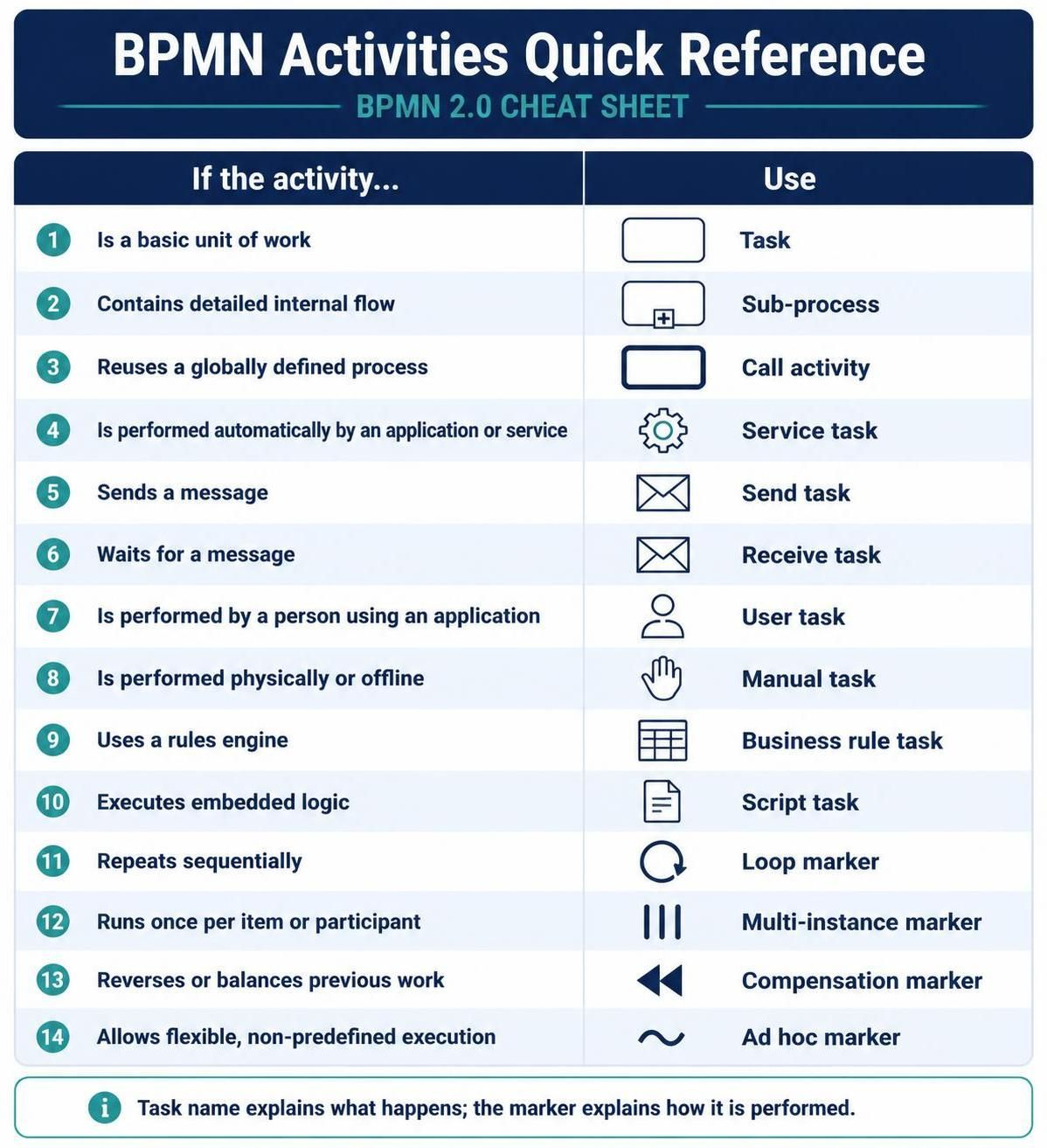
| If the activity… | Use |
|---|---|
| Is a basic unit of work | Task |
| Contains detailed internal flow | Sub-process |
| Reuses a globally defined process | Call activity |
| Is performed automatically by an application or service | Service task |
| Sends a message | Send task |
| Waits for a message | Receive task |
| Is performed by a person using an application | User task |
| Is performed physically or offline | Manual task |
| Uses a rules engine | Business rule task |
| Executes embedded logic | Script task |
| Repeats sequentially | Loop marker |
| Runs once per item or participant | Multi-instance marker |
| Reverses or balances previous work | Compensation marker |
| Allows flexible, non-predefined execution | Ad hoc marker |
A well-designed BPMN activity notation sheet should help readers answer three questions immediately:
-
What work is being performed?
-
Who or what performs it?
-
How does the activity behave within the process?
When those questions are clear, BPMN diagrams become easier to read, validate, automate, and maintain.

 English
 Arabic
 Chinese (Simplified)
 Dutch
Dutch French
 German
 Italian
 Japanese
 Korean
 Portuguese
 Russian
 Spanish