


“A picture is worth a thousand words — but a well-modeled business process diagram is worth a thousand meetings.”
📖 Introduction
Every time you click “Buy Now” on an e-commerce website, a complex chain of events unfolds behind the scenes — across departments, systems, and decision points — all within seconds. Yet, most organizations struggle to document, visualize, and optimize these workflows in a way that everyone can understand.
This is precisely the problem that Business Process Model and Notation (BPMN) was designed to solve.
BPMN is an open-standard graphical notation that provides a common visual language for business analysts, software developers, managers, and stakeholders to describe, analyze, and improve business processes [19]. It bridges the gap between business intent and technical execution — and it does so using intuitive symbols that require no coding background to read.
But knowing the theory is only half the battle. The other half is having the right tool — one that is free, accessible, collaborative, and powerful enough to handle real-world complexity without overwhelming beginners.
Enter Visual Paradigm Online (VP Online) — a free, browser-based BPMN 2.0 diagramming platform that lets you drag, drop, and design professional-grade business process diagrams with zero installation and zero cost [1]. With over 2,000 templates, real-time collaboration, AI-powered diagram generation, and seamless export options, VP Online has become one of the most popular entry points for BPMN learners and practitioners alike [1].
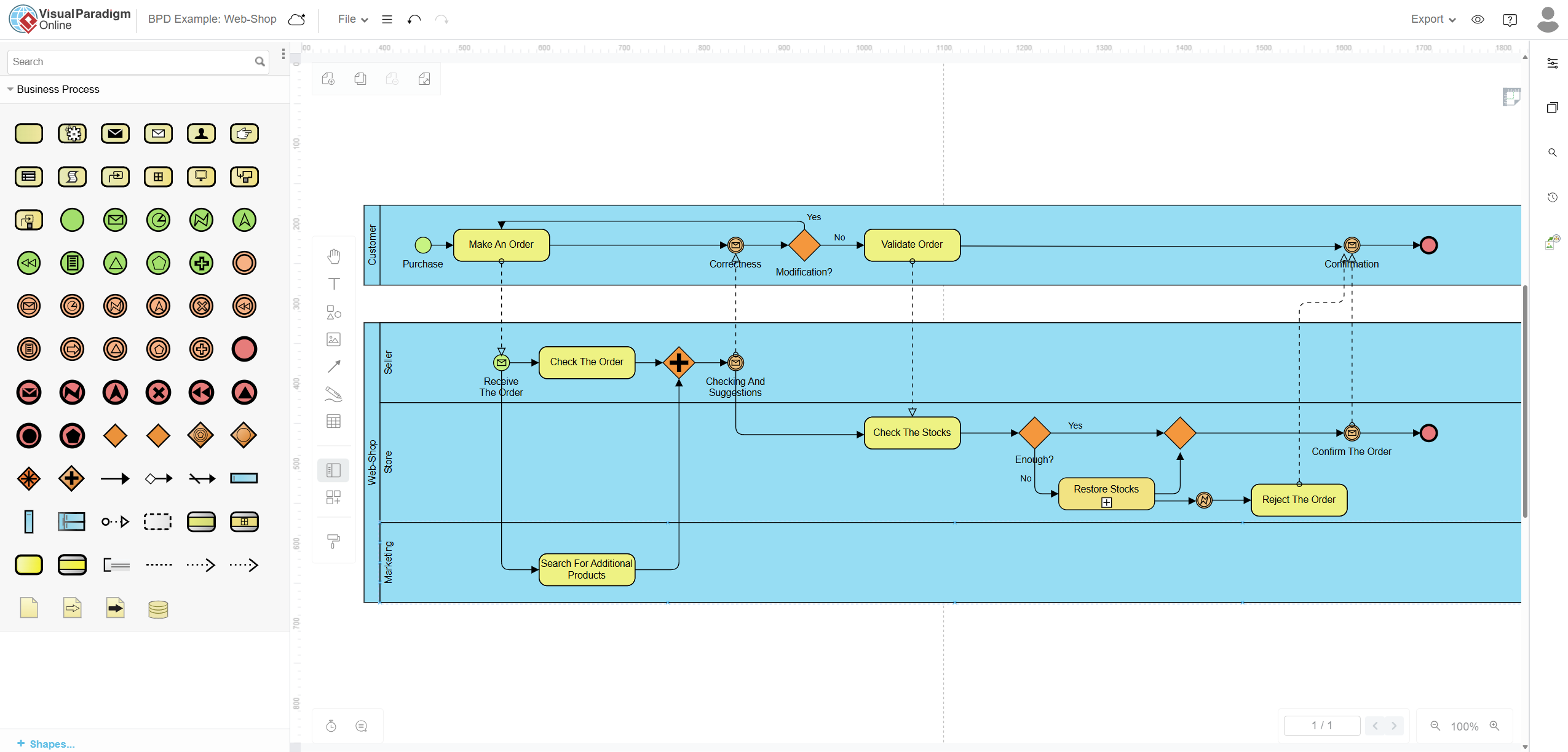
This guide uses VP Online’s built-in “BPD Example: Web-Shop” template as a hands-on case study to walk you through every core BPMN concept — from pools and swimlanes to gateways and message flows — so that by the end, you’ll be able to read, build, and optimize your own business process diagrams with confidence.
🔑 Part 1: Key BPMN Concepts — Explained Through the Web-Shop Lens
Before diving into the tool, let’s establish a rock-solid understanding of the BPMN building blocks, each illustrated with a direct reference to the Web-Shop diagram.
1.1 Pools and Swimlanes — Who Does What?
| Concept | Definition | Web-Shop Example |
|---|---|---|
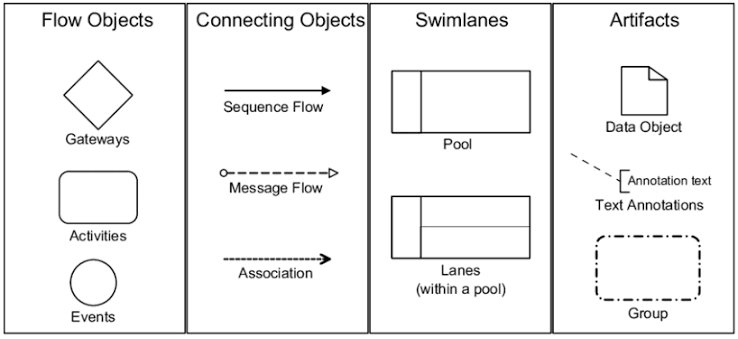
| Pool | A top-level container representing an independent participant or organization in a process. Pools are separated from each other and communicate only via Message Flows [15]. | The entire diagram contains two pools: the Customer pool (top) and the Web-Shop pool (bottom), representing two distinct organizational entities. |
| Swimlane (Lane) | A sub-partition within a pool that divides responsibilities among specific roles or departments [12]. | Inside the Web-Shop pool, there are three swimlanes: Seller, Store, and Marketing — each owning specific tasks. |
💡 Beginner Tip: Think of a Pool as a company and a Swimlane as a department within that company. The Customer is an external party — hence their own separate pool.
1.2 Flow Objects — The Three Pillars of BPMN
BPMN defines three categories of flow objects that form the skeleton of any process diagram [16]:
🟢 Events (Circles) — Something That Happens
Events represent triggers or outcomes in a process. They come in three flavors:
| Event Type | Symbol | Web-Shop Example |
|---|---|---|
| Start Event | Thin green circle | "Purchase" — triggered when the customer initiates the buying journey |
| Intermediate Event | Double-bordered circle | "Correctness" (message catch event) — waits for seller feedback; "Checking And Suggestions" — receives parallel input; "Confirmation" — signals order confirmation back to customer |
| End Event | Thick red circle | Two end events exist: one in the Customer lane (order confirmed/rejected received) and one in the Store lane ("Confirm The Order" completes fulfillment) |
Events can also be typed — notice the envelope icon (✉) inside several circles in the diagram. These are Message Events, indicating that communication is being sent or received across pool boundaries [23].
🟡 Activities (Rounded Rectangles) — Work That Gets Done
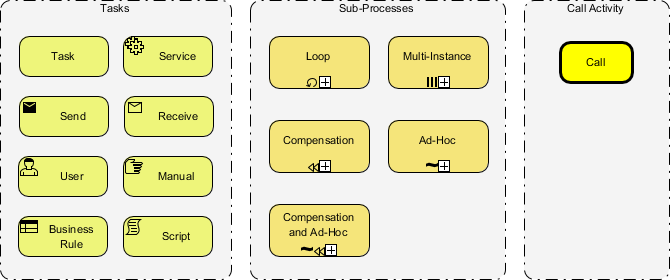
Activities represent tasks, subprocesses, or work units that must be performed [12]. In the Web-Shop diagram:
| Activity | Lane | Description |
|---|---|---|
Make An Order |
Customer | The customer fills out and submits their order |
Validate Order |
Customer | The customer reviews and corrects their order if needed |
Check The Order |
Seller | The seller reviews the incoming order for completeness |
Check The Stocks |
Store | The warehouse verifies inventory availability |
Restore Stocks |
Store | A subprocess (note the + marker) triggered when stock is insufficient |
Reject The Order |
Store | The order is declined due to stock unavailability |
Search For Additional Products |
Marketing | Marketing runs a parallel task to suggest complementary products |
💡 Beginner Tip: The small
+sign at the bottom of"Restore Stocks"indicates it is a Collapsed Subprocess — meaning it contains its own internal workflow that can be expanded for more detail.
🔶 Gateways (Diamonds) — Decisions That Control the Flow
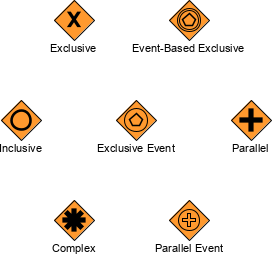
Gateways control how sequence flows diverge, converge, or branch based on conditions [10]. The Web-Shop diagram uses two critical gateway types:
| Gateway Type | Symbol | Web-Shop Example | Behavior |
|---|---|---|---|
| Exclusive Gateway (XOR) | Diamond (empty or with X) | "Modification?" in the Customer lane |
Only one path is taken: if “Yes,” the flow loops back to Make An Order; if “No,” it proceeds to Validate Order |
| Parallel Gateway (AND) | Diamond with + | After Check The Order in the Seller lane |
All outgoing paths execute simultaneously — the process splits into stock checking (Store) AND product searching (Marketing) at the same time |
| Exclusive Gateway (XOR) | Diamond (orange) | "Enough?" in the Store lane |
If stock is sufficient (“Yes”), the flow proceeds to confirm; if not (“No”), it diverts to Restore Stocks → Reject The Order |
💡 Beginner Tip: XOR = “either/or” (one path). AND = “all at once” (multiple paths simultaneously). This distinction is the single most important logic concept in BPMN.
1.3 Connecting Objects — How Everything Links Together
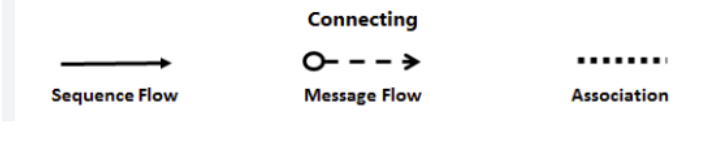
| Connector Type | Visual | Purpose | Web-Shop Example |
|---|---|---|---|
| Sequence Flow | Solid arrow (——→) | Shows the order of execution within a single pool/lane | Check The Stocks → Enough? gateway → Restore Stocks |
| Message Flow | Dashed line with open arrowhead (- – ->) | Shows communication between different pools | Customer’s Make An Order sends a message to Seller’s Receive The Order; Seller’s Confirmation sends a message back to Customer’s end event |
| Association | Dotted line (·····) | Links artifacts or annotations to flow objects | Used to attach data objects or text notes to activities |
⚠️ Critical Rule: Sequence Flows never cross pool boundaries. Only Message Flows connect separate pools. This is one of the most commonly violated rules by beginners [14].
🛠️ Part 2: Tooling Deep Dive — Why Visual Paradigm Online for BPMN?
Understanding BPMN notation is essential, but the tool you use to create your diagrams dramatically affects your speed, accuracy, and ability to collaborate. Here’s why Visual Paradigm Online stands out as a free BPMN tooling choice:
2.1 Core Free Features
| Feature | Description | Benefit for Beginners |
|---|---|---|
| Drag. Drop. Done. | Create shapes and connectors in a single interaction with precise drag-and-drop positioning [1] | No learning curve for basic diagram creation |
| 2,000+ Templates | Includes the “BPD Example: Web-Shop” and dozens of other real-world BPMN examples ready to edit [1] | Start from a working example instead of a blank canvas |
| Real-Time Collaboration | Multiple users can edit the same diagram simultaneously with commenting support [1] | Perfect for team workshops and remote process mapping sessions |
| Easy Export & Sharing | Export to PNG, JPG, SVG, GIF, and PDF formats [1] | Share diagrams with non-technical stakeholders instantly |
| Visio Import | Import existing Microsoft Visio drawings and continue editing online [1] | Migrate legacy diagrams without starting over |
| MS Office Integration | Embed diagrams directly into Word, Excel, and PowerPoint documents [1] | Include process maps in reports and presentations seamlessly |
| Browser-Based / Zero Install | Runs entirely in the browser — no software download required [8] | Accessible from any device, anywhere |
2.2 AI-Powered BPMN Generation (Advanced Feature)
For users ready to go beyond manual diagramming, Visual Paradigm also offers an AI-powered Text-to-BPMN engine that uses Natural Language Processing (NLP) to convert plain-English process descriptions into fully editable BPMN 2.0 diagrams [3]. The AI:
-
Extracts semantics — automatically identifies pools, lanes, tasks, and gateways from your text
-
Generates modeling objects — creates proper BPMN elements (not just flat shapes)
-
Optimizes layout — applies smart routing to minimize line crossings and keep swimlanes cleanProduces editable output — the result is a live diagram you can refine, not a static image [21]]
Example prompt: “The customer submits an order. The seller checks the order. If stock is available, the store confirms it. If not, the order is rejected.” → The AI generates a complete multi-lane BPMN diagram with appropriate gateways and message flows automatically [21].
2.3 Step-by-Step: Building the Web-Shop Diagram in VP Online
Here’s how a beginner can recreate or modify the Web-Shop workflow from scratch:
Step 1 — Start from the Template
Navigate to online.visual-paradigm.com → Search for “BPD Example: Web-Shop” → Click Edit to open it in the live editor [19].
Step 2 — Set Up Your Pools and Lanes
-
Drag a Pool from the left palette onto the canvas
-
Label it “Customer”
-
Add a second Pool labeled “Web-Shop”
-
Inside the Web-Shop pool, add three Lanes: Seller, Store, Marketing
Step 3 — Place Your Start and End Events
-
Drag a Start Event (green circle) into the Customer lane → label it “Purchase”
-
Drag End Events (red circles) at the conclusion of each pool’s workflow
Step 4 — Add Activities (Tasks)
-
Drag Rounded Rectangle shapes into the appropriate lanes
-
Label them:
Make An Order,Check The Order,Check The Stocks, etc.
Step 5 — Insert Gateways
-
Place an Exclusive Gateway after
Make An Order→ label the branches “Yes” (loop back) and “No” (proceed to Validate) -
Place a Parallel Gateway after
Check The Orderto split into Store and Marketing tasks simultaneously
Step 6 — Connect with Sequence and Message Flows
-
Use solid arrows (Sequence Flows) to connect tasks within the same pool
-
Use dashed lines (Message Flows) to connect the Customer pool to the Web-Shop pool
Step 7 — Review, Collaborate, and Export
-
Use the comment feature to discuss the diagram with teammates in real time
-
Export as PDF or PNG to share with stakeholders
-
Iterate based on feedback
📊 Part 3: Reading the Web-Shop Diagram — End-to-End Walkthrough
Let’s trace the complete happy path and exception path through the diagram
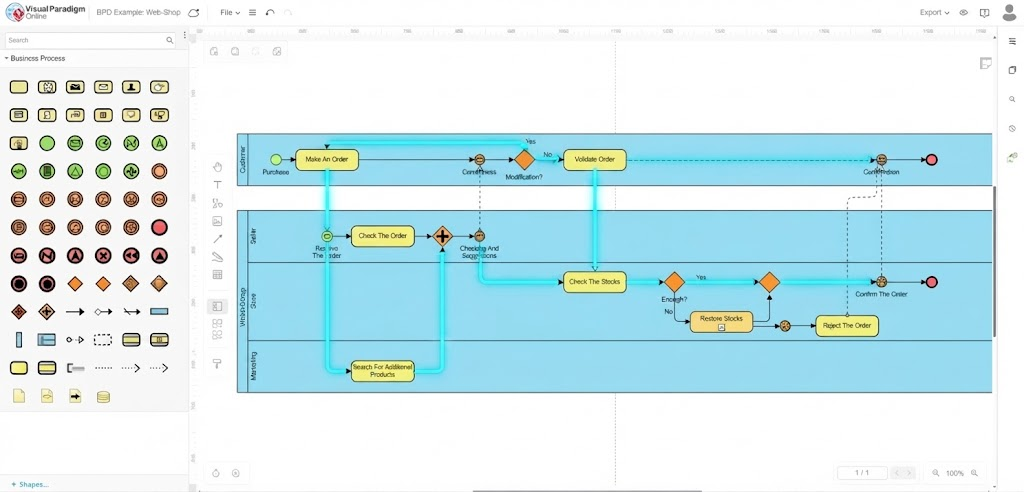 ✅ Happy Path (Order Confirmed)
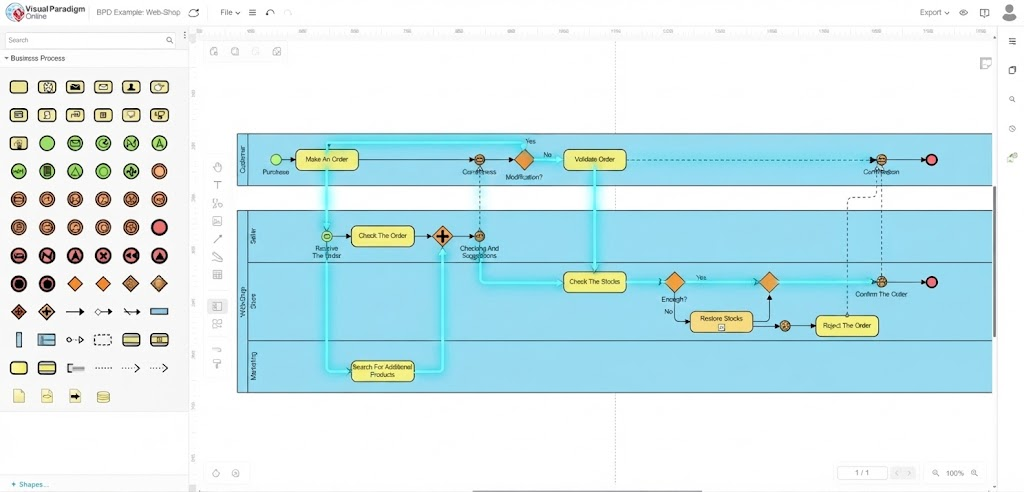
❌ Exception Path (Order Rejected — Insufficient Stock)
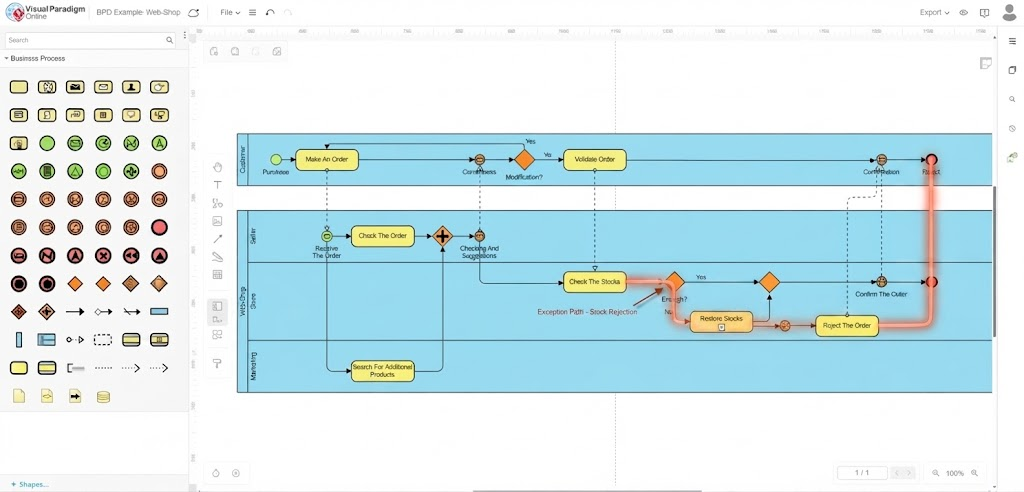
📌 Key Insight: The Restore Stocks activity is a collapsed subprocess (indicated by the +). In a real implementation, this would expand to reveal its own internal workflow — perhaps involving supplier notifications, purchase orders, and delivery tracking.
🧠 Part 4: Key Takeaways for Beginners
| # | Takeaway | Why It Matters |
|---|---|---|
| 1 | Pools = Organizations, Lanes = Roles | Keeps cross-functional processes visually organized and accountable |
| 2 | Sequence Flows stay inside pools; Message Flows cross pools | Violating this rule breaks BPMN compliance and creates ambiguity |
| 3 | XOR Gateway = One path; AND Gateway = All paths | Getting this wrong fundamentally misrepresents your business logic |
| 4 | Start from a template, don’t start from scratch | VP Online’s Web-Shop template gives you a validated, standards-compliant starting point [19] |
| 5 | Message Events (✉) signal cross-pool communication | They make handoffs between participants explicit and traceable |
| 6 | Subprocesses (+) hide complexity until needed |
Keep your top-level diagram clean; expand details only when necessary |
| 7 | Use AI to accelerate, not replace, your understanding | VP Online’s AI BPMN generator is a powerful accelerator — but you still need to validate the logic [21] |
| 8 | Collaborate in real time | Process modeling is a team sport — VP Online’s live editing makes workshops productive [1] |
🔄 Part 5: From “As-Is” to “To-Be” — Your Next Step
The Web-Shop diagram represents an “As-Is” process — a documentation of how things currently work. The natural next step in any BPMN journey is to design a “To-Be” process — an optimized version that eliminates bottlenecks, reduces handoffs, and improves cycle time.
Visual Paradigm Online already provides a companion template: “To-be Process for Purchase Order Process based on As-is BPMN” [22], which demonstrates how to evolve the Web-Shop workflow by:
-
Automating stock checks with real-time API integrations
-
Eliminating redundant validation loops
-
Adding SLA timers to intermediate events
-
Introducing service tasks for automated notifications
🚀 Challenge for the Reader: Open the As-Is Web-Shop template in VP Online, identify one bottleneck (hint: the manual
Validate Orderloop in the Customer lane), and redesign it as a To-Be process using a Service Task for automated validation. Export your result as a PDF and compare side-by-side.
🏁 Conclusion
BPMN is not just a diagramming standard — it is a shared language for operational clarity. Whether you’re a business analyst mapping a checkout flow, a developer implementing workflow automation, or a manager trying to understand where orders get stuck, BPMN gives you a precise, visual, and universally understood way to describe how work actually gets done.
The Web-Shop case study demonstrates that even a seemingly simple e-commerce transaction involves four organizational roles, multiple decision points, parallel processing, and cross-boundary communication — all of which BPMN captures elegantly with a handful of well-placed symbols.
And with Visual Paradigm Online, you don’t need expensive enterprise software, a dedicated IT team, or months of training to start modeling these processes. The free tier gives you drag-and-drop simplicity, 2,000+ templates, real-time collaboration, and even AI-assisted diagram generation — everything a beginner needs to go from “I’ve never drawn a process map” to “I just optimized our order fulfillment workflow” in a single afternoon [1][3][21].
The best way to learn BPMN is to start drawing. Open the Web-Shop template. Move a shape. Break something. Fix it. Then build your own.
Your processes are waiting to be seen clearly. 🗺️
📚 References & Further Reading
| Resource | Link |
|---|---|
| VP Online Free BPMN Tool | online.visual-paradigm.com/diagrams/features/bpmn-tool [1] |
| Web-Shop BPD Template | online.visual-paradigm.com/diagrams/templates/business-process-diagram [19] |
| To-Be Purchase Order Template | online.visual-paradigm.com/community/share/bpmn-v0dshjhvc [22] |
| Comprehensive BPMN + VP Guide | blog.visual-paradigm.com/comprehensive-guide-to-bpmn [21] |
| AI BPMN Diagram Generator | visual-paradigm.com/features/ai-bpmn-tool [3] |
| BPMN 2.0 Symbols Reference (Camunda) | camunda.com/bpmn/reference [10] |
| As-Is to To-Be Tutorial | visual-paradigm.com/tutorials/as-is-to-be-business-process [17] |
Related posts:
 Mastering Repetition in BPMN: A Practical Guide to Loops and Multi-Instance Activities
 AI-Powered Modeling in Agile: How BPMN and UML Are Making a Comeback
 Step-by-Step Guide: Mapping Employee Onboarding Workflows with AI
 Orchestrating, Collaborating, Choreographing: A Beginner’s Guide to BPMN 2.0 Diagram Types

 English
 Arabic
 Chinese (Simplified)
 Dutch
Dutch French
 German
 Italian
 Japanese
 Korean
 Portuguese
 Russian
 Spanish