


Introduction: Why BPMN Best Practices Matter
BPMN (Business Process Model and Notation) is the global standard for visualizing business processes, serving as the common language between business stakeholders and technical teams . However, simply knowing the symbols isn’t enough—creating models that are clear, maintainable, and truly useful requires following established best practices.
A poorly designed BPMN diagram can be as confusing as no diagram at all. Overly complex models with crossed lines, unclear naming, and missing elements frustrate readers and defeat the purpose of process modeling. This guide presents 7 essential tips for creating BPMN models that communicate effectively, using Visual Paradigm as the primary tooling platform.
Key Concepts: The BPMN Fundamentals You Need
Before diving into best practices, let’s establish the core building blocks of any BPMN diagram:
Flow Objects
-
Events (circles): Represent something that happens—start, intermediate, or end
-
Activities (rounded rectangles): Tasks or work performed
-
Gateways (diamonds): Decision points controlling flow based on conditions
Connecting Objects
-
Sequence Flows (solid arrows): Show the order of activities
-
Message Flows (dashed arrows): Show communication between different participants
Swimlanes
-
Pools: Represent major participants (departments, organizations)
-
Lanes: Subdivisions within pools for specific roles
Artifacts
-
Data Objects: Show data flow and state changes
-
Text Annotations: Provide additional explanations
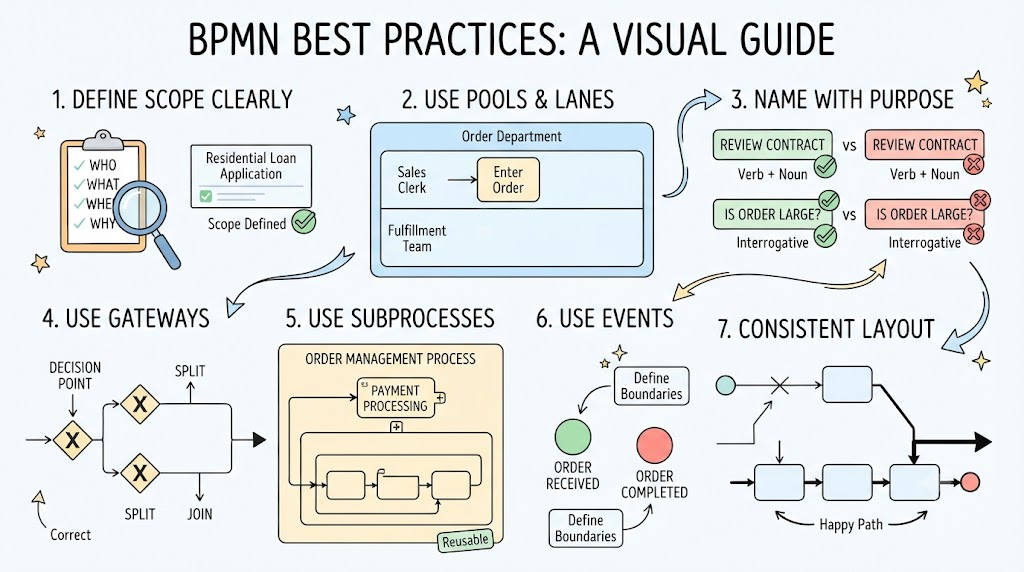
Tip 1: Define Your Process Scope Clearly
Before drawing a single shape, understand what you’re modeling. Start by documenting the who, what, when, where, and why of your process. This foundational step ensures your model serves a clear purpose .
In Visual Paradigm:
-
Use the Working Procedure Editor to document detailed operational procedures for each task
-
Create an As-Is diagram to capture current processes, then develop a To-Be diagram for future-state modeling—Visual Paradigm maintains traceability between both versions
Example:
Instead of creating “MyBank Loan Process,” define it as “Residential Loan Application”—the name should describe the business requirement, not your organization .
Tip 2: Always Use Pools and Lanes—and Use Them Correctly
Every process should include at least one Pool element, which provides a structured workspace for organizing all process elements. Lanes clarify responsibilities by showing which role performs each task .
Best Practices for Pools and Lanes:
| Practice | What to Do | What to Avoid |
|---|---|---|
| Use Pools | Include at least one Pool in every diagram | Creating a process without any Pool |
| Fill Lanes | Place every element clearly within a lane | Placing elements on lane boundaries |
| Empty Lanes | Remove any lane that has no elements | Leaving empty lanes in your model |
In Visual Paradigm:
-
Drag Pool and Lane elements from the toolbox onto your diagram
-
Use secondary pools when a task needs to be completed by more than one role
Tip 3: Name Everything with Purpose
Clear naming conventions are essential for readability. Names should instantly communicate what each element does.
Activity Naming
Use a Verb + Noun format in the present tense:
-
✅ “Review Contract”
-
✅ “Approve Invoice”
-
❌ “Contract” (no verb)
-
❌ “Contract Review Process” (too wordy)
Gateway Naming
Use an interrogative phrase that clarifies the decision:
-
✅ “Application Approved?”
-
✅ “Is Order Large?”
-
❌ “Decision” (too vague)
-
❌ “Check” (doesn’t explain what’s being checked)
Sequence Flow Labels
Name flows coming out of gateways using the condition outcome:
-
“Amount < $1,000”
-
“Amount ≥ $1,000”
Process Naming
Use descriptive names that define business purpose, not organization names:
-
✅ “Employee Onboarding”
-
❌ “The HR Process”
In Visual Paradigm:
-
Double-click any element to rename it
-
Use Text Annotations to provide additional context for complex logic
Tip 4: Use Gateways for Clear Decision Points
Gateways control how process flow splits and converges. Every decision point should use a gateway—avoid implicit branching that makes models confusing .
Key Gateway Rules
-
Always use gateways for splits and merges: Don’t have multiple outgoing sequence flows without a gateway
-
Separate split and join gateways: Use one gateway to split workflow and a separate one to join it
-
Use the same gateway type for both split and join: If you split with a Parallel Gateway, join with a Parallel Gateway
-
Place an activity before a diverging gateway: The activity should determine the condition for branching
In Visual Paradigm:
-
Select the appropriate gateway type from the palette—Exclusive (X), Inclusive (O), or Parallel (+)
-
Use Process Animation to visualize how your gateway logic executes in real time
Tip 5: Use Subprocesses to Manage Complexity
One of the most common mistakes is creating monolithic diagrams that try to capture everything in a single page. Break complex processes into reusable subprocesses .
Benefits of subprocesses:
-
Improves readability and maintainability
-
Enables reuse across multiple workflows
-
Simplifies error handling
-
Makes collaboration easier
Collapsed vs. Expanded Subprocesses
| Type | When to Use |
|---|---|
| Collapsed Subprocess | For high-level process overviews; hides detail until needed |
| Expanded Subprocess | When you need to show the detailed flow within the parent process |
In Visual Paradigm:
-
Use Process Drill-Down to open a subprocess and model its internal flow in a separate diagram
-
Expand or collapse subprocesses with one click to toggle between high-level and detailed views
-
Use Call Activities to reuse existing process definitions across multiple models
Example:
In an order management system, instead of one massive diagram, create separate subprocesses for:
-
Order Validation
-
Payment Processing
-
Notification Logic
These can then be reused across multiple order workflows .
Tip 6: Use Events to Define Clear Beginnings and Endings
Every process must have at least one Start Event and one End Event. This seems obvious, but it’s frequently overlooked—especially end events .
Start Events
-
Define how and when the process begins
-
Distinguish alternative triggers as separate start events
-
Name them uniquely
End Events
-
Define the final state of process instances
-
Distinguish different end states with separate end events
-
Merge flows that lead to the same end state
In Visual Paradigm:
-
Drag Start and End Event elements from the toolbar
-
Use multiple Start Events for different process triggers
-
Name each end event to indicate the outcome (e.g., “Approved,” “Rejected,” “Canceled”)
Tip 7: Maintain Consistent Layout and Direction
A well-organized diagram is easy to read. A messy diagram defeats the purpose of visual modeling.
Layout Best Practices
-
Maintain left-to-right workflow: Sequence flows should consistently flow from left to right
-
Minimize crossed lines: Crossed sequence flows make diagrams hard to follow
-
Use horizontal Sequence Flows, vertical Message Flows: This creates a clean, predictable visual pattern
-
Fit on one page when possible: If your diagram won’t fit on one page, consider using subprocesses
-
Make the “Happy Path” obvious: The primary flow should be immediately apparent
In Visual Paradigm:
-
Use the Process Animation feature to step through your process dynamically—this helps identify confusing paths and bottlenecks
-
Use Process Simulation to test process performance before implementation: analyze resource consumption, evaluate costs, and identify bottlenecks
Putting It All Together: A Sample Order Validation Process
Here’s how these practices come together in a real process:
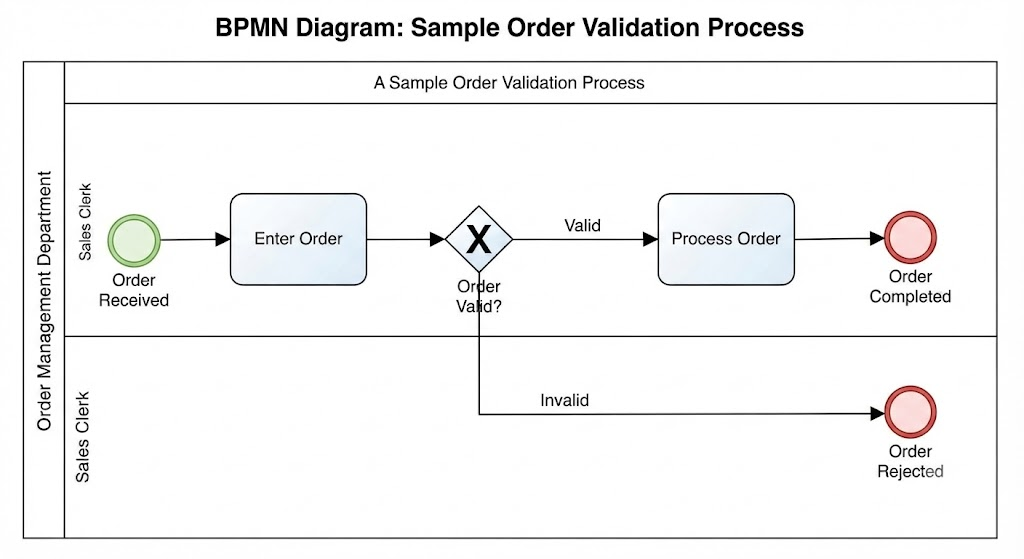
Why this works:
-
Clear start and end events define boundaries
-
Gateway split is clearly labeled
-
Task names use Verb+Noun format
-
Left-to-right flow is maintained
-
The process fits on one page
Visual Paradigm Features That Support Best Practices
Visual Paradigm offers several features that make following these best practices easier:
| Feature | How It Helps |
|---|---|
| Process Drill-Down | Navigate between parent and child subprocesses seamlessly |
| Process Animation | Visualize process flow dynamically for stakeholder presentations |
| Process Simulation | Test performance, identify bottlenecks, and evaluate costs before implementation |
| As-Is/To-Be Modeling | Compare current and future process states with traceability |
| Working Procedure Editor | Document detailed operational procedures for each task and generate comprehensive reports |
| RACI Charts | Define responsibilities (Responsible, Accountable, Consulted, Informed) for each activity |
Common Mistakes to Avoid
| Mistake | Why It’s a Problem | Solution |
|---|---|---|
| Using too many symbols | Creates confusing, overly complex diagrams | Focus on core elements |
| No end event | Process appears incomplete | Always include at least one end event |
| Elements on lane boundaries | Unclear who performs the task | Place all elements inside lane boundaries |
| Multiple gateways nested together | Hard to read and debug | Simplify with external decision tables or subprocesses |
| No text annotations | Missing context for complex logic | Add brief explanations where needed |
Conclusion
Creating effective BPMN models is about more than just knowing the symbols—it’s about applying consistent best practices that make your models clear, maintainable, and actionable.
The 7 Essential Tips:
-
Define your process scope before you start drawing
-
Always use Pools and Lanes—and use them correctly
-
Name everything with purpose (Verb+Noun for tasks, interrogative for gateways)
-
Use Gateways for every decision point
-
Use Subprocesses to manage complexity
-
Use Events to define clear beginnings and endings
-
Maintain consistent left-to-right layout
With Visual Paradigm’s comprehensive toolkit—from Process Drill-Down and Simulation to Animation and RACI charting—you have everything you need to create professional BPMN models that drive real business improvement .
BPMN Fundamentals and Tutorials
-
Comprehensive BPMN Diagram Tutorial: A step-by-step tutorial covering BPMN purpose, key concepts, elements, and practical examples using Visual Paradigm Online templates .
-
Understanding BPMN: A Comprehensive Overview: An in-depth overview of BPMN as the widely adopted standard for modeling and documenting business processes, developed by the Object Management Group (OMG) .
-
Introduction to BPMN Part I: Foundational tutorial covering what BPMN is and its basic constructs .
-
Introduction to BPMN Part II – Swimlanes: Tutorial focused on Pools and Lanes with a case study on the True Aqua Distilled Water Company .
-
Introduction to BPMN Part III – Flow and Connecting Objects: Covers Activities, Events, Gateways, Sequence Flows, and Message Flows .
-
Introduction to BPMN Part IV – Data and Artifacts: Explains Data objects, Groups, and Text Annotations in BPMN diagrams .
BPMN Diagram Creation and Best Practices
-
How to Draw BPMN Diagram?: A guide on creating BPMN diagrams from scratch .
-
Drawing BPMN Business Process Diagram: Technical guide on creating BPMN diagrams in Visual Paradigm, including assigning IDs to model elements and showing process statistics .
-
How to Create BPMN Diagram?: Covers what a BPMN diagram is, its purpose, and step-by-step creation instructions .
-
Business Process Modeling (BPM) Tutorial: Introduction to business process modeling and using BPD in process modeling .
-
Business Process Mapping (BPM) Tutorial: Introduction to business process mapping and using BPD in process mapping .
Advanced BPMN Features
-
Mastering Business Process Modeling: A Complete Guide to BPMN and AI-Powered Diagram Generation: Comprehensive guide on BPMN fundamentals combined with AI-powered features, including text-to-diagram generation and intelligent BPM analysis .
-
Chapter 6: Elevate Your BPMN Diagrams with Visual Paradigm: Detailed coverage of comprehensive BPMN 2.0 support, process drill-down functionality, animation and simulation tools, and integration with UML and ERD .
-
How to Develop As-Is and To-Be Business Process?: Guide on creating “As-is Process” models and transitioning to “To-be Process” models .
-
BPMN Tutorial: Writing Working Procedures: Step-by-step guide on defining working procedures for BPMN tasks and generating comprehensive documents .
-
How to Animate a BPMN Business Process?: Explains animating business processes and exporting animations to web content .
-
How to Use Business Process Simulation?: Covers quantifying process performance, identifying bottlenecks, and comparing process designs .
-
BPMN Process Simulation Example: Practical example demonstrating recording resource consumption, activities’ duration, and simulation chart analysis .
BPMN Data and Integration
-
BPMN Tutorial: How to Use BPMN Data Object?: Explains creating BPMN data objects with state and reusing data objects .
-
How to Link BPMN Data Object with ERD Entity?: Guide on understanding BPMN data objects and adding references from data objects to ERD .
-
How to Create Use Cases from BPMN Tasks?: Demonstrates transiting BPMN tasks and sub-processes to use case diagrams using Model Transitor .
Visual Paradigm Online Resources
-
Visual Paradigm Online BPMN Diagram Tool: Web-based tool that simplifies BPMN diagram creation with drag-and-drop functionality .
-
BPMN Tutorial with Example – The Leave Application Process: Practical tutorial using a leave application process as a case study .
Related posts:
 Visual Paradigm Online PowerPoint Web Viewer: Convert PPT to HTML5 with Animations & Transitions
 Complete Guide to Visual Paradigm Online Office Suite
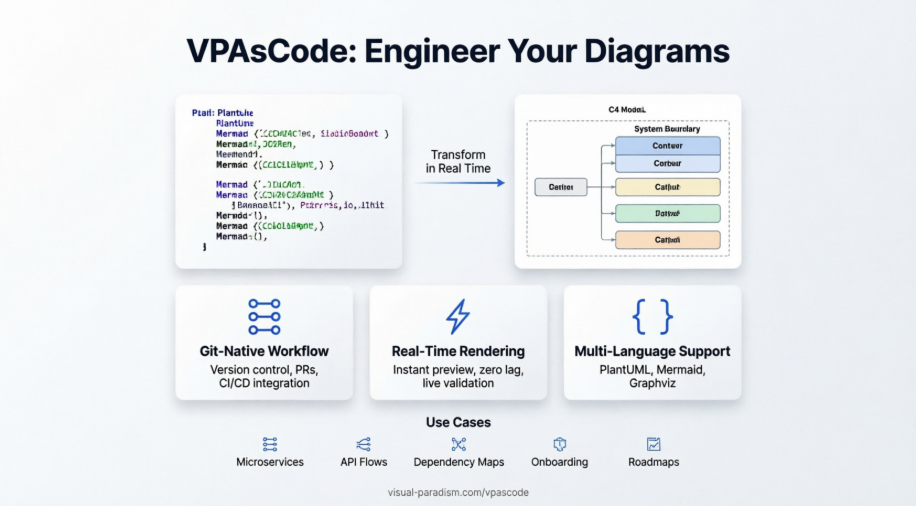 VPasCode Feature Review Guide: The Ultimate Diagram-as-Code Solution for Modern Teams
Mastering Business Process Modeling: A Practical Guide to BPMN 2.0
VPasCode Feature Review Guide: The Ultimate Diagram-as-Code Solution for Modern Teams
Mastering Business Process Modeling: A Practical Guide to BPMN 2.0

 English
 Arabic
 Chinese (Simplified)
 Dutch
Dutch French
 German
 Italian
 Japanese
 Korean
 Portuguese
 Russian
 Spanish