


Enterprise architecture is often described as the blueprint for an organization. It maps the complex relationships between business strategy, operational processes, information systems, and technology infrastructure. However, a blueprint that is too detailed for one stakeholder is useless to another. This is where the concept of ArchiMate Viewpoints becomes critical. By defining specific lenses through which to view the architecture, organizations can ensure clarity, reduce ambiguity, and foster better decision-making across the enterprise.
This guide explores the mechanics of designing and implementing ArchiMate Viewpoints. It covers the theoretical underpinnings, practical design strategies, and common challenges faced during implementation. The goal is to establish a robust framework for architectural communication that stands the test of time.
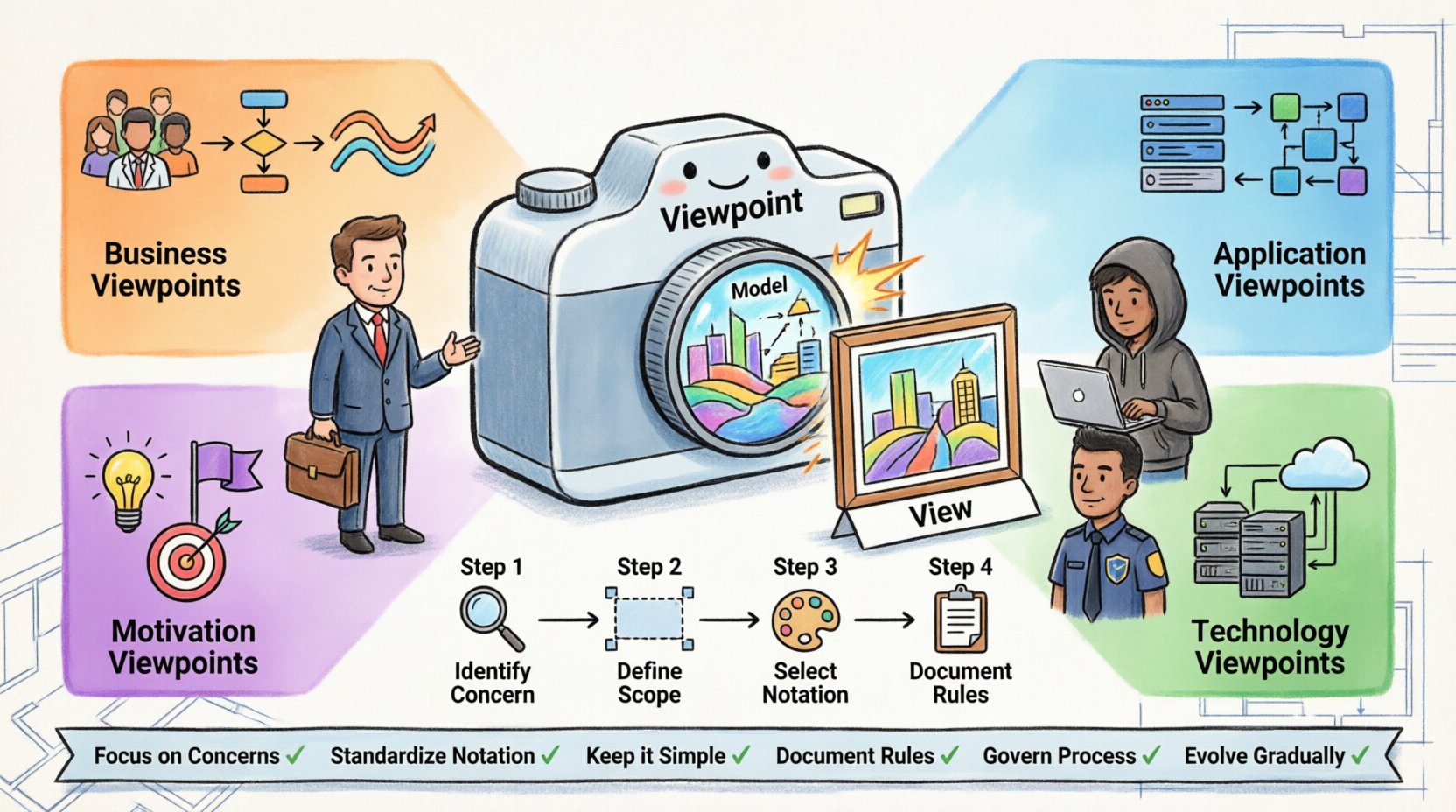
🧩 Understanding the Core Triad: Model, View, and Viewpoint
To grasp the utility of Viewpoints, one must first distinguish between three related concepts that often get conflated: the Model, the View, and the Viewpoint. These form the backbone of the ArchiMate standard and similar modeling languages.
- The Model: This is the complete repository of all architectural elements. It contains every business process, application, component, and device in the organization. It is comprehensive and exhaustive.
- The View: This is a specific representation of the model tailored to a particular audience. A view extracts relevant information from the model and presents it in a way that addresses specific concerns.
- The Viewpoint: This is the specification or template for creating a view. It defines the language, notation, and rules for constructing a view. It answers the question: “What should this view look like and why?”
Think of it like a camera. The Model is the entire landscape. The View is the photograph taken. The Viewpoint is the camera settings (lens type, focus, filters) that determine how the landscape is captured.
Without a defined Viewpoint, views become inconsistent. One architect might draw a process flow using different symbols than another. A Viewpoint standardizes these representations, ensuring that a stakeholder understands the diagram immediately without needing a legend.
🤝 Why Viewpoints Matter for Stakeholder Alignment
Enterprise Architecture (EA) exists to bridge the gap between business and IT. However, this gap is often filled with jargon and conflicting priorities. Viewpoints serve as a translation mechanism.
Addressing Specific Concerns
Every stakeholder group has unique concerns. A C-level executive cares about strategic alignment and cost. A developer cares about component interfaces and dependencies. A security officer cares about data flow and access points.
- Strategic Viewpoints: Focus on value streams, business capabilities, and organizational structure. They answer questions about “What are we doing?” and “Why are we doing it?”
- Operational Viewpoints: Focus on processes, data objects, and application usage. They answer questions about “How does work get done?”
- Technical Viewpoints: Focus on infrastructure, networks, and security mechanisms. They answer questions about “What hardware and software support this?”
By assigning specific Viewpoints to these concerns, architects ensure that the right information reaches the right person. A security officer does not need to see a high-level capability map, nor does a business analyst need to see server rack diagrams.
Reducing Cognitive Load
Complexity is the enemy of understanding. An architecture model can contain thousands of elements. Presenting all of them to a stakeholder causes confusion. Viewpoints filter this complexity.
When a Viewpoint is well-defined, it dictates:
- Which elements are included.
- Which relationships are displayed.
- The notation style (icons, colors, line types).
- The level of detail required.
This reduction in noise allows stakeholders to focus on the critical path of their decision-making process.
📋 Standard Viewpoint Categories in the ArchiMate Standard
The ArchiMate standard provides a set of predefined Viewpoints that cover common scenarios. While organizations often create custom Viewpoints, understanding the standard categories is essential for compliance and interoperability.
The standard organizes these by the layers they primarily address: Business, Application, Technology, Data, and Motivation.
1. Business Viewpoints
These focus on the business layer. They are used to describe how the organization creates value.
- Business Service Viewpoint: Describes business services and the business actors that use them.
- Business Process Viewpoint: Focuses on the flow of activities and the roles involved.
- Business Collaboration Viewpoint: Shows how different business actors interact with one another.
2. Application Viewpoints
These describe the software systems that support business services.
- Application Interaction Viewpoint: Illustrates how applications exchange data or services.
- Application Functionality Viewpoint: Details the functions provided by applications.
3. Technology Viewpoints
These cover the infrastructure that hosts applications.
- System Network Viewpoint: Shows communication paths and devices.
- Hardware Viewpoint: Focuses on physical computing resources.
4. Motivation Viewpoints
These explain the “why” behind the architecture.
- Goal Viewpoint: Links business goals to the capabilities and processes that achieve them.
- Principle Viewpoint: Documents the rules and guidelines governing the architecture.
Comparison of Viewpoint Types
| Category | Primary Focus | Key Audience | Example Element |
|---|---|---|---|
| Business | Value Streams & Processes | Business Leaders, Analysts | Business Process |
| Application | Software Capabilities | Developers, Architects | Application Component |
| Technology | Infrastructure | Infrastructure Team, Ops | Node |
| Motivation | Drivers & Goals | Strategy Office, PMO | Goal |
🛠️ Designing Effective Custom Viewpoints
While standard Viewpoints cover many bases, specific organizational needs often require custom definitions. Designing a custom Viewpoint requires discipline and a clear understanding of the problem being solved.
Step 1: Identify the Concern
Before drawing a single shape, define the concern. What question is this view trying to answer? If the concern is vague, the Viewpoint will be vague.
- Bad Concern: “Show me everything about the sales system.”
- Good Concern: “Show me the data flow between the CRM and the ERP during a sales transaction.”
Step 2: Define the Scope
Scope determines the boundaries of the model. Which layers are in scope? Which are out of scope? For a specific Viewpoint, you might include the Business and Application layers but exclude the Technology layer to keep the focus on logic rather than infrastructure.
Step 3: Select Notation and Symbols
The Viewpoint must specify the visual language. This includes:
- The specific ArchiMate elements to use (e.g., Actor vs. Business Actor).
- The allowed relationships (e.g., Assignment vs. Aggregation).
- The layout conventions (e.g., left-to-right flow, specific colors for status).
Step 4: Document the Rules
A Viewpoint is useless if it is not documented. Create a specification that includes:
- Purpose: Why does this Viewpoint exist?
- Target Audience: Who is supposed to read this?
- Notation: Which symbols are mandatory?
- Constraints: What is not allowed in this view?
🎯 Mapping Concerns to Visual Representations
Effective visualization relies on mapping abstract concerns to concrete visual elements. This process is known as “concern mapping.” It ensures that the diagram communicates the intended message.
Mapping Business Strategy
When mapping strategy, the focus is on hierarchy and causality. Use the Motivation layer to show how a goal drives a requirement, which is satisfied by a capability, which is realized by a process.
- Visual Tip: Use distinct colors for Goals (Green) and Requirements (Yellow) to differentiate intent from obligation.
- Visual Tip: Group related capabilities in boxes to show domains.
Mapping Data Flow
Data flow Viewpoints are critical for understanding integration points. These views must clearly distinguish between the source of data and the consumer.
- Visual Tip: Use thick lines for critical data streams and dashed lines for secondary or asynchronous flows.
- Visual Tip: Label the relationship with the data object type (e.g., “Customer Data”) rather than just “Access”.
Mapping Security Boundaries
Security Viewpoints require a focus on trust zones and access control. This involves grouping technology nodes into logical security domains.
- Visual Tip: Use background shading to denote different security domains (e.g., Public vs. Internal).
- Visual Tip: Highlight access points where authentication is required.
⚠️ Common Pitfalls in Viewpoint Implementation
Even with a solid plan, errors occur during the implementation of Viewpoints. Recognizing these pitfalls early can save significant time and effort.
1. The “Kitchen Sink” Viewpoint
This occurs when a Viewpoint tries to do everything. It includes every possible element type and relationship. The result is a diagram that is too dense to read. A Viewpoint should be minimal. If an element is not essential to the concern, exclude it.
2. Inconsistent Notation
If one team uses rounded rectangles for business processes and another uses diamonds, the architecture becomes confusing. This often happens when Viewpoints are not centrally managed. Enforce strict adherence to the Viewpoint specification.
3. Ignoring the “Why”
Architects sometimes create views without a clear stakeholder in mind. These views end up as shelf-ware—documentation that is created but never used. Every Viewpoint must have a defined owner and a defined consumer.
4. Over-Modeling
There is a temptation to model every detail of the system. In reality, a Viewpoint only needs to show the details relevant to the current concern. If a specific attribute of a business process is not needed for the process flow view, do not include it.
🗄️ Ensuring Consistency Across the Architecture Repository
As the architecture grows, maintaining consistency becomes a challenge. This is especially true in large organizations with multiple architecture teams.
Centralized Definition
Viewpoint definitions should be stored in a central location. This ensures that everyone is working from the same specification. Updates to a Viewpoint should propagate to all existing views that use it.
Versioning
Architectures evolve. Viewpoints must also evolve. Version control for Viewpoint specifications is essential. When a Viewpoint changes, it should be versioned so that historical views remain valid while new views adhere to the updated standard.
Quality Assurance
Implement a review process for new views. A senior architect should verify that the view adheres to the Viewpoint specification. This includes checking for:
- Correct element usage.
- Proper relationship types.
- Consistent labeling conventions.
- Adherence to the defined scope.
🔄 Integrating Viewpoints into Governance Workflows
Viewpoints are not just documentation tools; they are governance tools. They can be integrated into the approval and decision-making processes of the organization.
Change Management
When a change request is submitted, the relevant Viewpoints should be used to assess the impact. For example, a request to change a business process should trigger a review of the Business Process Viewpoint and the associated Application Viewpoint to identify downstream effects.
Compliance Audits
Regulatory bodies often require specific documentation. Viewpoints can be configured to generate the exact reports needed for compliance. By defining a Compliance Viewpoint, auditors can see exactly which controls are in place without wading through irrelevant technical details.
Decision Support
Portfolio management relies on accurate data. Viewpoints can aggregate information from the model to support investment decisions. For instance, a Portfolio Viewpoint might show the cost and value of all business capabilities to help prioritize funding.
🚀 Future-Proofing Your Architecture Documentation
The landscape of technology changes rapidly. Cloud, AI, and microservices introduce new complexities. Viewpoints must be flexible enough to accommodate these changes without requiring a complete redesign.
Abstraction
Design Viewpoints that rely on abstraction rather than specific technologies. Instead of mapping to “Oracle Database,” map to “Persistent Data Store.” This allows the model to remain valid even if the underlying technology changes.
Modularity
Break down large Viewpoints into smaller, modular components. If a new requirement arises for a specific technology layer, you can update that specific Viewpoint module without affecting the Business Viewpoint.
Automation
Where possible, automate the generation of views from the model. This ensures that the documentation is always up-to-date with the actual architecture. Automation also reduces the risk of human error in drawing the diagrams.
📝 Summary of Best Practices
To summarize, building a strong architectural foundation with ArchiMate Viewpoints requires a disciplined approach. The following principles should guide your efforts:
- Focus on Concerns: Start with the stakeholder question, not the diagram.
- Standardize Notation: Ensure visual consistency across the enterprise.
- Keep it Simple: Exclude elements that do not serve the specific concern.
- Document Rules: Define the Viewpoint specification clearly.
- Govern the Process: Integrate Viewpoints into change management and auditing.
- Evolve Gradually: Treat Viewpoints as living standards that adapt to organizational needs.
By adhering to these principles, organizations can transform their architecture documentation from a static repository into a dynamic tool for strategic alignment. The clarity provided by well-designed Viewpoints reduces risk, improves communication, and ensures that the technology investment supports the business strategy effectively.
Architecture is not about creating pictures; it is about creating understanding. Viewpoints are the vehicle that delivers this understanding to the people who need it most.

 English
 Arabic
 Chinese (Simplified)
 Dutch
Dutch French
 German
 Italian
 Japanese
 Korean
 Portuguese
 Russian
 Spanish