


Enterprise architecture is often described as a complex discipline. It involves mapping business strategies to IT capabilities, ensuring alignment, and communicating technical details to diverse audiences. For those new to the field, the terminology can seem overwhelming. One of the most critical concepts to grasp is the ArchiMate Viewpoint. This guide provides a comprehensive, step-by-step approach to understanding and creating these essential modeling structures. We will explore the core definitions, the relationship between views and viewpoints, and practical strategies for implementation without relying on specific software products. 🎯
What is an ArchiMate Viewpoint? 🤔
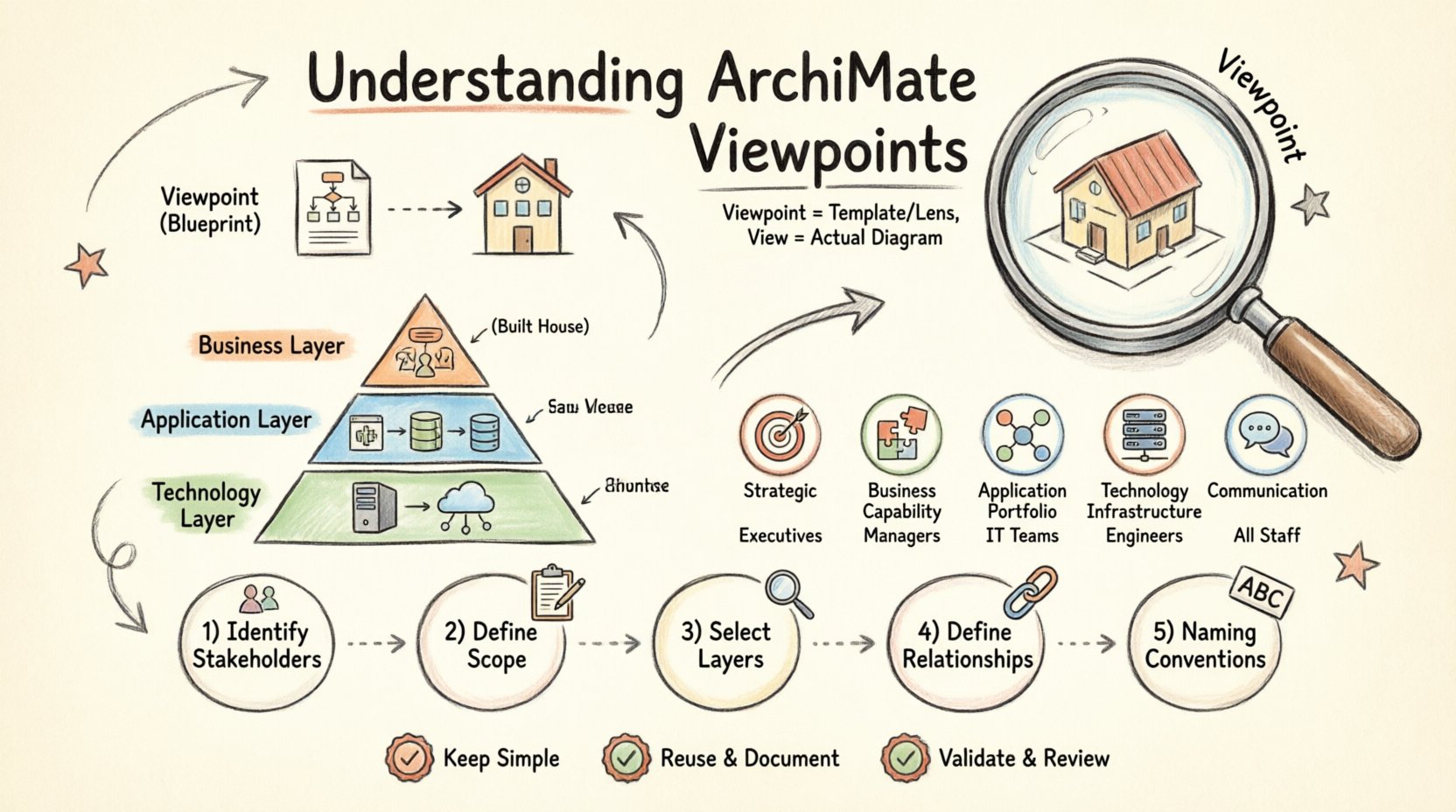
An ArchiMate Viewpoint is a specification that defines a set of conventions for creating a particular type of architecture view. In simpler terms, it is a template or a lens through which you look at a larger architecture model. Think of it like a map legend. A map of a city might focus on streets, while another might focus on topography. Both represent the same city, but they highlight different details based on the needs of the user.
When you work with an architecture model, the full model contains thousands of elements. Showing this entire model to a stakeholder would be confusing and unhelpful. A Viewpoint dictates:
- Which elements are relevant to include.
- Which relationships should be displayed.
- How the information is presented.
- What language is used for the audience.
By defining a Viewpoint, you ensure that the resulting View is focused, coherent, and valuable to the intended reader. It transforms raw data into meaningful information. This process is fundamental to effective Enterprise Architecture communication. 📊
View vs. Viewpoint: Understanding the Distinction 🔍
Confusion often arises between the terms “View” and “Viewpoint.” While related, they serve different purposes. Understanding this difference is crucial for structuring your architecture work correctly.
- Viewpoint: This is the definition. It is the abstract rule set. It says, “Here is how we show a Business Capability Map.” It does not contain actual data.
- View: This is the instance. It is the actual diagram or document created using the Viewpoint. It contains the specific business capabilities for a specific organization.
Imagine a Viewpoint as a blueprint for a house. It specifies the number of rooms, the type of doors, and the window placement. The View is the actual house built from that blueprint. You can build multiple houses (Views) from the same blueprint (Viewpoint) for different clients.
Why Does This Matter?
Without a defined Viewpoint, architects might create arbitrary diagrams. One diagram might focus on applications, while another focuses on business processes. If there is no standard Viewpoint, stakeholders may not understand why certain elements are missing. Consistency in Viewpoints leads to consistency in understanding. It allows teams to reuse definitions across different projects. 🔄
The Layers of ArchiMate 🧱
To understand Viewpoints, you must understand the underlying model structure. ArchiMate organizes architecture into layers. These layers help manage complexity by separating concerns. Most Viewpoints will focus on one or more of these layers.
1. Business Layer
This layer represents the business processes, organizational structure, and roles. It answers the question: “What does the organization do?” Elements here include:
- Business Process
- Business Role
- Business Object
- Business Service
2. Application Layer
This layer describes the software and systems that support the business. It focuses on the functionality provided by applications. Elements here include:
- Application Component
- Application Service
- Data Object (logical)
3. Technology Layer
This layer covers the physical and logical infrastructure. It describes the hardware and network environment. Elements here include:
- Node
- Device
- System Software
- Network
4. Cross-Cutting Layers
Some Viewpoints span across these layers or address specific concerns like strategy or security. These include:
- Strategy Layer: Goals, Principles, and Requirements.
- Implementation Layer: Projects and Deliverables.
- Motivation Layer: Drivers and Assessments.
A Viewpoint might restrict access to only the Business Layer. Another might require a view that shows the Technology Layer in detail. The choice depends entirely on the audience. 🔌
Types of Viewpoints 📋
There is no single Viewpoint that fits all situations. Different stakeholders require different perspectives. Below is a breakdown of common Viewpoint categories used in the industry.
Strategic Viewpoints
These are designed for executives and planners. They focus on the long-term direction. They often utilize the Strategy and Motivation layers. The goal is to show alignment between business goals and architectural capabilities.
- Focus: Goals, Drivers, Principles.
- Audience: C-Level Executives, Board Members.
- Key Question: “Are we moving in the right direction?”
Business Capability Viewpoints
This is one of the most common types. It maps what the business can do. It is not a process flow, but a catalog of abilities. This helps identify gaps in capability or areas of redundancy.
- Focus: Business Capabilities.
- Audience: Business Managers, Strategy Teams.
- Key Question: “What can we do, and what do we need to do?”
Application Portfolio Viewpoints
These views focus on the software landscape. They show which applications exist, how they interact, and which business processes they support. This is vital for application rationalization.
- Focus: Application Services, Components.
- Audience: IT Managers, Developers.
- Key Question: “What systems do we own and how do they connect?”
Technology Infrastructure Viewpoints
These views drill down into the hardware and network. They are essential for operations teams and infrastructure planners. They detail the deployment of software onto physical nodes.
- Focus: Nodes, Devices, Networks.
- Audience: Infrastructure Engineers, Ops Teams.
- Key Question: “Where is the software running?”
Communication Viewpoints
These are designed to explain complex relationships to non-technical stakeholders. They often simplify the notation or use specific metaphors to make the architecture digestible.
- Focus: Simplified relationships, Business Services.
- Audience: External Partners, General Staff.
- Key Question: “How does this affect me?”
Creating a Viewpoint: Step-by-Step Guide 🛠️
Now that we understand the theory, let us walk through the process of defining a Viewpoint. This process is generic and applies to any modeling environment. It does not rely on specific proprietary tools.
Step 1: Identify the Stakeholders 🗣️
Before drawing anything, you must know who will read the view. Stakeholders determine the content. If you are writing for a developer, you need technical depth. If you are writing for a CFO, you need financial implications.
- List all potential readers.
- Group them by role or interest.
- Define what information each group needs to make decisions.
Step 2: Define the Scope and Purpose 🎯
What is the specific problem this Viewpoint solves? Is it to show current state? Future state? Or the migration path? Clear scope prevents “scope creep” where the view becomes too large to manage.
- State the objective clearly.
- Limit the time horizon (e.g., current vs. future).
- Define the boundaries of the business domain.
Step 3: Select the Relevant Layers and Elements 🧩
Based on the stakeholders and purpose, select which ArchiMate layers to include. You do not need to show everything. A Viewpoint for Business Process improvement might ignore the Technology Layer entirely.
- Choose the Business Layer for process views.
- Choose the Application Layer for system integration views.
- Choose the Technology Layer for infrastructure views.
- Exclude irrelevant layers to reduce noise.
Step 4: Determine Relationships and Connections 🔗
Elements are useless without context. You must define which relationships are allowed in this Viewpoint. For example, an “Serves” relationship is common between Business and Application layers. A “Realization” relationship might be used for Strategy.
- Specify allowed relationships.
- Define forbidden relationships to avoid confusion.
- Ensure the flow of information makes sense logically.
Step 5: Define Naming Conventions 📝
Consistency is key. A Viewpoint should enforce how names are written. Should they be capitalized? Should they include version numbers? Standardizing this makes the resulting views easier to read and maintain.
- Set rules for capitalization.
- Define naming patterns for specific element types.
- Ensure language is consistent across all views.
Comparison of Viewpoint Types ⚖️
To help visualize the differences, here is a structured comparison of the most common Viewpoint categories.
| Viewpoint Type | Primary Layer | Key Audience | Typical Focus |
|---|---|---|---|
| Strategic | Strategy / Motivation | Executives | Goals & Drivers |
| Business Capability | Business | Business Managers | Capabilities & Gaps |
| Application Portfolio | Application | IT Managers | Systems & Integration |
| Technology Infrastructure | Technology | Engineers | Hardware & Network |
| Business Process | Business | Process Owners | Flow & Sequence |
Best Practices for Viewpoint Design 🌟
Creating a Viewpoint is an art as much as a science. To ensure your architecture work is effective, follow these proven practices.
1. Keep It Simple
Complexity is the enemy of understanding. If a Viewpoint requires a manual to explain it, it is too complex. Aim for clarity. Use standard notation. Avoid custom symbols unless absolutely necessary.
2. Reuse Existing Viewpoints
Do not reinvent the wheel. If a Viewpoint already exists for “Application Portfolio,” do not create a new one for the same purpose. Consistency across the organization saves time and reduces confusion. Update the existing one if changes are needed.
3. Document the Viewpoint
A Viewpoint is a document in itself. You must record its definition, rules, and usage. Store this in a central repository. Future architects need to know how to use it. Without documentation, the Viewpoint becomes a black box.
4. Validate with Stakeholders
Before finalizing a Viewpoint, show it to the intended audience. Ask them if the information is clear. Ask if the necessary details are present. Their feedback is the best validation tool you have.
5. Review Regularly
Architecture is not static. Business needs change. A Viewpoint that worked five years ago might be obsolete today. Schedule periodic reviews to ensure the Viewpoints still meet current needs.
Common Pitfalls to Avoid ⚠️
Even experienced architects can make mistakes when designing views. Being aware of these pitfalls can save you significant effort.
Pitfall 1: The “Kitchen Sink” View
This happens when an architect tries to show everything in one diagram. They include every layer, every relationship, and every element. The result is a messy, unreadable image that conveys nothing. Always apply strict filtering rules in your Viewpoint.
Pitfall 2: Ignoring the Audience
Showing a deep Technology Layer view to a Business Manager is a mistake. They do not understand the terminology. Tailor the language and depth to the reader’s expertise level. Technical accuracy means nothing if the audience cannot understand it.
Pitfall 3: Lack of Consistency
If one Viewpoint uses “Serves” and another uses “Provides” for the same relationship, confusion arises. Ensure all Viewpoints in your library follow the same modeling rules. Standardization builds trust.
Pitfall 4: Static Documentation
Creating a Viewpoint and never updating it leads to decay. The model becomes out of sync with reality. Integrate Viewpoint reviews into your regular architecture governance cycle.
The Role of Viewpoints in Governance 🏛️
Viewpoints are not just for drawing diagrams. They play a critical role in architecture governance. Governance ensures that architecture decisions are made correctly and align with strategy.
- Standardization: Viewpoints enforce standards. Everyone uses the same definitions.
- Quality Control: Views created from Viewpoints are easier to review because they follow known patterns.
- Communication: They bridge the gap between technical teams and business leadership.
When a governance board reviews a change, they often ask for a Viewpoint-specific view. This ensures they are seeing the impact on their specific area of concern. It prevents decisions based on incomplete information.
Integrating Viewpoints into Your Workflow 🔄
How do you actually use these Viewpoints in your daily work? Here is a suggested workflow for integrating them into your architecture practice.
- Start with the Model: Ensure your core model is accurate. The Viewpoint is just a filter; the data must be solid.
- Select the Viewpoint: Choose the Viewpoint that matches the request. Do not force a View to fit a Viewpoint if it does not match.
- Generate the View: Extract the relevant data based on the Viewpoint rules.
- Annotate: Add context or notes if necessary. The Viewpoint defines the structure, but human insight adds value.
- Review and Publish: Get approval from stakeholders before distributing the view.
This workflow ensures that your architecture work remains organized and relevant. It prevents the common issue of ad-hoc diagrams that never get updated.
Advanced Considerations for Viewpoints 🔬
As you gain experience, you may need to create custom Viewpoints for specific scenarios. This requires a deeper understanding of the ArchiMate specification.
Combining Layers
Sometimes a problem spans multiple layers. A migration plan might need to show Business Processes, Applications, and Technologies simultaneously. You can create a Viewpoint that explicitly allows cross-layer relationships. However, be careful. Cross-layer views can become very complex quickly.
Adding Custom Notation
Standard ArchiMate notation is powerful, but sometimes you need more. You might add icons to indicate risk levels or colors to show compliance status. If you do this, document it clearly in the Viewpoint definition. Do not rely on implicit meanings.
Versioning Viewpoints
Just like software, Viewpoints have versions. If you change a Viewpoint definition, you should version it. This allows you to track changes in how views are generated over time. It is especially useful for large organizations with multiple teams.
Summary of Key Takeaways 📌
To wrap up this comprehensive guide, here are the essential points to remember about ArchiMate Viewpoints:
- Definition: A Viewpoint is a template for creating a View. It defines rules and conventions.
- Audience: Always design Viewpoints based on who will read the resulting diagram.
- Layers: Understand the Business, Application, and Technology layers to filter content correctly.
- Consistency: Use standard Viewpoints to ensure consistency across the organization.
- Documentation: Document your Viewpoints so others can use them effectively.
- Evolution: Regularly review and update Viewpoints to match changing business needs.
Mastering Viewpoints is a journey. It requires practice and patience. Start with the standard types and expand as your understanding grows. By focusing on clear communication and stakeholder needs, you will create architecture models that truly add value to your organization. 🚀

 English
 Arabic
 Chinese (Simplified)
 Dutch
Dutch French
 German
 Italian
 Japanese
 Korean
 Portuguese
 Russian
 Spanish