


Introduction: Why I Decided to Test Visual Paradigm’s AI Chatbot
As someone who has spent years juggling product roadmaps, system architecture diagrams, and stakeholder presentations, I know the pain of diagramming tools all too well. The drag-and-drop interfaces, the endless palette hunting, the frustration of aligning connectors just so—it all adds up to hours lost that could be spent on strategy, not formatting.
When I first heard about Visual Paradigm’s AI Chatbot—a conversational assistant that turns plain-text prompts into professional, standards-compliant diagrams—I was skeptical. Could an AI really understand the nuances of UML, ArchiMate, or C4 modeling? Could it save time without sacrificing quality? I decided to put it through its paces across real-world scenarios my team faces daily. What follows is my honest, third-party review of the experience, the capabilities, and the genuine value this tool brings to collaborative visual modeling.
Unlock Your Team’s Potential
Discover how professionals across different roles leverage Visual Paradigm AI to work smarter, collaborate better, and achieve their goals faster. Explore real-world scenarios where AI-powered diagramming makes a difference.
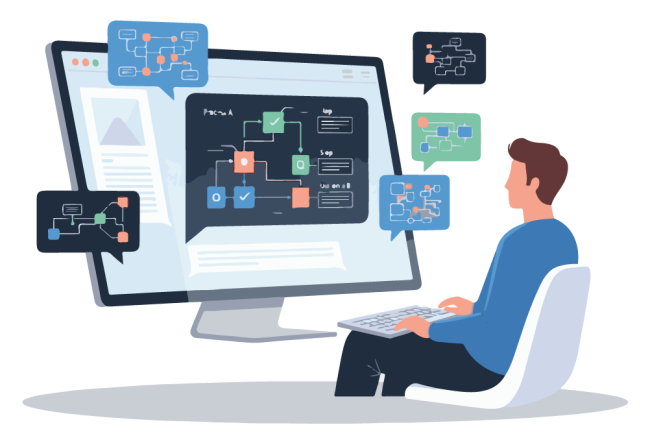
Generate Diagram: The Core Power
This is where the magic begins. Instead of struggling with palettes, connectors, and complex notation rules, you simply state what you need. The AI understands industry standards—from UML and ArchiMate to strategic matrices—and instantly renders a professional, fully editable diagram, making the initial modeling step a matter of seconds, not hours.
Fitness Tracking Application Example
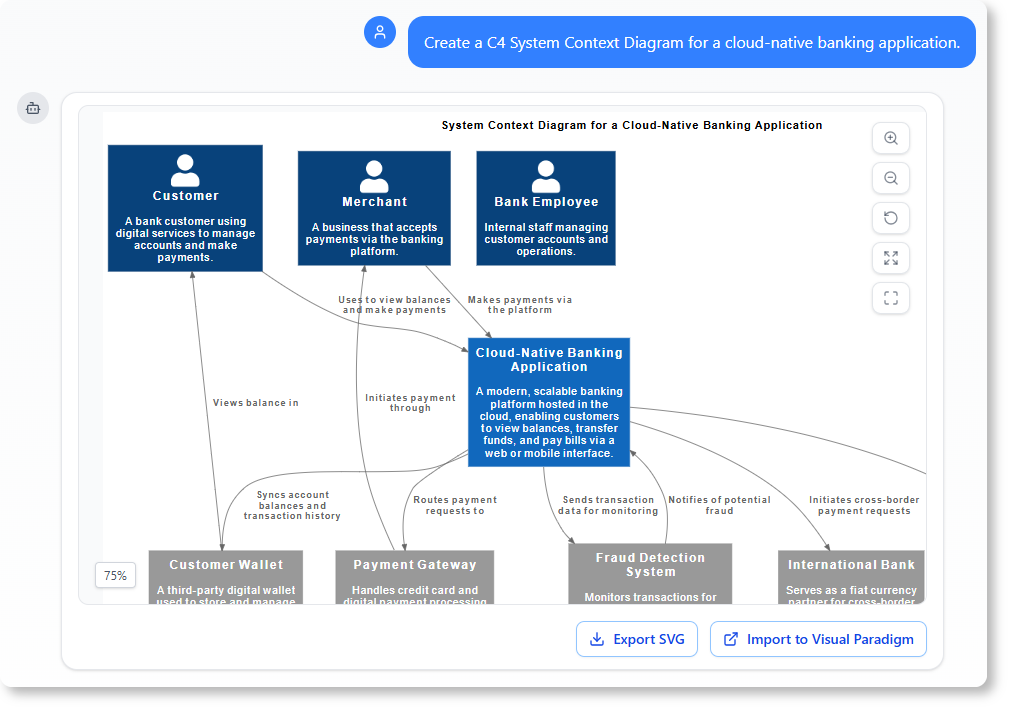
Prompt: Create a C4 System Context Diagram for a cloud-native banking application.
Chat History
SWOT Analysis Example
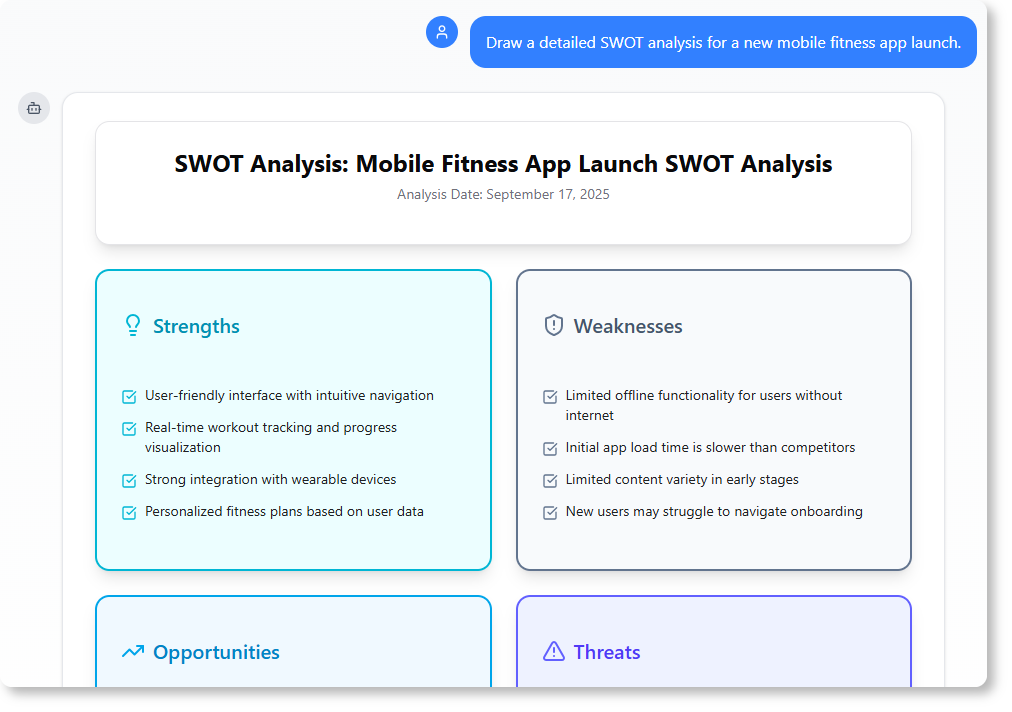
Prompt: Draw a detailed SWOT analysis for a new mobile fitness app launch.
Chat History →
UML Use Case Example
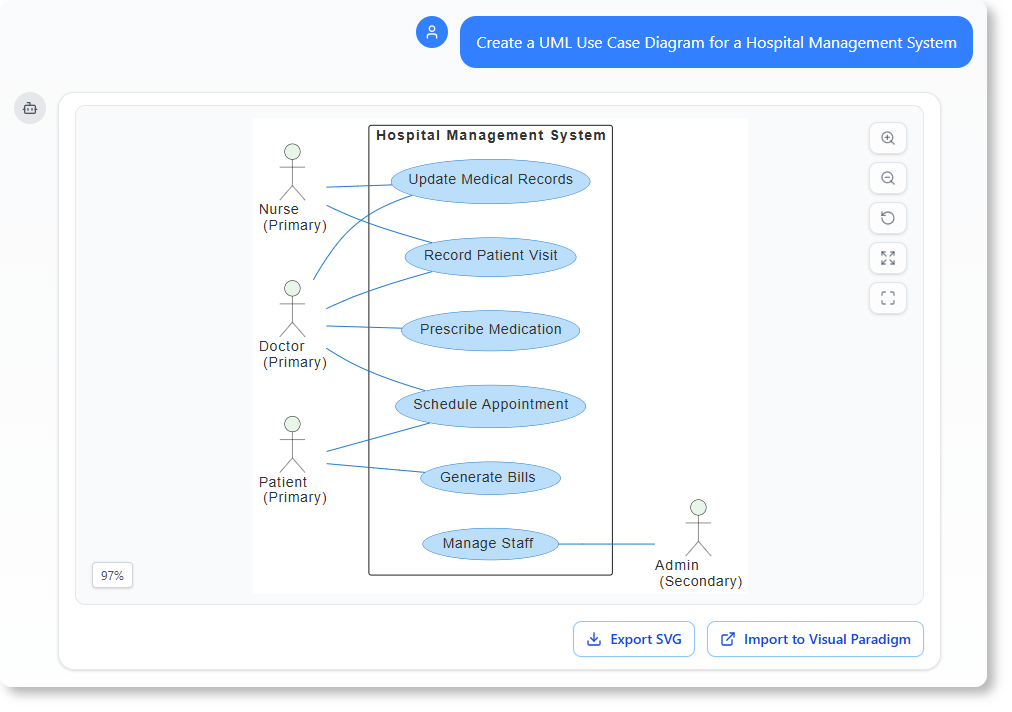
Prompt: Create a UML Use Case Diagram for a Hospital Management System.
Chat History →
✏️ Refine and Enhance: Iteration Without the Friction
Once your initial diagram is generated, your work is just beginning. The AI Chatbot allows you to evolve your visual models through simple, conversational commands, applying sophisticated changes without ever touching a drag-and-drop editor. This feature is perfect for quick iterations and ensuring your diagram accurately reflects design changes or new requirements.
Example Prompts in Action:
- Add an alternative path to this Sequence Diagram to handle “book damage”
- Rename Customer to User.
- Translate the diagram content to Simplified Chinese.
What impressed me most here was the cascading intelligence: renaming a class didn’t just update a label—it automatically adjusted related attributes, methods, and references across the entire canvas. For teams working in multilingual environments, the on-demand translation feature is a genuine productivity multiplier.
📋 Explain and Document: Turn Diagrams into Knowledge
The AI Chatbot goes beyond drawing; it makes your diagram an intelligent knowledge base. You can ask it to generate clear, structured documentation, summaries, and reports directly from your visual model. This saves countless hours on project documentation and ensures your reports are always in sync with your latest design.
Practical Documentation Prompts:
- Explain this Sequence Diagram to me.
- Generate a Use Case Description on the “Withdraw Cash” use case.
- Describe the user journey in this Activity Diagram.
In my testing, the generated documentation was surprisingly coherent—well-structured, technically accurate, and ready to drop into Confluence, Notion, or a stakeholder deck. The “live sync” capability means that when you tweak the diagram, the associated documentation updates contextually, eliminating the dreaded “diagram vs. doc drift.”
❓ Analyze and Question: Your AI-Powered Design Consultant
Use the AI Chatbot as a domain expert to validate your design against established standards. By asking targeted questions, you can uncover potential flaws, get suggestions for improvements, and ensure your model adheres to industry best practices in UML, ArchiMate, and more, all through a simple conversation.
Validation Prompts That Add Real Value:
-
What are the security risks in this Deployment Diagram?
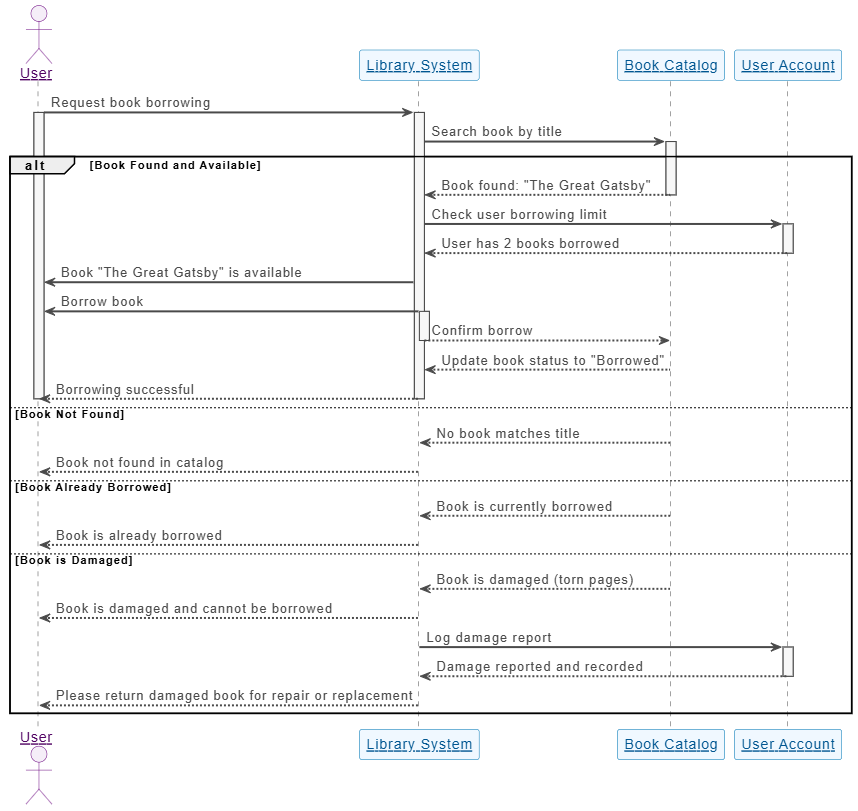
-
What are the possible scenarios for the “Place Order” use case?
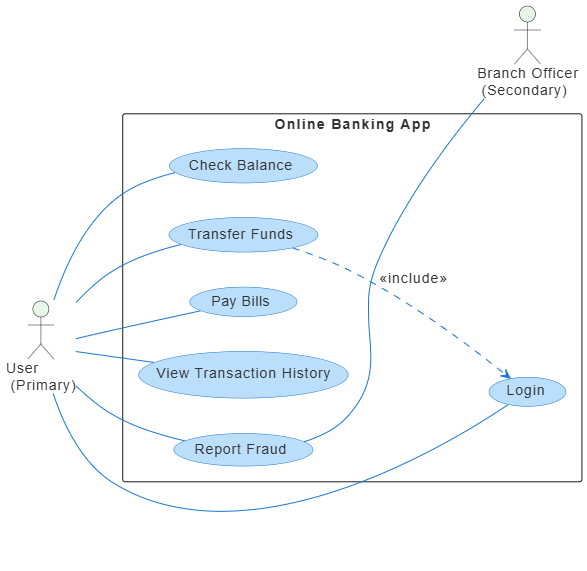
-
How can we improve the scalability of this system architecture?
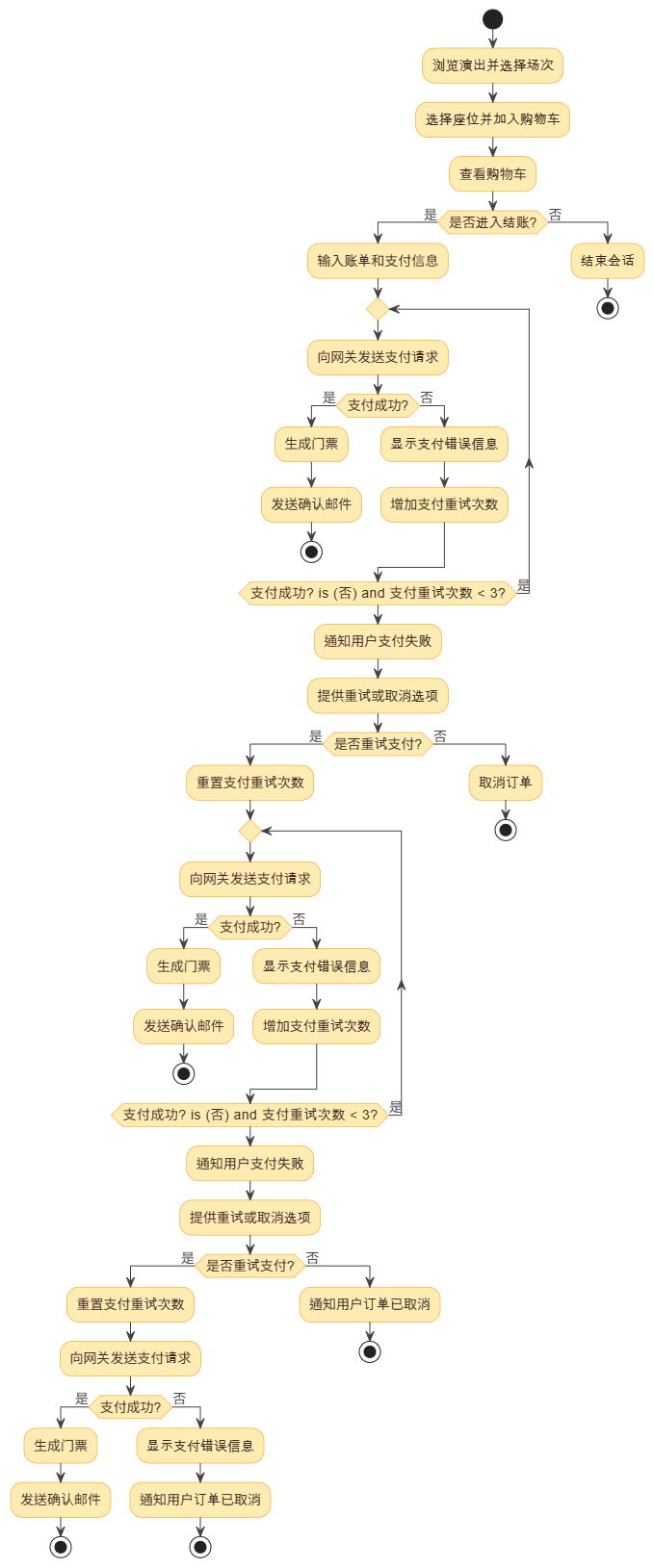
This “ask your diagram” capability transformed the tool from a productivity aid into a collaborative thought partner. During architecture reviews, I found myself using it to stress-test assumptions and surface edge cases I might have overlooked—a genuine value-add for senior engineers and architects.
Behind the Scenes: What Makes This Tool Stand Out
1. Instant, Standards-Compliant Diagram Generation
Users describe a system, workflow, or scenario in natural language and watch the chatbot map out a comprehensive diagram in seconds. The AI engine automatically applies standard notation and layout rules for UML (Class, Use Case, Sequence, Composite Structure), SysML, BPMN, ArchiMate, C4 Models, Mind Maps, and strategic frameworks like SWOT analyses—ensuring technically sound formatting without manual alignment.
2. Conversational Editing That Actually Works
Instead of clicking shapes, you modify the diagram by continuing the chat. Commands like “Add a payment gateway” or “Rename Employee to Staff” instantly add nodes, update connections, and cascade changes across related elements. The localization feature (“Translate to Simplified Chinese”) is particularly valuable for global teams.
3. Diagrams as Semantic Knowledge Bases
The diagram isn’t just a static image—it’s a queryable model. Ask “What are the main scenarios in this use case?” or “How should I implement this deployment?” and receive contextual, architecture-aware responses. The AI even offers proactive nudges to uncover missing logic or deepen structural refinement.
4. Documentation That Stays in Sync
Bridge visual modeling and technical writing by automatically generating structured documents—summaries, project proposals, compliance reports—pulled directly from active visual elements. Changes to the diagram reflect in the documentation, eliminating manual sync work.
5. Enterprise-Ready Integration
Avoid “walled-garden” limitations with clean integration into production workflows:
-
Import generated diagrams directly into the Visual Paradigm Desktop Application (Professional Edition for standard diagrams, Enterprise for ArchiMate)
-
Leverage advanced native toolsets: version control, code engineering, project repository management
-
Cloud syncing via Visual Paradigm Online ensures consistency across web and desktop clients
My Verdict: Who Should Use Visual Paradigm’s AI Chatbot?
✅ Product Managers & Business Analysts: Rapidly prototype workflows, validate requirements, and generate stakeholder-ready documentation without diagramming expertise.
✅ Software Architects & Engineers: Accelerate system design, validate architectures against best practices, and maintain living documentation that evolves with your code.
✅ Consultants & Freelancers: Deliver polished visual deliverables faster, impress clients with interactive model exploration, and reduce time spent on formatting.
✅ Educators & Students: Teach modeling concepts with instant visual feedback, experiment with design patterns, and generate study materials from diagrams.
⚠️ Considerations:
-
Advanced ArchiMate modeling requires the Enterprise Edition
-
While the AI handles most standard notations beautifully, highly customized or niche diagram types may still need manual refinement
-
As with any AI tool, always review generated output for domain-specific accuracy
Conclusion: A Genuine Leap Forward for Visual Collaboration
After weeks of testing Visual Paradigm’s AI Chatbot across diagrams, documentation tasks, and team workflows, I can confidently say this isn’t just another “AI wrapper” around an existing tool. It’s a thoughtfully designed co-pilot that understands the intent behind visual modeling—not just the syntax.
The ability to go from a plain-English prompt to a standards-compliant, editable diagram in seconds is transformative. But what truly sets it apart is the conversational refinement loop: the way you can iterate, question, document, and validate—all without leaving the chat interface. For teams drowning in diagram maintenance, stakeholder alignment, or onboarding documentation, this tool doesn’t just save time; it reduces cognitive load and elevates the quality of collaborative output.
If you’re tired of wrestling with drag-and-drop editors and ready to let AI handle the visualization so you can focus on solving bigger problems, Visual Paradigm’s AI Chatbot is worth a serious look. Start with a simple prompt. See what it generates. Then ask it to refine, explain, or challenge your design. You might just find, as I did, that the future of visual modeling is conversational.
References
- Visual Paradigm AI Chatbot – Official Feature Page: Comprehensive overview of the AI Chatbot capabilities, integration options, and edition requirements for professional diagramming workflows.
- Unlock Your Team’s Potential: The Complete Guide to Visual Paradigm AI Chatbot: Third-party tutorial covering practical use cases, prompt engineering tips, and team adoption strategies for the AI modeling assistant.
- Visual Paradigm AI Toolbox – AI Chatbot Tool Page: Direct access point for the conversational modeling assistant with feature highlights and quick-start resources.
- Visual Paradigm AI Chatbot Live Demo Environment: Interactive sandbox where users can test prompt-based diagram generation, refinement, and documentation features in real time.
- Turn Your Ideas into Diagrams Instantly – Visual Paradigm Blog: Official blog post detailing the user journey from concept to compliant diagram, with real-world examples and productivity metrics.
- AI Chatbot Features Overview: Detailed breakdown of core capabilities including instant generation, conversational editing, intelligent analysis, documentation automation, and enterprise integration.
- What Makes Visual Paradigm’s AI Chatbot Different?: Comparative analysis highlighting the tool’s standards compliance, contextual intelligence, and workflow integration advantages over generic AI diagram generators.
- Visual Paradigm AI Chatbot – Tool Documentation: Technical documentation covering prompt syntax, supported frameworks, output formats, and best practices for professional modeling.
- Guide to Powered UML Diagram Generation: Step-by-step walkthrough for creating, refining, and exporting UML diagrams using natural language commands and AI assistance.
- Visual Paradigm AI Chatbot Feature Deep Dive: Expanded feature catalog with use-case examples, keyboard shortcuts, and collaboration tips for team-based modeling.
- Visual Paradigm AI Chatbot Demo Video: Screen-recorded walkthrough demonstrating end-to-end workflow from prompt to polished diagram, including refinement and documentation generation.
- AI Chatbot Capabilities Reference: Consolidated resource listing all supported diagram types, conversational commands, export options, and integration endpoints.
- Visual Paradigm Desktop Integration Guide: Instructions for importing AI-generated diagrams into the desktop application, leveraging version control, code engineering, and repository management features.
- Visual Paradigm Chat Platform Home: Central hub for accessing the AI Chatbot, managing chat history, sharing diagrams with teammates, and exploring community prompt libraries.
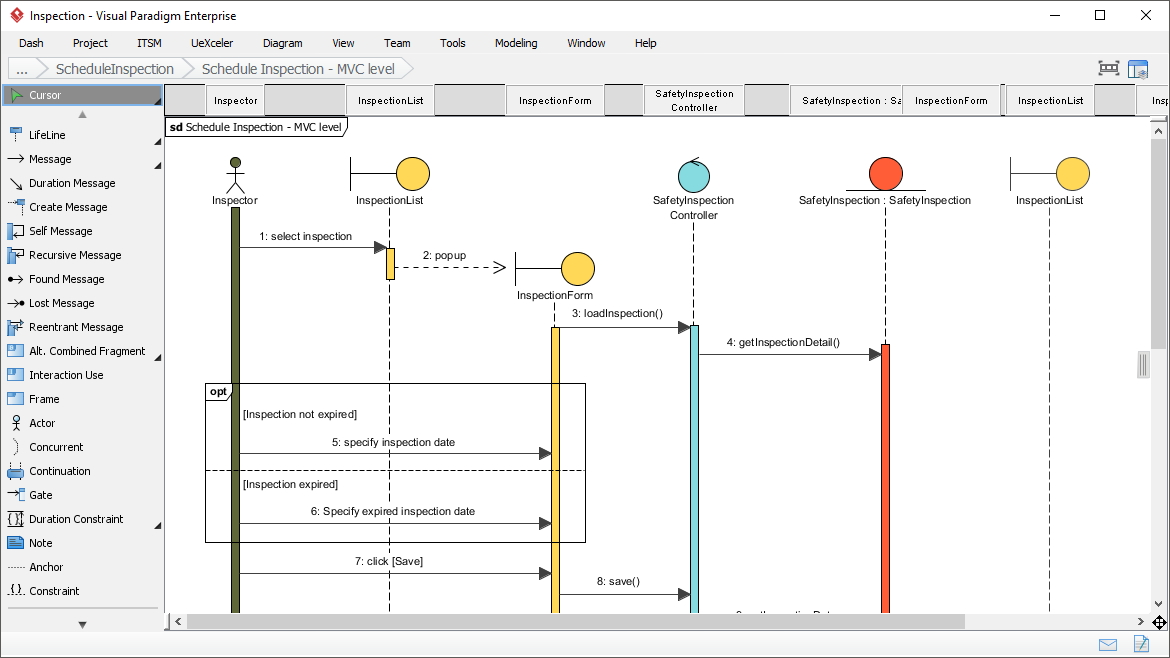

![How to Model Constraints in UML? [With Examples]](https://www.archimetric.com/wp-content/uploads/2026/04/uml-constraint-example.png "How to Model Constraints in UML? [With Examples]")

 English
 Arabic
 Chinese (Simplified)
 Dutch
Dutch French
 German
 Italian
 Japanese
 Korean
 Portuguese
 Russian
 Spanish