


Introduction
In the fast-paced world of software development and business process management, documentation often becomes the bottleneck. Teams struggle with scattered diagram files, outdated wikis, and a disconnect between technical architecture and written requirements. Visual Paradigm OpenDocs emerges as a transformative solution to this fragmentation.
OpenDocs is an AI-powered documentation and knowledge-management platform built directly into the Visual Paradigm ecosystem. It acts as a single source of truth, unifying rich-text authoring with professional visual modeling. By keeping technical context, architecture designs, and written documentation connected in a centralized, web-based workspace, OpenDocs ensures that your documentation remains evergreen, accessible, and deeply integrated with your design workflow.
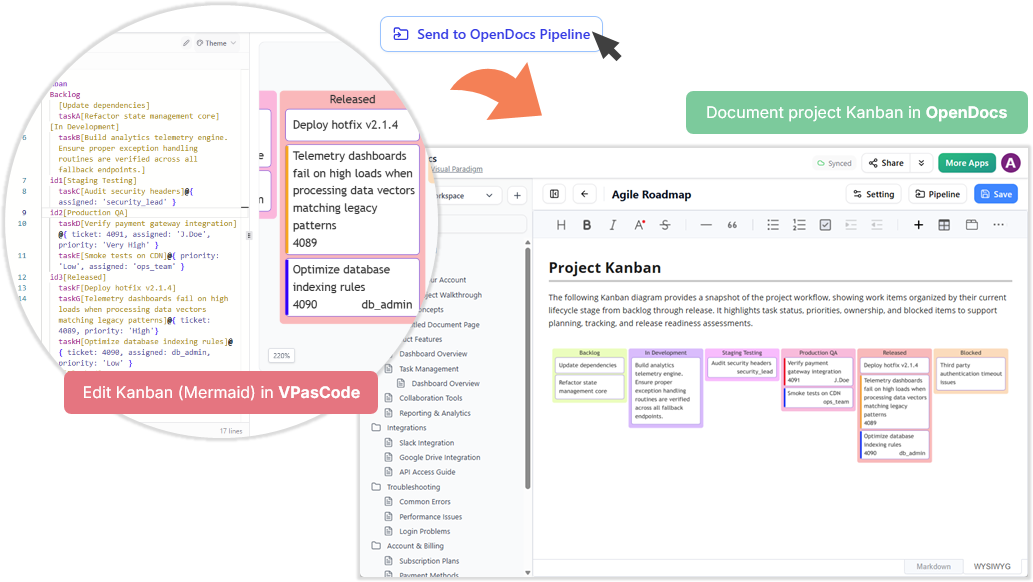
This guide explores the core capabilities of OpenDocs, demonstrating how it bridges the gap between text and visuals to streamline collaboration for engineering, product, and business teams.
Key Concepts
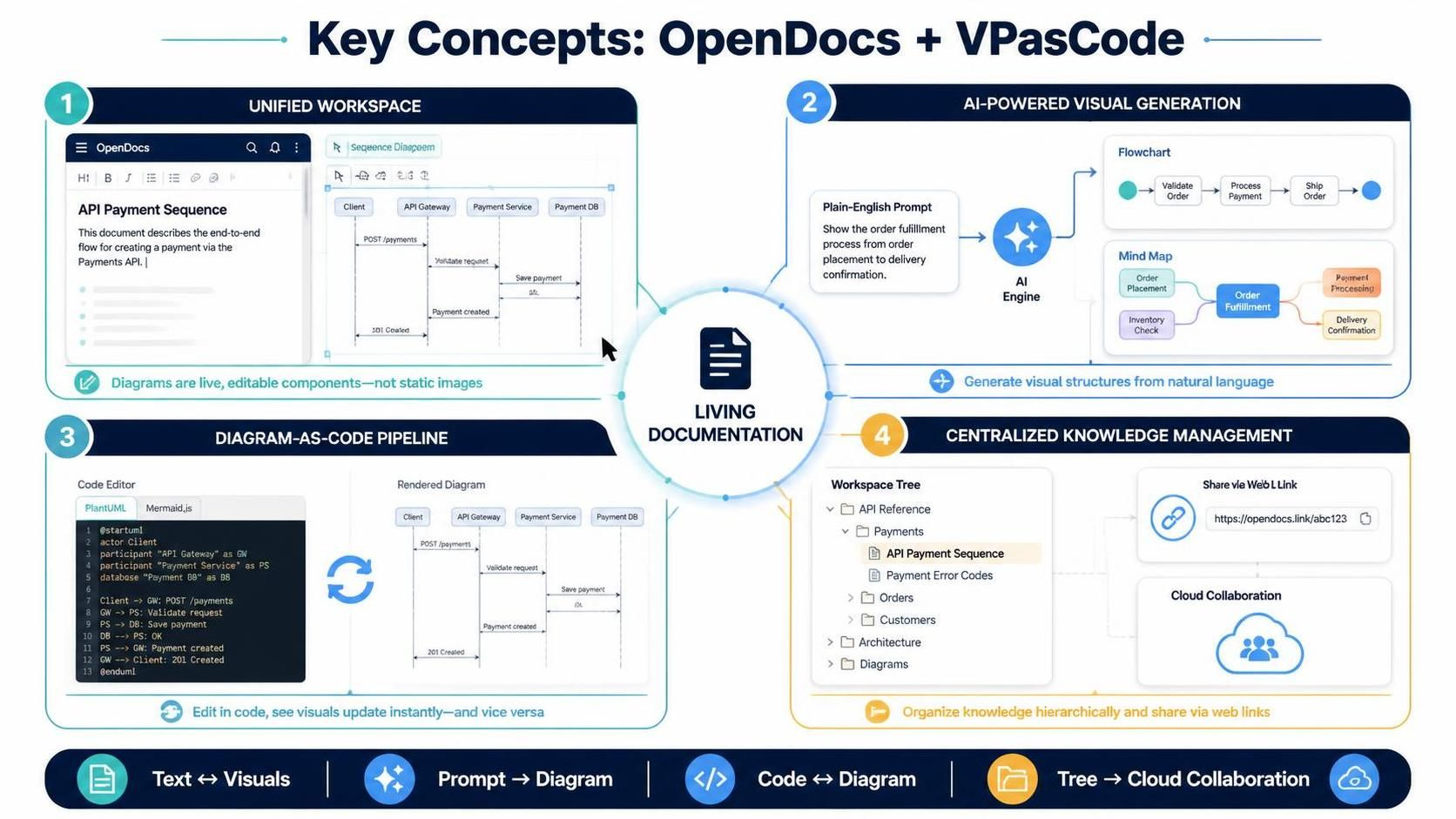
1. Unified Workspace: Text Meets Visuals
Traditional documentation tools treat diagrams as static images attached to documents. OpenDocs integrates a powerful diagram editor directly into the page. This means your UML diagrams, BPMN flows, and ERDs are not just pictures; they are live, editable components of your documentation.
2. AI-Powered Visual Generation
Leveraging artificial intelligence, OpenDocs allows users to generate complex visual structures from plain English prompts. Whether you need a quick flowchart to explain a user journey or a detailed mind map for brainstorming, the AI can draft these visuals instantly, reducing the time spent on manual layout.
3. The “Diagram-as-Code” Pipeline
For developers and architects who prefer code-centric workflows, OpenDocs supports the “Diagram-as-Code” philosophy. Through integration with VPasCode, users can edit diagrams using textual languages like PlantUML or Mermaid.js. Changes made in code are synced instantly to the visual representation, and vice versa, ensuring consistency between code repositories and documentation.
4. Centralized Knowledge Management
With a tree-structured workspace, OpenDocs allows teams to organize documents hierarchically. This structure mimics a traditional file system but offers the benefits of cloud-based collaboration, including real-time sharing via web links without the need for local software installation.
Core Features and Capabilities
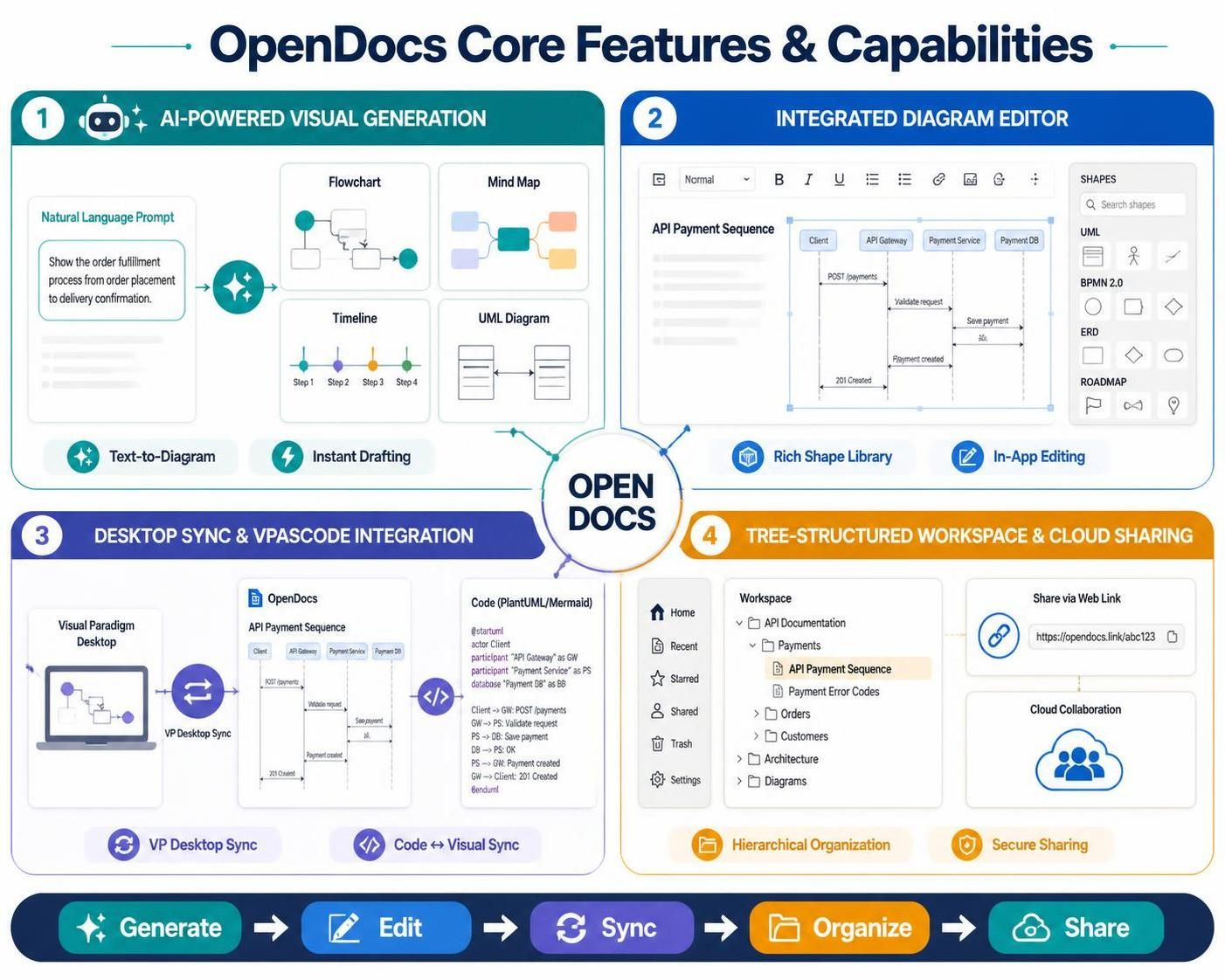
🤖 AI-Powered Visual Generation
-
Text-to-Diagram: Use natural language prompts to generate Flowcharts, Mind Maps, Timelines, and UML diagrams.
-
Instant Drafting: Quickly visualize ideas during meetings or brainstorming sessions without getting bogged down in tool mechanics.
🛠️ Integrated Diagram Editor
-
Rich Shape Library: Access a vast library of shapes for UML, BPMN 2.0, ERD, and project management roadmaps.
-
In-App Editing: Build and modify diagrams directly within the documentation page, eliminating the need to switch between applications.
🔄 Desktop Sync & VPasCode Integration
-
VP Desktop Sync: Push professional models created in the Visual Paradigm Desktop client directly into OpenDocs, maintaining high-fidelity designs.
-
VPasCode: Edit diagrams using structural code (PlantUML/Mermaid) for version control friendly documentation. Sync changes instantly between code and visual views.
📂 Tree-Structured Workspace & Cloud Sharing
-
Hierarchical Organization: Keep documents organized with folders and side-navigation nodes.
-
Secure Sharing: Share live documentation with teammates or stakeholders via simple web links. No downloads or installations required for viewers.
Common Use Cases
OpenDocs is optimized for teams that require technical documentation to stay current and accurate. Common applications include:
-
Software Architecture Manuals: Maintain living documents that reflect the current state of your system architecture with embedded, up-to-date UML diagrams.
-
Business Process Modeling: Document operational workflows using BPMN 2.0 standards, ensuring clarity across business and technical teams.
-
API and System Integration Documentation: Provide clear, visual guides for API endpoints and integration points, reducing onboarding time for new developers.
-
Engineering Onboarding Wikis: Create comprehensive, visually rich onboarding materials that help new hires understand the system landscape quickly.
Examples: Putting OpenDocs to Work
Example 1: Generating a User Journey Flowchart with AI
Scenario: A product manager needs to document a new checkout process.
Action: In OpenDocs, type the prompt: “Create a flowchart for a user checkout process including cart review, payment selection, confirmation, and error handling.”
Result: OpenDocs AI generates a structured flowchart. The PM can then tweak specific steps or add details using the integrated editor, saving hours of manual diagramming.
Example 2: Syncing Enterprise Architecture from Desktop
Scenario: An enterprise architect has a complex component diagram in Visual Paradigm Desktop.
Action: Use the VP Desktop Sync feature to push the model to OpenDocs.
Result: The diagram appears in the OpenDocs workspace. The architect can add contextual text, requirements, and decision logs around the diagram, creating a comprehensive architecture decision record (ADR) that stays synchronized with the source model.
Example 3: Collaborative API Documentation with VPasCode
Scenario: A development team wants to document REST API endpoints using Mermaid.js sequence diagrams.
Action: Developers write the sequence diagram code in VPasCode within OpenDocs.
Result: The visual diagram updates in real-time. Other team members can view the visual representation without needing to understand the code, while developers can easily version-control the underlying text.
Conclusion
Visual Paradigm OpenDocs represents a significant shift in how teams approach documentation. By integrating AI-powered visual generation, professional diagramming tools, and a centralized knowledge base, it eliminates the silos that traditionally separate text from visuals. Whether you are a developer looking to streamline “Diagram-as-Code” workflows, a product manager needing quick visualizations, or an architect maintaining complex system models, OpenDocs provides the tools to keep your documentation alive, accurate, and collaborative.
Embracing OpenDocs means moving from static, outdated documents to dynamic, living knowledge bases that evolve with your projects.
Recommended Reading: Visual Paradigm Resources
- Visual Paradigm OpenDocs: Comprehensive Guide: A detailed overview of OpenDocs features, benefits, and best practices for teams.
- Transforms Technical Knowledge Management Through AI-Powered Integration: Explores how AI integration in OpenDocs enhances technical documentation and knowledge sharing.
- From Silos to Synergy: How OpenDocs Transforms Team Documentation: Discusses the collaborative benefits of unifying text and visuals in OpenDocs.
- Architecture as Code: Building Self-Updating Documentation: Details the VPasCode integration and how to maintain self-updating architecture documentation.
- OpenDocs AI Mind Map Integration Update: Highlights recent updates to AI-powered mind map generation in OpenDocs.
- Edit & Sync Diagrams with AI Chatbot and VPasCode: Explains the workflow for editing diagrams via code and syncing with visual representations.

 English
 Arabic
 Chinese (Simplified)
 Dutch
Dutch French
 German
 Italian
 Japanese
 Korean
 Portuguese
 Russian
 Spanish