


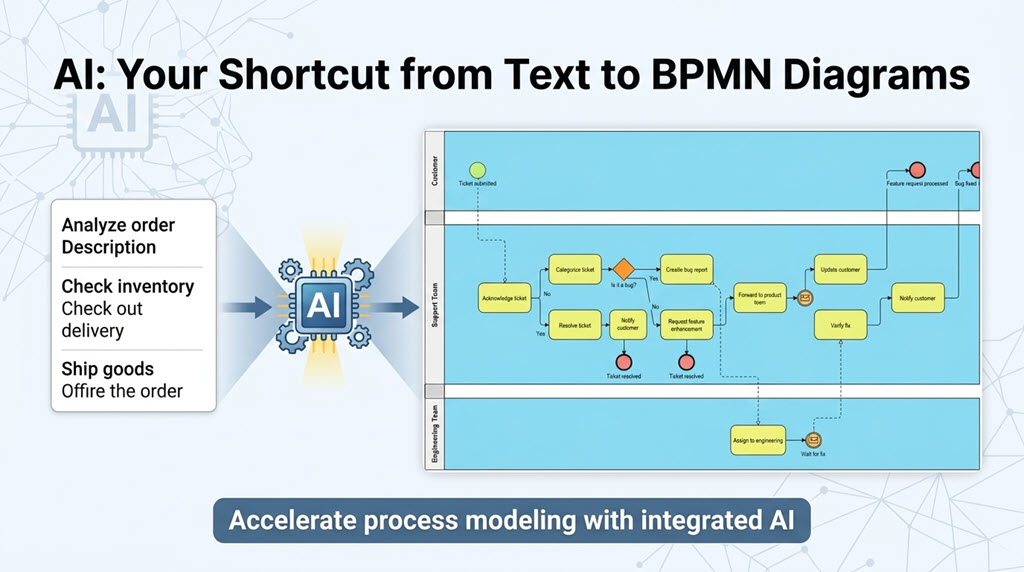
In the rapidly evolving landscape of Business Process Management (BPM), the gap between business requirements and technical implementation is often bridged by modeling. Traditionally, creating a Business Process Model and Notation (BPMN) diagram was a labor-intensive task requiring deep technical knowledge of syntax, shapes, and gateways. However, a paradigm shift is underway. Modern tools are now integrating Artificial Intelligence to bridge this gap, allowing analysts to convert plain-text descriptions into professional BPMN diagrams in seconds.
The Evolution of Process Modeling
Historically, process modeling was a manual drafting exercise. Business analysts would have to manually drag and drop events, gateways, and activities onto a canvas, ensuring that the flow logic adhered to strict BPMN standards. While effective, this method was prone to “drafting fatigue” and often slowed down the initial collaboration phase.
Today, the focus has shifted from how to draw to what to model. By automating the syntax and structure generation, tools like Visual Paradigm enable users to focus on refining the logic and collaborating on the process flow rather than struggling with the drawing tools.
Understanding the Architecture: From Text to BPMN
The core technology behind this acceleration is Natural Language Processing (NLP) integrated directly into the modeling environment. When you provide a descriptive prompt, the system performs the following architectural steps:
- Semantic Analysis: The AI parses your text to identify key process entities (e.g., “Customer,” “Support Team”) and actions (e.g., “Check inventory,” “Ship goods”).
- Structural Mapping: It maps these entities to BPMN pools and lanes, organizing the diagram by participant roles.
- Flow Generation: The system identifies the sequence of events and applies appropriate BPMN gateways (e.g., Exclusive Gateways for “Yes/No” decisions) to create a logical flow.
- Rendering: Finally, it renders the visual diagram using standard BPMN 2.0 notation.
Step-by-Step Guide: Using the AI BPMN Generator
Visual Paradigm Desktop has integrated a powerful AI feature to streamline this workflow. Follow these steps to generate your first AI-assisted diagram.
1. Initiate the Generation
Begin by navigating to the main menu of Visual Paradigm. Locate the Tools menu and select AI Diagram Generation. This action opens the interface designed for natural language prompts.
2. Select the Diagram Type
From the available options, select Business Process Diagram. This ensures the generated elements are specific to process flow, such as start events, task nodes, and sequence flows.
3. Configure Participant Organization
To ensure the diagram is structured correctly, you can optionally check the box for “Include Pools and Lanes”. This is crucial for multi-step processes involving different departments or roles, as it automatically separates the logic into distinct swimlanes (e.g., Customer, Support Team, Engineering Team).
4. Enter a Descriptive Prompt
The most critical step is the prompt. You must provide a clear, descriptive narrative of the process. A vague prompt will result in a generic diagram, while a detailed prompt yields a sophisticated starting point.
Example Prompt:
“An order fulfillment process for an e-commerce fashion retailer, covering the flow of purchasing and shipment.”
Alternatively, for a service-oriented process, you might use:
“A customer support workflow where a ticket is submitted, checked for bugs, and routed to the engineering team if a fix is required, otherwise resolved by the support team.”
Analyzing the Generated Output
Upon generating the diagram, Visual Paradigm produces a visual representation of your text. As seen in the resulting architecture, the system intelligently divides the process into lanes:
- Customer Lane: Contains the initiating events (e.g., “Ticket submitted”) and final outcomes.
- Support Team Lane: Houses the core logic, including decision diamonds (gateways) for tasks like “Is it a bug?” and tasks such as “Notify customer.”
- Engineering Team Lane: Handles specialized tasks like “Assign to engineering” and “Verify fix.”
This output provides a sophisticated starting point for refinement. You can now use the standard Visual Paradigm modeling tools to adjust connectors, add error handling, or modify the logic without having to redraw the entire process from scratch.
Conclusion
By integrating AI-powered diagram generation, Visual Paradigm has significantly reduced the barrier to entry for BPMN modeling. Whether you are an analyst drafting a new workflow or a developer documenting an existing system, this tool transforms plain text into actionable, visual architecture instantly.

 English
 Arabic
 Chinese (Simplified)
 Dutch
Dutch French
 German
 Italian
 Japanese
 Korean
 Portuguese
 Russian
 Spanish