


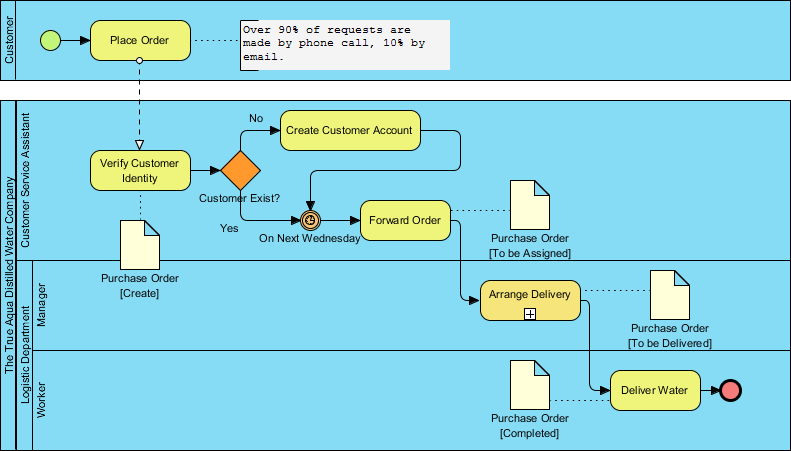
In the rapidly evolving landscape of supply chain management, precision is paramount. For companies like The True Aqua Distilled Water Company, operational bottlenecks can directly impact market share and customer satisfaction. This tutorial guides you through the architectural analysis of a complex business process using Business Process Model and Notation (BPMN) and Visual Paradigm.
We will dissect a specific workflow designed to scale market share from 5% to 10%. By visualizing the interaction between the Customer, Customer Service, and the Logistics Department, we can identify inefficiencies and automate critical decision points.
Understanding the Swimlane Architecture
The foundation of this model lies in its Swimlane Diagram structure. In Visual Paradigm, swimlanes are used to represent organizational responsibilities, ensuring that every action is assigned to a specific actor. This separation is crucial for understanding the “handoff” points where responsibility transfers between departments.
The process is divided into three distinct lanes:
- Customer: The initiator of the process who places orders via phone or email.
- Customer Service Assistant: Responsible for account management and order validation.
- Logistic Department (Manager & Worker): Handles the physical arrangement and execution of deliveries.
Step-by-Step Process Flow Analysis
1. The Initiation Phase
The process begins with a Start Event (the green circle), representing the trigger for the entire workflow. The Customer initiates the process by placing an order. A key annotation in the diagram notes a critical business statistic: Over 90% of requests are made by phone call, and 10% by email. This data point is vital for system architects deciding whether to prioritize a Voice API integration or an Email Parser.
2. Customer Verification Logic
Upon receiving the order, the flow moves to the Customer Service Assistant lane. The first task is Verify Customer Identity. This task is followed by a Gateway (the diamond shape), which acts as the decision point for the logic: Customer Exist?
The logic branches as follows:
- Yes: The system proceeds directly to order processing.
- No: The system triggers the Create Customer Account task before merging back into the main flow.
3. The Time-Based Gate
Once the customer is verified, the process generates a Purchase Order artifact. However, the process does not immediately move to logistics. Instead, it encounters a Intermediate Event (the circle with a clock icon) labeled On Next Wednesday.
This is a Time Event. It signifies that orders are batched and forwarded only on specific days (Wednesdays). This is a classic “batch processing” pattern often used to optimize resource allocation in logistics.
4. Logistics and Delivery Execution
After the time event, the Purchase Order is forwarded to the Manager lane. The Manager performs the Arrange Delivery task, which creates a new artifact (Purchase Order [To be Delivered]). Finally, the Worker executes the Deliver Water task, updating the document status to Purchase Order [Completed] and triggering the End Event (the red circle).
Modeling Technicalities in Visual Paradigm
To replicate this model effectively in Visual Paradigm, specific tools and syntax rules are applied to ensure the diagram accurately reflects the business reality. Below is the pseudo-code logic used to define the flow control within the tool’s diagramming engine.
// BPMN Logic Structure for True Aqua Process

Process Start:
  -> [Customer] Place Order

Decision Logic:
  IF (Customer Exists) == FALSE
    THEN -> [Customer Service] Create Customer Account
    THEN -> Merge to Forward Order

Time Gate:
  -> [Customer Service] Forward Order
  -> Intermediate Event: Time (Wednesday)

Batching:
  -> [Logistics Manager] Arrange Delivery
  -> Artifact: Purchase Order [To be Delivered]

Execution:
  -> [Logistics Worker] Deliver Water
  -> Artifact: Purchase Order [Completed]
  -> Process End
In Visual Paradigm, the “Time Event” is a specific configuration that pauses the workflow until a specific time condition is met. This is distinct from a standard delay; it effectively freezes the order in a queue until the system clock hits the target day.
Strategic Value of the Model
This visual model is not just a drawing; it is a blueprint for automation. By identifying the Time Event and the Gateway logic, The True Aqua Distilled Water Company can:
- Reduce Handoff Delays: Automate the “Forward Order” step to trigger immediately on Wednesday mornings.
- Standardize Service: Ensure that no order bypasses the “Verify Customer Identity” check.
- Improve Efficiency: By batching orders until Wednesday, the Logistics Manager can assign workers more effectively, reducing idle time.

 English
 Arabic
 Chinese (Simplified)
 Dutch
Dutch French
 German
 Italian
 Japanese
 Korean
 Portuguese
 Russian
 Spanish