


In the modern landscape of business architecture, the gap between a conceptual idea and a formalized technical specification is often bridged by the tedious work of manual drafting. Visual Paradigm, the industry-leading modeling tool, addresses this bottleneck with its advanced AI Diagram Generation capabilities. This technology empowers analysts to transform natural language prompts into sophisticated, compliant Business Process Model and Notation (BPMN) diagrams in seconds.
This tutorial explores the system architecture of AI-driven modeling, specifically focusing on how Visual Paradigm interprets textual descriptions to construct complex organizational flows. We will walk through the step-by-step generation of a business process, analyze the resulting structure, and understand the underlying modeling principles.
The Architecture of AI-Assisted Modeling
When you interact with the AI Diagram Generation tool in Visual Paradigm, you are engaging with a sophisticated Natural Language Processing (NLP) engine integrated directly into the BPMN 2.0 standard. The system operates on a context-aware architecture:
- Input Parsing: The engine analyzes the semantic meaning of your prompt, identifying key entities (e.g., “Retailer”, “Customer”), actions (e.g., “Purchase”, “Ship”), and relationships.
- Structural Mapping: Based on the “Include Pools and Lanes” setting, the AI maps these entities to BPMN Pools (representing organizations) and Lanes (representing specific roles or departments).
- Flow Construction: The system constructs a directed graph using BPMN primitives such as Start Events, Tasks, Gateways, and End Events to represent the logical flow.
Step-by-Step Guide: Generating a Business Process
To demonstrate the power of Visual Paradigm’s AI capabilities, we will generate a comprehensive Order Fulfillment process. Follow these steps to replicate the process shown in the interface.
1. Accessing the Generation Module
Begin by navigating to the main menu. In Visual Paradigm, the AI tools are centralized for ease of access. Go to:
- Tools > AI Diagram Generation.
2. Configuring Diagram Parameters
Once the dialog box opens, you must define the scope of the model:
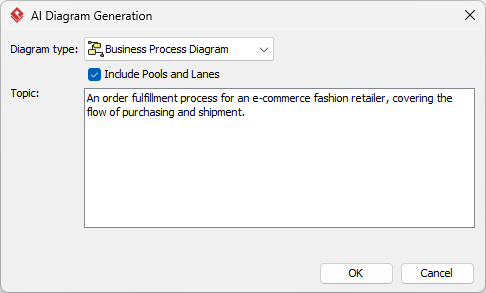
- Diagram Type: Select
Business Process Diagramfrom the dropdown. This ensures the output adheres to BPMN 2.0 syntax. - Organizational Structure: Check the box for Include Pools and Lanes. This is crucial for complex business processes where multiple departments (e.g., Sales, Logistics, Finance) interact. Without this, the AI would generate a flat process flow.
3. Crafting the AI Prompt
The intelligence of the generated diagram relies heavily on the quality of your prompt. You need to provide context that includes the domain, the actors, and the specific flow. For our example, we use the following prompt:
“An order fulfillment process for an e-commerce fashion retailer, covering the flow of purchasing and shipment.”
This prompt triggers the AI to identify the following components:
- Actor 1: The E-commerce Fashion Retailer (The Organization).
- Actor 2: The Customer (Implicit external entity).
- Process Flow: Purchasing (Order placement) -> Fulfillment (Picking/Packing) -> Shipment.
4. Execution and Refinement
Click OK to initiate the generation. Visual Paradigm will process the request and render a BPMN diagram. The tool eliminates the tedious manual drafting of connecting lines and object placement, providing a sophisticated starting point. The resulting diagram is fully editable, allowing you to refine the logic or add specific error handling paths.
Understanding the BPMN Concepts
The AI generates a structure that adheres to strict BPMN standards. Understanding these elements is vital for effective modeling.
Pools and Lanes
When “Include Pools and Lanes” is selected, Visual Paradigm creates a visual separation of responsibilities. The Pool represents the top-level boundary of the process (the Retailer), while Lanes divide the internal process into logical sections, such as “Sales Team,” “Warehouse,” and “Shipping Department.”
Gateways and Flow Control
Automated generation often introduces Exclusive Gateways (the diamond shape with an ‘X’). These represent decision points. For example, in an order process, a gateway might determine if payment has been received before moving to the shipping lane.
Conclusion
The AI Diagram Generation feature in Visual Paradigm represents a shift from manual drafting to intelligent modeling. By leveraging natural language inputs, analysts can rapidly prototype business processes, ensuring that the resulting diagrams are not only visually accurate but logically sound according to BPMN standards.

 English
 Arabic
 Chinese (Simplified)
 Dutch
Dutch French
 German
 Italian
 Japanese
 Korean
 Portuguese
 Russian
 Spanish