


In the world of Business Process Model and Notation (BPMN), modeling a process that branches into multiple possibilities based on specific conditions is a fundamental requirement. Visual Paradigm, a leading enterprise modeling tool, provides robust features to handle these scenarios efficiently. This tutorial focuses specifically on the Inclusive Gateway, a critical control flow mechanism that allows a process to split into multiple paths, where one or more paths can be taken depending on the evaluation of specific conditions.
Whether you are designing a hardware troubleshooting workflow or a complex enterprise integration flow, understanding how to configure an Inclusive Gateway ensures your models are both accurate and executable.
Understanding the Inclusive Gateway Concept
An Inclusive Gateway is often referred to as an “OR” gateway. Unlike a Parallel Gateway (which forks all paths simultaneously) or an Exclusive Gateway (which selects exactly one path), the Inclusive Gateway allows for flexible routing. When the process flow reaches this gateway, the system evaluates the conditions associated with each outgoing sequence flow.
The logic is inclusive: Zero, one, or multiple paths can be taken. This makes it ideal for scenarios where the outcome depends on a combination of factors, such as hardware specifications or user preferences.
Step-by-Step Modeling: The Hardware Check Scenario
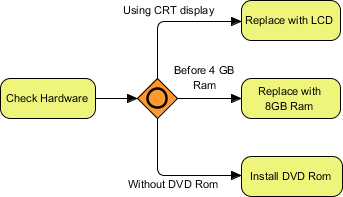
Let us walk through a practical example: a system diagnostic process that checks hardware and routes the workflow based on the results. This mirrors the logic shown in the diagram below.
1. The Entry Point
The process begins with a specific activity, such as a task labeled Check Hardware. This represents the system performing a diagnostic scan to identify current system parameters.
2. Configuring the Inclusive Gateway
In Visual Paradigm, you will insert an Inclusive Gateway (often represented by a diamond shape with an orange or yellow fill) immediately following the “Check Hardware” task. This diamond acts as the decision point.
3. Defining the Conditions
The power of the Inclusive Gateway lies in its outgoing sequence flows. Each path leaving the gateway must have a condition that the system evaluates.
- Path A: If the system detects a CRT display, the process should route to Replace with LCD.
- Path B: If the system memory is below a certain threshold (e.g., Before 4 GB Ram), the process routes to Replace with 8GB Ram.
- Path C: If the system lacks specific storage media (e.g., Without DVD Rom), the process routes to Install DVD Rom.
In Visual Paradigm, you achieve this by selecting the outgoing line from the gateway and setting the “Condition Expression” in the properties dialog. You might use a boolean expression like hasCRT == true or RAM < 4.
4. The Execution Logic
When the model is executed or simulated:
- The process arrives at the Inclusive Gateway.
- It evaluates the condition for Path A. If true, it activates the path.
- It evaluates the condition for Path B. If true, it activates the path.
- It evaluates the condition for Path C. If true, it activates the path.
Because this is an inclusive gateway, if a computer has both a CRT monitor and insufficient RAM, both "Replace with LCD" and "Replace with 8GB Ram" tasks will be triggered. This is the defining characteristic of the OR logic.
Visualizing the Logic
Below is a representation of how the logic flows in the context of our hardware example:
@startuml
start
:Check Hardware;
--> (Inclusive Gateway)
:Using CRT display?|yes
--> :Replace with LCD;

:RAM < 4GB?|yes
--> :Replace with 8GB Ram;

:Has DVD Rom?|no
--> :Install DVD Rom;

@enduml
In Visual Paradigm, the diagrammatic representation uses an orange diamond to clearly distinguish this logic from an Exclusive (XOR) gateway (usually a diamond with an "X") or a Parallel (AND) gateway.
Best Practices for Inclusive Gateways
When modeling with Inclusive Gateways in Visual Paradigm, keep the following in mind to ensure your model remains maintainable:
- Clarity of Conditions: Always provide clear, boolean expressions for your conditions. Avoid complex nested logic within the gateway itself; keep conditions simple to improve readability.
- Default Paths: If no condition is met, the Inclusive Gateway simply passes control forward without executing the specific branches. Ensure you have a default path if one of these scenarios must be handled.
- Convergence: If the paths are meant to merge back into a single flow, ensure you use a matching Inclusive Gateway to join them back together, maintaining the flow consistency.
Conclusion
Mastering the Inclusive Gateway allows you to create dynamic and realistic process models in Visual Paradigm. By correctly applying conditions to sequence flows, you can simulate complex decision-making processes that accurately reflect real-world system behaviors, such as hardware diagnostics and adaptive workflows.

 English
 Arabic
 Chinese (Simplified)
 Dutch
Dutch French
 German
 Italian
 Japanese
 Korean
 Portuguese
 Russian
 Spanish