


In the world of Business Process Model and Notation (BPMN), clarity is king. When a process encounters a decision point, the flow of the diagram must be unambiguous. This is where Gateways come into play. Gateways are the traffic controllers of your business logic, directing the flow of control based on specific conditions or events.
This tutorial explores the mechanics of the Exclusive Gateway (XOR), the most common type of decision point, using a practical healthcare application scenario. We will break down the visual syntax, the underlying logic, and how to implement this efficiently using Visual Paradigm.
Understanding the Exclusive Gateway (XOR)
Visually, an Exclusive Gateway is represented as a diamond shape. It serves as a junction where the process flow splits into multiple possible paths, but only one path can be executed at a time. This is distinct from a Parallel Gateway (AND), which would activate all outgoing paths simultaneously.
The term “Exclusive” is literal: the options are mutually exclusive. If the condition for “Path A” is met, “Path B” and “Path C” are strictly ignored.
The Anatomy of a Decision Point
To model a decision correctly, you must define a condition expression on every outgoing sequence flow. This expression is a boolean (True/False) logic statement that the process engine evaluates at runtime.
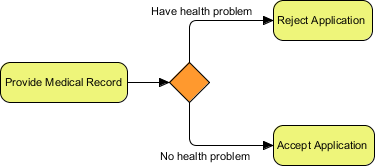
Let’s analyze a specific workflow scenario involving a medical application review:
- Start Event: The process begins when a user submits a
Provide Medical Recordtask. - The Gateway: The flow enters an Exclusive Gateway (the orange diamond).
- Outgoing Path 1: If the condition
Have health problemevaluates to true, the flow moves to theReject Applicationtask. - Outgoing Path 2: If the condition
No health problemevaluates to true, the flow moves to theAccept Applicationtask.
Implementing Logic with Visual Paradigm
Visual Paradigm is a powerful tool that simplifies the transition from abstract logic to executable diagrams. When creating an Exclusive Gateway, you do not need to manually write complex code; Visual Paradigm provides a robust interface for defining these conditions.
Step 1: Create the Gateway
Select the Exclusive Gateway from the palette and place it after your Provide Medical Record activity.
Step 2: Define Sequence Flows
Draw lines from the gateway to your subsequent tasks. You will see small text boxes appear near the gateway on each line. These are where you define your logic.
Step 3: Configure the Conditions
Click on the condition text (e.g., “Condition 1”). Visual Paradigm allows you to enter standard boolean expressions. For the “Reject Application” path, you might enter:
hasHealthProblem == trueFor the “Accept Application” path, you would enter:
hasHealthProblem == falseBest Practice for Visual Paradigm Users:
Visual Paradigm includes a Expression Language editor. When you click on a gateway condition, you can use the built-in syntax checker to ensure your boolean logic is valid before running the process engine. This prevents runtime errors where the engine cannot decide which path to take.
Why “Exclusive” Matters
It is crucial to understand that in an Exclusive Gateway, the engine stops evaluating conditions as soon as it finds a match that is true. If you have three outgoing paths, and the first two evaluate to false, the third one will be taken (assuming the logic is exhaustive). However, if multiple paths evaluate to true simultaneously, the behavior is undefined unless you structure your logic carefully (e.g., using mutually exclusive ranges).
In the medical example provided, the logic is designed so that an applicant cannot simultaneously “Have a health problem” and “Have no health problem.” This ensures a clean, deterministic flow.
Summary
By mastering the Exclusive Gateway, you transform a linear list of tasks into a dynamic, responsive process model. Whether you are filtering loan applications, processing insurance claims, or managing medical records, the XOR Gateway provides the necessary logic to direct traffic where it needs to go.

 English
 Arabic
 Chinese (Simplified)
 Dutch
Dutch French
 German
 Italian
 Japanese
 Korean
 Portuguese
 Russian
 Spanish