


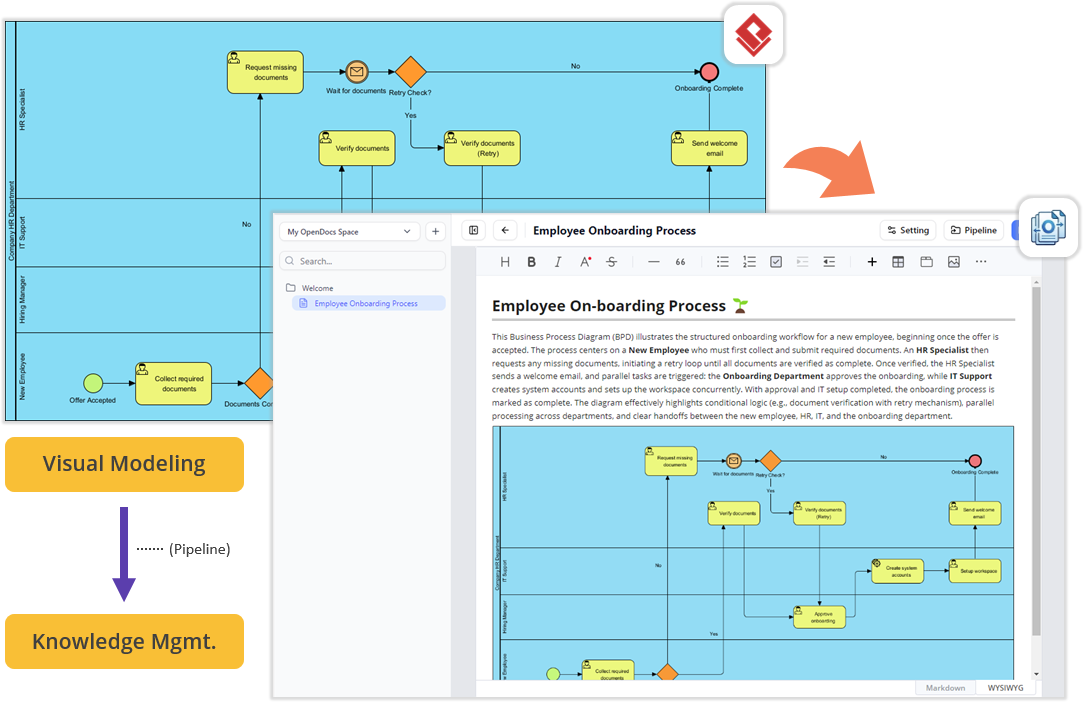
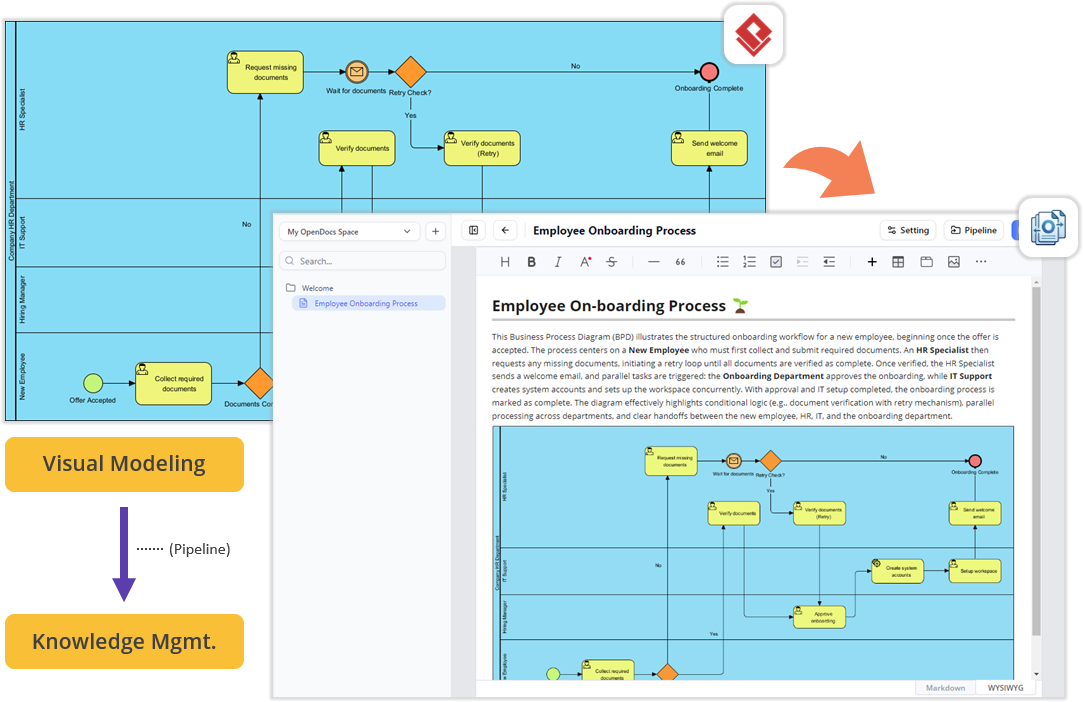
In modern software engineering and technical documentation, a significant disconnect often exists between the creation phase (modeling, designing, and coding) and the publication phase (writing manuals, wikis, and guides). Traditional workflows often require exporting diagrams to images, copying them into a word processor, and hoping the resolution remains intact. This tutorial explores a streamlined, frictionless architecture that bridges this gap.
Using the Unified Platform’s ecosystem—specifically VP Desktop, Pipeline, and OpenDocs—you can establish a live link between your visual models and your written documentation. This approach ensures that your documentation is never “out of date” because the images are not static files, but live references to the source models.
The Architecture: From Desktop to Cloud
The workflow described in the provided context follows a three-stage architectural pattern designed to minimize context-switching and maximize data integrity.
Phase 1: Visual Modeling (VP Desktop)
The journey begins in VP Desktop. This is your local, high-performance workspace where you construct complex diagrams such as Business Process Diagrams (BPD), System Architecture models, or Data Flow Diagrams.
For example, consider an Employee Onboarding Process. You would model the following elements locally:
- Swimlanes: Defining roles like HR Specialist, IT Support, and Hiring Manager.
- Logic Flow: Implementing decision diamonds (e.g., “Retry Check?”) to handle conditional paths.
- Parallel Processing: Visualizing concurrent tasks, such as IT setup happening simultaneously with HR approval.
Phase 2: The Pipeline Bridge
Once the model is complete, you do not “save as image.” Instead, you utilize the Pipeline. The Pipeline acts as a secure, cloud-based repository that synchronizes your local desktop workspace with the web-based Unified Platform. This step is crucial because it transforms your local file into a cloud resource accessible by other tools without needing file transfer protocols like FTP or email attachments.
Phase 3: Knowledge Management (OpenDocs)
The final destination is OpenDocs. This is a cloud-based documentation editor designed for writing manuals and project guides. The magic happens in the editor’s interface: it includes a specific Pipeline Pane. This pane acts as a window into your cloud repository, allowing you to drag-and-drop diagrams directly onto the canvas.
Step-by-Step Implementation Guide
Follow these steps to replicate the seamless workflow shown in the architectural diagram.
Step 1: Build the Diagram Locally
Start VP Desktop and construct your diagram. Ensure your layout is clean and your labels are descriptive. For the Employee Onboarding scenario, you might use a syntax or tool interface similar to this logic structure:
graph TD
    A[Offer Accepted] --> B{Documents Complete?}
    B -- No --> C[Request missing documents]
    C --> D[Verify documents]
    D -- Retry? --> C
    D -- Yes --> E[Send welcome email]
    E --> F[Create system accounts]
    F --> G[Setup workspaces]
    G --> H[Onboarding Complete]
Step 2: Push to the Cloud
Locate the Pipeline integration in your desktop toolbar. Select the option to “Send to Cloud” or “Sync.” This action uploads your model to the cloud repository. You should see a confirmation that the model is now available in your “My OpenDocs Space.”
Step 3: Open the Editor
Navigate to the Unified Platform panel and launch the OpenDocs app. Create a new document titled “Employee On-boarding Process.” You will see the standard WYSIWYG (What You See Is What You Get) editing toolbar.
Step 4: The Drag-and-Drop Integration
Locate the Pipeline Pane within the OpenDocs sidebar. You will see the diagram you just built in VP Desktop listed there. Simply click and drag the diagram from the pane into the main text editor canvas.
Note: The system automatically handles the rendering. You do not need to worry about image formats (PNG vs. JPG) or file sizes.
Why This Workflow Matters
This architecture solves three critical problems in technical writing:
- Version Control: If the HR process changes and you update the model in VP Desktop, the diagram in OpenDocs updates automatically. You never have to re-export and re-upload an image.
- Resolution Independence: Since the diagram is a vector-based reference, it looks crisp on any screen size, from mobile phones to 4K monitors.
- Zero Context Switching: You stay within the Unified Platform ecosystem. You don’t need to open a graphic editor, then a word processor, then a browser tab.
Supplementary Features: Agile and Management
While OpenDocs handles documentation, the Unified Platform also integrates Project Management (PM) and Agile tools. Once your documentation is complete, you can jump to apps dedicated to:
- Stakeholder Management: Mapping who needs to approve the process.
- Gantt Charts: Visualizing the timeline of the onboarding steps.
- RACI Matrix: Defining who is Responsible, Accountable, Consulted, and Informed for each step.
This creates a holistic environment where the what (the diagram), the how (the documentation), and the when (the schedule) are all connected.

 English
 Arabic
 Chinese (Simplified)
 Dutch
Dutch French
 German
 Italian
 Japanese
 Korean
 Portuguese
 Russian
 Spanish