


In the world of Business Process Management (BPM) and systems architecture, clarity is king. One of the most critical decisions a modeler faces is determining the appropriate level of detail for a specific activity within a process flow. Are we looking at a high-level overview for a stakeholder, or a granular, step-by-step guide for an operator? This tutorial explores the fundamental distinction between Tasks and Sub-Processes, explaining how to use them effectively to create scalable and understandable diagrams.
The Core Distinction: Atomic vs. Expandable
When modeling a business process, you often encounter activities that require different levels of attention. To manage this complexity, BPMN (Business Process Model and Notation) provides two distinct types of activities: Tasks and Sub-Processes. Understanding the difference is essential for maintaining a clean model.
1. Tasks: The Atomic Unit
A Task represents an atomic unit of work. In technical terms, “atomic” means it cannot be broken down further without losing its meaning within the context of the current model. It is the smallest piece of work a system or human performs.
- Characteristics: Tasks are simple, self-contained actions.
- Usage: They are used when the internal details of the activity are irrelevant to the current diagram or when the activity is too simple to warrant a separate breakdown.
- Visuals: Typically depicted as a rounded rectangle with a single activity name inside.
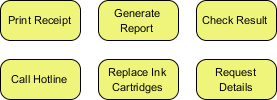
Example: “Print Receipt” or “Call Hotline” are classic examples of Tasks. When a user prints a receipt, the system sends a command to the printer. The internal logic of the printer driver, the paper feed mechanism, or the ink density calculation is irrelevant to the business process flow. The task is simply “Print Receipt.”
2. Sub-Processes: Complex Activities
A Sub-Process represents a complex activity that can be expanded into detailed child diagrams. It acts as a placeholder for a collection of activities that are too complex to display on the current diagram level.
- Characteristics: Sub-processes encapsulate logic. They can be expanded (collapsed) to reveal the underlying steps.
- Usage: Use these when a specific step in the process requires detailed explanation, debugging, or implementation specifications.
- Scalability: They allow you to maintain a “Level 0” overview while keeping a “Level 1” detailed map for complex areas.
Contextual Modeling: The Audience Factor
The decision to use a Task or a Sub-Process is rarely technical; it is almost always contextual. It depends entirely on the needs of the audience viewing the diagram.
Consider a scenario where a customer is checking the status of an order. The process might include a step labeled “Process Payment.” For the customer, “Process Payment” is a single atomic event (a Task) that happens instantly. However, for the Finance Team, this is a massive Sub-Process involving credit card validation, fraud detection, currency conversion, and ledger updates.
Key Rule: If the audience needs to know how it works, use a Sub-Process. If the audience only needs to know that it happens, use a Task.
Visual Paradigm: The Tooling Standard
To implement these modeling concepts effectively, industry professionals rely on robust tooling. Visual Paradigm is a premier BPMN tool designed to handle the transition between high-level overviews and detailed process maps seamlessly.
When using Visual Paradigm to build your architecture, you can easily convert a simple Task into a Sub-Process. This allows you to collapse complex logic into a single block for executives, while maintaining the ability to double-click and expand it for developers. By utilizing Visual Paradigm’s dedicated Sub-Process capabilities, you ensure that your diagrams remain consistent, scalable, and strictly adherent to BPMN standards.
Building the Architecture
Let’s look at how to structure a model that includes the atomic elements shown in the provided context (e.g., Print Receipt, Generate Report) alongside complex logic.
Below is a snippet representing the logical structure of a process that utilizes both Tasks and Sub-Processes.
Process: Invoice Fulfillment

Start Event
   |
   v
[Task: Generate Report]      // A simple, atomic task
   |
   v
[Sub-Process: Validate Order] // Complex activity, expandable
   |  (Contains: Check Stock, Verify Address, etc.)
   v
[Task: Print Receipt]         // Atomic action
   |
   v
End Event
In this example, “Generate Report” is a Task because the output is immediate. “Validate Order” is a Sub-Process because it likely involves multiple checks and conditional logic that would clutter the main diagram if drawn out.
Conclusion
Effective process modeling is about abstraction. By correctly distinguishing between Tasks (atomic units) and Sub-Processes (expandable logic), you create diagrams that serve their specific purpose without overwhelming the viewer. Whether you are a customer checking a result or a finance team auditing a report, the right level of detail ensures business success.

 English
 Arabic
 Chinese (Simplified)
 Dutch
Dutch French
 German
 Italian
 Japanese
 Korean
 Portuguese
 Russian
 Spanish