


In the world of process modeling, clarity is king. One of the most powerful techniques for organizing complex workflows is the use of Swimlanes. Whether you are mapping out a simple transaction or a multi-departmental enterprise system, swimlanes provide a visual framework that organizes responsibilities, ensuring every step is assigned to the correct entity.
Understanding the Swimlane Concept
Swimlanes act as a visual organizer within a process diagram. They partition the diagram into distinct areas, much like lanes in a swimming pool, to separate the work of different participants.
These lanes can be arranged in two primary ways:
- Horizontal Flow (Top-to-Bottom): Participants are stacked vertically, and the process flow moves from top to bottom.
- Vertical Flow (Left-to-Right): Participants are arranged side-by-side, and the process flow moves from left to right.
Regardless of orientation, the semantics remain identical: they separate who does what from the “what” itself.
Pools: Defining the Major Participants
In formal modeling standards like BPMN, the outermost container is often called a Pool. A pool represents a major participant in a process—essentially an entity that is independent of the other parties involved.
Examples of pools include:
- The Customer: The external party initiating the request.
- The Accounting Department: The internal team handling financial data.
- The Payment Gateway: A third-party service provider.
The Power of the Blackbox Pool
One of the most critical concepts in process modeling is the Blackbox Pool. This is a special case where a pool is defined as having no internal detail.
Why use a Blackbox?
A blackbox models external entities whose internal workings are irrelevant to the current process scope. It simplifies the diagram by focusing only on the interaction points (inputs and outputs) rather than the internal complexity of the other party.
Context is Key:
What constitutes a blackbox is entirely dependent on your perspective:
- In a Meal Preparation Process, the “Customer” is often a blackbox. We don’t care what the customer does inside their house; we only care that they place an order and receive food.
- In an Order Placement Process, the “Chef” might become the blackbox. Here, the focus is on the logistics of taking the order, not the cooking techniques used inside the kitchen.
Lanes: Subdividing Responsibility
Once you have defined your major participants (Pools), you often need to break them down further. This is where Lanes come in. Lanes subdivide a pool to represent specific roles, sub-teams, or functional departments.
For example, inside a “Restaurant Operations” pool, you might have lanes for:
- Department Head: Responsible for approvals and high-level management.
- General Clerk: Responsible for data entry and basic processing.
Best Practices for Lanes
While you can nest lanes for deep hierarchical organization, it is crucial to remember the primary goal of BPMN (Business Process Model and Notation): Process Flow.
- Clarify, Don’t Replicate: Use lanes to clarify responsibility for a specific task. Do not use them simply to replicate an entire HR organizational chart unless the workflow strictly follows those reporting lines.
- Focus on the Flow: If a task moves frequently between many different lanes, the process might be too complex or the roles too granular. Try to group related activities to keep the visual flow clean.
Visualizing the Flow: A Practical Example
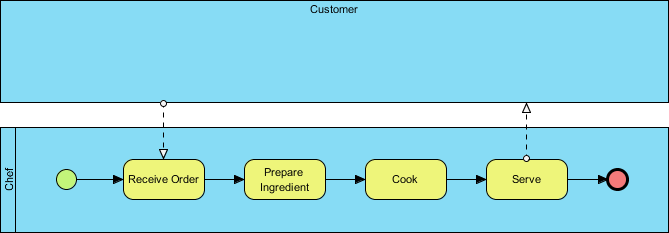
Let’s look at the structure of a typical “Chef” workflow as seen in the provided diagram. This example demonstrates a vertical swimlane arrangement.
- The Customer (Top Pool): This is a blackbox. It initiates the process (via the dashed line pointing down) and receives the final output.
- The Chef (Bottom Pool/Lane): This is the active participant. Inside this lane, we see the actual steps:
- Receive Order: The starting point of the process.
- Prepare Ingredient: A sequential task.
- Cook: The core value-add activity.
- Serve: The final action before handing the result back to the Customer.
The arrows connecting these yellow rounded rectangles represent the sequence flow, indicating the strict order in which tasks must be completed.
Tooling: Visual Paradigm
To effectively implement these concepts, you need robust modeling software. Visual Paradigm is a leading tool for creating BPMN diagrams, offering intuitive drag-and-drop interfaces for defining Pools, Lanes, and Blackboxes.
When using Visual Paradigm, you can easily:
- Create Swimlanes: Right-click on a pool to add new lanes.
- Define Blackboxes: Simply leave a pool empty or mark it as external to indicate it has no internal logic.
- Manage Flow: Use the sequence flow tools to connect activities within and across lanes, ensuring your process logic is sound.

 English
 Arabic
 Chinese (Simplified)
 Dutch
Dutch French
 German
 Italian
 Japanese
 Korean
 Portuguese
 Russian
 Spanish