


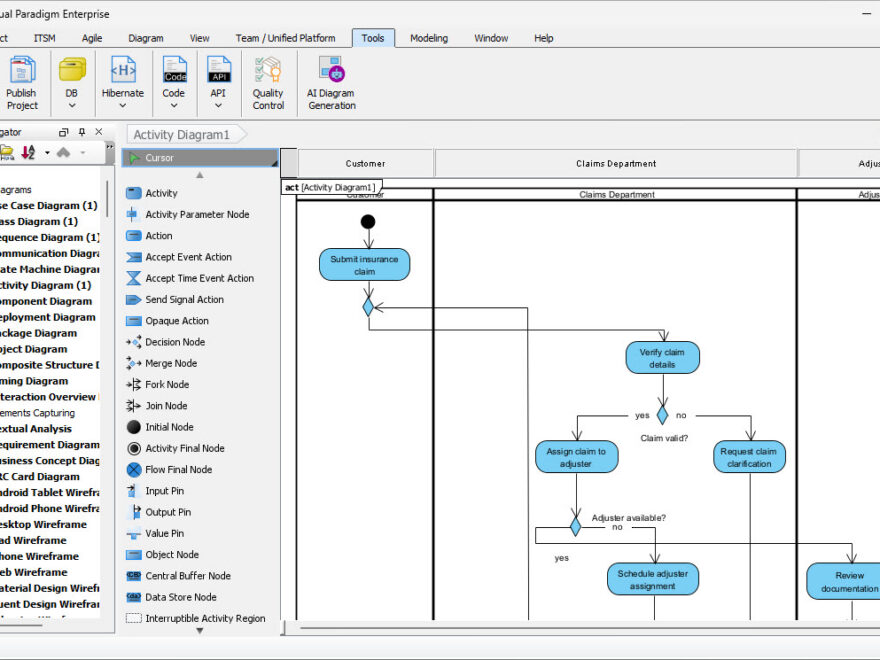
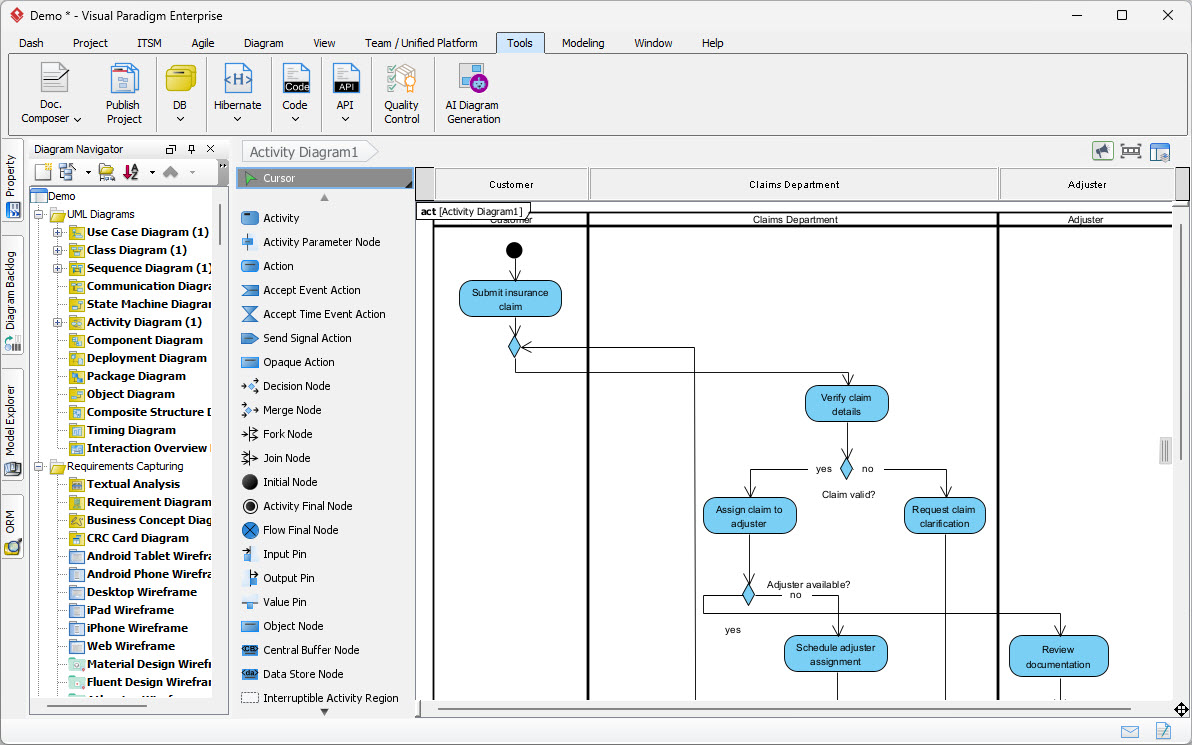
In the complex world of business analysis and software engineering, few things are as critical as understanding the flow of events within a system. The screenshot provided illustrates a sophisticated UML Activity Diagram generated by the Visual Paradigm AI engine. This specific diagram models an Insurance Claim Processing system, demonstrating how raw business requirements are transformed into a structured, executable workflow.
This tutorial breaks down the architectural components of this diagram, explains the logic of the workflow, and details how to leverage the tools shown to create professional models from plain English descriptions.
1. Architectural Overview: The Swimlane Paradigm
At the highest level of abstraction, this diagram utilizes a Swimlane architecture. This design pattern is essential for clarifying “who does what” in a business process. By partitioning the diagram into vertical sections, we can clearly distinguish responsibilities between different actors.
Understanding the Actors
The diagram is organized into three distinct lanes, representing the primary stakeholders in the claims process:
- Customer (Left Lane): The initiator of the process. Their role is strictly to provide input to the system by submitting the insurance claim.
- Claims Department (Center Lane): The core processing unit. This lane handles the heavy lifting: validating data, assigning tasks to adjusters, and scheduling.
- Adjuster (Right Lane): The external or specialized resource. This actor is responsible for the final review of documentation and verification of the claim’s validity.
2. Step-by-Step Logic Flow
UML Activity Diagrams are essentially flowcharts for software. They use specific symbols to denote different types of actions. Let’s trace the path of a claim from submission to resolution.
Phase A: Initiation and Validation
- Start Node: The process begins with a solid black circle.
- Submit Claim: The Customer performs the action of submitting a claim.
- Verify Claim Details: The flow moves to the Claims Department. Here, a decision point (diamond) labeled Claim valid? appears.
- Yes Path: The workflow proceeds to assign the claim to an adjuster.
- No Path: If the details are invalid or incomplete, the system loops back to the Customer via the Request claim clarification action. This is a classic “exception handling” loop.
Phase B: Resource Allocation
Once a claim is deemed valid, the system enters a state of resource management:
- Assign Claim to Adjuster: The system prepares to hand off the task.
- Adjuster Available? (Decision Node): The system checks the availability of the Adjuster.
- Yes: The workflow moves to Schedule adjuster assignment.
- No: The flow typically implies a wait state or a queue, though in this specific diagram, the line continues downwards, suggesting the process waits until availability is confirmed.
Phase C: Execution and Closure
The final leg of the journey involves the specialized role of the Adjuster:
- Review Documentation: The Adjuster reviews the claim details and supporting documents.
- Flow Final: The process concludes with an open circle (the final node), indicating that the claim processing workflow is complete.
3. Technical Implementation: From Chatbot to Code
The screenshot highlights the power of the Visual Paradigm AI Ecosystem. The interface on the left shows the “Diagram Navigator” and “Activity Diagram” tools, while the toolbar indicates “AI Diagram Generation.” This workflow allows users to bypass manual drawing.
Instead of dragging and dropping shapes, the user describes the system in plain English. The AI engine then parses this text into the underlying UML structure. For example, the logic “If claim is invalid, request clarification” is automatically rendered as a Decision Node with a ‘no’ branch returning to the input actor.
To replicate this workflow using the AI tool, the prompt might look like this:
Create a UML Activity Diagram for an Insurance Claim Processing system.
Swimlanes: Customer, Claims Department, Adjuster.

Flow:
1. Customer submits claim.
2. Claims Department verifies claim details.
3. Decision: Is claim valid?
   - If No: Request claim clarification (loop back to Customer).
   - If Yes: Assign claim to adjuster.
4. Decision: Is adjuster available?
   - If Yes: Schedule adjuster assignment.
5. Adjuster reviews documentation.
6. End process.4. Advanced Features: Enterprise Integration
The screenshot also reveals that this is not merely a drawing tool but an Enterprise Modeling Platform. The “Tools” tab and “Model Explorer” indicate capabilities beyond simple diagramming:
- Model-to-Code: The generated activity diagram can be transformed into actual code (e.g., C#, Java, or Python) to automate the business logic within an application.
- Version Control: Built-in version control allows teams to collaborate on the model, tracking changes to the workflow logic over time.
- Documentation Generation: The “Doc. Composer” tool suggests that this diagram can be exported into professional PDF reports, complete with detailed specifications for stakeholders.
Conclusion
This Insurance Claim Processing diagram is a perfect example of how modern AI tools can bridge the gap between abstract business requirements and concrete technical models. By automating the creation of swimlanes and decision nodes, engineers can focus on the logic of the system rather than the mechanics of the drawing tool.
Whether you are modeling a simple workflow or a complex enterprise system, the key is to maintain a clear separation of concerns (swimlanes) and to rigorously define your decision points (diamonds) to ensure the model is both accurate and actionable.

 English
 Arabic
 Chinese (Simplified)
 Dutch
Dutch French
 German
 Italian
 Japanese
 Korean
 Portuguese
 Russian
 Spanish