


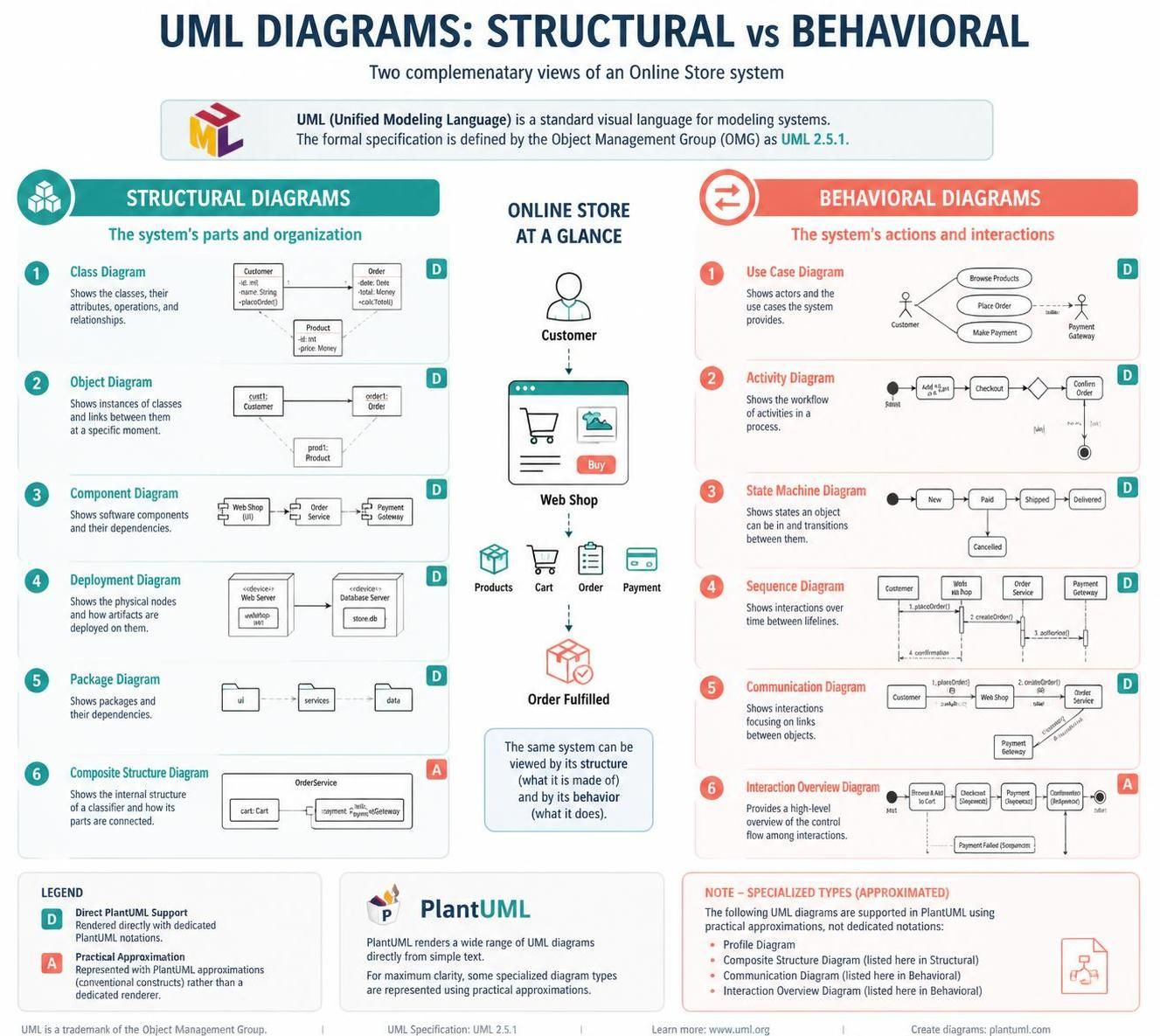
Understanding software architecture requires more than just writing code; it demands a visual language to communicate complex ideas. This tutorial explores the Unified Modeling Language (UML), specifically focusing on the critical distinction between Structural Diagrams and Behavioral Diagrams. Using the context of an “Online Store” system, we will walk through how these diagrams provide complementary views: one showing what a system is made of, and the other showing what it does.
1. The Foundation: UML 2.5.1 and Structural Views
Before diving into the code, it is essential to establish the standard. The formal specification referenced here is UML 2.5.1, defined by the Object Management Group (OMG). This specification ensures that diagrams created by different tools (like Visual Paradigm or PlantUML) remain interoperable.
Structural diagrams describe the static aspects of a system. They are the “skeleton” of your architecture. Let’s break down the key structural types:
Class Diagrams: The Blueprint
The Class Diagram is the most common structural diagram. It describes the classes, their attributes, operations, and relationships. In an online store, you might define a Customer class and an Order class.
@startuml
class Customer {
  -id: int
  -name: String
  +placeOrder()
}

class Order {
  -id: int
  -total: Money
  +calcTotal()
}

Customer --> Order
@enduml
Object Diagrams: The Snapshot
While a Class Diagram shows the type, an Object Diagram shows specific instances at a specific moment. If the Class Diagram is the blueprint, the Object Diagram is a photo of the house under construction.
@startuml
object cust1 : Customer
object order1 : Order
object prod1 : Product

cust1 --> order1
order1 ..> prod1
@enduml
Component & Deployment: Infrastructure
As systems scale, we need to look at software components (like a “Web Shop” or “Payment Gateway”) and their physical deployment (like a “Web Server” hosting a “Database Server”).
@startuml
component "Web Shop" as WS
component "Order Service" as OS
component "Payment Gateway" as PG

WS --> OS
OS --> PG
@enduml
2. Behavioral Diagrams: Dynamics and Flow
If structural diagrams are the anatomy, behavioral diagrams are the physiology. They describe the system’s actions and interactions over time.
Use Case Diagrams: User Goals
Use Case diagrams identify actors (users) and the functionality (use cases) they interact with. This is often the first diagram created to define system requirements.
@startuml
actor Customer
actor PaymentGateway

Customer --> (Browse Products)
Customer --> (Place Order)
Customer --> (Make Payment)
(Pay) --> PaymentGateway
@enduml
Activity Diagrams: The Workflow
An Activity Diagram maps the workflow of activities. For our store, the process moves from “Add to Cart” to “Checkout” and finally “Confirm Order.”
@startuml
start
:Add "a" to Cart;
:Checkout;
if (Payment OK?) then (Yes)
  :Confirm Order;
  stop
else (No)
  :Show Error;
endif
@enduml
State Machine Diagrams: Object Lifecycle
Unlike activity diagrams which show a process flow, a State Machine Diagram shows the lifecycle of a single object (e.g., an Order) as it transitions between states like “New,” “Paid,” “Shipped,” and “Delivered.”
@startuml
[*] --> New
New --> Paid
Paid --> Shipped
Shipped --> Delivered
Shipped --> Cancelled
Delivered --> [*]
@enduml
Interaction Diagrams: Communication
These diagrams focus on the exchange of messages between objects. The Sequence Diagram is the most famous, showing a vertical timeline of interactions (e.g., placeOrder(), createOrder(), authorize()).
@startuml
participant Customer
participant "Web Shop" as WS
participant "Order Service" as OS
participant "Payment Gateway" as PG

Customer -> WS : 1. placeOrder()
WS -> OS : 2. createOrder()
OS -> PG : 3. authorize()
PG --> OS : 4. confirmation
@enduml
3. Specialized Diagrams & Practical Approximations
The infographic notes that while UML 2.5.1 defines many diagram types, not all are natively supported by every rendering engine like PlantUML. Specifically, Profile, Communication, and Interaction Overview diagrams are often represented using “Practical Approximations.”
For example, a Communication Diagram is similar to a Sequence Diagram but focuses on the links between objects rather than the strict timeline. A Composite Structure Diagram reveals the internal structure of a classifier (showing parts and roles), often visualized using nested compartments.
4. Synthesizing the Architecture
When designing an online store, you do not use these diagrams in isolation. You start with a Use Case to understand requirements, define the Class structure to build the database, map the Sequence to handle the API logic, and verify the Deployment to ensure the server can handle the load.
By mastering the interplay between structural and behavioral views, you gain the ability to document, communicate, and architect robust systems that are easy to understand and maintain.

 English
 Arabic
 Chinese (Simplified)
 Dutch
Dutch French
 German
 Italian
 Japanese
 Korean
 Portuguese
 Russian
 Spanish