


Introduction
Unified Modeling Language (UML) sequence diagrams serve as an essential blueprint for software engineers, system architects, and product managers. By visualizing how objects interact chronologically through sequential messages and triggers, these diagrams clarify complex system logic before a single line of code is written. This tutorial explores an automated hotel room booking workflow, breaking down its core components, message flows, and implementation rules.
1. Overview of the Hotel Reservation Sequence Diagram
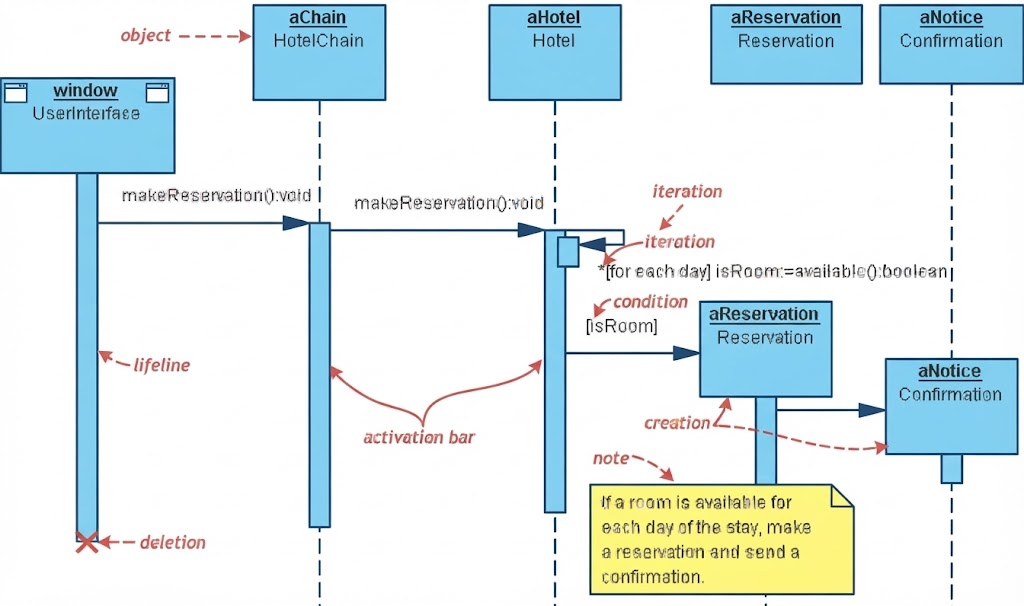
Sequence diagrams illustrate object collaborations over time. The model examined here coordinates five core participant instances: window (UserInterface), aChain (HotelChain), aHotel (Hotel), aReservation (Reservation), and aNotice (Confirmation).
2. Core Components Breakdown
-
Lifelines & Objects: Represented by vertical dashed lines originating from rectangular classifier boxes, denoting the active existence of object instances over time.
-
Activation Bars: Vertical rectangular overlays specify the precise time periods when an object is actively executing code or processing a request.
-
Lifeline Deletion: A red cross symbol at the terminal end of the
windowlifeline indicates the destruction or deallocation of that object instance. -
Note Box: A yellow annotation documenting underlying business rules—specifically, that a room must be available for each day of the stay before generating a confirmation.
3. Step-by-Step Message Flow & Logic
-
Initiation: The user interface (
window) triggers the sequence by dispatching a synchronousmakeReservation():voidmessage to the hotel chain (aChain). -
Delegation: The hotel chain forwards the
makeReservation():voidrequest downstream to the targeted hotel instance (aHotel). -
Iteration & Evaluation: The hotel executes an iterative loop (
*[for each day]) to evaluate daily availability via the method callisRoom:=available():boolean. -
Conditional Creation: Upon validating the conditional guard (
[isRoom]), the system instantiates a newaReservationobject, which subsequently triggers the creation (creation) of anaNoticeconfirmation notification.
Tooling Section: Visual Paradigm Free UML Tool
When building professional sequence diagrams efficiently, Visual Paradigm (available via Visual Paradigm Community Edition or VP Online Free Edition) provides powerful modeling capabilities tailored for non-commercial and personal projects:
-
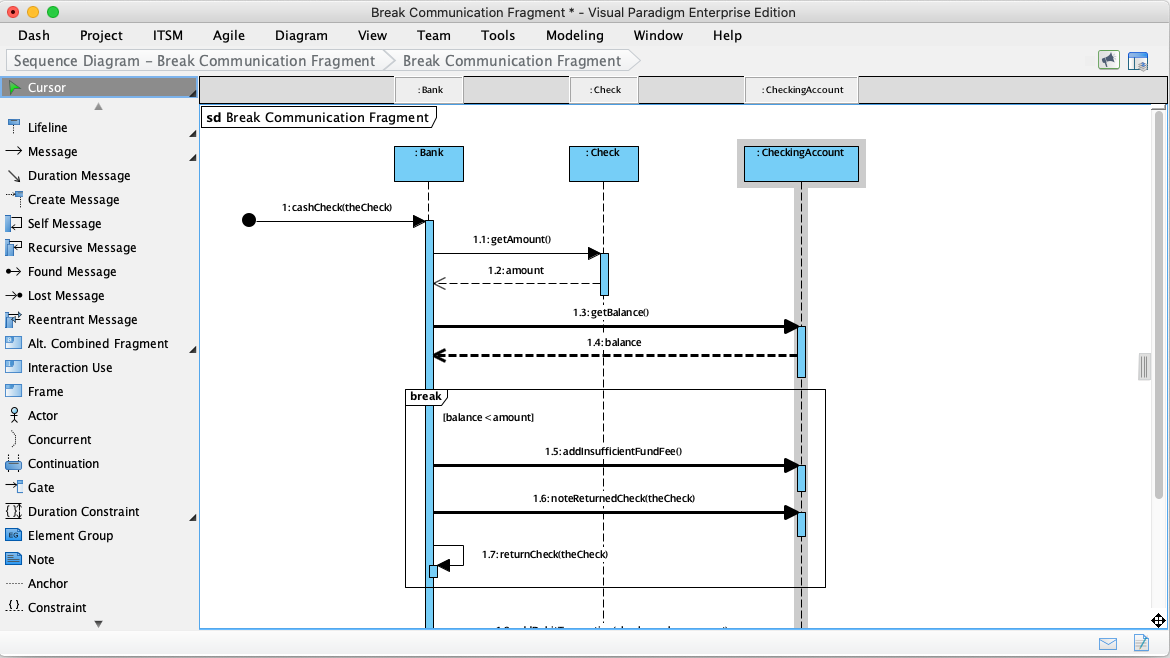
Resource Catalog: Speeds up diagram creation by allowing you to rapidly generate and connect subsequent lifeline messages and actors with just a few clicks.
-
Real Modeling Engine: Unlike basic drawing boards, Visual Paradigm ensures model integrity through built-in syntax checking, element reusability, and structural referencing across multiple abstraction levels.
-
Cross-Platform Access: Available as a desktop suite (Windows, macOS, Linux) or an intuitive web-based canvas (VP Online Free Edition) with zero expiration on personal projects and seamless cloud integration.
Conclusion
Mastering sequence diagrams bridges the gap between high-level business requirements and low-level software design. By mapping out lifelines, iterative loops, and conditional instantiation clearly—and leveraging professional tooling like Visual Paradigm—teams can design robust, scalable architectures with confidence.
Reference
- Mastering Sequence Diagram Modeling: A Practical Approach with Visual Paradigm: Provides a hands-on learning journey with examples for basic interaction, conditions, loops, exceptions, and parallel processes.
- 5.2 Interaction Modeling (Sequence Diagrams): Explains how to generate sequence diagrams directly from textual use case descriptions using AI, with practical examples like restaurant booking and ATM withdrawal.
- UML Sequence Diagrams: Behavior Blueprints: A guide on using sequence diagrams as behavior blueprints for distributed systems, covering key elements, real-world examples, and advanced techniques.
- Creating Sequence Diagrams in UML: A Comprehensive Tutorial: A complete tutorial covering sequence diagram notation, step-by-step drawing instructions, and examples like MVC architecture and hospital bed allocation.
- Practical 4: Behavioral Simulation: Focuses on behavioral simulation and modeling a “Borrow Book” use case using sequence diagrams, covering both AI generation and manual drawing.
- Tutorial: Diagramming a User Login Sequence: A step-by-step tutorial for creating a user login sequence diagram, covering conditional logic, return messages, and best practices for clarity.
- Conversational Sequence Diagrams: Introduces creating and refining sequence diagrams conversationally through Visual Paradigm’s AI Chatbot using natural language prompts.
- Mastering UML Interaction Diagrams: A Comprehensive Guide to Sequence and Communication Diagrams: A guide comparing sequence and communication diagrams, covering key concepts, notational differences, and practical examples with PlantUML.
- How to draw a Sequence Diagram in UML: A quick reference guide on the basic steps for creating sequence diagrams, including creating actors, lifelines, combined fragments, and managing operands.
- UML Sequence Fragments: Handling Alternatives and Loops: Explains how to use
alt,option,loop, andparfragments to model conditional logic, repetition, and parallelism in sequence diagrams.

 English
 Arabic
 Chinese (Simplified)
 Dutch
Dutch French
 German
 Italian
 Japanese
 Korean
 Portuguese
 Russian
 Spanish